สรุป: Discover all the VEIN console commands, including money cheats, god mode, item spawn codes, and more. This 2025 guide covers the full cheat list, how to enable the console, and the best mods and tools like เอ็กซ์เอ็มโอดี to enhance your gameplay even further.
VEIN continues to captivate players with its immersive world and intense gameplay—especially for those who enjoy tweaking their experience with console commands.
Whether you’re looking to unlock unlimited money, spawn rare items, or enable god mode, VEIN’s console offers powerful tools for enhancing your adventure.
In this guide, we’ll break down how to access and use console commands in VEIN, share the most useful cheats, and provide the complete 2025 command list.
Plus, we’ll show you how tools like Xmod can take your modding and cheat engine experience to the next level.
สารบัญ
- What Are VEIN Console Commands?
- How to Enable the Console in VEIN
- Most Useful VEIN คำสั่งคอนโซล
- Full VEIN Console Commands List (2025 Edition)
- วิธีปรับปรุง VEIN with Xmod
- สรุป
What Are VEIN Console Commands?

VEIN console commands are built-in debugging tools that let players customize and control various aspects of the game in real time. By entering specific text commands, you can instantly unlock resources, adjust character stats, enable invincibility, spawn items, and much more. These commands are especially useful for testing, speedrunning, or just having fun with unlimited freedom—making them a favorite among both casual players and advanced modders alike.
How to Enable the Console in VEIN
Locate the Game Settings
Start VEIN and go to the main menu. Navigate to the game’s settings or configuration files.
Enable Developer Console
Look for an option labeled “Enable Console” or “Developer Mode” and turn it on. If it’s not available in-game, you may need to edit a config file (like config.ini) and set console=true.
Open the Console In-Game
Press the tilde key (~หรือ F1 while in-game to bring up the console. A text bar should appear at the top or bottom of the screen.
ป้อนคำสั่ง
Type in your desired command (e.g., godmode, addmoney 1000, etc.) and hit Enter to apply it instantly.
Most Useful VEIN Console Commands
Before exploring the full list, here are the most popular and useful VEIN console commands to enhance your gameplay right away:
| Key |
Description
|
|
`
|
Toggles displaying the console
|
|
Delete
|
Toggles displaying the HUD
|
|
Numpad 0
|
Toggles pausing the game
|
|
Tab
|
Cycles through previous commands
|
|
Ctrl + Numpad /
|
Dumps object and name addresses to text file
|
Full VEIN Console Commands List (2025 Edition)

Now that you’ve seen the top picks, here’s the full list of VEIN console commands available in 2025 for complete control:
|
คำสั่ง
|
Description |
|
พระเจ้า
|
Toggles god mode |
|
playersonly
|
Toggles player prescence in the world |
|
pause
|
Toggles pausing the game |
|
สลับโหมดกล้องแสดงการดีบัก
|
Toggles the debug camera view |
|
เทเลพอร์ต
|
Teleports the player at the debug camera’s pointed at location |
|
slomo x
|
Sets game speed to the desired speed e.g. 1.0, 0.5, 2.0 |
|
changesize x
|
Sets player size to the desired size |
|
fov x
|
Sets the field of view to the desired angle, e.g. 0, 90 |
|
viewmode lit / viewmode shadercomplexity
|
Toggles shaders on/off |
|
สถิติ fps
|
Toggles displaying FPS on screen |
|
stat unit
|
Toggles displaying frametimes on screen |
|
showdebug
|
Toggles displaying coordinates on screen |
|
summon
|
Spawns a specified object from its blueprint with an appended _C e.g. summon BP_DevilOliver_C summon BP_Executioner_C when in a valid combat zone/story progression. |
|
shot showui / shot
|
Takes a PNG screenshot of the game with/without UI and saves it to C:\Users\%userprofile%\AppData\Local\CodeVein\Saved\Screenshots\WindowsNoEditor |
|
open work
|
Opens the debug map. If opened without a save loaded, loads the debug character with debug equipment and gifts. As of the later patches, this command is mostly useless since debug items were removed from the files. |
|
exit
|
Closes the game |
วิธีปรับปรุง VEIN with Xmod
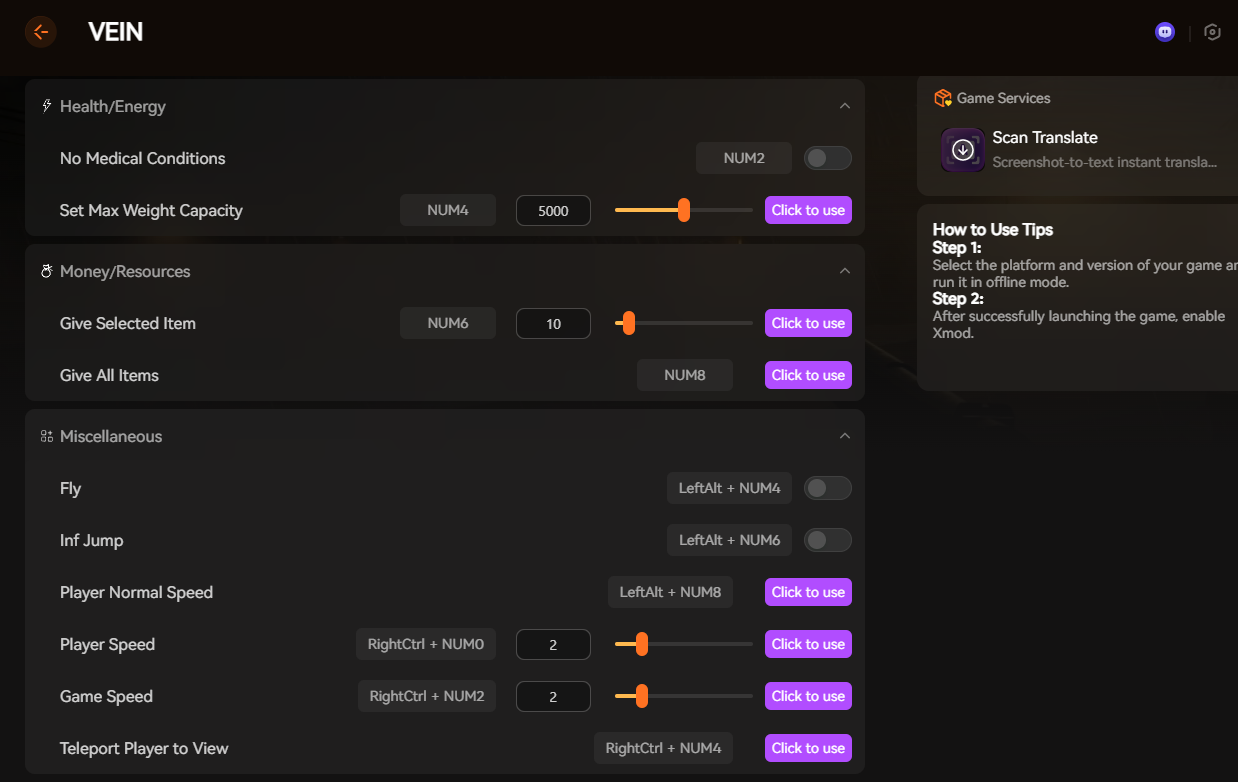
If you want more than just basic console cheats in VEIN, Xmod is the best all-in-one tool to take your gameplay even further. Instead of manually typing commands, Xmod gives you a visual cheat menu with sliders, toggles, and one-click functions — no coding, no setup, no risk of broken saves.
With Xmod, you can:
Instantly boost skills like Agility, Crafting, Farming, Medical, etc.
Enable cheats such as Fly Mode, Infinite Jump, No Medical Conditions, or Max Weight Capacity
Spawn items, give yourself resources, or unlock all items in one click
Adjust player speed, game speed, or teleport instantly
Use hotkeys (NUM keys, F keys, CTRL combos) for quick activation
Everything is organized into categories such as:
- Health/Energy
- เงิน/ทรัพยากร
- Miscellaneous Movement & Speed
- Skills/Experience
No console typing, no mod conflicts — just launch VEIN, enable Xmod, and start using cheats immediately.
Why use Xmod instead of console commands?
- Faster and easier than typing lines of text
- Works in offline mode, safe for single-player use
- Auto-updates for future VEIN patches
- Also supports thousands of other PC games
สรุป
VEIN’s console commands let you tweak the game, but Xmod makes everything faster, easier, and way more powerful. With one click, you can unlock infinite items, boost skills, change game speed, and more — no coding or setup needed.
If you want the simplest and safest way to customize VEIN, Xmod is the best tool to use.
Just install it, launch the game, and start playing your way.
ฉันเป็นเกมเมอร์และนักเขียนที่มีความหลงใหลที่ XMODhub มุ่งมั่นที่จะนำเสนอข่าวสารเกมล่าสุด เคล็ดลับ และข้อมูลเชิงลึกให้กับคุณ.
ติดต่อฉัน:
โปรไฟล์ LinkedIn ↗

 แคทเธอรีน ฮู