สรุป: This guide covers the complete system requirements for SILENT HILL f, including minimum and recommended specs, helping players ensure smooth gameplay on PC.
SILENT HILL f is the latest installment in the legendary horror series, known for its chilling atmosphere, psychological storytelling, and intense survival gameplay.
As players anticipate its release, understanding the ข้อกำหนดของระบบ is essential to ensure smooth performance.
This guide covers the minimum and recommended specs, explains how to determine if your PC can run the game, and offers tips for enhancing the experience with เอ็กซ์เอ็มโอดี.
Whether you’re a longtime fan or new to the series, this guide will help you prepare for the full horror experience.
สารบัญ
- คือ SILENT HILL f?
- System Requirements for SILENT HILL f: Minimum and Recommended
- Can You Run SILENT HILL f on a Low-End PC?
- Can My PC Run SILENT HILL f?
- How to Enhance Gameplay Experience with XMOD?
- สรุป
What is SILENT HILL f?

SILENT HILL f is an upcoming psychological survival horror game developed by NeoBards Entertainment and published by Konami Digital Entertainment. Scheduled for release on September 25, 2025, it marks the ninth mainline entry in the Silent Hill series and the first new installment in over a decade. Unlike previous titles set in the American town of Silent Hill, this game introduces a fresh narrative and setting, immersing players in 1960s rural Japan.
The story follows Shimizu Hinako, a high school student whose secluded town of Ebisugaoka is suddenly engulfed by a dense fog, transforming her once-familiar surroundings into a nightmarish landscape. As the town falls silent and the fog thickens, Hinako must navigate the twisted paths of Ebisugaoka, solving complex puzzles and confronting grotesque monsters to survive.
System Requirements for SILENT HILL f: Minimum and Recommended
These minimum requirements allow SILENT HILL f to run smoothly at 720p with Performance settings.
Minimum System Requirements
| องค์ประกอบ |
Specification |
| ระบบปฏิบัติการ |
Windows 11 x64 |
| โปรเซสเซอร์ |
Intel Core i5-8400 / AMD Ryzen 5 2600 |
| ความทรงจำ |
แรม 16 GB |
| กราฟิก |
NVIDIA GeForce GTX 1070 Ti / AMD Radeon RX 5700 |
| DirectX |
เวอร์ชัน 12 |
| การจัดเก็บ |
50 GB available space |
| Sound Card |
Windows Compatible Audio Device |
| Additional Notes |
Playable at Performance settings 30 FPS at 720p. SSD recommended. |
Recommended System Requirements
| องค์ประกอบ |
Specification |
| ระบบปฏิบัติการ |
Windows 11 x64 |
| โปรเซสเซอร์ |
Intel Core i7-9700 / AMD Ryzen 5 5500 |
| ความทรงจำ |
แรม 16 GB |
| กราฟิก |
NVIDIA GeForce RTX 2080 / AMD Radeon RX 6800 XT |
| DirectX |
เวอร์ชัน 12 |
| การจัดเก็บ |
50 GB available space |
| Sound Card |
Windows Compatible Audio Device |
| Additional Notes |
Playable at Performance 60 FPS or Quality 30 FPS at FullHD (4K via DLSS). SSD required. |
For the best experience, meeting the recommended specifications ensures smooth 60 FPS gameplay at FullHD, or even 4K using DLSS, with enhanced visuals and stable performance.
Can You Run SILENT HILL f on a Low-End PC?
การวิ่ง SILENT HILL f on a low-end PC is possible but comes with limitations. With the minimum system requirements, the game is playable at 720p with Performance settings around 30 FPS, but visuals will be reduced, and some effects may be simplified. To improve performance on lower-end hardware, consider lowering resolution further, adjusting graphics settings, and using an SSD if available. However, for the full horror experience with smoother frame rates and richer graphics, meeting or exceeding the recommended requirements is strongly advised.
Can My PC Run SILENT HILL f?

To determine if your PC can run SILENT HILL f, compare your system’s specifications with the minimum and recommended requirements:
- Minimum Specs: Windows 11 x64, Intel Core i5-8400/AMD Ryzen 5 2600, 16 GB RAM, GTX 1070 Ti/RX 5700, 50 GB storage, Performance settings at 720p.
- Recommended Specs: Windows 11 x64, Intel Core i7-9700/AMD Ryzen 5 5500, 16 GB RAM, RTX 2080/RX 6800 XT, 50 GB storage, 60 FPS at FullHD or 4K with DLSS.
If your PC meets or exceeds the minimum requirements, you can run the game, though graphics and frame rates will be lower. Meeting the recommended specs ensures smooth gameplay, higher visual fidelity, and the full experience. You can also use tools like เอ็กซ์เอ็มโอดี to optimize performance or tweak settings for your system.
How to Enhance Gameplay Experience with XMOD?
คุณสามารถเพิ่มประสิทธิภาพของคุณได้ SILENT HILL f ประสบการณ์ในการใช้ เอ็กซ์เอ็มโอดี, แพลตฟอร์มอเนกประสงค์ที่ออกแบบมาเพื่อขยายการเล่นเกมให้เกินกว่าการตั้งค่าเริ่มต้น. นี่คือวิธีที่ XMOD สามารถช่วยคุณได้:
- ม็อด: ปรับปรุงกราฟิก เพิ่มเอฟเฟกต์ภาพ ปรับแต่งส่วนติดต่อผู้ใช้ หรือแนะนำองค์ประกอบการเล่นเกมใหม่เพื่อเพิ่มความลึกซึ้งในการดื่มด่ำ.
- ผู้ฝึกสอน: ปรับค่าสถานะในเกม เช่น พลังชีวิต พลังความอดทน หรือไอเทมในคลัง เพื่อความราบรื่นในการเล่นเกมหรือทดลองสิ่งใหม่ ๆ.

- สูตรโกง: ปลดล็อกไอเทม ข้ามส่วนที่ยาก หรือเรียกอาวุธและเครื่องมือเพื่อมุ่งเน้นการสำรวจและเนื้อเรื่อง.
- เครื่องมือเพื่อคุณภาพชีวิต: XMOD ยังมีตัวเพิ่ม FPS, ฟีเจอร์แปลภาษาสำหรับผู้เล่นต่างชาติ, ตัวปลดล็อก DLC และเครื่องมือเพิ่มประสิทธิภาพอีกด้วย.
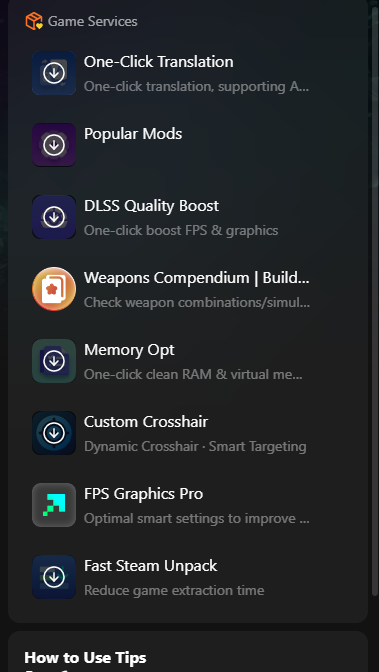
ไม่ว่าคุณต้องการที่จะทำให้ความท้าทายง่ายขึ้น, ค้นหาเนื้อหาที่ซ่อนอยู่, หรือปรับแต่งประสิทธิภาพของคอมพิวเตอร์ของคุณให้ดีที่สุด, XMOD มอบการควบคุมอย่างสมบูรณ์ให้กับประสบการณ์การเล่นเกมของคุณใน SILENT HILL f.
สรุป
In conclusion, SILENT HILL f promises a chilling and immersive horror experience, blending the series’ classic psychological tension with a fresh setting in 1960s Japan. By understanding the ข้อกำหนดของระบบ, players can ensure smooth performance on both minimum and recommended hardware. For those looking to further enhance gameplay, เอ็กซ์เอ็มโอดี provides powerful tools, including mods, trainers, and performance optimizations. Whether you’re a longtime fan or a newcomer, preparing your PC and utilizing these enhancements will help you fully experience the eerie world of SILENT HILL f.
ฉันเป็นเกมเมอร์และนักเขียนที่มีความหลงใหลที่ XMODhub มุ่งมั่นที่จะนำเสนอข่าวสารเกมล่าสุด เคล็ดลับ และข้อมูลเชิงลึกให้กับคุณ.
ติดต่อฉัน:
โปรไฟล์ LinkedIn ↗

 แคทเธอรีน ฮู