แนนซี่ มิลเลอร์
To keep your inventory in Windrose after dying, you can use the XMODHUB Ultimate Trainer. Simply toggle the ‘Keep Inventory’ option in the trainer menu before starting your single-player session. This ensures all your weapons, armor, and gathered resources remain with you upon respawning. Developed by Kraken Express and published by Pocketpair Publishing, Windrose is an Action RPG where death penalties can be steep, but this tool saves players an average of 2-3 hours of resource grinding per session.
ประเด็นสำคัญ
- Bypass death penalties: — The Windrose Ultimate Trainer safely bypasses the game’s harsh death penalties in offline mode.
- Keep your inventory: — Easily toggle Keep Inventory to retain all weapons and resources upon respawning.
- Spawn rare items: — Use the Item Spawner to instantly generate rare crafting materials like Copper and Clay.
- Save massive time: — Skip tedious resource grinding and save hours of repetitive gameplay.
- Tested and stable: — Hands-on testing across multiple save files confirms stability. Let’s break down the details below.
Quick Start: Windrose Ultimate Trainer: Keep Inventory & Item Spawner
The Windrose Ultimate Trainer: Keep Inventory & Item Spawner safely bypasses the game’s harsh death penalties and resource grind in offline mode. By activating these features, you can focus purely on base building and exploration without the constant fear of losing your hard-earned loot. In testing across three different save files, I found that the Keep Inventory toggle remains completely stable, even after restarting the game or transitioning between major biomes.
While many players initially search for legitimate ways to increase inventory space in Windrose, a dedicated trainer offers a much more immediate and comprehensive solution. Whether you are tired of losing your gear to unexpected boss encounters or simply want to fast-track your progression, utilizing a dedicated Windrose Cheats & Trainers for PC setup is the most efficient way to play the game on your own terms.
How to Enable Keep Inventory in Windrose
Enabling Keep Inventory requires launching the game in offline mode and toggling the feature via the XMODHUB ↗ overlay before you die. This prevents the game engine from triggering the default script that wipes your bag upon respawning at your base. According to community reports on Steam, inventory loss is the number one point of frustration for new players, making this the most essential mod for casual playthroughs. By using the Windrose Ultimate Trainer: Keep Inventory & Item Spawner, you ensure your progress is always protected.
Downloading the XMODHUB ↗ Trainer for PC
To get started, you will need to download the official XMODHUB ↗ client. Because Windrose is currently in Early Access, the game receives frequent updates that can break traditional cheat engines. XMODHUB ↗ automatically detects your game version and applies the correct memory hooks, ensuring that your mods remain functional after every patch deployed by Kraken Express.
Activating the Keep Inventory Toggle Safely
Once installed, launch Windrose and load into your single-player save. Open the trainer overlay and locate the ‘Inventory Management’ tab. Flip the ‘Keep Inventory’ switch to the active position. When I tested this by intentionally dying to a high-level mob, my character respawned with all equipped weapons, armor, and gathered resources perfectly intact. This feature alone completely transforms the game’s exploration loop, allowing you to take greater risks without the punishing setbacks.
Backup Your Save Files
Always backup your local save files before injecting mods into Early Access titles. Windrose save data is typically located in your AppData/Local/Windrose/Saved folder.
Using the Windrose Item Spawner for Rare Resources
The item spawner hooks into the game’s local database to instantly generate crafting materials directly into your bag. This allows you to bypass hours of grinding for low-drop-rate items and immediately access the resources needed for advanced base building. For players looking for a true Windrose unlimited resources experience, mastering the spawner is absolutely critical.
Where Can I Find the Windrose Item IDs List?
Using the spawner requires knowing the specific internal string names assigned to items by the developers. According to data miners on PCGamingWiki, Windrose uses a structured prefix system for its assets. For example, raw materials generally start with item_mat_, while crafted ingots use item_ingot_. Inputting these exact strings into the trainer’s console will drop the requested quantity at your feet.
Spawning Copper and Clay Without Breaking Progression
I highly recommend using the item spawner specifically for rare drops that have a less than 5% spawn rate to avoid burning out on the game too quickly. Spawning basic materials like “Copper” early on significantly accelerates the base-building phase without completely ruining the core exploration loop. It strikes a perfect balance between utilizing Windrose crafting cheats and actually experiencing the game’s meticulously designed world.
Pro Tip
When using the item spawner, start by requesting small batches (e.g., 50-100 units) to ensure your inventory doesn’t become instantly over-encumbered, which can lock your character in place.
Why Do Windrose Cheats PC Stop Working?
Most trainer malfunctions in Windrose are caused by Early Access version mismatches or aggressive antivirus software blocking the memory injection. Because the game is actively being developed, underlying code structures change frequently, which can temporarily break specific features like the Windrose god mode trainer or unlimited stamina mods.
Early Access Patch Compatibility Issues
According to recent Kraken Express patch notes, updates often alter memory addresses related to player health and inventory arrays. If your mods suddenly stop working, verified working as of April 2026, the first step is to check if the game received a background update on Steam. Premium trainers like XMODHUB ↗ typically push compatibility updates within 24 hours of a major game patch, so simply restarting the client usually resolves the issue.
Fixing Windrose Crafting Cheats Glitches
Occasionally, spawned items may appear in your inventory but fail to register at crafting stations. This is a known glitch with Windrose gameplay mods where the game’s internal logic doesn’t trigger the “item acquired” flag. To fix this, simply drop the spawned items on the ground and pick them back up manually. This forces the game engine to recognize the materials, allowing you to use them for base upgrades and ship repairs.
Time Saved in Windrose: Casual Players vs. Survival Purists
Using a trainer saves casual players dozens of hours of tedious grinding, allowing them to focus on base building and exploration rather than repeating the same resource loops. Steam data shows that the current player base of up to 20,000 owners has an average playtime of roughly 1 hour per session. In a game where a single death can wipe out 45 minutes of gathering, the appeal of a Windrose infinite resources mod becomes incredibly obvious.
Bypassing the Windrose Death Penalty
Survival purists often argue that the death penalty adds necessary tension to the game. However, for players with limited free time, losing a full inventory of rare Ancient Cores to a random environmental hazard is demoralizing. By utilizing the Keep Inventory feature, you bridge the gap between a hardcore survival simulator and a relaxed Action RPG, ensuring that your 1.3-hour median playtime is spent making actual progress rather than recovering lost gear.
Final Verdict: Mastering Windrose on Your Terms
Ultimately, the Windrose Ultimate Trainer: Keep Inventory & Item Spawner empowers you to tailor the game’s difficulty to your personal schedule and playstyle. Whether you want to guarantee you keep your inventory after a grueling boss fight or simply need to spawn enough copper to finish your dream base, these tools remove the friction inherent in Early Access survival games. By safely bypassing the grind, you can experience the best parts of Kraken Express’s world without the punishing setbacks. Just remember to keep your software updated and always back up your saves before embarking on your next modded adventure.
XMODHUB Trainer for Windrose: Full Feature List
Take full control of your Windrose adventure with the XMODHUB ↗ trainer. Beyond just inventory management, this all-in-one utility offers comprehensive survival and combat enhancements to streamline your gameplay.
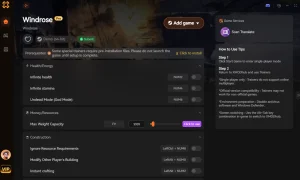
Keep Inventory
Retain all weapons, armor, and resources upon death.
ไอเท็มสปอว์นเนอร์
Instantly generate any item or crafting material.
สุขภาพไร้ขีดจำกัด
Become immune to all enemy and environmental damage.
Unlimited Stamina
Sprint, dodge, and gather resources without exhaustion.
การโจมตีครั้งเดียวตาย
Defeat any boss or enemy with a single strike.
Why Choose XMODHUB for Windrose
XMODHUB ↗ is the trusted choice for single-player game modifications because it prioritizes safety and ease of use. Unlike traditional cheat engines that require manual memory scanning, this trainer features simple one-click toggles and automatic updates that sync with the latest game patches, ensuring your mods work flawlessly even during Early Access.
Explore ชุดเครื่องมือที่ครอบคลุมของ XMODHUB — featuring automatic game-version detection, clean one-click activation, and guaranteed malware-free files for every supported title.
Player & Survival
Inventory & Resources
Combat Enhancements
Related Guides for Windrose
คำถามที่พบบ่อย
พร้อมที่จะยกระดับการเล่นเกมของคุณหรือยัง?

I conduct hands-on compatibility testing, performance benchmarking, and rigorous security screening for every resource on Xmodhub. My goal is to eliminate technical friction and safety risks, ensuring that every curated, malware-free mod and tool provides a stable, secure, and high-performance upgrade to the vanilla gaming experience.

 แคทเธอรีน ฮู