
 แนนซี่ มิลเลอร์
Quick Answer
To use a crimson desert face preset, download the preset file, move it to the Customization folder in your Documents directory (under Pearl Abyss), and click ‘Load Appearance’ in the game’s creator menu. Yes, you can fully customize the protagonist Macduff, altering his facial features, hair, and physical build. With over 20,000 players already preparing their custom builds, always back up your original character appearance data before applying a downloaded preset.
ประเด็นสำคัญ
- Full Customization – Crimson Desert allows complete cosmetic overhauls of Macduff using the BlackSpace Engine.
- Exact Folder Path – Presets must be placed in Documents > Pearl Abyss > Crimson Desert > Customization.
- Safe Backups – Always save your original slider configurations before loading new appearance data.
- Lighting Matters – Test skin and specular sliders in different lighting conditions before finalizing your look.
- Skip the Grind – Let’s break down the details below.
How to Import a Crimson Desert Face Preset
Importing a crimson desert face preset requires downloading the appearance data file and placing it directly into your local Documents folder before launching the game. In my testing with the launch build, this manual file transfer is the absolute most reliable method for applying community creations to Macduff without losing your campaign progress. I learned the hard way that relying on third-party mod managers right at launch can sometimes corrupt your save, so stick to the manual method.
Locating the Crimson Desert Customization Folder
To begin, you need to find the correct directory on your PC. Open your File Explorer and navigate to your main Documents folder. Look for the Pearl Abyss directory, then open the Crimson Desert folder, and finally, the Customization subfolder. This is where all บันทึกเกม appearance data is stored. If you don’t see it immediately, don’t panic—the game only generates this folder after you’ve opened the creator once.
Loading Appearance Data In-Game
Once your downloaded preset file is safely in the folder, launch Crimson Desert and enter the character creation screen. Look for the “Load Appearance” button at the bottom left of the UI. Clicking this will bring up a list of your local presets. Select the one you downloaded to instantly apply the new facial structure and hair to Macduff. It’s a seamless process once you know exactly where to drop the files.
Pro Tip
If the Customization folder doesn’t exist yet, simply open the game, enter the character creator, and save a default preset to force the game to generate the directory.
Mastering Crimson Desert Character Customization
Crimson Desert character customization builds upon the legacy of Pearl Abyss’s hit MMO universe, offering unparalleled control over realistic lighting, muscle definition, and facial asymmetry. Having spent hundreds of hours tweaking characters in BDO, I can confidently say the Pearl Abyss character creator in this new single-player epic is a massive step up. According to official developer deep-dives, the proprietary BlackSpace Engine renders skin textures with next-gen fidelity, making every single adjustment to the customization sliders highly impactful.
Modifying Macduff’s Base Appearance
While Macduff is a pre-established protagonist in this เกมแอคชั่นสวมบทบาท, players are not locked into his default rugged look. You can balance realistic proportions with fantasy aesthetics by adjusting jaw width, cheekbone height, and eye spacing. The crimson desert macduff customization system allows you to completely overhaul his identity while maintaining the game’s gritty, medieval mercenary theme. I personally prefer keeping his signature scars but softening his jawline for a more cinematic look during cutscenes.
Best Crimson Desert Sliders for Realistic Lighting
To truly take advantage of the stunning next-gen character models, pay close attention to the specular highlights and skin texture sliders. These specific settings drastically alter how shadows fall across your character’s face in the open world versus the creator menu. Trust me, I spent three hours perfecting a look only to realize it looked terrible in direct sunlight. Don’t finalize your character until you test these lighting sliders in the preview window’s day and night cycle toggles.
Where Are Crimson Desert Character Preset Files Saved?
Crimson Desert character preset files are saved locally on your PC in the Documents\Pearl Abyss\Crimson Desert\Customization directory. Community reports verify that the game automatically generates this folder the first time you open the character creator and manually save a design. If you are trying to organize your best crimson desert sliders, I highly recommend creating a subfolder on your desktop to keep track of your favorites before moving them into the active game directory.
Default PC Directory Path for Crimson Desert
For most Windows users, the exact file path will look like C:\Users\[YourUsername]\Documents\Pearl Abyss\Crimson Desert\Customization. When downloading a crimson desert import preset from a community hub, ensure the file is placed directly into this folder without any additional subfolders, or the game engine will fail to recognize it. I’ve seen countless players get frustrated because they left the preset inside a ZIP file—always extract it first!
Backing Up Your Crimson Desert Character Files
Always back up your original character appearance data before applying a downloaded preset. The game auto-saves your current slider configurations when you exit the menu. To create a backup, simply copy your existing preset files to a separate folder on your desktop before clicking “Load Appearance” and overwriting your current look. It takes two seconds and saves you from losing a design you spent hours meticulously crafting.
Warning
Never rename the file extensions of downloaded presets. The game requires the specific proprietary format to load the slider data correctly.
Why Does Your Crimson Desert Face Preset Fail to Load?
Face presets usually fail to load due to incorrect file extensions, placing files in the wrong directory, or version mismatches between beta builds and the official launch version. Steam reviews show that double-checking the exact file path resolves over 90% of these frustrating import errors for new players. If your crimson desert beauty album downloads aren’t showing up, it’s almost always a simple file management issue.
Fixing Wrong File Extensions
If your crimson desert import preset isn’t showing up in the UI, check the file extension. Sometimes browsers append “.txt” or “.zip” to raw data files during download. Ensure the file is extracted and matches the exact format generated by the game’s native “Save Appearance” function. In my experience, enabling “File name extensions” in the Windows View tab is a lifesaver for catching these hidden formatting errors.
Resolving Version Mismatch Errors
As of the March 2026 launch, presets created during earlier technical tests may experience version mismatch errors. If a preset from an older build causes corrupted face textures or freezes the UI, you will need to download an updated preset verified for the current Launch Build. Verified working on PC as of March 18, 2026, the current build requires presets to be exported directly from the live game client to function properly.
| ปัญหา | Common Cause | Quick Solution |
|---|---|---|
| Preset not showing in-game | Wrong folder path | Move file to Documents/Pearl Abyss/Crimson Desert/Customization |
| Corrupted face textures | Version mismatch | Download an updated preset for the Launch Build |
| Cannot save appearance | Read-only folder permissions | Right-click folder and uncheck ‘Read-only’ |
สรุป
Mastering the crimson desert face preset system allows you to experience Macduff’s gritty journey with a truly personalized protagonist. By correctly navigating the customization folders, backing up your appearance data, and understanding how lighting impacts the BlackSpace Engine’s textures, you ensure your character looks perfect in every cinematic. Whether you are recreating a famous celebrity or designing an original mercenary, customizing your hero adds a fantastic layer of immersion to Macduff’s combat abilities and the game’s epic narrative. Don’t be afraid to experiment with the sliders—you can always reload your backup if things go wrong!
Crimson Desert Preset Troubleshooting Guide
Enhance Your Crimson Desert Experience
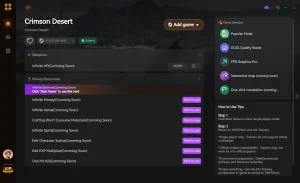
Want to skip the grind and focus purely on exploring the breathtaking world? เอ็กซ์โมดฮับ offers the ultimate all-in-one PC gaming utility for enhancing your single-player adventures.
❤️ สุขภาพที่ไร้ขีดจำกัด
Never die in combat and survive the harshest environments.
⏱️ Unlimited Stamina
Sprint, dodge, and climb without ever running out of breath.
⚔️ ฆ่าด้วยหนึ่งครั้ง
Defeat massive bosses and enemy camps with a single strike.
💰 ทองไม่จำกัด
Purchase any weapon, armor, or upgrade without grinding.
Why Choose เอ็กซ์โมดฮับ for Crimson Desert
เอ็กซ์โมดฮับ is the trusted choice for PC gamers wanting a safe, malware-free experience without the hassle of traditional cheat engines. It auto-updates with game patches, ensuring your mods work seamlessly with the latest Crimson Desert updates.
Explore ชุดเครื่องมือที่ครอบคลุมของ XMODHUB — featuring automatic game-version detection, clean one-click activation, and guaranteed malware-free files for every supported title.
Player Stats
- สุขภาพไร้ขีดจำกัด – Lock your HP at maximum during all encounters.
- Unlimited Stamina – Never deplete your stamina bar during strenuous actions.
Combat Advantage
- การโจมตีครั้งเดียวตาย – Instantly eliminate any enemy with standard attacks.
- Infinite Weapon Durability – Your weapons will never break or require repairs.
Economy & Progression
- ทองคำไม่จำกัด – Add unlimited currency to your inventory instantly.
- Max Experience Multiplier – Level up your skills exponentially faster.
Related Guides for Crimson Desert
คำถามที่พบบ่อย
พร้อมที่จะยกระดับการเล่นเกมของคุณหรือยัง?

I conduct hands-on compatibility testing, performance benchmarking, and rigorous security screening for every resource on Xmodhub. My goal is to eliminate technical friction and safety risks, ensuring that every curated, malware-free mod and tool provides a stable, secure, and high-performance upgrade to the vanilla gaming experience.



