
 แคทเธอรีน ฮู
Let’s get straight to the point. You spent an hour crafting the perfect Dungeons & Dragons 5e Party Composition. You carefully selected your background traits, balanced your frontline fighters with backline casters, and jumped into the tactical dungeons of Solasta 2. But almost immediately, the beautiful lighting engine becomes a problem. You are squinting at the screen, desperately pixel-hunting in the dark to find lootable chests, hidden switches, and dropped enemy weapons.
You will face the soul-crushing agony of rolling a Natural 1 (Critical Failure) on a crucial Investigation check, the pain of blowing all your Spell Slots and being forced to spam weak cantrips, and the pure fatigue of constantly hitting F5 and F8 to save-scum your way through a dungeon.
Then, we will introduce your new digital Dungeon Master: XMODhub—the ultimate tool to bypass brutal RNG, automatically pass Perception checks, and conquer the campaign on your own terms.
🛠️ TL;DR: How to Highlight Items in Solasta
If you are tired of hovering your mouse over every pixel on the screen to find loot, here is the direct PC shortcut to reveal everything around you:
➤
Hold the ALT Key: By default on PC (Steam/Epic), pressing and holding the Left ALT key will instantly highlight all visible interactable objects, lootable containers, doors, and loose items on the ground within your party’s line of sight.
➤
Toggle Option: If you do not want to hold the key down constantly, you can open the game’s Settings > Input menu and rebind “Highlight Interactables” to a more comfortable mouse button, or check the accessibility options for a toggle feature.
1. Solasta 2 PC Controls: Looting and Interactables
Using the ALT key is mandatory for efficiently clearing dungeons. Solasta 2 features heavy verticality, meaning items can be hidden on ledges above you or tucked beneath staircases.
✨
Color Coding: When you hold ALT, items will often outline in different colors indicating their status (e.g., blue for standard interactables, red for locked/trapped items).
✨
Line of Sight: The game enforces strict 5e vision rules. If your human Fighter doesn’t have a torch or Darkvision, pressing ALT in a pitch-black room will not highlight the loot. Make sure you cast the Light cantrip before scanning the room.
2. Finding Hidden Objects (Perception vs. Investigation)
Here is the biggest trap new players fall into: pressing ALT does not magically reveal secrets. The environment is tied directly to the D20 dice system.
As your party walks near a hidden chest, the game silently rolls a D20 in the background against the object’s DC (Difficulty Class).
If your high-Wisdom Cleric rolls low, the chest stays invisible. You can hold the ALT key all day, but you will walk right past legendary loot simply because of bad dice luck.
3. The Real Campaign Killer: D&D 5e RNG and Rules
Once you realize that finding loot is locked behind dice rolls, the real battle against the ruleset begins. The game has absolutely no mercy on your party.
- 🔥
The Agony of the D20:
You discover a room with an obvious secret door. Your Rogue rolls Investigation… and lands a Natural 1 (Critical Failure). Automatic failure. The hidden door stays sealed unless you reload. - 🔥
The 15-Minute Adventuring Day:
Your Wizard spends powerful spells to survive a tough encounter. But once the Spell Slots are gone, your archmage is reduced to weak cantrips until the party can take a Short or Long Rest. - 🔥
Save-Scumming Fatigue:
To avoid missed loot or deadly traps, players fall into the endless loop of F5 quicksave before every room and F8 quickload after every failed check—destroying the pacing of the adventure.
4. Safe Modding: Why XMODhub Beats Traditional .pak Files
You are playing to have fun, not to suffer statistical variance, squint at dark screens, or deal with fragile file modifications. Many players try to fix these punishing mechanics using traditional .pak mods from community forums.
These mods overwrite game files on your hard drive. When the game updates or loads a custom map, conflicts can occur—often causing crashes or permanently corrupted save files.
XMODhub works differently. It is a clean memory trainer that injects directly into your PC’s active RAM, leaving all physical game files 100% untouched and safe.
With XMODhub you can enable Always Roll 20 to automatically pass Perception and Investigation checks, activate Infinite Spell Slots to cast magic without resting, and set Max Attributes during character creation to start your party with perfect stats.
5. How to Use XMODhub for Solasta 2?
Getting XMODhub running is incredibly simple and perfectly safe for your PC. Here is the exact step-by-step process:

Grab the verified, virus-free XMODhub desktop application from our official homepage and install it on your PC.
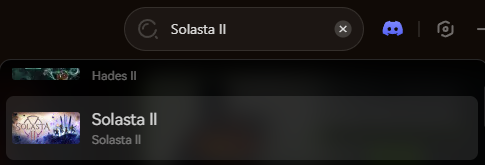
Open the XMODhub client and use the search bar to find Solasta 2. The app will automatically detect your game installation path.
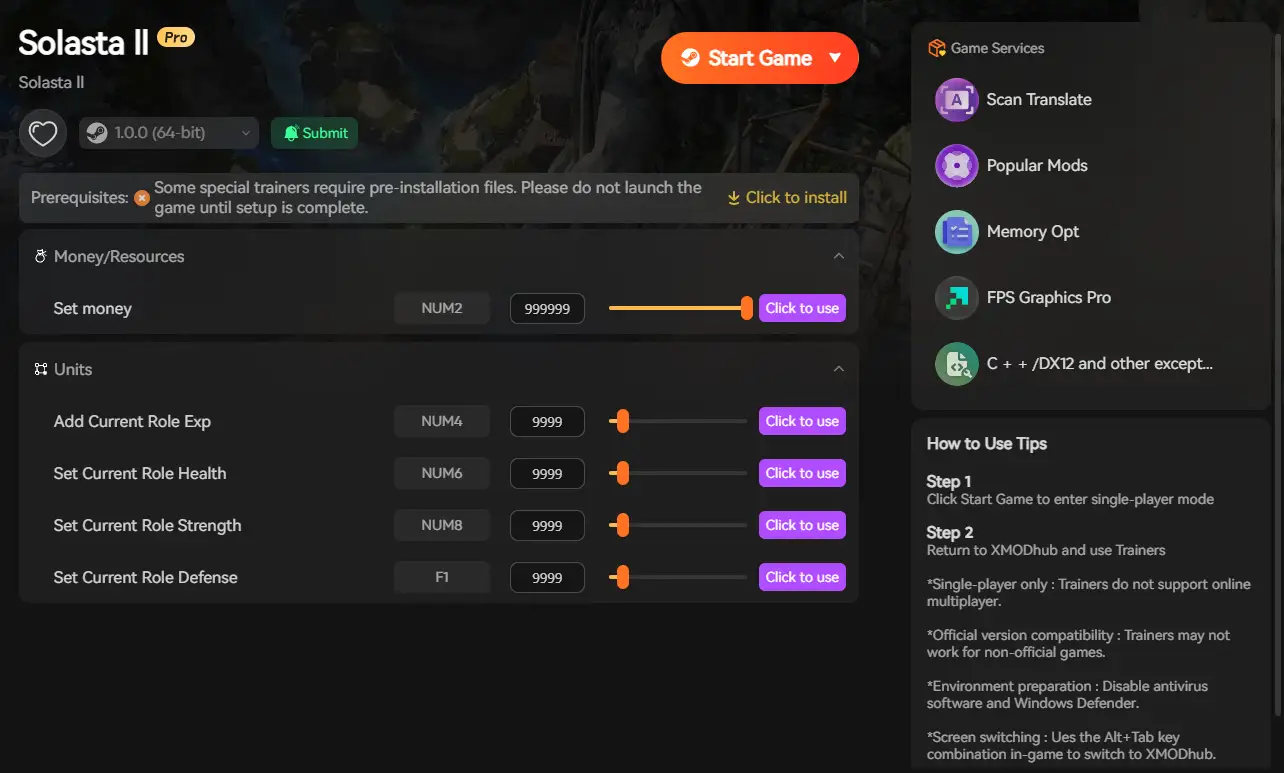
Click the prominent Play button within the XMODhub app. This safely links the software to the game’s memory. Once in-game, simply toggle your cheats to instantly activate your powers and never miss a hidden item again.
6. Conclusion: Stop Pixel-Hunting and Save-Scumming
Your Solasta 2 journey should be defined by epic combat, tactical triumphs, and finding legendary artifacts—not by pixel-hunting in the dark or the artificial difficulty of punishing RNG. Knowing the PC shortcut to highlight items is essential, but it is only the first step.
By utilizing a clean memory injector like XMODhub, you protect your hard-earned progress while gaining the power to bypass the most frustrating aspects of the tabletop ruleset.
Reveal every secret, end the exhausting cycle of F5/F8 save-scumming, and become the true Dungeon Master today.

ฉันเป็นเกมเมอร์และนักเขียนที่มีความหลงใหลที่ XMODhub มุ่งมั่นที่จะนำเสนอข่าวสารเกมล่าสุด เคล็ดลับ และข้อมูลเชิงลึกให้กับคุณ.
ติดต่อฉัน:
โปรไฟล์ LinkedIn ↗