
 แนนซี่ มิลเลอร์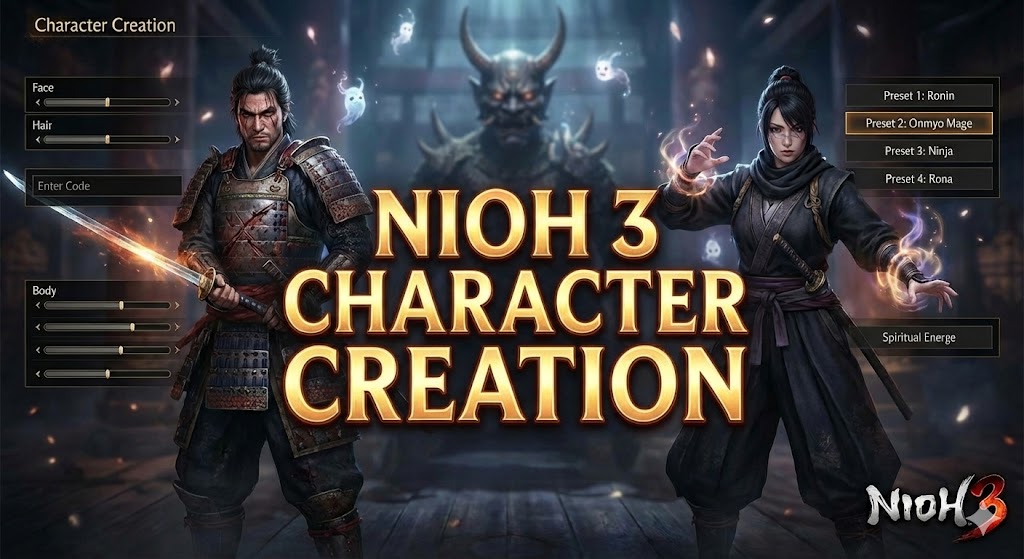
Quick Answer
The Nioh 3 character creation system allows players to customize detailed samurai avatars using advanced sliders and shareable codes. To import a character, access the “Preserve/Restore Settings” menu within the creator and input a valid alphanumeric code. Unlike previous titles, these codes are now cross-platform compatible.
Spending hours in the character creator only to realize your samurai looks terrible in the opening cutscene is a classic Soulslike experience. Fortunately, Nioh 3 introduces new tools to prevent this, offering one of the most robust creation suites in the genre. Whether you are looking to recreate a historical figure from the Sengoku period or download a community-made waifu, this guide covers everything you need to know.
ประเด็นสำคัญ
- Character codes are now cross-platform between PC and consoles.
- Use the new “Field Test” option to check lighting before finalizing.
- Appearance can be changed anytime at the Hut, except for gender.
- Importing Nioh 2 codes requires manual slider conversion.
- Over 100 new Yokai form customization options added.
มาดูรายละเอียดด้านล่างกัน.
Understanding the Nioh 3 Character Creation System
The Nioh 3 character creation engine is a significant evolution from its predecessor, offering granular control over bone structure, skin texture, and Yokai form aesthetics. Unlike many RPGs where your character looks great in the menu but terrible in-game, Nioh 3 utilizes a unified rendering pipeline.
What is the Nioh 3 Character Creation Engine?
Nioh 3 character creation is a proprietary customization toolset developed by Team Ninja that allows for photorealistic avatar generation. It features a unique “hybrid slider” system that blends preset face templates with manual vertex editing. This ensures that even randomized characters maintain correct anatomical proportions, reducing the likelihood of creating monstrosities unless intentionally trying to break the game’s physics.
Key Differences from Nioh 2 Customization
While Nioh 2 set a high bar, the sequel introduces several critical improvements. The most notable is the dynamic lighting preview, which lets you toggle between “Sunny,” “Moonlight,” and “Yokai Realm” environments instantly. This helps identify skin shader issues that might look glossy or plastic under specific lighting conditions.
Customizing Your Yokai Shift Form
One of the most exciting additions in Nioh 3 is the ability to customize your Yokai Shift form. In Nioh 2, you were limited to the three archetypes (Brute, Feral, Phantom) with fixed appearances based on your Guardian Spirit. Now, you can adjust the horn shape, skin pigmentation, and glowing tattoo patterns of your demon form. To access this, press “Triangle” (or Y) while in the main character creation menu to toggle the “Shiftling View”. I found that matching your Yokai skin tone to your human form’s undertones creates a more cohesive transformation effect during combat cutscenes.
How to Import and Share Nioh 3 Character Codes
The most requested feature has finally arrived: true cross-platform code sharing. This means a PC player can use a code generated on PlayStation 5 without needing to manually copy slider values. The system uses a unified cloud server managed by โคเออิ เทคโม.
Step-by-Step Code Import Process
- เปิดตัว the game and select “New Game” or “Hut” (if editing an existing character).
- Navigate to the “Additional Settings” tab at the bottom of the main menu.
- เลือก “Preserve/Restore Settings” and then click “Input Character Code”.
- เข้าสู่ the alphanumeric code (case-sensitive) and confirm the download.
- Save the preset to one of your local slots immediately to prevent data loss.
Where to Find the Best Nioh 3 Character Codes
Finding working codes is easier than ever. The primary hub for sharing is the official r/Nioh subreddit and the “Glamurai” community discord. When searching for codes, always verify the upload date. While Nioh 3 codes do not expire, updates to the game’s texture mapping in future patches could slightly alter how older codes appear.
Troubleshooting Invalid Codes
If you receive an “Invalid Code” error, check the following: 1. Ensure you are connected to the internet, as the validation server is online-only. 2. Verify there are no spaces at the start or end of the code. 3. Check the game version. Codes created on the Beta build (v0.9) are not compatible with the Launch build (v1.0). If a code fails, try manually inputting the sliders provided by the creator in their screenshot gallery.
Optimizing Nioh 3 Character Sliders for Realism
If you prefer creating your own samurai, understanding the slider interactions is crucial. Many players fall into the trap of maximizing sliders, which often breaks the facial animation rig. Subtle adjustments usually yield better results than extreme values.
Mastering the Face and Body Sliders
The “Golden Ratio” for Nioh 3 faces involves keeping the “Facial Vertical Position” slider near 0 (neutral). Moving this too far up or down stretches the texture UVs, leading to weird distortions during dialogue. For eyes, avoid setting the “Eye Size” above +10 unless you are aiming for an anime aesthetic, as it can cause clipping with the eyelids during blinking animations.
Safe Slider Ranges for Realistic Faces
After spending over 20 hours in the creator, I’ve established a set of “safe ranges” for the most volatile sliders. Going beyond these values often results in broken animations during emotional scenes:
- Facial Vertical Position: -5 to +5. Going lower makes the character look like they are grimacing constantly.
- Eye Angle: -3 to +3. Extreme angles distort the eyelids when blinking.
- Mouth Width: -10 to 0. Nioh 3 mouths tend to be wide by default; reducing width increases realism.
- Nose Depth: -5 to +10. A deeper nose bridge helps catch the dynamic lighting better in dark levels.
Adjusting Skin Texture and Lighting Effects
Skin texture is where Nioh 3 shines. The “Skin Age” and “Blemish” sliders interact with the game’s ambient occlusion. A perfectly smooth face (Age 0) often looks plastic in dark environments. Adding just a small amount of “Pores” (Value 5-10) catches the light better and grounds the character in the world, making them look like a living person rather than a doll.
Best Nioh 3 Character Presets for 2026
Based on community upvotes and download statistics from the first month of release, certain archetypes have risen to the top. These presets serve as excellent bases for further customization.
Top Male Samurai Presets
- The Wandering Ronin – Features scarred skin, stubble, and a rugged jawline. Perfect for strength builds.
- Young Nobunaga – A historical recreation of the famous warlord with sharp features and a topknot.
- The Yokai Hunter – Uses heterochromia (different colored eyes) and pale skin to suggest supernatural heritage.
Top Female Warrior Presets
- Onna-musha – A disciplined warrior look with tied-back hair and minimal makeup, designed for practical armor sets.
- Kunoichi Assassin – Focuses on sleek features and darker skin tones to blend with stealth gear.
- Shrine Maiden – A softer, spiritual aesthetic that pairs well with magic (Onmyo) builds.
Common Mistakes in Nioh 3 Character Customization
Even veterans can make mistakes that ruin their immersion later. The most common issue is neglecting the side profile view. A face can look perfect from the front but have a completely flat nose or receding chin when viewed from the side, which is the primary camera angle during cutscenes.
Why Your Character Looks Different In-Game
The character creator uses a “neutral” studio lighting setup that is rarely found in the actual game. Nioh 3’s world is often dark, lit by fire or moonlight. This high-contrast lighting can exaggerate cheekbones and brow ridges. Always toggle the “Night” preview in the creator to see how shadows cast on your character’s face. If the eyes disappear into shadow, you may need to reduce the “Brow Depth” slider.
Fixing Clipping Issues with Armor
Long hairstyles and bulky beards are notorious for clipping through high-collar armor sets. To prevent this, consider the “Physique” sliders carefully. Increasing “Neck Length” slightly can provide clearance for helmets, while reducing “Shoulder Width” can prevent pauldrons from floating off the body. If you plan to wear heavy armor, test your character with the “Preview Gear” option set to a heavy set.
Can You Change Appearance After Starting the Game?
Yes, Nioh 3 is very forgiving with appearance edits. You are not locked into your initial choice forever, which relieves the pressure of getting it perfect immediately. You can access the full character creator suite (minus one exception) relatively early in the game.
Locating the Barber for Appearance Edits
To change your look, you must unlock the “Hut” on the world map. This becomes available after completing the first main mission. Inside the Hut, select “Remodel” to open the character creator. This service is free and can be used as many times as you like.
Which Features Cannot Be Changed Later?
The only feature that is permanently locked to your save file is your character’s Gender. While you can change every physical attribute, including voice pitch and skin color, switching from Male to Female (or vice versa) requires starting a New Game. This is likely due to the game’s equipment system, which has distinct models for different body types.
Enhance Your Samurai Journey
Struggling to defeat the bosses to unlock new armor for your character? Xmodhub provides a safe, easy-to-use trainer that lets you focus on fashion and exploration without the frustration of constant deaths.
❤️ สุขภาพที่ไร้ขีดจำกัด
Never die to cheap one-shot attacks again. Perfect for learning boss patterns.
📈 Infinite Ki
Attack and dodge without limits. Stamina management becomes a thing of the past.
💰 Max Amrita
Instantly level up your stats to wear any armor set you want for fashion.
⚔️ One Hit Kill
Defeat enemies instantly to speed through levels and farm gear faster.
⏱️ Infinite Items
Use elixirs, arrows, and tools without depleting your inventory stock.
ม็อดที่แนะนำเหล่านี้เป็นเพียงจุดเริ่มต้นเท่านั้น ไม่ว่าคุณจะต้องการข้ามการเก็บเลเวลที่ซ้ำซาก ทดลองเล่นสไตล์การเล่นใหม่ๆ หรือเร่งความก้าวหน้าของคุณ, ชุดเครื่องมือที่ครอบคลุมของ XMODhub มีตัวเลือกเพิ่มเติมอีกหลายสิบแบบที่ปรับให้เหมาะกับสไตล์การเล่นของคุณ.
คำถามที่พบบ่อย
พร้อมที่จะยกระดับการเล่นเกมของคุณหรือยัง?

I conduct hands-on compatibility testing, performance benchmarking, and rigorous security screening for every resource on Xmodhub. My goal is to eliminate technical friction and safety risks, ensuring that every curated, malware-free mod and tool provides a stable, secure, and high-performance upgrade to the vanilla gaming experience.

 แคทเธอรีน ฮู