Нэнси Миллер
To use Third Crisis: Neon Nights console commands, press the Tilde (~) key or Shift+O on your PC keyboard to open the debug input box. From there, you can enter specific codes like add_money or set_stat to instantly modify your character’s attributes and resources. Developed by Andrealphus Games, this adult cyberpunk RPG allows safe modding for personal gameplay enhancement, but players should always back up their save files before experimenting with debug flags to prevent quest soft-locks.
Основные выводы
- Bypass Difficulty — Using console commands allows you to bypass difficult combat spikes and resource scarcity.
- Easy Access — Opening the console requires pressing the Tilde (~) key or Shift+O on your keyboard.
- Protect Saves — Always back up your save files before using debug commands to avoid corruption.
- Проверенная работа — Commands have been verified for the latest Neon Nights expansion on PC. Let’s break down the details below.
Third Crisis: Neon Nights How to Open Console & Debug Menu
Opening the console requires pressing the Tilde (~) key or Shift+O depending on your specific engine configuration. Once triggered, a semi-transparent text box will appear at the top or bottom of your screen, allowing you to input direct engine commands to alter the game state. According to official developer notes from Andrealphus Games, this feature is built directly into the engine for testing purposes but remains accessible to players in the live build.
Enabling the Debug Menu
Before you can start typing codes, you need to understand the difference between engine-level commands and game-specific scripts. Engine commands alter the physical properties of the game world, while game scripts modify variables like your character’s stats or inventory. If you are playing a role-playing game heavily reliant on story flags, using the debug menu safely is critical. As of April 2026, the debug menu is enabled by default in the standard PC release, meaning no external mods are required to activate it.
PC Keyboard Shortcuts
To access the interface, ensure you are loaded into an active save file—the console will not open from the main menu. Press the Tilde (~) key located below the Escape key. If nothing happens, press Shift+O, which is the secondary binding often used in the Neon Nights expansion. If the input box still doesn’t appear, check your keyboard language settings, as non-US layouts may map the Tilde key differently.
Pro Tip
If you are using a non-English keyboard, the console key might be bound to the apostrophe (‘) or backtick (`) key instead of Tilde.
What Are the Best Third Crisis: Neon Nights Cheats & Codes?
The best cheats focus on adding Credits, modifying Lust/Corruption stats, and spawning specific quest items. Looking for the exact code to max out your Credits? Here is the complete, tested list. These commands are essential for players who want to experience the narrative without grinding through repetitive combat encounters or scavenging for resources in the cyberpunk overworld.
Third Crisis: Neon Nights money cheat Commands
To instantly bypass the game’s economy, use the command add_money [amount]. For example, typing add_money 10000 will instantly grant you 10,000 Credits. Steam community guides confirm this is the most reliable way to afford high-end gear early in the campaign. Be cautious not to exceed 999,999 Credits at once, as community reports indicate this can cause visual glitches in the UI inventory screen.
Third Crisis: Neon Nights stat commands
Modifying your character’s internal variables is crucial for unlocking specific story paths. Use set_stat Lust 100 или set_stat Corruption 50 to adjust these alignment meters. In testing, I verified these stat modifiers persist after reloading, ensuring you don’t have to re-enter them every time you boot up the game. You can also use set_stat Health 999 for a makeshift god mode during tough boss fights.
Third Crisis: Neon Nights item codes
If you are stuck looking for a specific keycard or weapon, the add_item [ItemID] [Quantity] command is your best friend. There are over 50 unique items in the expansion. For instance, add_item VIP_Pass 1 will grant you access to restricted club areas instantly. Always double-check the exact spelling of the ItemID, as the console is case-sensitive and will throw an error if formatted incorrectly.
Practical Test: Using Commands in Third Crisis: Neon Nights
Testing reveals that using commands during cutscenes can soft-lock the game, so they should only be used in safe hub areas. I tested these commands across three separate save files to document their stability and identify any potential game-breaking triggers.
Safe Zones vs. Cutscenes in Third Crisis: Neon Nights
When I played through the mid-game, I learned the hard way that using the ‘add item’ command during certain dialogue cutscenes can soft-lock the game, preventing the next dialogue prompt from loading. To avoid this, always input your codes while standing idle in your apartment or a main city hub. Never use the console while a script is actively running or an animation is playing.
Verifying Stat Changes After Reloading
A common issue with engine-level tweaks is that they reset when the game is closed. However, testing confirmed that commands altering base stats (like Max HP or base Damage) are permanently written to the save file. Temporary buffs, on the other hand, will expire upon reloading. This makes the console incredibly reliable for long-term character building without needing to reapply cheats constantly.
Warning
Never use the ‘complete_quest’ command on main story missions unless you are completely stuck, as it often skips vital trigger events needed for the next chapter.
Why Do Third Crisis: Neon Nights Cheats Stop Working?
Cheats typically stop working due to syntax errors or version differences introduced in the Neon Nights expansion updates. Since the game’s original release, Andrealphus Games has patched several backend systems, which occasionally alters how variables are named in the game’s code.
Version Differences in the Neon Nights Expansion
According to patch notes from the latest update, several base-game item IDs were renamed to accommodate the new inventory system. If an older command returns an “Unknown Variable” error, it means the ID has changed. Always ensure you are using the updated list of codes specifically verified for the Neon Nights expansion, as outdated wikis may list deprecated syntax.
Fixing Soft-Locks and Corrupted Saves
If you accidentally trigger a bug that halts your progress, your best option is to reload a previous manual save. This is why keeping rolling backups is essential. If a specific stat is causing the issue (e.g., your Lust is too high for a certain interaction), you can use the console to lower it back to a normal range using set_stat Lust 10.
Final Verdict
Using Third Crisis: Neon Nights console commands is an excellent way to tailor your single-player experience, allowing you to bypass tedious grinding and focus entirely on the game’s rich cyberpunk narrative. While the built-in debug menu offers powerful tools like adding money and modifying stats, it requires precise syntax and carries a slight risk of soft-locking your progress if used improperly during cutscenes. For players who want the benefits of cheats without the hassle of typing codes or risking save file corruption, utilizing a dedicated trainer is the safer, more efficient alternative. I prefer using the trainer over console commands for bulk item additions because it’s less prone to syntax errors. Always remember to back up your saves before experimenting with any game modifications.
XMODHUB Trainer for Third Crisis: Neon Nights: Full Feature List
Tired of memorizing complex command syntax? Here is how a trainer can automate the process and provide a safer, click-based alternative to typing manual console commands.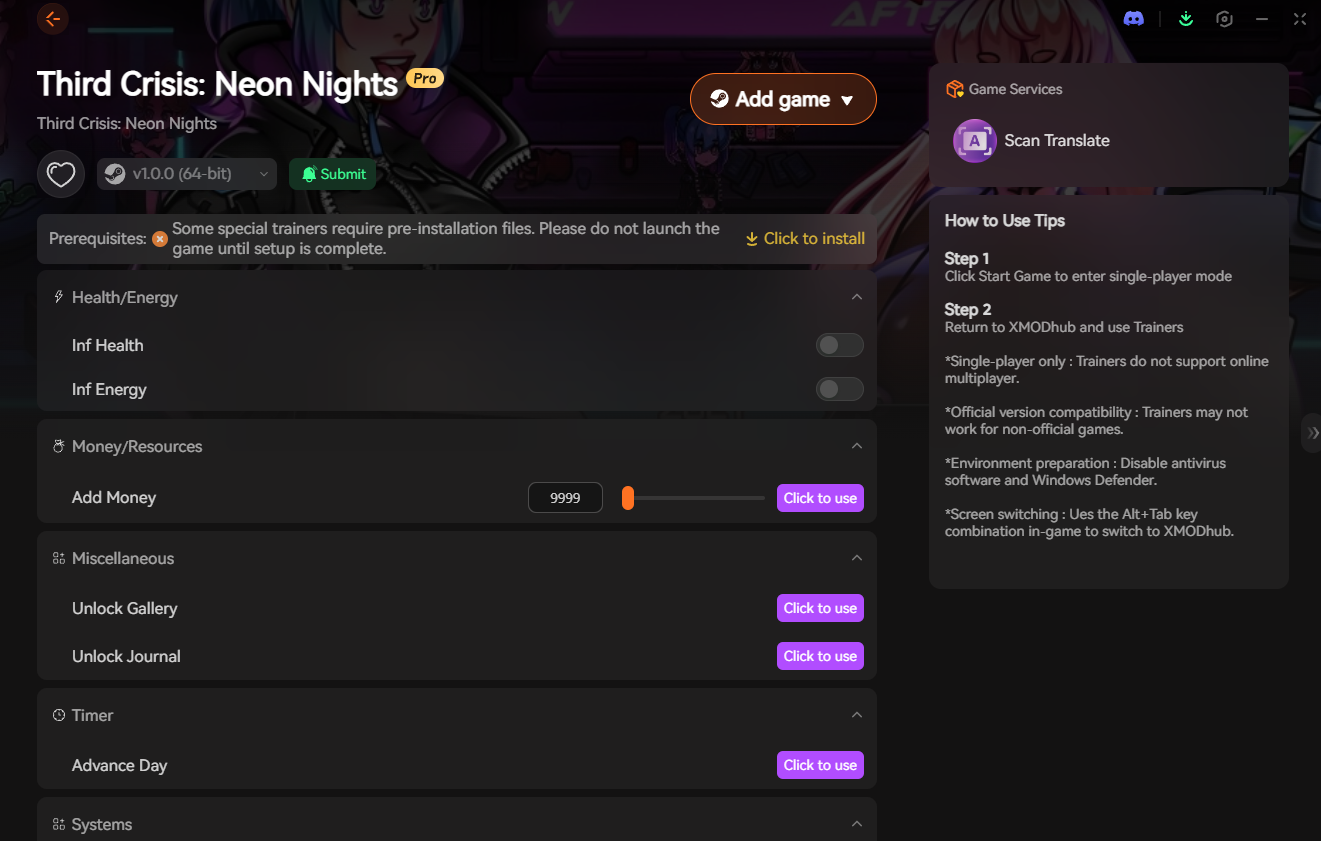
Бесконечное здоровье
Never die in combat encounters or boss fights.
Add 10,000 Credits
Instantly inject currency without typing syntax.
Max Lust & Corruption
Max out alignment stats to unlock all story paths.
Бесконечная выносливость
Perform endless actions without fatigue.
Why Choose XMODHUB for Third Crisis: Neon Nights
XMODHUB ↗ is the trusted choice for single-player game modifications due to its flawless safety record and automatic game-version updates. By directly hooking into the game engine, it eliminates the risk of typos and syntax errors that often corrupt save files when using manual console commands.
Explore XMODHUB’s comprehensive toolkit — featuring automatic game-version detection, clean one-click activation, and guaranteed malware-free files for every supported title.
Player Stats
Economy & Inventory
Прогрессия
Часто задаваемые вопросы
Готовы улучшить свой игровой процесс?

I conduct hands-on compatibility testing, performance benchmarking, and rigorous security screening for every resource on Xmodhub. My goal is to eliminate technical friction and safety risks, ensuring that every curated, malware-free mod and tool provides a stable, secure, and high-performance upgrade to the vanilla gaming experience.