
 Кэтрин Ху
Excited for RACCOIN: Coin Pusher Roguelike‘s launch, only to be met with freezes, cryptic errors, or instant desktop crashes? Launch-week issues for this Unity-based title usually stem from a few fixable causes: corrupted files, missing C++ libraries, or overlay conflicts. This guide covers every verified fix—from quick 5-minute solutions to system tweaks—to get your game running smoothly.
CRITICAL INFO
Editor’s Note: The “Day One” Launch Curse
“I’ve seen this pattern with every Unity-based indie roguelike that launches on Steam — especially physics-heavy ones. RACCOIN‘s coin simulation runs a lot of real-time collision logic even on a 2D field, and if your C++ runtime is even slightly out of date, the engine silently refuses to initialize. The game window flashes and disappears, and most players assume it’s their hardware. It almost never is. The fix takes under ten minutes. Go through Метод 2 first — it solves about 70% of Unity launch crashes outright. And please back up your save before you start tweaking anything.”
— Catherine Hu, Tech Support Lead, XMODhub
Check First: RACCOIN System Requirements
Before debugging, confirm your PC actually meets the game’s requirements. Unity-based games often “silent crash” — closing instantly with no error message — when running below minimum specs.
💡
Key note: RACCOIN is a 2D Unity title. It is not a graphically demanding game — if it crashes on a mid-range PC, the issue is almost always a software environment problem, not raw hardware.
Method 1: Verify Game Files on Steam
Corrupted download data is the single most common cause of RACCOIN crashing on startup, especially if your connection dropped during installation or a patch downloaded incompletely.
For Steam Users:
- 01. Open your Steam Library and right-click RACCOIN: Coin Pusher Roguelike.
- 02. Выберите Свойства → Установленные файлы.
- 03. Нажмите “Проверьте целостность игровых файлов”.
- 04. Wait for the scan to complete. Steam will automatically re-download any corrupted or missing files.
- 05. Relaunch the game.
This process takes 2–5 minutes and fixes a surprisingly large percentage of launch failures. Always run this before anything else.
Метод 2: Обновление драйверов и Visual C++ Redistributables
RACCOIN runs on Unity, which depends on Microsoft’s Visual C++ runtime libraries to handle its physics engine and rendering calls. If these libraries are missing or outdated, Unity silently crashes before the game window even appears.
Драйверы GPU:
- ✦ NVIDIA users: Download the latest Game Ready Driver from the official NVIDIA website.
- ✦ AMD users: Update to the latest Adrenalin driver from AMD’s support page.
- ✦ After updating, restart your PC fully before relaunching RACCOIN.
Visual C++ Redistributables:
If you see errors like MSVCP140.dll not found, VCRUNTIME140.dll is missing, or api-ms-win-crt-runtime-l1-1-0.dll, the fix is to reinstall the Microsoft Visual C++ Redistributable packages:
- ✦ Install both the x64 и x86 versions of Visual C++ 2015–2022 Redistributable.
- ✦ These are available free from Microsoft’s official download page.
- ✦ After installing, restart your machine and try RACCOIN again.
DirectX:
RACCOIN targets DirectX 11. Run Windows Update to ensure your DirectX runtime is current. There is no need to force a DX12 mode — the game does not use it.
Method 3: Fix Black Screen & Overlay Conflicts
If RACCOIN launches but shows a black screen (with or without audio), or freezes on the Unity splash screen, the most likely cause is a third-party overlay injecting into the game process and conflicting with Unity’s renderer.
Disable all active overlays:
- ✗ Steam Overlay: Steam Library → right-click RACCOIN → Properties → General → uncheck Enable the Steam Overlay while in-game.
- ✗ Discord Overlay: Discord Settings → Activity Settings → disable overlay.
- ✗ NVIDIA ShadowPlay: Нажмите
Alt + Zto open GeForce Experience and toggle the overlay off. - ✗ Xbox Game Bar: Windows Settings → Gaming → Xbox Game Bar → toggle off.
Disable Fullscreen Optimizations:
- ✓ Navigate to RACCOIN’s installation folder (right-click in Steam → Manage → Browse Local Files).
- ✓ Right-click the game’s
.exefile → Properties → Compatibility tab. - ✓ Check “Disable fullscreen optimizations”.
- ✓ Check “Run this program as an administrator”.
- ✓ Click Apply and relaunch.
Метод 4: Общие коды ошибок и их исправление
Here are targeted solutions for the specific errors players are reporting after RACCOIN’s March 31, 2026 launch:
“Application failed to start correctly (0xc0000005)”
This is an Access Violation error, almost always triggered by overly aggressive antivirus software blocking Unity’s memory access. Add RACCOIN’s installation folder as an exclusion in Windows Defender (or your third-party antivirus), then relaunch.
“MSVCP140.dll / VCRUNTIME140.dll not found”
Unity runtime dependency error. Reinstall the Microsoft Visual C++ 2015–2022 Redistributable (both x64 and x86). See Метод 2 above.
Coin physics loading indefinitely / stuck on “Initializing”
This is a Unity scene initialization issue rather than a hardware problem. First, verify game files (Method 1). If it persists, delete the game’s local config folder at %AppData%\..\LocalLow\RACCOIN Coin Pusher Roguelike\ and allow it to regenerate on next launch.
“Unhandled Exception: EXCEPTION_ACCESS_VIOLATION”
Usually a RAM stability issue or an XMP/EXPO overclock conflict. Try disabling XMP/EXPO in your BIOS temporarily and relaunching. Also close memory-heavy background applications like Chrome before starting RACCOIN.
Game crashes specifically during Lucky Wheel or TNT Coin chain reactions
This is a known physics simulation spike. High-density coin collisions briefly overload the Unity physics thread on lower-end CPUs. Lowering the in-game simulation quality setting (if available) or closing background CPU tasks helps. See Method 5 for the FPS fix that also addresses this.
Method 5: Fix Low FPS, Stuttering & Frozen Coin Physics
RACCOIN is not a graphically demanding title, but its real-time 2D coin physics simulation can cause unexpected CPU spikes on older hardware during large cascades. If you’re seeing stuttering mid-run or frozen coin animations:
- ➤ Close background applications: RACCOIN’s physics is CPU-bound. Chrome tabs, Discord video, and background downloads all compete for CPU time during cascade moments.
- ➤ Set Process Priority to High: Open Task Manager → Details tab → right-click RACCOIN.exe → Set Priority → High. This gives Unity’s physics thread more CPU headroom during heavy coin drops.
- ➤ Disable Windows Hardware-Accelerated GPU Scheduling (HAGS): For some Unity games on Windows 11, HAGS introduces micro-stutters. Go to Windows Settings → Display → Graphics → Change default graphics settings → toggle HAGS off.
- ➤ Update to Windows 10 22H2 or Windows 11 23H2 minimum: Older Windows builds have known scheduler issues that cause Unity physics micro-stutters.
- ➤ Windowed Borderless Mode: If fullscreen mode causes frame pacing issues, switch to Windowed Borderless in the game’s display settings.
The Workaround: Use XMODhub to Bridge the Gap
Some RACCOIN crashes are not caused by your PC at all. They stem from unoptimized code paths that fire during specific in-game events — a massive TNT chain reaction, a Lucky Wheel sequence loading too many simultaneous physics objects, or a run that triggers multiple chip effects in a single frame.
While Doraccoon works on patches, XMODhub offers tools that help you stay in the game:
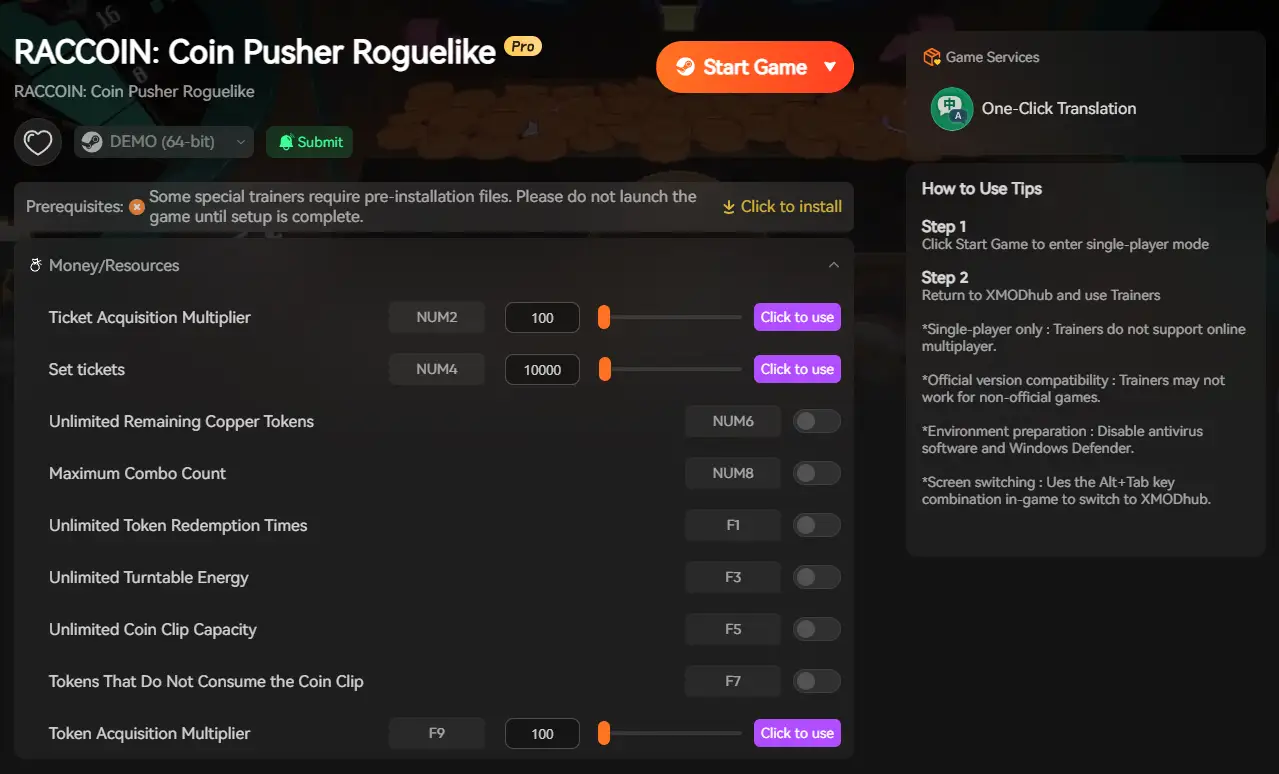
- ✦ Game Speed Control: Slow RACCOIN down to 0.5x speed during high-load cascade sequences. This reduces the physics thread spike that causes Unity to drop frames or crash, buying time until the official optimization patch arrives.
- ✦ Save Manager: Automatically backs up your run state every session exit. If RACCOIN crashes mid-run due to an unoptimized TNT chain or Lucky Wheel sequence, you can roll back to your last safe checkpoint instead of losing everything.
How to Get Started with XMODhub
Загрузите и установите: Get the latest XMODhub client from the official XMODhub website and run the installer.

Auto-Detect: Launch the app. It will automatically locate RACCOIN: Coin Pusher Roguelike in your Steam installation.
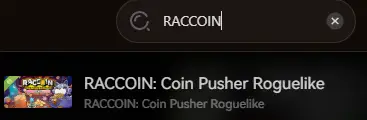
Select Your Tools: Enable Game Speed Control, Save Manager, or any trainer features you want active.
Launch & Play: Start RACCOIN directly from XMODhub to apply all settings seamlessly.
Часто задаваемые вопросы
Q: Does RACCOIN support Windows 10?
A:
Yes. Windows 10 (64-bit) is the confirmed minimum OS. However, ensure you are on build 22H2 or newer. Older Windows 10 builds have Unity compatibility issues that can cause silent launch failures.
Q: Will uninstalling and reinstalling fix the crash?
A:
Reinstalling is a last resort. “Verify Integrity of Game Files” via Steam (Method 1) achieves the same result in a fraction of the time. Only do a full reinstall if file verification fails multiple times and the game still will not launch.
Q: Is there a patch coming for RACCOIN launch crashes?
A:
RACCOIN launched March 31, 2026, and Doraccoon has been actively responsive to community feedback throughout the demo period. A post-launch stability patch is expected quickly. Check the XMODhub news section and RACCOIN’s Steam community hub for patch announcements.
Q: Why does RACCOIN crash specifically during coin cascade sequences?
A:
Large-scale cascades — especially TNT Coin chain reactions or Lucky Wheel multi-coin events — generate a high number of simultaneous physics collision calculations in Unity’s engine. On CPUs at or near the minimum spec (i5-6600K), this can cause a brief thread overload. Use the Process Priority method (Method 5) and close background applications to reduce the risk.

Я страстный геймер и писатель XMODhub, который стремится предоставить вам самые свежие игровые новости, советы и мнения.
Свяжитесь со мной:
Профиль LinkedIn
 Нэнси Миллер