Кэтрин Ху
⚡ Quick Answer: Are there cheat codes for OPUS: Prism Peak on PC?
Modern PC versions of OPUS: Prism Peak do not feature traditional cheat codes. Because the game was developed by SIGONO using the Unity engine, the native developer console was removed from the final retail release. Players cannot simply modify game files to unlock the Tilde (~) key.
The safest and fastest method to manipulate the game is using an automated mod manager like XMODhub, which gives you a clean menu for Game Speed Multipliers, Time Freezing for photography, and instant gallery unlocks with a single click.
🔥 Editor’s Note
Hey guys, Catherine Hu here. Remember the golden days of gaming when you could just pause, type in a secret code, and instantly get what you wanted? Sadly, modern narrative games rarely offer that freedom. When I hit the pacing wall in OPUS: Prism Peak, I spent hours trying to figure out how to enable the developer console just to force-unlock a missing photograph of a fleeing spirit animal I missed. It was a massive headache involving injected script files and risking my 15-hour emotional save file. Today, I am going to explain the reality of built-in cheats for this title, and share the modern, 1-click shortcut I actually use to speed up Eugene’s walking pace and enjoy the story.
— Catherine Hu, Senior Game Content Editor at XMODhub
Introduction
Introduction: Why Bend the Rules?
Gaming is supposed to be an escape, not a test of patience. OPUS: Prism Peak is an incredibly moving cinematic experience, but let’s face it: the mechanical pacing can be unforgiving. Whether you are frustrated by the agonizingly slow walking speed across the expansive Dusklands, or you simply do not have the time to replay entire 40-minute chapters just to capture a missed spirit photograph, sometimes you need to level the playing field.
Using cheats on PC isn’t about ruining the game; it’s about customizing your single-player narrative experience to fit your schedule. In this guide, we will break down the reality of hacking your gameplay: why the old-school manual console command method fails here, and the modern, automated trainer approach you need.
Built-In PC Cheats: The Developer Console Reality
For many PC games, the only way to manually input cheats is by unlocking the hidden developer console. However, OPUS: Prism Peak handles this very differently:

In the final retail build shipped to Steam, SIGONO completely compiled the native text parser out of the game.
You might see outdated forums telling you to navigate to your PC’s documents folder, specifically C:\Users\YourUsername\AppData\LocalLow\SIGONO\OPUS Prism Peak\, to edit a settings file and change EnableConsole=0 на 1. This absolutely does not work for this title. The UI code to render the console window simply does not exist.
⚠️ The Catch
Trying to force a custom console open using third-party DLL injectors like Unity Explorer often causes a fatal NullReferenceException, instantly crashing your game to the desktop and potentially corrupting your story progress.
How to Find OPUS: Prism Peak Item IDs & Event Codes
Even if you manage to inject a custom text hook via advanced mods, you cannot just type “give photo”. You need the exact string ID recognized by the game engine’s inventory and event dictionary.
For example, to spawn a specific camera lens upgrade, the command string in a modded console typically looks like this:
Finding these exact Unity Item IDs requires unpacking asset bundles and keeping a massive spreadsheet open on your second monitor. Because OPUS: Prism Peak features hundreds of unique lore fragments and dialogue flags, cross-referencing these lists while trying to stay immersed in the story is incredibly tedious.
The Modern Way: 1-Click OPUS: Prism Peak Cheats with XMODhub
Let’s be honest: you just want to experience Eugene’s journey and take beautiful photos, not feel like a data entry clerk typing out case-sensitive console commands. Furthermore, injecting raw code can permanently break narrative triggers after an official Steam hotfix.
This is why the PC modding community has moved on to automated trainers. XMODhub replaces the missing developer console with a sleek, modern UI.
Why XMODhub is the best cheat method for OPUS: Prism Peak:
You don’t have to touch your AppData game folders or risk breaking your installation.
No need to alt-tab to look up complicated Unity string IDs. Everything is clearly labeled with simple toggle switches.
When the game gets a new patch, XMODhub updates its memory pointers from the cloud automatically, preventing version-mismatch crashes.
How to Use XMODhub for OPUS: Prism Peak

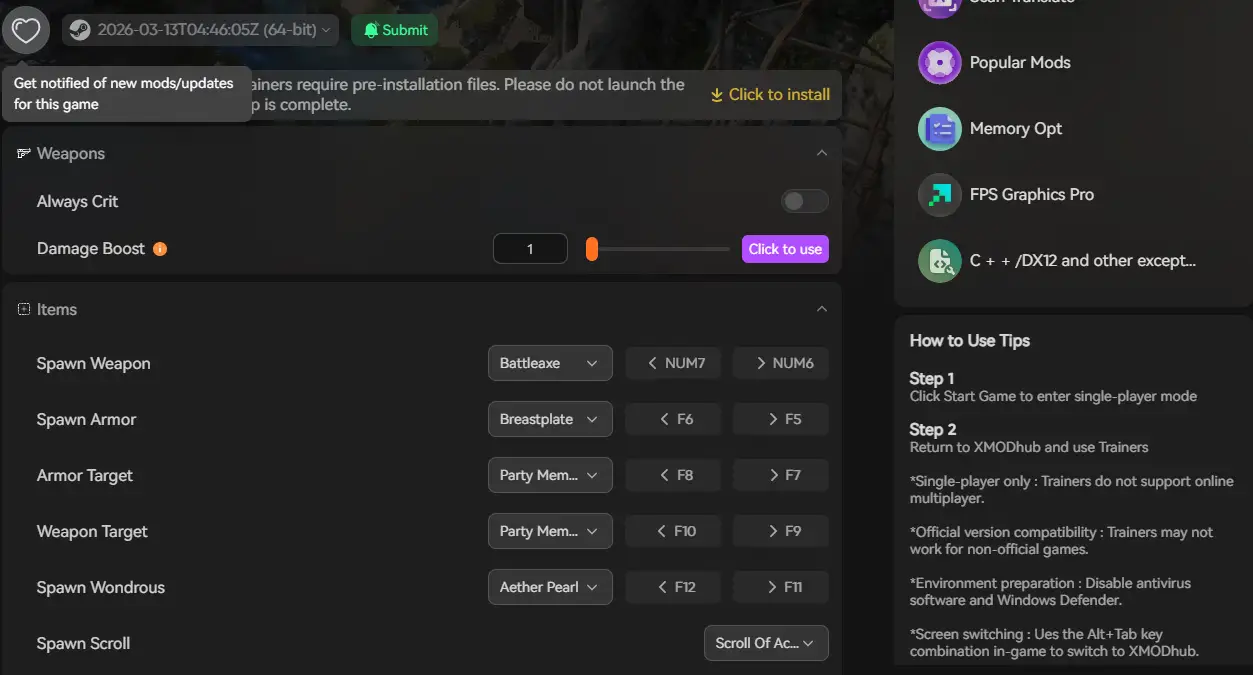
XMODhub will offer OPUS: Prism Peak mods on the release day
Most Popular Cheats You Can Activate Right Now
Since you are bypassing the locked console via XMODhub, here are the most highly requested cheats for OPUS: Prism Peak that completely change the cinematic experience:
Increase your walking and running speed by 2x or 3x. Sprint across the ethereal landscapes effortlessly and skip the sluggish traversal.
Stop the clock during fast-moving spirit animal encounters. Take all the time you need to frame the perfect camera shot without the pressure of a failing grade.
Instantly fill your notebook with every missing photograph and memory fragment, completely bypassing the collection grind.
Ensure your dialogue choices always yield the highest affection with your companion, locking in the game’s best ending.
Do Cheats Work on the Steam Deck?
With the massive popularity of handheld PC gaming, many players want to know if they can tweak their narrative games on the go.
Because OPUS: Prism Peak’s native console is locked, connecting a Bluetooth keyboard to your Steam Deck will not help. Additionally, because the Steam Deck runs on SteamOS (Linux), running standard Windows .exe trainers natively is complicated and requires forcing compatibility layers like Proton. Fortunately, cloud-based injection platforms are continually optimizing for handhelds, making it easier than ever to activate Fast Movement from your couch.
Do Cheats Disable Achievements?
If you try to force a developer console open using injected .dll files, yes. The moment the Unity engine detects modified assembly scripts, OPUS: Prism Peak will flag your save file and permanently disable Steam achievements for that playthrough.
Because XMODhub uses stealth memory injection rather than permanently altering the game’s internal Unity files, the game engine usually cannot detect that you are cheating. This means you can run the Speedhack and still unlock your 100% completion achievements.
Frequently Asked Questions (FAQ)
Q: Are these PC cheats safe to use?
A: Yes, as long as you use a verified platform. Using a sandboxed memory tool like XMODhub is completely secure. However, be extremely careful when downloading random standalone .exe cheat programs from YouTube descriptions, as they often contain malware.
Q: Can I use these cheats on the Xbox Game Pass version?
A: Modifying files to inject code is notoriously difficult on Game Pass due to Microsoft’s locked UWP file system. Fortunately, XMODhub bypasses this entirely by targeting active RAM, working flawlessly with the Game Pass PC version of OPUS: Prism Peak.
Q: Will using cheats corrupt my save file?
A: Memory-injected cheats (like fast movement) will not corrupt your save, as they disable as soon as you close the game. However, force-spawning late-game story items via external mods can sometimes cause narrative glitches. Always back up your AppData\LocalLow save folder before heavily modifying your inventory.
Q: Can I use these cheats in multiplayer or co-op?
A: OPUS: Prism Peak is a strictly single-player experience. However, as a general rule, third-party trainers should never be used in any online multiplayer lobby for other games, as it will trigger anti-cheat systems and result in an immediate account ban. Keep the tweaks in single-player!
Conclusion: Play By Your Own Rules
If you are frustrated by a fleeting photography moment, or you just want to experience the story without the artificially slow walking speed, you shouldn’t feel bad about bending the rules in a single-player narrative environment.
While digging through Unity config files to try and unlock non-existent developer commands is a frustrating waste of time, XMODhub makes tweaking your game effortless. And the greatest benefit? XMODhub supports over 5,000 PC games. Once you install the app, you have the ultimate cheat engine for almost your entire library. Whether you are capturing memories in OPUS: Prism Peak, uncovering mysteries in A Space for the Unbound, or exploring the stars in OPUS: Echo of Starsong, you are always just one click away from total control.

Я страстный геймер и писатель XMODhub, который стремится предоставить вам самые свежие игровые новости, советы и мнения.
Свяжитесь со мной:
Профиль LinkedIn
 Нэнси Миллер