
 Кэтрин Ху
Editor’s Note: Can You Cheat in MENACE?
Mastering MENACE can be brutal. Overhype Studios is known for creating unforgiving tactical sandboxes, and losing your veteran squad leader to a random critical hit—or worse, running out of Supplies halfway through a hostile sector—can end a 20-hour campaign instantly.
Whether you are stuck on a “High Threat” procedurally generated mission or simply want to experiment with different Mech loadouts in a creative environment, using MENACE console commands is a popular way to bypass the grind.
However, accessing the developer debug menu isn’t straightforward. Below is the complete guide on how to force the console open, the known command list, and the safer alternative to cheat without corrupting your save data.
Вам также может понравиться:
MENACE Cheat Engine Table vs. XMODhub Trainer: Best Free Alternative (2026)
How to Enable the Console in MENACE
If you are determined to access the debug menu manually, standard methods usually fail. You need to try these Unity-specific workarounds:
Method A (Launch Options – Low Success):
- Щелкните правой кнопкой мыши на . MENACE in Steam > Properties.
- In Launch Options, type:
-devили-консоль.
Note: This often only enables a log output, not an input window.
Method B (The “Hard” Way – BepInEx):
- Download and install BepInEx (IL2CPP version) for MENACE.
- Install the UnityExplorer plugin into the BepInEx/plugins folder.
- Запустите игру и нажмите кнопку F7 to open the “Object Explorer” where you can manually call functions like
GiveSupplies.
(If installing mod loaders sounds too risky just to get some free Supplies, skip to the XMODhub Solution below.)
Essential Console Commands List
If you manage to open the command line using the mods above, here are the most useful function calls found in the game code:
Player & Resource Cheats
| Command / Function | Эффект | Примечание |
|---|---|---|
| Resources.Add(“Supplies”, [X]) | Adds Supplies | Prevents game over on map. |
| Resources.Add(“Renown”, [X]) | Adds Renown. | Used for unlocking regions. |
| Unit.HealAll() | Instantly repairs all | Usable in battle. |
| Unit.ToggleGodMode() | Grants invincibility. | Units take 0 damage. |
| Squad.GivePromotionPoints([X]) | Adds XP | Level up instantly. |
World & System Commands
- Map.RevealFog(): Removes fog of war on the sector map.
- Battle.Win(): Instantly wins the current tactical encounter.
- Time.SetTimeScale(2.0): Doubles the game speed.
MENACE Item IDs List
To use spawn commands, you need the specific internal codes. These correspond to the game’s equipment data:
Ресурсы
- RES_Supplies
- RES_Renown
- RES_Intel
Weapons / Gear
- Wpn_Bolter_Mk1
- Wpn_Railgun_Sniper
- Armor_Heavy_Mech_Plating
- Item_Medkit_L
(Pro Tip: Tired of guessing IDs like Wpn_01_B? The XMODhub Trainer has a built-in visual inventory spawner, so you can see the item icon before adding it.)
The Problem: Why Console Commands Disable Achievements
Using the developer console comes with a cost, especially in a rogue-lite structure like MENACE:
- Achievement Lock: Typing debug commands usually flags your save file as “Modified”, permanently disabling Steam Achievements for that campaign.
- Save Corruption: Spawning mission items (like “Intel”) before the quest starts can break the campaign logic, forcing you to restart the entire run.
- Inconvenience: You have to re-type complex Unity syntax every time you load the game.
Лучшая альтернатива: XMODhub Trainer (без типизации)
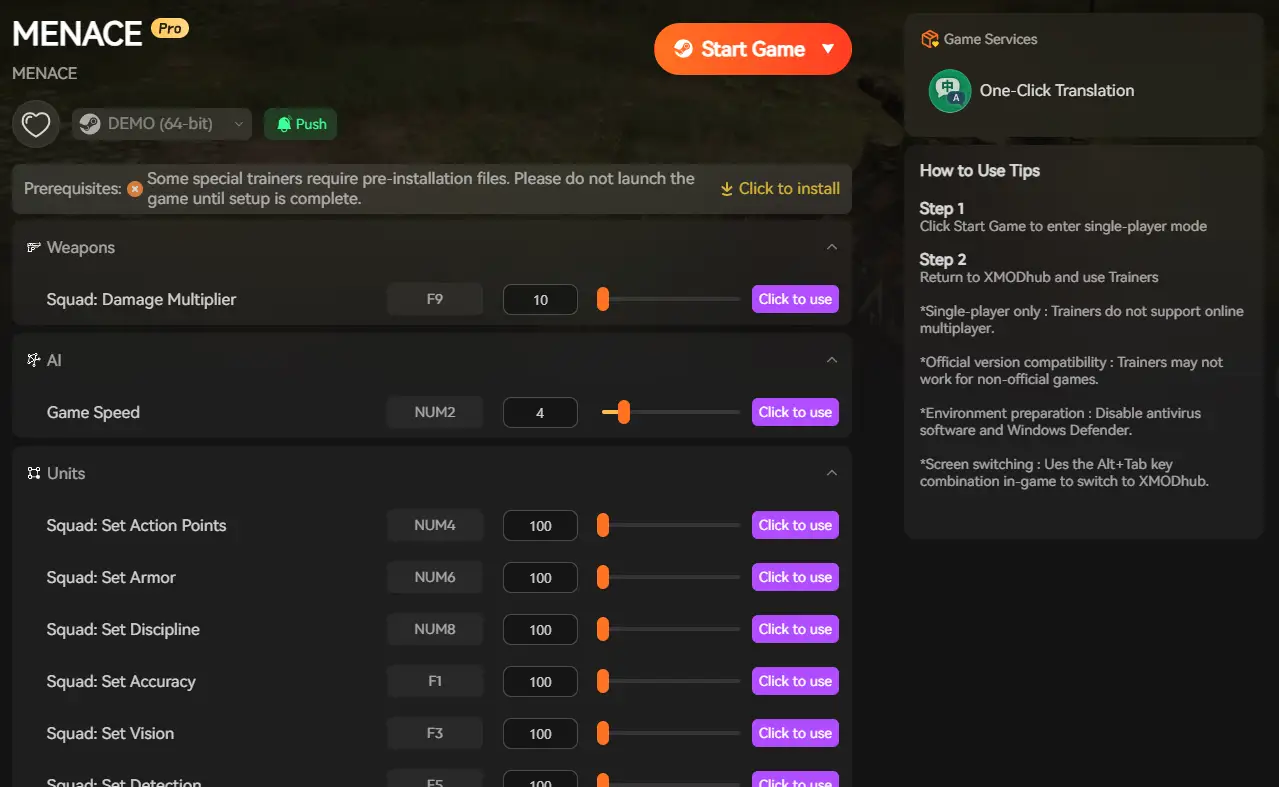
Stop memorizing case-sensitive Unity codes. XMODhub acts as a visual overlay that bypasses the need for the developer console entirely.
| Характеристика | Команды консоли | XMODhub Trainer |
|---|---|---|
| Метод | Typing text manually | Горячие клавиши одним нажатием |
| Achievements | Disabled (High Risk) | Safe (Achievements Work) |
| Supplies Cheat | Complex Syntax | Infinite Supplies Toggle |
| Game Version | Breaks with updates | Auto-Updated via Cloud |
How to Use XMODhub Trainer for MENACE
Don’t waste time editing config files. Here is how to use XMODhub in 3 simple steps:
01 Download
Get the free XMODhub Client.

02 Запуск
Open XMODhub—it automatically detects your installed copy of MENACE.

03 Activate
Click “Infinite Supplies” or “Max Promotion Points” and enjoy the game.
ЧАСТО ЗАДАВАЕМЫЕ ВОПРОСЫ
Q: Can I use console commands in MENACE Multiplayer?
A: No. MENACE is primarily a single-player tactical experience. Console commands are client-side only and attempting to use them in any future co-op modes will cause desyncs.
Q: What is the cheat for Infinite Supplies?
A: If you can’t open the console, there is no text cheat. You must use the XMODhub Trainer to freeze your Supply count so it never decreases while traveling.
Q: Why does the Tilde (~) key not work?
A: As mentioned in the Editor’s Note, Overhype Studios disables this key in the shipping version. You need to mod the game with BepInEx or use XMODhub to access cheats.
Заключение: Обманывать умнее
While classic console commands are nostalgic, they are often risky and clunky in modern Unity games like MENACE. XMODhub offers a safer, visual, and achievement-friendly way to customize your tactical experience.
Поддерживает похожие игры

MENACE is just the beginning. XMODhub supports more than 5,000+ games, including similar tactical hits like Battle Brothers, XCOM 2, и Jagged Alliance 3.

Я страстный геймер и писатель XMODhub, который стремится предоставить вам самые свежие игровые новости, советы и мнения.
Свяжитесь со мной:
Профиль LinkedIn

 Нэнси Миллер