Кэтрин Ху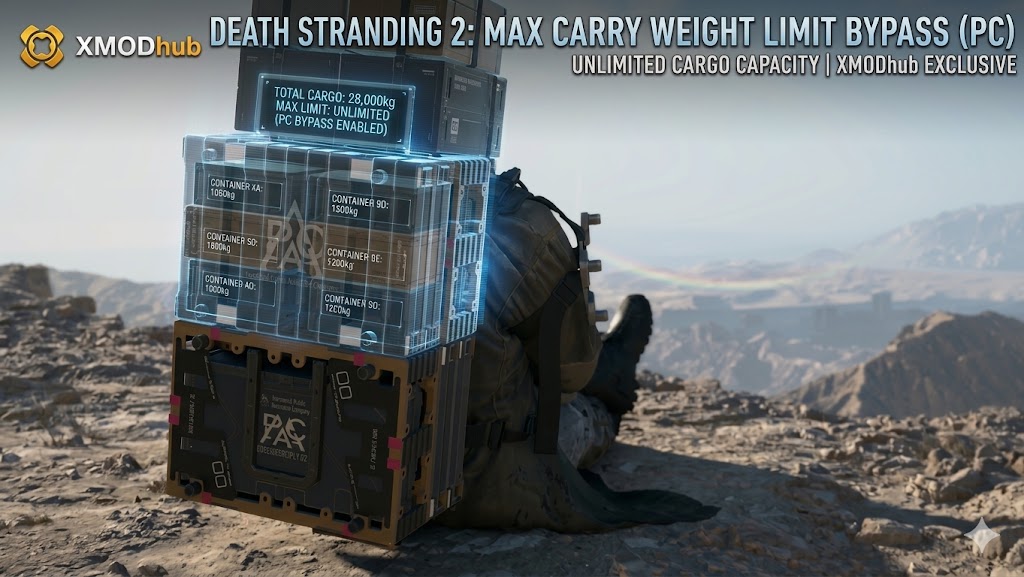
Hideo Kojima’s DEATH STRANDING 2: ON THE BEACH takes environmental traversal and physics to a terrifyingly realistic level. Whether you are delivering fragile medical supplies for the Drawbridge crew or hauling thousands of kilograms of Metals to rebuild the highway network, you are in a constant battle against gravity.
When you exceed Sam’s max carry weight limit, the game becomes a miserable experience. Your stamina drains in seconds, your boots degrade instantly, and taking a single step on a mild, muddy incline will cause Sam to violently faceplant, completely destroying your Premium cargo.
Вам также может понравиться: DEATH STRANDING 2 Cheat Engine Table vs. XMODhub Trainer: The Best Free Alternative
Editor’s Take: The Manual Labor Grind
“I spent a whole Sunday trying to build a bridge across a massive Tar flood. Because of the strict weight limit, I had to make four agonizing 20-minute trips back and forth from the Magellan ship. I was holding down the Left and Right mouse buttons to grip my backpack straps so hard that my fingers physically cramped.”
“The physics engine is a masterpiece, but the manual labor grind is brutal. I have outlined the legitimate in-game ways to carry more weight below. But if you are a working adult who just wants to build roads without destroying your hands or your controller, skip to the XMODhub weight bypass at the bottom.”
Quick Answer: How to Increase Carry Weight
If you want to play by the rules and naturally increase Sam’s carrying capacity to avoid the sluggish “Over-Encumbered” penalty, focus on these four in-game methods:
- Equip a Power Skeleton: Progress the main storyline until you unlock the blueprint for the Power Skeleton exoskeleton. Equipping this to your legs drastically increases your max weight limit by over 120kg.
- Craft Floating Carriers: Once unlocked, you can craft hover-carts called Floating Carriers. Attach them to Sam’s waist via a strand thread. You can drag up to two carriers simultaneously, completely offloading massive amounts of weight from Sam’s back.
- Level Up Your ‘Volume’ Stat: Complete Standard Orders focused specifically on heavy cargo (look for the stacked box icon on the delivery terminal). Hitting new milestones (Level 10, 20, 30) permanently increases Sam’s base carrying capacity.
- Use Vehicles: Whenever the terrain allows it, load your heavy Metals and Ceramics into the back of a Drawbridge Truck or onto the side-racks of a Reverse Trike.
Why Sam Keeps Falling Over (Balance Mechanics)
Even if you haven’t hit the absolute maximum weight limit (the point where Sam physically refuses to walk), carrying a tall stack of cargo will constantly make you tip over left and right.
- Center of Gravity: The Decima Engine calculates physics based on how you stack your items. If you put heavy 30kg Metals at the very top of your backpack and light 2kg medical supplies at the bottom, Sam will be dangerously top-heavy and fall over constantly.
- The Auto-Arrange Fix: Always open your Cargo Management menu and press the Auto-Arrange button (usually Triangle on PlayStation controllers or C on PC). The game will automatically sort the heaviest items to the bottom of your backpack and attach smaller items to your suit, instantly fixing your balance.
- Grip Your Straps: When walking down a steep snowy hill or through a river, hold both the Left and Right mouse buttons (or L2 + R2 on controllers) to grab your backpack straps. This drains stamina but guarantees you won’t fall over.
Best Exoskeletons for Heavy Cargo
As you progress, you will unlock different types of leg armor. Do not wear the wrong one for a heavy delivery.
- Power Skeleton: The absolute best choice for flat terrain and heavy lifting. It provides the highest raw weight capacity boost, perfect for carrying XL containers from a Prepper shelter to your parked truck.
- All-Terrain Skeleton: Provides a much smaller weight boost than the Power Skeleton, but drastically reduces the stamina penalty when walking through deep snow, thick mud, or steep inclines. Use this if your heavy delivery forces you to climb a mountain.
How to Fix Ruined Cargo (Container Repair Spray)
If you tried to carry too much weight, tumbled down a rocky cliff, and your cargo cases are flashing red, do not panic. The items inside might still be safe.
You can repair the outer casing using Container Repair Spray. Equip the spray from your radial menu, aim it over your shoulder at your backpack, and spray until the cases turn silver again.
Примечание: This only repairs the container, protecting it from Timefall rain. It does not repair the actual item damage (the percentage shown on the UI) caused by the physical impact of the fall.
The Ultimate Bypass: XMODhub Zero Encumbrance
Let’s be honest: building the massive highway network across Pywel requires tens of thousands of kilograms of Ceramics and Special Alloys. Even with a Level 3 Power Skeleton and two Floating Carriers, you are forced to make multiple tedious, hour-long trips through BT-infested territory just to build a single piece of road.
If you are a working adult who wants to bypass the grueling logistics simulation and focus on the cinematic story and exploration, you need the XMODhub PC Utility. Carry Everything. Never Fall Over: XMODhub safely injects into the game engine, granting you access to traversal modifiers that completely remove the frustrating physical limitations of the game.
- •Zero Encumbrance (Infinite Weight): Toggle this feature to instantly set Sam’s perceived cargo weight to 0kg. You can stack 50 XL containers of heavy Metals on your back. You will still visually carry the massive tower of cargo, but Sam will sprint at full speed as if he is carrying nothing.
- •Perfect Balance (Never Fall): Combine the weight bypass with God Mode balance. No matter how tall your cargo stack is, Sam will never tip over, stumble, or drop packages when navigating rocky mountains. You never have to hold the strap buttons again.
- •Infinite Exoskeleton Battery: Never worry about your Power Skeleton running out of battery in the middle of a blizzard, which normally leaves you paralyzed by the sudden weight shift.
How to Use XMODhub (3 Simple Steps)

- Скачать: Get the verified, digitally signed XMODhub client from the Official XMODhub Trainers Page.
- Запуск: Open the app alongside your Steam or Epic Games copy of Death Stranding 2.
- Активировать: Click “Play” on the module. Use the clean in-game overlay or your keyboard numpad to toggle “Zero Cargo Weight” и “Perfect Balance” before leaving the terminal.
Frequently Asked Questions (FAQ)
Q: Do Floating Carriers drain my Chiral Crystals?
A: Yes. Floating Carriers use anti-gravity technology that constantly consumes a slow trickle of Chiral Crystals from your inventory. If you run out of crystals, the carrier will drop to the ground and become dead weight.
Q: Can I take a Floating Carrier on a Zipline in Death Stranding 2?
A: Unlike the launch version of the first game, Death Stranding 2 features advanced Level 2 Ziplines that allow you to bring a single connected Floating Carrier with you when zipping across the map.
Q: Does cargo weight affect my vehicles?
A: Absolutely. If you load too much heavy cargo into the back of a Drawbridge Truck or onto a Reverse Trike, the suspension will lower, the top speed will drastically decrease, and the vehicle’s battery will drain much faster when boosting.
Conclusion: Lighten the Load
Mastering the cargo management and physics engine is the core loop of Death Stranding 2: On the Beach. By unlocking Power Skeletons, utilizing Floating Carriers, and constantly auto-arranging your backpack, you can safely navigate Pywel without ruining your deliveries.
However, when the endgame infrastructure grind begins, the strict weight limits and constant balancing act can quickly turn a breathtaking exploration game into a tedious chore that makes your fingers cramp. Your time is valuable. Do not spend three hours walking back and forth to build one bridge. Equip the XMODhub PC Trainer to activate Zero Encumbrance, perfectly balance your cargo, and carry thousands of kilograms of materials in a single, flawless trip.
Think Bigger: XMODhub supports 5,000+ titles including massive hits like Горизонт Запретный Запад и Призрак Цусимы.

Я страстный геймер и писатель XMODhub, который стремится предоставить вам самые свежие игровые новости, советы и мнения.
Свяжитесь со мной:
Профиль LinkedIn
 Нэнси Миллер