Резюме: This guide provides a simple, step-by-step solution to fix the GTA 5 initialization error and help you launch the game smoothly.
Running into the GTA 5 initialization error and not sure how to fix it?
This common startup issue can stop your game from launching, especially when mods are involved.
In this quick guide, you’ll learn what causes the error and how to fix it step by step. Plus, we’ll show you how to get free mods for GTA 5 using Xmod to level up your single-player experience without spending a cent.
Оглавление
- What Is GTA 5 Initialization Error?
- How to Fix GTA 5 Initialization Error: Step By Step
- How to Get Free Mods for GTA 5 with Xmod?
- Заключение
What Is GTA 5 Initialization Error?
Сайт GTA 5 Initialization Error is a common issue that prevents the game from launching properly. It typically appears as error messages like “Failed to initialize”, “GTA V has stopped working”, or cryptic codes such as ERR_GFX_D3D_INIT или ERR_MEM_EMBEDDEDALLOC_ALLOC. This problem can be caused by missing files, corrupted mods, outdated drivers, or conflicts with background software. It’s especially frustrating because it stops you from even reaching the loading screen.
when you try to start the game. This error can be caused by several factors, including:
- Corrupted or missing game files
- Incompatible graphics drivers
- Outdated game launcher or software
- Conflicts with third-party mods or antivirus programs
Resolving this error typically involves verifying game files, updating drivers, or adjusting system settings to ensure smooth gameplay.
Now that you understand what causes the GTA 5 initialization error, let’s walk through the step-by-step solutions to fix it quickly and get back to playing.
How to Fix GTA 5 Initialization Error: Step By Step
The “err_gfx_d3d_init” error in GTA 5 usually points to issues with your graphics setup. Common causes include GPU overclocking, overlay software, outdated drivers, corrupted DLL files, or incompatible DirectX versions.
Follow these steps to resolve it:
Solution 1: Disable GPU Overclocking
Overclocking can boost performance, but it may cause instability.
Шаги:
- Revert your GPU clock speed to factory settings using your overclocking tool (e.g., MSI Afterburner).
- If you use multiple GPUs, try running the game with just one.
Solution 2: Change DirectX Value in Config File
Шаги:
- Нажмите Win + E to open File Explorer.
- Navigate to:
Documents\Rockstar Games\GTA V.
- Щелкните правой кнопкой мыши на .
settings.xml > Open with Notepad.
- Нажмите Ctrl + F, search for
DX_Version.
- Change the value:
0 for DirectX 10 1 for DirectX 10.1 2 for DirectX 11
- Нажмите Ctrl + S to save, then relaunch the game.
Solution 3: Update Your Graphics Driver
Шаги:
- Right-click the Start Menu > select Диспетчер устройств.
- Expand Display adapters, right-click your GPU, and choose Update driver.
- Нажмите Search automatically for drivers, or manually install from the manufacturer’s website.
Solution 4: Remove Bugged DLL Files
Шаги:
- Go to the GTA V installation folder.
- Delete
d3dcsx_46.dll и d3dcompiler.dll.
- Открыть
_CommonRedist in the GTA folder and run DXSETUP.exe to reinstall DirectX.
- If errors persist, verify game files:
Открыть Пар > Library > right-click GTA V > Свойства > Local Files > Проверьте целостность игровых файлов.
Solution 5: Disable Overlay Software
Example with GeForce Experience:
- Exit GTA V and open GeForce Experience.
- Click the Settings gear icon.
- Under Общие сведения, turn off In-Game Overlay. Disable other overlays (e.g., Discord, Fraps) if applicable.
Solution 6: Change DirectX Version In-Game
Шаги:
- Launch GTA V and go to Settings > Graphics.
- Change DirectX Version на 10 or 10.1.
- Save changes and restart the game.
Try these solutions one by one to eliminate the GTA 5 initialization error. If none work, a clean reinstall of the game may be your last resort.
Once the error is resolved and your game runs smoothly, why not take your GTA 5 experience to the next level? Here’s how you can use Xmod to add exciting free mods and customization.
How to Get Free Mods for GTA 5 with Xmod?
Xmod is a powerful tool that lets you easily enhance your GTA 5 single-player experience with free mods, cheats, and trainers. Whether you’re looking for visual upgrades, gameplay tweaks, or added features, Xmod makes customization simple. Here’s how to use it:
- Download and install the Xmod app on your device.
- Open Xmod and search for GTA 5 in the game list.
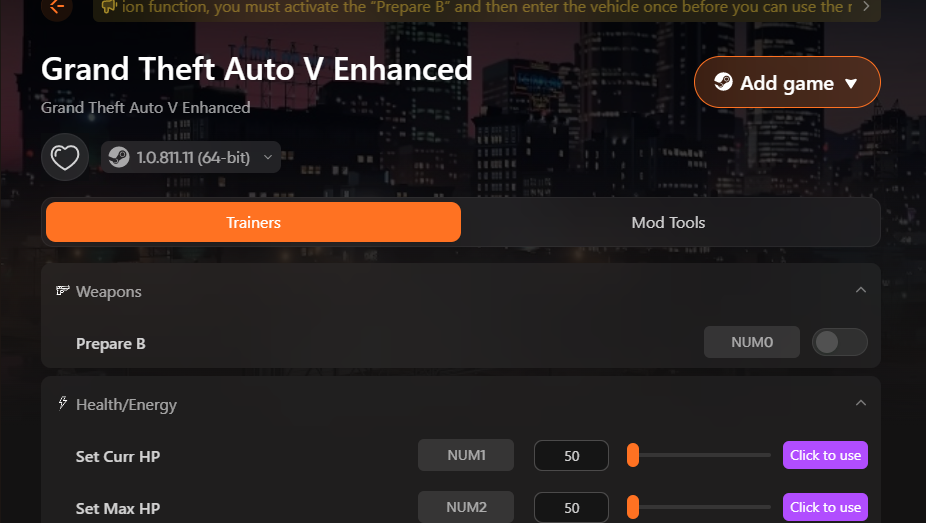
- Launch GTA 5 directly through the Xmod platform.
- Enable your preferred mods or cheats within the app to enjoy a customized gameplay experience.
With just a few steps, you can unlock a new level of fun in GTA 5—no extra cost required.
Заключение
The GTA 5 initialization error can be frustrating, but with the right steps, it’s easy to fix and get back into the game. Whether you’re troubleshooting launch issues or looking to enhance your gameplay with free mods, tools like Xmod make customization simple and accessible. Follow the guide above to resolve errors and unlock a richer, more immersive GTA 5 experience—no extra cost, just more fun. Happy modding!
Я страстный геймер и писатель XMODhub, который стремится предоставить вам самые свежие игровые новости, советы и мнения.
Свяжитесь со мной:
Профиль LinkedIn

 Кэтрин Ху

 Нэнси Миллер
