
 Кэтрин Ху
Want to test out endgame Train logistics early? Are you tired of grinding for Blueprint Points just to copy and paste your massive space platforms, or perhaps you are struggling to manually generate a mind-bending 4-layer shape to unlock the next technology tier?
Using developer console commands to spawn items is a beloved staple of PC gaming freedom. However, shapez 2 – Factory is not a traditional RPG with “swords” or “health potions.” It is a massive automation sandbox built on the Unity engine that uses complex geometric strings instead of standard Item IDs.
Below is the most comprehensive, categorized, and up-to-date guide on how internal progression pointers and Shape Codes work in shapez 2 – Factory, verified for the latest patch.
Quick Reference: Top 10 Most Wanted shapez 2 – Factory IDs
If you don’t want to scroll through thousands of rows analyzing 3D engine structures, here are the exact internal references for the most essential and frequently searched elements in the game (including massive currency injections and foundational shape strings).
| Element / Shape | Internal ID / String Code | Категория |
|---|---|---|
| Blueprint Points | currency_blueprint_points |
Economy |
| Research Points | currency_research_points |
Прогрессия |
| Full Circle | CuCuCuCu |
Base Geometry |
| Full Rectangle (Square) | RuRuRuRu |
Base Geometry |
| Full Star | SuSuSuSu |
Base Geometry |
| Full Pinwheel | WuWuWuWu |
Base Geometry |
| Red Pigment | r |
Color Code |
| Green Pigment | g |
Color Code |
| Blue Pigment | b |
Color Code |
| Uncolored (Empty) | u |
Color Code |
How to Enable the Console & Use Spawn Commands (The Truth)
Before you try to copy and paste the ID codes listed above, you must understand the reality of the developer backend in shapez 2 – Factory.
The Command Syntax Reality:
If you play games like Skyrim or Fallout, you expect to press the Tilde (~) key, open a text box, and type spawn item_01 500.
shapez 2 – Factory does not have an accessible native developer console.
The developers built the game using a highly optimized Unity framework designed to track millions of moving entities simultaneously. To protect the game’s progression loops and prevent logic crashes, the text input UI was completely stripped from the retail executable.
Furthermore, you do not have a traditional “inventory.” You cannot spawn a shape into your pocket; shapes must be delivered to the Vortex.
The Easy Way: XMODhub (No Typing Required)
Stop Alt-Tabbing to check massive spreadsheets for geometric strings. Trying to manually calculate the exact orientation of a 3-layer half-star/half-circle breaks your immersion and wastes time.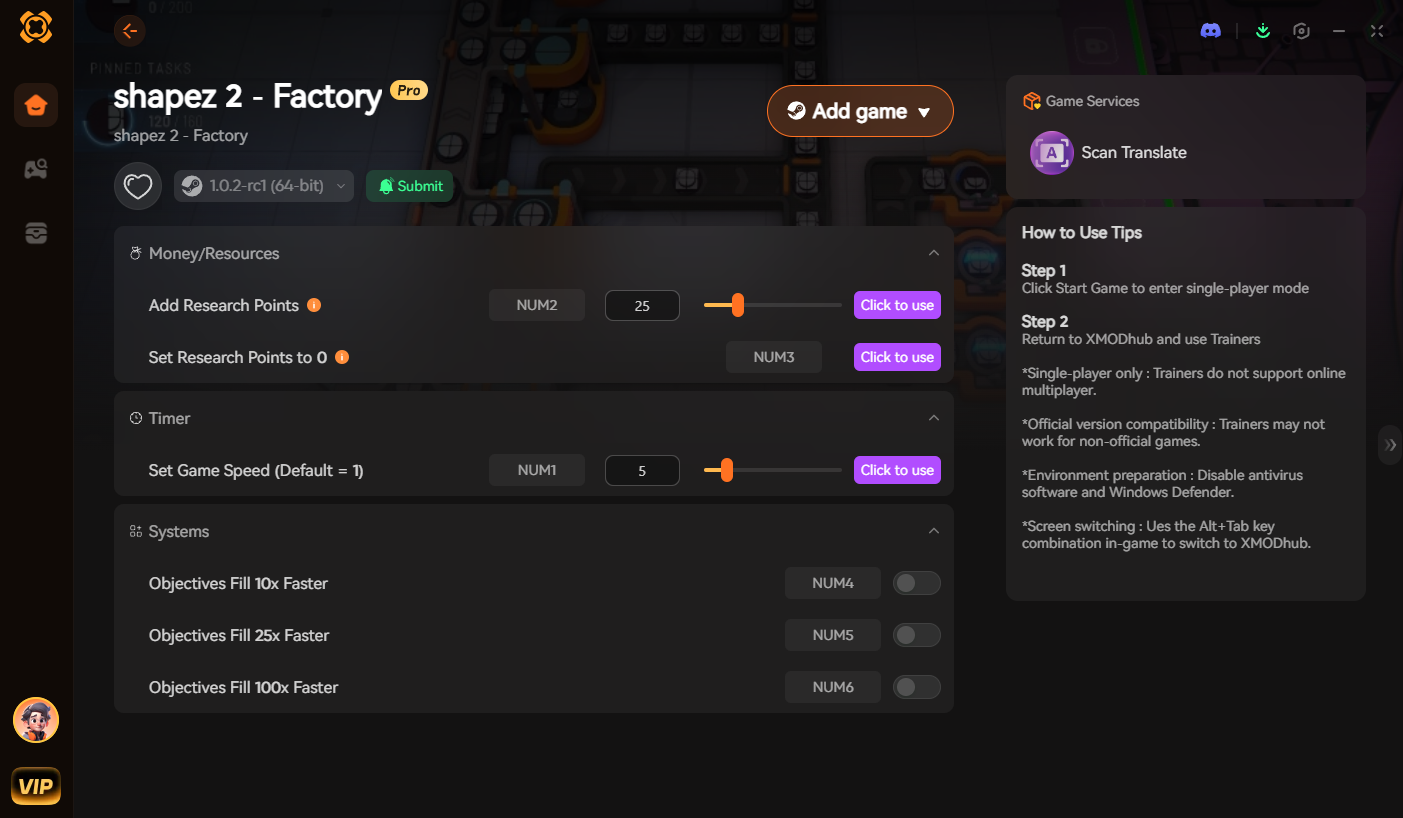
Because the native console is locked, the XMODhub PC Client includes a dedicated “Visual Spawner” feature specifically built for shapez 2 – Factory.
- ✦Icon-Based UI: See exactly what the complex shape looks like visually before you inject it into the Vortex. No need to memorize
CuCuRuRu. - ✦Instant Delivery: Instantly meet the milestone requirements for the shape currently pinned on your objective board with one click.
- ✦Batch Spawning: Max out your Blueprint Points to 999,999 instantly so you can copy and paste continent-sized factory segments without restrictions.
- ✦Auto-Updated Logic: When the developers add new mechanics (like crystalized shapes), XMODhub updates its geometric generator automatically via the cloud.
Base Geometry Shape Codes List
If you are building your own memory tables or referencing the engine’s data architecture, these are the string formats for the fundamental shapes. The game reads shapes in quadrants: Top-Right, Bottom-Right, Bottom-Left, Top-Left.
(Memory Logic Format: shape_string_[Code])
| Shape Type | String Code | Description |
|---|---|---|
| Circle | C |
Smooth, rounded quadrant. |
| Rectangle | R |
Sharp, 90-degree square quadrant. |
| Star | S |
Pointed, spiked quadrant. |
| Pinwheel | W |
Angled, fan-like quadrant. |
| Empty Space | - |
Represents a missing quadrant (crucial for floating layers). |
Color & Layer Codes List
Shapes are useless without color. The engine uses a secondary lowercase letter attached to the primary shape letter to dictate pigment.
(Memory Logic Format: append_color_[Code])
| Color / Layer | Code | Example Output |
|---|---|---|
| Red | r |
CrCrCrCr (Full Red Circle) |
| Green | g |
RgRgRgRg (Full Green Rectangle) |
| Blue | b |
SbSbSbSb (Full Blue Star) |
| Cyan (G+B) | c |
WcWcWcWc (Full Cyan Pinwheel) |
| Magenta (R+B) | m |
CmCmCmCm (Full Magenta Circle) |
| Yellow (R+G) | y |
RyRyRyRy (Full Yellow Rectangle) |
| White (R+G+B) | w |
SwSwSwSw (Full White Star) |
| Layer Separator | : |
CuCuCuCu:RuRuRuRu (Circle placed on top of a Rectangle) |
Economy & Progression Pointer IDs
These are the internal memory pointers the game uses to track your macro-progression currencies.
(Memory Logic Format: inject_currency_[ID])
| Currency Type | Internal Unity Pointer ID | Использование |
|---|---|---|
| Blueprint Points | stat_currency_blueprint_total |
Used to copy and paste placed structures. |
| Research Points | stat_currency_research_active |
Used to unlock new technologies. |
| Platform Cap | stat_platform_limit_max |
Dictates how many space platforms you can build. |
Tech Tree & Milestone Unlocks
You don’t just have to spawn physical shapes. You can manipulate the game’s memory to instantly unlock factory machinery or advanced logistics.
(Memory Logic Format: unlock_tech_node_[ID])
| Technology | Internal Tech ID | Эффект |
|---|---|---|
| Trains & Rails | tech_logistics_trains_1 |
Unlocks interstellar train transportation. |
| Advanced Painters | tech_machinery_painter_double |
Unlocks machines that paint two sides at once. |
| Space Platforms | tech_expansion_platforms_large |
Unlocks massive 3×3 foundation grids. |
Troubleshooting: Why Are My Commands Failing?
If you are trying to inject these shapez 2 – Factory strings and nothing is working, check these absolute realities of the game engine:
- ✦“Command not found / No Console”: The developers permanently locked the console in the retail patch. You cannot type these codes natively. You must use an external memory injector like XMODhub to interface with the game’s logic.
- ✦“Syntax Error / Invalid Shape”: If you successfully hooked the game with a hex editor but the shape fails to register, ensure your string formatting is flawless. The engine is strictly case-sensitive.
cucucucuwill crash the game; it must beCuCuCuCu. - ✦Save File Corruption: If you inject a 5-layer shape into an early-game save file before unlocking multi-layer processing, the Unity engine will fail to render it, resulting in an infinite loading screen.
Frequently Asked Questions (FAQ)
Q: Are these Shape Codes case-sensitive in shapez 2 – Factory?
A: Yes. The geometry string formatting is strictly enforced by the game engine. The primary shape letter must be Capitalized (C, R, S, W) and the color letter must be lowercase (u, r, g, b). Typing CURU instead of CuRu will result in a null reference.
Q: Can I spawn shapes while playing in Multiplayer or Co-Op?
A: shapez 2 – Factory is a single-player automation experience. Any memory injection or shape delivery commands you execute are client-side only. If the developers ever add co-op, using memory trainers in a shared session will likely cause severe network desynchronization.
Q: How do I calculate the ID for a massive, floating 4-layer shape?
A: Calculating complex strings with missing quadrants and floating layers (using the – and : characters) manually is a logistical nightmare. We highly recommend using the XMODhub Visual Spawner, which automatically calculates the exact string you need based on your current Vortex objective and delivers it instantly.
Conclusion: The Ultimate Sandbox Experience
Having access to the complete shapez 2 – Factory Item IDs and geometric string structures is the fastest way to understand how the game’s complex rendering engine functions. Bookmark this page so you can quickly reference the color and shape syntax whenever you are theory-crafting a new assembly line.
However, if you want a significantly smoother, crash-free experience where you don’t need to manually type highly sensitive strings like CuRbSuWg:--Cb--Cw, the XMODhub Visual Spawner is the superior modern choice. Browse objectives visually. Fulfill milestones instantly. Keep your Steam achievements active.
XMODhub is your ultimate all-in-one toolkit for PC single-player gaming. Whether you need powerful Trainers to bypass the grind in shapez 2 – Factory, or you want to optimize your sprawling logistics networks in Factorio и Satisfactory, our engine supports over 5,000+ games.

Я страстный геймер и писатель XMODhub, который стремится предоставить вам самые свежие игровые новости, советы и мнения.
Свяжитесь со мной:
Профиль LinkedIn

 Нэнси Миллер