
 Кэтрин Ху
To fix the AI LIMIT – Eirene’s Furnace of War Sync Rate dropping too fast bug, you must immediately unequip any active elemental weapon enchantments (like Volt Infusion or Corrosive Coating) and rest at a Branch Terminal.
A known Unreal Engine 5 calculation error occurs when combining elemental weapon buffs with Sync-boosting armor, causing your meter to glitch and drain 10x faster than intended. If completely unequipping your character does not reset the math loop, your save file’s stat multiplier is temporarily stuck.
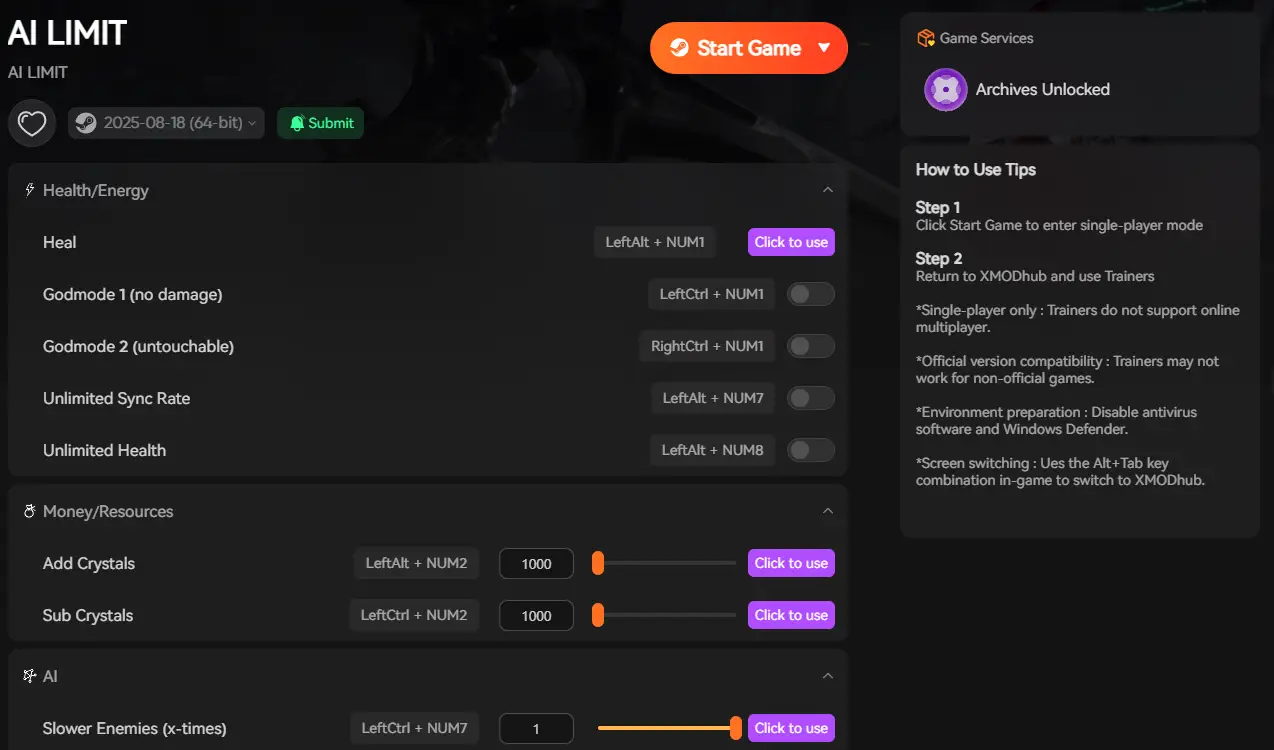
Because the game lacks a developer console to reset hidden attributes, you can use the XMODhub PC Client to toggle “Infinite Sync Rate” and permanently bypass the glitch.
In this guide, we will break down why the engine miscalculates these specific values, exactly what triggers this devastating mathematical loop, how to reset your character’s stats natively, and how to use external memory tools to lock your meter and play the game without fear of random resource drains.
Вам также может понравиться: How to Farm Crimson Core in AI Limit Early (Eirene Route)
Editor’s View: The Invisible Resource Drain
“I thought I was going crazy during the second half of the game. I was fighting the Twin Wardens, and my Sync Rate was evaporating instantly. I initially assumed it was a hidden boss mechanic—that standing too close to their fire was draining my energy.”
“But then it kept happening while I was just sprinting through empty hallways. After hours of testing, I realized it was a bug caused by my specific build. The engine’s tick rate miscalculates the stamina drain when you have a weapon buff active while wearing the ‘Resonance’ armor set. It effectively registers one spell cast as ten.”
“Until the developers patch this specific interaction, you either have to change your entire build, or do what I did: boot up a trainer, lock the Sync Rate at 100%, and refuse to let broken code ruin a perfectly good boss fight.”
Why the Sync Rate Bug Occurs in UE5
Before diving into the fixes, it helps to understand why the Unreal Engine 5 is punishing your character.
The Sync Rate in AI LIMIT – Eirene’s Furnace of War is designed as a delicate balancing mechanic to prevent players from infinitely spamming high-damage spells and heavy Bladeworks. The game relies on a complex network of float variables to calculate how fast this meter drains and replenishes. When you equip gear that modifies your maximum capacity while simultaneously applying a buff that modifies your consumption rate, the engine’s arithmetic logic unit (ALU) occasionally fails to multiply the decimal values correctly. Instead of calculating a 0.15% drain, the engine shifts the decimal and calculates a 15.0% drain per frame, resulting in an instant, catastrophic energy loss.
Method 1: The Elemental Coating Conflict
The primary trigger for the Sync Rate dropping too fast bug is an overlapping logic error in the game’s equipment system.
When you apply a consumable weapon buff (like a Volt or Fire coating) while wearing armor pieces that explicitly state “Increases maximum Sync Rate capacity,” the math breaks.
How to stop the drain:
- Open your inventory.
- Remove any active elemental coatings from your primary and secondary weapons.
- If you have a permanent enchantment baked into a weapon at the forge, you must unequip that weapon entirely and switch to a pure physical-damage blade.
- Let your Sync Rate regenerate naturally to 100%. The extreme drain should stop immediately upon casting your next spell.
Method 2: The “Naked Terminal” Hard Reset
Sometimes, simply taking off the weapon is not enough. The Unreal Engine 5 logic loop can get “stuck” in your active memory, meaning your character continues to suffer the 10x drain penalty even with standard gear equipped.
You must force the engine to recalculate your base stats from scratch.
How to execute the hard reset:
- Fast travel to any major Branch Terminal (the main hub terminal is the safest).
- Open your equipment screen and unequip absolutely everything. Remove your weapons, your armor, your accessories, and your quick-items. Your character should be in their base starting clothes.
- Exit the menu and rest at the Branch Terminal.
- When the screen fades to black, the game writes a new auto-save, stripping all modifier variables from your character’s code.
- Re-equip your gear (avoiding the bugged elemental coatings). Your Sync Rate drain will now behave normally.
Method 3: Temporarily Abandon Magic Builds
If neither Method 1 nor Method 2 works for your specific save file, your third option is to temporarily pivot your combat strategy.
Because the bug only affects Sync Rate consumption, you can completely ignore the meter by switching to a heavy Strength or pure Agility build that relies entirely on physical attack combos and perfect parries. Refund your attribute points, remove all spells from your quick-slots, and focus on fundamental combat mechanics until Lion Shield releases a hotfix for the math error.
Method 4: The Developer Console Myth (Unreal Engine Facts)
When an RPG character gets stuck with a permanent negative debuff due to a bug, veteran PC gamers immediately search for a command console to type something like remove_debuff all или sv_infinite_mana 1.
Do not waste your time searching for the tilde (~) key. Because AI LIMIT – Eirene’s Furnace of War is shipped as a securely packaged retail UE5 game, the developers have completely removed the native developer console. You cannot input text commands to fix your character’s stat modifiers.
Furthermore, you cannot manually fix the math in your save file. Your character’s current status effects and Sync Rate are compiled into heavily encrypted binary strings located in %LOCALAPPDATA%\AILimit\Saved\SaveGames. Opening this file in a hex editor to manually reset your Sync Rate value will instantly trigger a “Save Data Corrupted” fatal error. To safely manipulate your active stats without destroying your save, you must use a verified memory hook.
The Ultimate Solution: Lock Your Sync Rate with XMODhub
If your favorite Bladework build relies on elemental coatings and you refuse to change your playstyle just to appease a developer’s unpatched math error, you do not have to suffer.
Сайт XMODhub PC Client gives you total control over the engine’s memory variables, allowing you to rewrite the rules of combat and completely ignore resource bugs.
How XMODhub Stabilizes Your Gameplay:
- Infinite Sync Rate (Meter Lock): Open the XMODhub in-game overlay and toggle “Lock Sync Rate.” This intercepts the game’s internal math, forcefully freezing your meter at 100%. Even if the bug tries to drain your energy at 10x speed, the meter will not budge. You can cast your heaviest spells flawlessly.
- Auto-Parry Script: If the bug already drained your energy and you cannot afford to block an incoming boss combo, activate our Auto-Parry feature. Your character will perfectly deflect every strike, buying you time to recover without taking damage.
- Save Manager: Did the bug cause you to die and lose thousands of experience points? Use our Save Manager to instantly roll back to your previous Branch Terminal auto-save, entirely negating the unfair death.
How to Get Started:
- Download XMODhub: Grab the secure, ad-free PC client directly from our official website.

- Auto-Detect Game Path: Launch the app. It will instantly map out your AI LIMIT – Eirene’s Furnace of War installation and hook into the engine safely.
- Activate the Trainer: Launch the game through the XMODhub dashboard. Press the hotkey to open the overlay, activate your Sync Rate lock, and get back to exploring Eirene’s Furnace without restrictions.
Frequently Asked Questions (FAQ)
Q: Is the fast Sync Rate drain a boss mechanic in AI LIMIT – Eirene’s Furnace of War?
A: Rarely. Some late-game bosses inflict a “Parasite” status effect that slowly drains Sync Rate. However, if your meter is dropping from 100 to 0 in under two seconds outside of combat, you are experiencing the calculation bug, not a boss mechanic.
Q: Will leveling up my Sync Rate capacity fix the bug?
A: No. The bug is a percentage-based calculation error. If you increase your total capacity at a terminal, the bug will simply drain a larger total amount of energy at the exact same hyper-accelerated speed.
Q: Does restarting the game fix the Sync Rate drain?
A: Only temporarily. If you restart the game but still have the conflicting elemental weapon and armor equipped, the Unreal Engine will trigger the bug again the moment you cast your first spell.
Заключение
Having your most vital combat resource stolen by a mathematical glitch is infuriating. The Sync Rate dropping too fast bug fundamentally breaks the flow of AI LIMIT – Eirene’s Furnace of War, turning spectacular magical combat into a sluggish, exhausting chore. By understanding why the UE5 ALU fails, identifying the elemental coating conflict, and performing a “Naked Terminal” hard reset, you can force the Unreal Engine to correct its math and restore your character’s stamina.
However, if you are tired of unequipping your best gear just to bypass poor optimization, you don’t have to compromise your build. The XMODhub PC Client provides a seamless safety net, allowing you to permanently lock your Sync Rate at maximum capacity. Ignore the broken code, cast your ultimate Bladeworks, and conquer the game on your own terms.
Think Bigger: XMODhub is the ultimate gaming companion for hardcore PC action gamers. With native support for over 5,000+ games, we provide safe Save Managers and combat automation. Whether you are battling UE5 resource bugs in AI LIMIT – Eirene’s Furnace of War, looking for unlimited mana in Hogwarts Legacy, or surviving the grueling combat of Black Myth: Wukong, XMODhub ensures you conquer every game in your library safely and easily.

Я страстный геймер и писатель XMODhub, который стремится предоставить вам самые свежие игровые новости, советы и мнения.
Свяжитесь со мной:
Профиль LinkedIn

 Нэнси Миллер