
 Кэтрин Ху
To apply the Nova Roma hud disappeared ui missing fix, first press the default Photo Mode hotkey (F11 or F10) to toggle the interface back on, as you likely triggered cinematic mode by accident.
If the UI remains missing, press Alt + Enter to force the Unity Engine into Windowed Mode, triggering a UI render refresh. If your build bar and resource counters are still invisible, you must reset your UI Scaling by deleting the preferences file in your LocalLow folder.
If your save file’s native UI is permanently bugged, use the XMODhub PC Client’s independent DirectX overlay to manage your resources.
You are halfway through designing a massive aqueduct system for your new Roman metropolis. You pan the camera to check your stone reserves, and suddenly, there is nothing there. The bottom build menu is gone. Your resource counters in the top right have vanished. Playing a complex city-builder without an interface is impossible. This missing HUD bug is a known issue in Lion Shield’s new release, often triggered by a misclick, a resolution conflict, or a Unity Engine rendering crash.
In this guide, we will show you exactly how to restore your missing interface, how to fix corrupted UI scaling settings outside of the game, and how to use external overlays to manage your city when the native engine fails you.
Вам также может понравиться: How to Fix Nova Roma Black Screen Issues
Editor’s View: The Invisible Empire Bug
“I encountered this exact issue while trying to place my first Colosseum. I was rapidly pressing hotkeys to rotate the building, and suddenly my entire screen was completely clean—no menus, no mouse cursor, nothing.”
“I panicked and forcefully closed the game via the Task Manager, losing an hour of unsaved progress. It turns out, I had just accidentally fat-fingered the ‘Hide UI’ shortcut meant for taking clean screenshots.”
“However, later in the week, my UI vanished again, and the hotkey didn’t work. The Unity UI canvas had actually crashed in the background. Understanding the difference between an accidental toggle and a rendering crash will save you a massive amount of frustration.”
Why Did My HUD Disappear in Nova Roma?
The user interface in Nova Roma is rendered on a separate layer from the 3D world.
When you scale your resolution (especially on 4K monitors) or use a “Windowed Borderless” mode that doesn’t match your native desktop resolution, the UI layer can literally be pushed off-screen. Additionally, Nova Roma features an “Immersion Mode” hotkey designed for taking clean screenshots. If you accidentally bump this key during a hectic building session, your entire resource bar, mini-map, and construction menus will vanish instantly, leaving you unable to interact with your city’s buildings.
Method 1: The Cinematic Photo Mode Toggle
The most common reason for a suddenly vanished HUD is not a bug at all. Nova Roma includes a dedicated “Cinematic Mode” or “Photo Mode” designed to let players take beautiful, unobstructed screenshots of their Roman architecture.
How to toggle the UI back on:
- Look at the top row of your keyboard.
- Press the F11 key. (Depending on your keyboard layout, you may need to press Fn + F11).
- If F11 does not work, try the F10 или F9 keys, as these are the standard Unity engine fallback binds for UI toggling.
- If the UI reappears, you simply brushed the hotkey by accident during gameplay.
Method 2: Force a Unity Render Refresh
If the hotkeys do not bring your menus back, the game’s UI rendering thread has crashed. The Unity Engine processes the 3D game world (your buildings and citizens) and the 2D UI canvas (your menus) on different layers. Sometimes, a memory spike causes the 2D layer to drop out while the 3D world keeps running.
How to jolt the UI back to life:
- Do not forcefully close the game yet.
- Нажмите Alt + Enter simultaneously on your keyboard.
- This forces the game out of Exclusive Fullscreen and into Windowed Mode.
- This action forces your graphics card to rebuild the visual swap chain, which almost always re-renders the crashed UI canvas.
- Once your menus reappear, you can go into the Graphics Settings and set the game back to Borderless Windowed.
Method 3: Reset UI Scaling via Config File
Are you playing on a 4K monitor? Sometimes, the in-game “UI Scaling” slider bugs out, scaling the menus to 0% or pushing them completely off the physical edges of your screen. Because you cannot see the settings menu to fix it, you must reset it outside of the game.
How to reset your preferences:
- Close the game completely.
- Press the Windows Key + R to open the Run dialog box.
- Тип
%userprofile%\AppData\LocalLowand press Enter. - Откройте Lion Shield folder, then the Nova Roma folder.
- Look for a file named
Settings.jsonилиPreferences.ini. - Delete this file. (Do not worry, this will not delete your save games; it only resets your graphics and audio settings).
- Relaunch the game. The engine will generate a fresh settings file with the default 100% UI scaling, restoring your HUD.
Method 4: The Developer Console Myth
When a bug traps you without a user interface, older PC games allowed you to press the tilde key (~) to bring up a command console and type show_hud 1 или ui.draw 1 to manually force the menus to render.
Because Nova Roma is a packaged retail Unity build, Lion Shield has not exposed the developer console to the public. There is no hidden command line window. You cannot input text commands to manipulate the engine’s rendering layers.
Furthermore, you cannot manually inject UI commands into your save file. The save data strictly tracks city layout and resource values, not engine rendering states. If the native game engine refuses to draw your menus and you need to manage your city in an emergency, you must rely on an external DirectX overlay.
The Ultimate Solution: XMODhub’s Independent Overlay
If your game’s native UI is permanently bugged on a specific save file, or if the interface frequently crashes during heavy endgame city management, you do not have to abandon your playthrough.
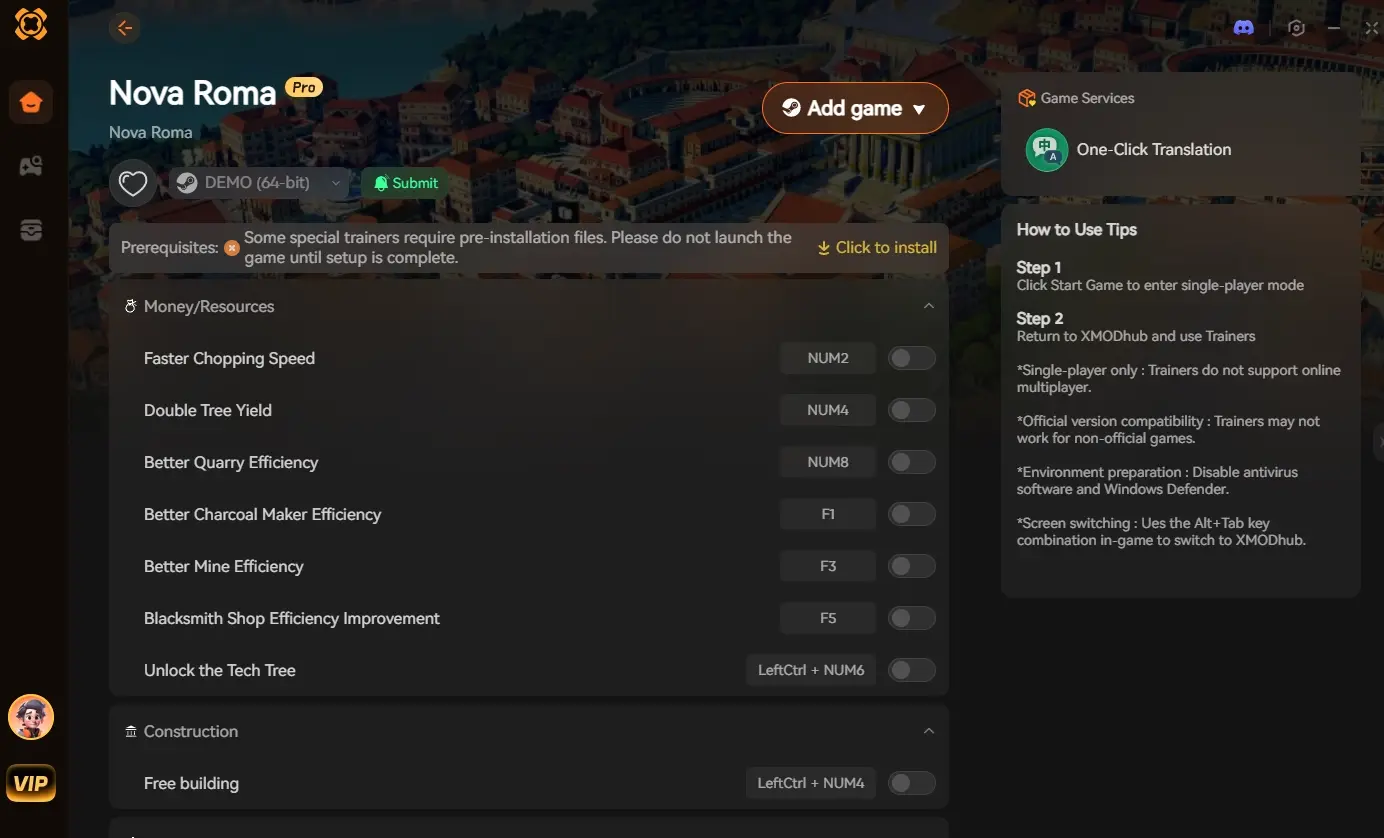
The XMODhub PC Client uses its own independent DirectX overlay. Even if Nova Roma’s engine completely fails to draw the build menus, the XMODhub interface remains visible and fully functional on your screen.
How XMODhub Saves Your Playthrough:
- Independent Resource Management: Native UI missing? No problem. Use the XMODhub overlay to instantly view and inject resources. Click to add 10,000 Denarii or 5,000 Stone, completely bypassing the need for the broken in-game resource counters.
- Hotkey Spawners: You can bind XMODhub’s features to your keyboard. If the build menu vanishes, you can use your custom hotkeys to instantly toggle God Mode, lock citizen happiness, or fast-forward the simulation without needing to click any in-game buttons.
- Force Save Hotkey: If the UI vanishes and you are terrified of losing your progress, use the XMODhub Save Manager hotkey to forcefully trigger an engine-level auto-save before you close the game to restart.
How to Get Started:
- Download XMODhub: Grab the secure, ad-free PC client directly from our official website.

- Auto-Detect Game Path: Launch the app. It will automatically detect your Nova Roma installation.
- Activate the Overlay: Launch the game through the XMODhub dashboard. Our independent UI will seamlessly hook into the game, giving you total control even when the native engine glitches out.
Frequently Asked Questions (FAQ)
Q: Does zooming in too close cause the UI to disappear in Nova Roma?
A: Sometimes. Nova Roma features an immersive first-person or deep-zoom camera view that intentionally fades the UI to let you watch your citizens up close. Simply scrolling the mouse wheel backwards to zoom out to the tactical view should restore the HUD.
Q: I pressed Alt+Enter, but my screen just went black. What now?
A: This happens if your GPU driver hangs during the Windowed Mode transition. Press Ctrl + Shift + Win + B to restart your graphics driver instantly. Your screen will blink, and the game should recover with the UI intact.
Q: Does verifying game files fix the missing UI?
A: Yes. If the actual Unity Canvas assets (the image files for the buttons and menus) were corrupted or deleted by an overzealous antivirus, verifying your files via Steam or Epic Games will re-download the missing interface elements.
Заключение
Losing your HUD in a city builder is like trying to drive a car while blindfolded. Without your resource counters, build menus, and warning notifications, your Roman empire will quickly collapse. By checking your Photo Mode hotkeys, forcing a render refresh with Windowed Mode, and resetting your LocalLow config files, you can easily apply the Nova Roma HUD disappeared UI missing fix and get back to urban planning.
However, if the Unity engine’s UI layer proves to be terminally unstable on your hardware, you don’t have to play in the dark. The XMODhub PC Client provides a completely independent overlay and hotkey system, ensuring you always have full control over your city’s economy and simulation, regardless of what the native game engine decides to do.
Think Bigger: XMODhub is the ultimate tool for PC simulation gamers. With native support for over 5,000 titles, we provide independent overlays, safe Save Managers, and real-time Visual Spawners to ensure technical bugs never ruin your creative vision.

Я страстный геймер и писатель XMODhub, который стремится предоставить вам самые свежие игровые новости, советы и мнения.
Свяжитесь со мной:
Профиль LinkedIn

 Нэнси Миллер