You are on Day 8. The camp is starving, the generator is out of fuel, and the horde is banging on the gates. You just need one more crate of antibiotics to save the run, but the trader isn’t coming until tomorrow.
While the game wants you to suffer, you don’t have to. Whether you need to instantly restock Rations, unlock the Advanced Blood Tester early, or just give yourself enough cash to upgrade your turrets, console commands are your lifeline.
Below is the verified list of Item IDs and spawn codes, updated for the January 2026 launch version.
Indice dei contenuti
Quick Reference: Top 10 Survival Essentials
How to Enable Developer Console
How to Use XMODhub Visual Spawner (Step-by-Step)
Base Resources IDs (Food, Fuel, Meds)
Inspection Tools & Upgrades IDs
Defense & Drone Codes
Event & Time Commands (Skip Day)
Troubleshooting & ID Formats
FAQ
Riferimento rapido: I 10 documenti d'identità più ricercati
Here are the emergency codes for when your checkpoint is about to collapse.
Nome dell'articolo
Console ID / Code
Effetto
[Aggiungi soldi]
add_money 5000
Instantly gain $5,000 Credits
[Full Rations]
resource_food_crate
Adds 50 Food Rations
[Fuel Canister]
resource_fuel_barrel
Refills Generator (100L)
[Medical Supplies]
resource_meds_box
Stockpile for the Infirmary
[Advanced UV Light]
tool_scanner_uv_t2
See hidden infection marks
[Blood Test Gun]
tool_blood_tester
100% Accuracy Infection Check
[Medical Hammer]
tool_reflex_hammer
The “Bonk” Tool (Check reflexes)
[Combat Drone]
defense_drone_attack
Spawns air support
[Instant Win]
win_current_day
Skips to the daily report
[Modalità Dio]
player_invincible
You cannot die during raids
How to Enable Developer Console
Da quando Zona di quarantenaruns on the Unity engine, the console is hidden by default. You must enable it before typing any codes.
Enable Debug Mode: Go to your Steam Library > Right Click Game > Proprietà > Opzioni di lancio. Type -debug o -Console.
Open Console: In-game, press the Backtick key (~) (left of the 1 key) or F1.
Command Syntax:
To give items: give [Item ID] [Amount]
To set values: set [Variable] [Value]
Example: To get 100 Fuel, type give resource_fuel_barrel 10 and press Enter.
How to Use XMODhub Visual Spawner (Step-by-Step)
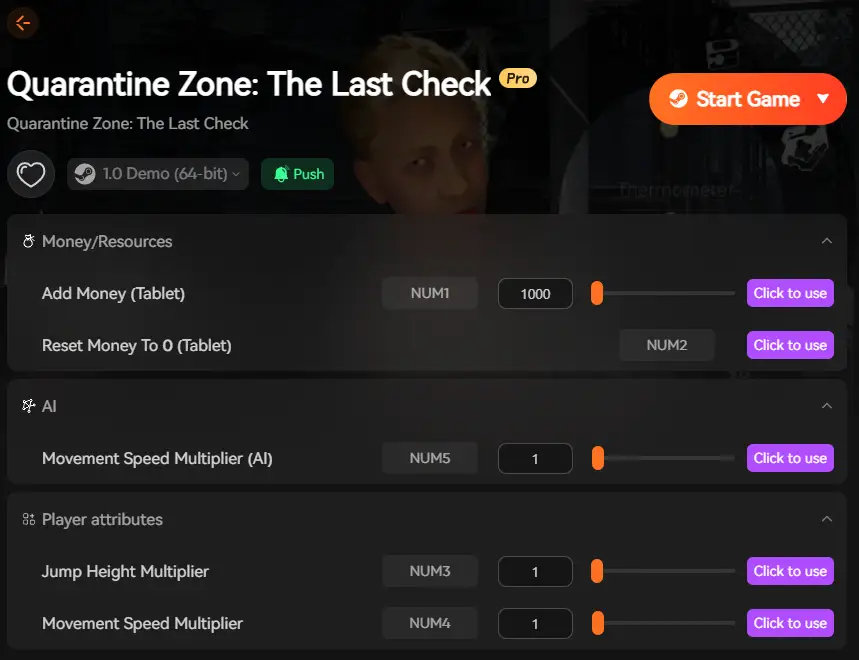
Tired of typing give resource_food_raw 50 every time your survivors get hungry? The XMODhub Spawner visivo completely replaces the need for the console command line. It overlays a modern UI directly on top of your game, letting you spawn items with a mouse click.
Here is how to set it up in less than 2 minutes:
Step 1: Install & Auto-Detect
Download the Cliente XMODhub(PC). Once installed, it will automatically scan your library and detect Quarantine Zone: The Last Check. No need to move files manually—XMODhub handles the directory mapping for you.
Step 2: Launch via XMODhub
Click the “Play” button inside the XMODhub app. This launches the game with the Visual Spawner Hook active.
(Note: You will hear a confirmation sound “XMOD Ready” at the main menu.)
Step 3: Open the Overlay In-Game
Load your save file. Once you are at your checkpoint or base, press F4 (or your custom hotkey) to open the XMODhub Overlay.
The game will pause automatically, so you don’t get attacked by zombies while browsing.
Step 4: Browse & Spawn
You will see the Item Grid:
Search: Type “Scanner” or “Fuel”.
Preview: See the actual in-game icon (so you don’t confuse fuel_can con fuel_barrel).
Quantity Slider: Drag to choose if you want 1 item or a stack of 99.
Click “Add”: The item appears instantly in your inventory.
Step 5: Bonus – The “Camp Manager” Tab
Exclusive to Quarantine Zone, XMODhub includes a “Camp Manager” tab. Instead of spawning items, you can directly edit camp stats:
Compatible with Steam & Epic Games Store versions (v1.0+)
Base Resources IDs (Food, Fuel, Meds)
The economy in Zona di quarantena is unforgiving. Use these IDs to keep your camp running when the trader rips you off.
Resource Name
Item ID
Note
Credits (Money)
currency_credits
Use add_money command for safety
Food Rations
resource_food_raw
Basic food for survivors
Canned Goods
resource_food_premium
High morale boost
Diesel Fuel
resource_fuel
Keeps the lights/gates on
Antibiotics
med_antibiotics
Cures “Sick” status (not Infected)
Construction Parts
resource_parts_basic
Used to build Tents/Walls
Scrap Metal
resource_scrap
Used for turret repairs
Inspection Tools & Upgrades IDs
Tools are your primary weapon against the virus. Spawning these early makes the “Paperwork” phase much easier and helps you catch infected travelers faster.
Nome dello strumento
Item ID
Funzione
Flashlight (Pro)
tool_flashlight_t3
Brighter, longer battery
UV Scanner
tool_uv_lamp
Reveals hidden sweat/rashes
Thermometer
tool_thermometer_digital
Instant temperature read
Stethoscope
tool_stethoscope
Listen for lung irregularities
Reflex Hammer
tool_hammer_med
Test reflexes (or bonk rude survivors)
Blood Test Kit
consumable_test_strip
Single-use infection check
Blood Test Gun
tool_injector_gun
Reusable (Requires batteries)
Defense & Drone Codes
When the alarm rings and the horde attacks your gates, paperwork doesn’t matter. Firepower does.
defense_turret_auto – Spawns an automated sentry gun.
defense_drone_scout – Spawns a camera drone.
defense_drone_attack – Spawns an attack drone.
ammo_turret_box – Refills turret ammunition.
kill_all_enemies - Panic Button: Instantly kills all active zombies on the map.
Event & Time Commands (Skip Day)
Stuck on a day with an impossible difficulty spike? Or just want to speed up the night?
time_set_hour [0-24] – Change the time of day.
skip_day – Immediately ends the current shift and goes to the summary screen.
event_trigger_raid – Forces a zombie wave (good for testing defenses).
weather_clear – Removes fog/rain for better visibility.
Risoluzione dei problemi: Perché i comandi non funzionano
Unity Engine Sensitivity: Unlike Bethesda games, Unity commands are often Case Sensitive. Give resource_food might fail, while give resource_food works. Always use lowercase unless specified otherwise.
ID Changes: Brigada Games patches the game frequently. If tool_scanner stops working, try tool_scanner_v2.
Un consiglio da professionista: Type dump_item_list in the console to generate a text file of the current version’s IDs on your desktop.
Beta Branch: If you are playing on the “Experimental” branch on Steam, some IDs (especially for the new Lab update) may not be finalized.
FAQ
Q: Can I use these cheats to get Steam Achievements?
Using the console usually disables achievements for that play session. However, using the XMODhub Visual Spawner bypasses this check, allowing you to spawn items and still unlock achievements.
Q: How do I spawn NPCs?
You can use spawn_npc [ID]. For example, spawn_npc zombie_walker creates a basic enemy. Be careful—they will attack you immediately!
Q: The console isn’t opening on my laptop.
If you are on a laptop, try holding the Fn key + F1.
Conclusione
Managing a checkpoint is stressful enough. Skip the manual coding and use the XMODhub Spawner visivo to map Item IDs to simple buttons. Focus on the decisions, not the syntax.
One Tool, Thousands of Games XMODhub is your all-in-one platform for survival sims. Check out our Visual Spawners for
Sono un giocatore appassionato e uno scrittore di XMODhub, che si dedica a fornire le ultime notizie, consigli e approfondimenti sui giochi.
Collegatevi con me:
Profilo LinkedIn
Solasta 2 Dungeon Maker Guide: Best Custom Campaigns & How to Play (2026)
You finally beat the main campaign of Solasta 2. You maxed out your party, rolled the credits, and now you have that post-RPG emptiness. The good news? The game is just getting started.…
Top 20 Best Solasta 2 Mods (UI, Classes & Custom Maps) | XMODhub
Let’s speak Dungeon Master to player. Solasta 2 is a phenomenal CRPG that faithfully translates the Dungeons & Dragons 5th Edition (5e) ruleset onto your screen. The grid-based tactical combat, the verticality, and…
Un pensiero su “Quarantine Zone: The Last Check Item IDs & Console Commands (Complete Guide)”
The ‘resource_fuel_barrel’ command saved my last run when I was completely out of fuel. It’s amazing how these simple cheats can keep the survival aspect of the game intact while giving you just enough breathing room.

 Catherine Hu


 Nancy Miller
The ‘resource_fuel_barrel’ command saved my last run when I was completely out of fuel. It’s amazing how these simple cheats can keep the survival aspect of the game intact while giving you just enough breathing room.