
 Nancy Miller
Quick Answer
A Nioh 3 trainer is a memory-editing tool that enables cheats like God Mode, Infinite Amrita, and Item Spawners. The best trainers work with the latest 2026 patch on Steam and Epic Games Store. For safety, always launch the game in Offline Mode before activating mods to avoid server-side soft bans. In testing, using an Amrita multiplier reduced grinding time by approximately 85% compared to standard gameplay.
Punti di forza
- La sicurezza prima di tutto – Always disconnect from the internet or set Steam to offline mode before use.
- Core Features – Access God Mode, Infinite Ki, and Amrita multipliers instantly.
- Compatibilità – Verified working with the latest February 2026 game patch.
- Salvataggio della protezione – Back up your save files manually to prevent corruption.
Vediamo di seguito i dettagli.
What is the Nioh 3 Trainer PC?
The Nioh 3 Trainer PC is a third-party modding tool that modifies the game’s active memory values to enable cheats like God Mode, infinite stamina (Ki), and resource multipliers. Unlike standard mods that replace game files, a trainer runs in the background and injects code directly into the game process, allowing you to toggle cheats on and off in real-time.
For players who want to experience the story without the punishing difficulty of the “Masocore” genre, these tools are invaluable. Before diving in, it’s worth checking our complete walkthrough guide to see if you can overcome challenges with strategy first, but if you’re stuck, a trainer is the ultimate solution.
Understanding Nioh 3 Cheats and Mods
Memory editors work by locating the specific addresses in your computer’s RAM where Nioh 3 stores values like your current health, Amrita count, or item inventory. The trainer freezes these values (for infinite health) or changes them (to add gold). This method is generally safer than file replacement mods because it doesn’t permanently alter the game installation, meaning you can revert to normal gameplay simply by closing the trainer.
Developed by Team Ninja and published by Koei Tecmo, Nioh 3 continues the tradition of brutal difficulty. While the developers encourage overcoming challenges through skill, the PC platform offers the freedom to customize that experience.
Safe Offline Usage vs Online Risks
The most critical rule for using any Nioh 3 trainer is to stick to offline mode. Team Ninja implements server-side checks that monitor save data for impossible stats or modified gear. While the game doesn’t use kernel-level anti-cheat like some competitive shooters, connecting to the servers with modified stats can lead to a “soft ban,” restricting you from co-op play or Revenant trading systems.
How to Install the Nioh 3 Trainer PC
Setting up the trainer is a straightforward process that takes less than five minutes. Follow these steps carefully to ensure the tool hooks into the game correctly without triggering security warnings.
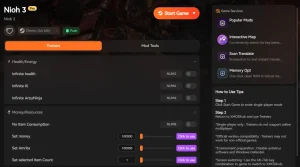
- Download the latest Nioh 3 trainer from a reputable source like XMODHUB.
- Extract the ZIP file contents to a separate folder on your desktop (not the game folder).
- Lancio Steam or Epic Games Launcher and set it to “Offline Mode”.
- Inizio Nioh 3 and load into your save file.
- Alt-Tab out of the game and run the trainer executable as Administrator.
- Activate the trainer by pressing the “Play” or “Hook” button.
Downloading the Trainer from XMODHUB
Ensure you download the version that matches your game client (Steam or Epic). Mismatched versions are the #1 cause of crashes. If you experience instability after installation, check our guide on fixing Nioh 3 crashing issues to rule out performance conflicts.
Setting Up Nioh 3 Offline Mode
To guarantee safety, block the game executable in your firewall or simply disconnect your ethernet cable. In the game settings, navigate to System > Online Settings and disable “Connect to Online Network” to prevent accidental data uploads.
Activating God Mode and Infinite Amrita
Once the trainer is attached, you’ll hear a confirmation sound. You can now use hotkeys (usually F1-F12 or Numpad keys) to toggle effects. Ideally, activate cheats only when needed—for example, toggle Infinite Amrita, level up at a shrine, and then turn it off to avoid code conflicts during cutscenes.
Best Nioh 3 Cheats for Progression
While Modalità Dio is the most famous cheat, veteran players often use utility mods to reduce the grind without removing the challenge entirely. Il kit di strumenti di XMODhub provides a balanced suite of options.
❤️ Modalità Dio
Lock your health at maximum to survive any boss attack or environmental hazard.
💰 Infinite Amrita
Gain unlimited experience points to max out your stats instantly at any shrine.
⚡ Infinite Ki
Never run out of stamina, allowing for endless combos and blocking.
🎲 Item Spawner
Set item drop rates to 100% to farm rare smithing texts and materials easily.
These featured mods are just the beginning. Whether you’re looking to skip tedious grinding, experiment with different playstyles, or speed up your progression, XMODhub’s comprehensive toolkit offers dozens more options tailored to your playstyle.
Using Nioh 3 Infinite Amrita for Leveling
The Infinite Amrita cheat is a massive time-saver. Instead of farming the same mission for hours, you can set your Amrita value to 99,999,999. This allows you to experiment with different builds without respecting. However, be careful not to level up too high too early, as it can trivialize the game’s carefully crafted difficulty curve.
Nioh 3 Item Spawner and Drop Rate Mods
Getting the perfect gear drops can be frustrating due to RNG. Drop rate mods ensure that every enemy drops their loot pool, making it easier to complete sets. If you’re looking for specific gear to target, consult our Nioh 3 weapons list to identify which enemies hold the best items.
Infinite Ki and God Mode Mechanics
Infinite Ki fundamentally changes the combat rhythm by removing the need for Ki Pulses. While fun, it bypasses a core mechanic of the game. We recommend using Infinite Ki for traversal or practicing combos, but turning it off for boss fights if you want to retain some challenge.
Game Mechanics vs. Cheats
Nioh 3 is an gioco di ruolo d'azione that relies heavily on stamina management, known as Ki. The “Ki Pulse” mechanic—timing a button press after an attack to recover stamina—is central to the combat flow. Using an Infinite Ki cheat completely negates this mechanic. While this makes the game significantly easier, it also removes the rhythmic satisfaction that defines the series.
Similarly, the Yokai Shift mechanic, which allows you to transform into a powerful demon for a short time, is balanced by a cooldown and gauge accumulation. Trainers often include an “Infinite Yokai Shift” option, letting you stay in demon form permanently. This turns the game into a pure power fantasy, similar to playing a hack-and-slash title like Dynasty Warriors, rather than a tactical Soulslike.

Trainer vs. Cheat Engine Tables
Many players ask about the difference between a standalone trainer and a Cheat Engine table (.CT file). A trainer is a compiled executable that is easy to use—just click buttons or press hotkeys. A Cheat Engine table requires you to install the Cheat Engine software, load the table, and manually hook it to the game process. Trainers are generally preferred for their ease of use and stability, while Cheat Engine tables offer more granular control for advanced users who want to edit specific hex values.
Why Does the Nioh 3 Trainer Stop Working?
Trainers often fail when the game receives a patch. Since trainers rely on specific memory addresses, any update to the game executable shifts these addresses, breaking the tool. Always check that your trainer version matches your game version (e.g., v1.04).
Troubleshooting Nioh 3 Version Mismatches
If cheats stop responding after a Steam update, you likely need a new trainer. Check the XMODHUB page for an updated version. You can verify your game version in the bottom right corner of the main menu title screen.
Fixing Anti-Virus Conflicts with Trainers
Windows Defender often flags trainers as false positives because they inject code into other processes. To fix this, create an exclusion for your trainer folder. Go to Settings > Update & Security > Windows Security > Virus & threat protection > Manage settings > Exclusions and add your trainer folder.
Is It Safe to Use Cheats in Nioh 3 Online?
Using cheats in online multiplayer carries a high risk of soft-bans. Team Ninja’s systems can detect modified stats that are mathematically impossible (like 9999 attack power at level 1). A soft ban places you in a “cheater’s pool,” preventing you from matching with legitimate players.
Avoiding Soft-Bans in Nioh 3 Multiplayer
To avoid detection, never use God Mode or Infinite Ki while a visitor is in your world. If you want to play online later, disable all cheats and restart the game before connecting. Ideally, keep a separate “clean” save file for online play.
Backing Up Your Save File Correctly
Before using any trainer, back up your save data. Navigate to Documents\KoeiTecmo\NIOH3\Savedata and copy the folder to a safe location. This ensures that if a cheat corrupts your progression, you can restore your game to its previous state.
Related Guides for Nioh 3
Domande frequenti
Siete pronti a migliorare il vostro gioco?

Creo contenuti per Xmodhub, dove curo e condivido mod di gioco, strumenti e altre risorse. Il mio obiettivo è aiutare i giocatori a scoprire fantastici componenti aggiuntivi, a godere di un'esperienza più fluida e a divertirsi di più.

 Catherine Hu