
 Catherine Hu
Sintesi: Get detailed system requirements for Little Rocket Lab, including minimum and recommended specs for CPU, GPU, RAM, storage, and OS to ensure smooth gameplay.
Little Rocket Lab is an exciting simulation and strategy game that challenges players to build, manage, and launch rockets with precision and creativity.
To fully enjoy the experience, it’s essential to understand the game’s system requirements, including both minimum and recommended specifications.
This guide will help you determine if your PC—whether high-end or low-end—can run the game smoothly, and show how tools like XMOD can further enhance your gameplay.
By the end, you’ll have a complete overview to optimize your Little Rocket Lab experience.
Indice dei contenuti
- Che cosa è Little Rocket Lab?
- System Requirements: Minimum and Recommended
- Can You Run Little Rocket Lab on a Low-End PC?
- Can My PC Run Little Rocket Lab?
- How to Enhance Gameplay Experience with XMOD?
- Conclusione
What is Little Rocket Lab?

Little Rocket Lab is a simulation and strategy game that puts players in charge of designing, building, and launching rockets. The game combines creative engineering with problem-solving, requiring players to carefully manage resources, construct rocket components, and optimize launch sequences for success.
Players must consider physics, fuel, payloads, and environmental conditions to ensure their rockets reach orbit or complete mission objectives. With its mix of strategic planning and hands-on construction, Little Rocket Lab appeals to fans of simulation, engineering challenges, and space exploration.
System Requirements: Minimum and Recommended
Before launching your first rocket, it’s important to know if your PC can handle the game. Meeting the minimum requirements ensures that Little Rocket Lab runs at a playable level, although some graphics and performance settings may need to be adjusted:
Requisiti minimi di sistema
- OS: Windows 10 (richiesto 64 bit)
- Processore: Intel i5
- Memoria: 1 GB RAM
- Grafica: NVIDIA GeForce GTX 1050
- Notes: Requires a 64-bit processor and operating system
With these specs, you can enjoy the core gameplay, though performance may vary depending on the complexity of your rocket designs and launch scenarios.
Requisiti di sistema consigliati
For the smoothest experience with high-quality visuals and stable performance, your PC should meet or exceed the recommended specifications:
- OS: Windows 10 (richiesto 64 bit)
- Notes: A 64-bit processor and operating system are advised for full stability and to handle more complex builds efficiently.
By aiming for the recommended specs, you’ll be able to fully enjoy the detailed simulation, realistic physics, and dynamic gameplay Little Rocket Lab has to offer.
Can You Run Little Rocket Lab on a Low-End PC?

Yes, you can run Little Rocket Lab on a low-end PC, but there are some important considerations to ensure a playable experience.
The game’s minimum requirements—Intel i5 processor, 1 GB RAM, and an NVIDIA GTX 1050—represent the baseline for running the game. If your system is below these specs, you may still be able to launch it, but expect:
- Lower frame rates and occasional stuttering during complex rocket builds
- Reduced graphics quality and simplified visual effects
- Slower load times for larger missions or multiple rocket components
To improve performance on a low-end PC, you can:
- Lower in-game graphics settings, such as textures, shadows, and particle effects
- Close background applications to free up CPU and RAM
- Use optimization tools like XMOD, which can stabilize gameplay, boost FPS, and enhance overall performance
While a low-end PC can handle basic gameplay, meeting at least the minimum requirements is recommended for a smoother and more enjoyable experience.
Can My PC Run Little Rocket Lab?
To determine if your PC can run Little Rocket Lab, compare your system specs with the game’s requirements. The minimum specifications include Windows 10 (64-bit), an Intel i5 processor, 1 GB RAM, and an NVIDIA GeForce GTX 1050. Meeting these allows the game to run, though you may need to lower graphics settings for smoother performance. PCs that meet or exceed recommended specs will enjoy higher visual fidelity and faster gameplay. If your system falls below the minimum, the game might still launch, but performance could be limited; tools like XMOD can help optimize FPS and overall stability.
How to Enhance Gameplay Experience with XMOD?

You can enhance your Little Rocket Lab gameplay experience using XMOD, a versatile PC tool that optimizes performance and improves visual quality. XMOD can boost FPS, reduce stuttering, and stabilize gameplay on low- or mid-range PCs, ensuring smoother rocket launches and mission execution.
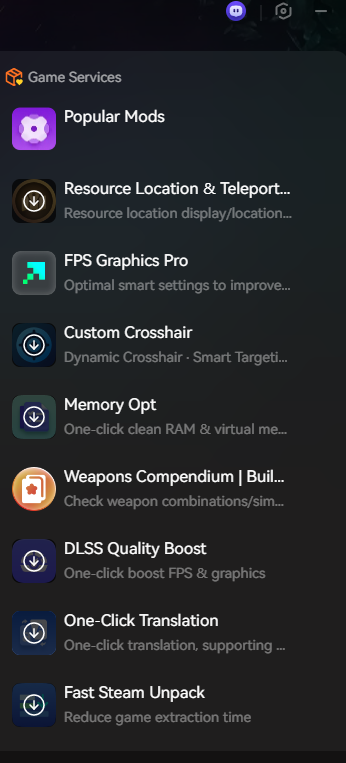
It also allows you to adjust graphics settings, streamline controls, and safely customize certain game mechanics for a more enjoyable and efficient experience. By combining XMOD with your system, even lower-end PCs can handle the game better, while higher-end systems can maximize graphics and physics simulations for a fully immersive rocket-building adventure.
Conclusione
Little Rocket Lab offers an engaging blend of simulation and strategy, challenging players to design, build, and launch rockets while managing resources and mission objectives. By understanding the game’s system requirements and checking if your PC meets them, you can ensure smooth gameplay. Tools like XMOD can further enhance performance, graphics, and overall stability, making the experience enjoyable even on lower-end systems. Whether you’re a casual player or a space enthusiast, Little Rocket Lab promises an exciting and immersive rocket-building adventure.

Sono un giocatore appassionato e uno scrittore di XMODhub, che si dedica a fornire le ultime notizie, consigli e approfondimenti sui giochi.
Collegatevi con me:
Profilo LinkedIn

 Nancy Miller

