Sintesi: Discover the minimum and recommended system requirements for Genokids. Learn what hardware and software you need to run the game smoothly.
Genokids is an engaging adventure game that combines exploration, strategy, and unique gameplay mechanics to deliver an immersive experience for players of all ages.
Before diving in, it’s important to understand the system requirements to ensure your PC can handle the game smoothly.
In this guide, we’ll cover the minimum and recommended specs, explore whether low-end PCs can run it, and help you determine if your system is ready.
We’ll also show how tools like XMOD can enhance your gameplay, making your Genokids adventure even more enjoyable.
Indice dei contenuti
- Che cosa è Genokids?
- System Requirements for Genokids: Minimum and Recommended
- Can You Run Genokids on a Low-End PC?
- Can My PC Run Genokids?
- How to Enhance Gameplay Experience with XMOD?
- Conclusione
What is Genokids?

Genokids is a high-energy hack-and-slash action game developed by Nukefist, where a quirky band of musicians must defend Earth from an alien invasion. Set in the vibrant city of Las Divas, players control four unique characters—each with their own abilities and playstyles—to battle through waves of enemies. The game emphasizes fluid combat, allowing players to seamlessly swap between characters mid-fight, and features parkour-style movement for dynamic navigation. With a focus on stylish action and a humorous narrative, Genokids offers an engaging experience for fans of fast-paced combat games.
System Requirements for Genokids: Minimum and Recommended
Before jumping into the action of Genokids, it’s important to know whether your PC meets the necessary requirements for smooth gameplay. Below are the current minimum and recommended system specifications.
Minimum Requirements:
- OS: Windows 7
- Processore: Intel i5 3450
- Memoria: 4 GB RAM
- Grafica: NVIDIA GeForce GT 640
- DirectX: Version 10
- Stoccaggio: 8 GB available space
- Notes: Minimum system requirements are still being confirmed
Recommended Requirements:
- OS: Windows 7
- Processore: AMD FX 8350 / Intel i7 3770
- Memoria: 8 GB DI RAM
- Grafica: AMD R9 380 / NVIDIA GTX 960
- DirectX: Versione 11
- Stoccaggio: 8 GB available space
- Notes: Recommended system requirements are still being confirmed
With these specs in mind, you can quickly determine whether your PC is ready to handle Genokids, or if adjustments or upgrades may be needed for optimal performance.
Can You Run Genokids on a Low-End PC?
If you’re using a low-end PC, you can still enjoy Genokids, but performance will depend on how closely your system matches the minimum requirements. A PC with an Intel i5 3450, 4 GB RAM, and an NVIDIA GeForce GT 640 can run the game at low settings, allowing for playable frame rates and functional gameplay.
However, you may experience lower resolution, reduced graphical effects, and occasional frame drops during intense combat or large enemy waves. To improve performance on weaker systems, consider closing background applications, lowering in-game graphics settings, and ensuring your drivers are up to date.
By understanding your system’s limits, you can still enjoy the core gameplay of Genokids even on less powerful hardware.
Can My PC Run Genokids?

Whether your PC can run Genokids depends on how your hardware compares to the system requirements. If your setup meets at least the minimum specs—Intel i5 3450, 4 GB RAM, and a GeForce GT 640—you’ll be able to launch the game and play at lower graphics settings. This ensures you can enjoy the action and story, though performance may be limited during intense battles.
For a smoother experience, aim for the recommended specs: AMD FX 8350 or Intel i7 3770, 8 GB RAM, and AMD R9 380 or NVIDIA GTX 960. Meeting these requirements will give you higher frame rates, better visuals, and a more stable overall experience.
To check your PC’s compatibility:
- Stampa Windows + R, tipo
dxdiag, e premere Invio.
- Review your CPU, RAM, and GPU under the System e Display tabs.
- Compare your specs to the minimum and recommended requirements above to see if your PC is ready for Genokids.
How to Enhance Gameplay Experience with XMOD?
Even if your PC meets the system requirements, XMOD can take your Genokids experience to the next level. This all-in-one platform provides tools to optimize performance, customize gameplay, and unlock additional features.
Key ways XMOD can enhance your gaming include:
- FPS Boosters: Improve frame rates by reducing unnecessary visual effects and stabilizing combat-heavy sequences.
- Graphics & UI Customization: Tweak textures, adjust the interface, or enhance visuals to suit your preferences.
- Unlockables & Cheats: Access in-game resources, unlock items, or experiment with different strategies without restrictions.
- Translation Tools: For international players, XMOD can help make the game more accessible.
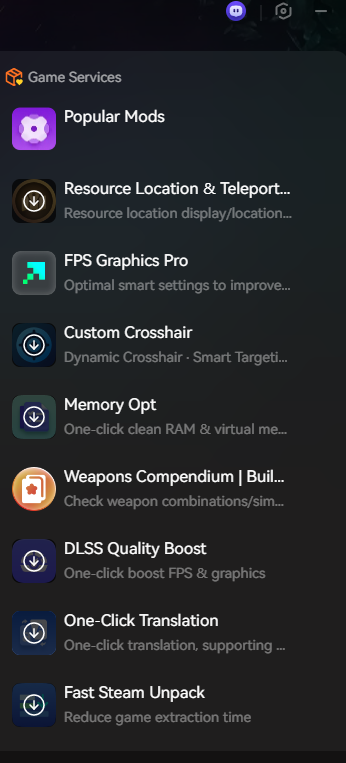
By leveraging XMOD, you can tailor Genokids to your playstyle, enjoy smoother performance, and fully explore the game’s fast-paced combat and unique character mechanics.
Conclusione
Genokids offers fast-paced, hack-and-slash action with a humorous story and dynamic combat mechanics. Knowing the requisiti di sistema ensures your PC can handle the game smoothly, whether you’re on minimum or recommended hardware.
For those looking to maximize performance and customize their experience, tools like XMOD provide FPS boosters, UI enhancements, unlockables, and more. By combining the right setup with optional optimizations, you’ll be ready to dive into Genokids’ chaotic, action-packed world without compromise.
Sono un giocatore appassionato e uno scrittore di XMODhub, che si dedica a fornire le ultime notizie, consigli e approfondimenti sui giochi.
Collegatevi con me:
Profilo LinkedIn

 Catherine Hu

 Nancy Miller


I like that you brokeBlog comment creation down both the minimum and recommended specs, since a lot of players underestimate how much smoother the experience can be with just a small bump in hardware. I’m curious if you’ve noticed any particular bottlenecks for Genokids—like whether GPU power matters more than CPU performance for keeping combat fluid? That would really help players with mid-range systems decide where to prioritize upgrades.