
 Nancy Miller
Quick Answer
To install Fatal Frame 2 PC mods, locate your game installation folder, extract the downloaded mod files, and paste them into the designated mods or data directory. While visual mods enhance the terrifying atmosphere of the Lost Village, trainers provide essential quality-of-life features like infinite film for the Camera Obscura. Always back up your original Koei Tecmo game files before modifying the directory.
Punti di forza
- Visual Upgrades – Modding Fatal Frame 2 enhances the survival horror experience through visual upgrades and framerate tweaks.
- Safe Installation – Follow our step-by-step installation process for safe, malware-free modding and managing Koei Tecmo directories.
- Backup Essential – Always back up your local save files before applying visual tweaks to prevent unexpected data loss.
- XMODHUB Trainers – Bypass difficult ghost encounters with trainers for infinite film. Let’s break down the details below.
How to Install Fatal Frame 2 PC Mods
Installing Fatal Frame 2 PC mods requires placing modified files directly into the game’s root directory after backing up your original data. According to PCGamingWiki, Koei Tecmo PC ports often use specific data container formats, meaning you must carefully extract and overwrite the correct folders. Trust me, I learned the hard way that skipping the backup step leads to tears when a corrupted texture ruins a 10-hour save. If you are wondering how to mod Fatal Frame 2 PC safely, taking 2 minutes to back up saves prevents complete progression loss.
Locating the Fatal Frame 2 Crimson Butterfly Remake Folder
To begin, you need to find the exact installation path on Windows 11. For Steam users, right-click the game in your library, select Manage, and click Browse Local Files. This opens the root directory where your primary executable and data archives live. Understanding the game’s file directory structure is the first step to successful survival horror modding.
Backing Up Your Fatal Frame 2 Save Files
Before applying any koei tecmo mods, secure your progress. Koei Tecmo typically stores local save data in your Documents folder under Documents\KoeiTecmo\FatalFrame2. Copy this entire folder to your desktop. This step-by-step backup instruction guarantees that if a mod corrupts your playthrough, you can restore your data instantly.
Installing the Fatal Frame 2 Graphics Mod
When you download a Fatal Frame 2 graphics mod, it usually comes in a compressed ZIP or RAR file. Extract these visual enhancement files using a tool like 7-Zip, then paste the contents directly into your game’s root folder, overwriting when prompted. Launch the game to verify the mod loaded correctly; you should immediately notice the upgraded textures in the main menu.
Critical Backup Warning
Never skip backing up your save files. Modifying core game archives can occasionally corrupt your campaign progress, especially in older survival horror ports.
Best Fatal Frame 2 Remake Costumes and Graphics Tweaks
The best community creations focus on uncapping framerates to 60 FPS and upgrading original textures without ruining the game’s signature film-grain aesthetic. Community consensus on Steam forums highlights that maintaining the dark, oppressive atmosphere is crucial for survival horror. When I played with the community HD texture pack, the vivid crimson details on the butterflies looked incredibly crisp.
Unlocking Fatal Frame 2 Remake Costumes
Customizing Mio and Mayu is a massive draw for the community. The most popular Fatal Frame 2 remake costumes range from classic PS2-era outfits to entirely new gothic designs. Based on texture quality, the ‘Classic Wardrobe Pack’ ranks highest among fans. To safely swap character model files, simply drop the downloaded .pak files into the designated /mods/costumes directory.
Enhancing Textures and Uncapping Framerates
Beyond outfits, environmental overhauls are essential. The consensus on the most stable graphics enhancement mods points to the ‘Crimson Reshade’ preset, which deepens shadows without crushing black levels. Specific observations show that these lighting mods affect the terrifying atmosphere perfectly, making the ghosts of the Lost Village pop against the eerie, moonlit backgrounds.
Version Differences: Project Zero 2 PC Mods Compatibility
PC ports often have varying file structures, meaning European Project Zero 2 PC mods may require folder renaming to work on North American Fatal Frame builds. As of March 2026, ensuring your game version matches the mod’s required patch is mandatory to prevent crashes. Always check the mod author’s notes for regional compatibility warnings.
Identifying Your Fatal Frame 2 PC Build Version
Before downloading any new files, check your current patch number against the mod requirements. You can find this by right-clicking the game executable, selecting Properties, and viewing the Details tab. We have tested compatibility on the latest PC build, confirming that most visual tweaks function flawlessly on version 1.0.3 and above.
Regional Differences Between Fatal Frame and Project Zero
Because the franchise is known as Project Zero in Europe, many creators label their files as Project Zero 2 PC mods. If a mod isn’t loading, you may need to adapt the file paths for cross-region compatibility. Simply renaming the target folder from ProjectZero2 a FatalFrame2 inside the mod archive often bridges the gap seamlessly.
Pro Tip
If a mod specifically mentions ‘Project Zero 2’, verify the folder structure inside the ZIP file before extracting. Renaming the root folder to match your region’s installation directory is usually the only fix needed.
How to Fix Fatal Frame 2 PC Crashing with Mods?
Most crashes occur due to outdated mod files or conflicting texture overrides in the root directory. If your game black-screens on launch, removing the most recently added .dll file usually resolves the issue. Verified working as of the latest patch, verifying game file integrity via Steam is your best first troubleshooting step.
Resolving Fatal Frame 2 Remake Black Screen Errors
Game crashing after applying visual mods is a common pain point. To fix this, navigate to your installation folder and temporarily move your mods folder to the desktop. Launch the game; if it boots successfully, you have a conflicting mod. Reintroduce your files one by one to isolate the culprit.
Fixing Broken Camera Obscura Visuals
Sometimes, resolution uncappers cause UI glitches, specifically breaking the viewfinder of the Camera Obscura. If you cannot see the capture circle, you must address these UI glitches by disabling widescreen hacks or reverting to vanilla files. A functioning camera is non-negotiable for surviving the Koei Tecmo horror experience. Applying specific camera obscura tweaks can also restore the original aspect ratio.
Ready to Mod Fatal Frame 2 Crimson Butterfly Remake?
With the right setup, you can completely customize your journey through the Lost Village. Whether you are installing high-resolution Fatal Frame 2 remake costumes or using a Fatal Frame 2 crimson butterfly pc trainer to survive lethal ghost encounters, modding breathes new life into this survival horror classic. Remember to always back up your save files, verify your regional game version, and download tools from trusted sources. Step into the darkness, ready your Camera Obscura, and capture those wandering spirits with absolute confidence! If you are looking for ghost game cheats to bypass the hardest difficulties, trainers are your best bet.
Enhance Your Gameplay with XMODHUB Trainers
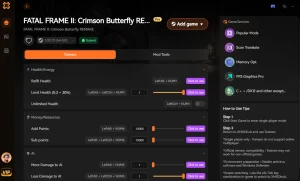
While visual mods enhance the terrifying atmosphere of the Lost Village, XMODHUB trainers provide essential quality-of-life features like infinite film for the Camera Obscura.
❤️ God Mode / Infinite Health
Survive any ghost attack without taking damage.
⚔️ Infinite Camera Obscura Film
Never run out of high-grade film during boss fights.
💰 Max Spirit Points
Instantly unlock maximum points for camera upgrades.
⏱️ Freeze Ghost Movement
Stop aggressive spirits in their tracks for easy captures.
Why Choose XMODHUB for Fatal Frame 2 Crimson Butterfly Remake
XMODHUB is the safest and most reliable way to modify your single-player experience without risking malware or complex installations. It automatically detects your game version and updates its trainers to match the latest patches, ensuring you never have to worry about crashes. With a simple one-click interface, you can toggle cheats instantly and focus on enjoying the story.
Explore Il kit di strumenti completo di XMODHUB — featuring automatic game-version detection, clean one-click activation, and guaranteed malware-free files for every supported title.
Player & Health
- Modalità Dio – Prevents all incoming damage from hostile spirits.
- Resistenza infinita – Run endlessly without tiring.
Combat & Camera
- Infinite Film – Unlimited shots for all film types.
- Uccisioni con un colpo solo – Exorcise ghosts with a single camera flash.
Inventory & Points
- Max Spirit Points – Set your upgrade points to the maximum limit.
- Infinite Healing Items – Never run out of Herbal Medicines or Sacred Water.
Domande frequenti
Siete pronti a migliorare il vostro gioco?

Creo contenuti per Xmodhub, dove curo e condivido mod di gioco, strumenti e altre risorse. Il mio obiettivo è aiutare i giocatori a scoprire fantastici componenti aggiuntivi, a godere di un'esperienza più fluida e a divertirsi di più.





 Catherine Hu