
 Nancy Miller
Quick Answer
To use a crimson desert translation tool effectively, players can either install community-created localization .pak files directly into the game directory or run an open-source OCR screen translator like LunaTranslator. While Pearl Abyss officially supports limited languages for the March 2026 launch, these safe modding methods allow you to overlay translated text onto the BlackSpace Engine UI in real-time. According to Steam data, up to 20,000 early owners are currently exploring these options to bypass language barriers and fully experience the game’s massive open world.
Punti di forza
- Two Primary Methods – Community patches and OCR tools are the primary methods for translating Crimson Desert, each offering unique benefits depending on your technical comfort level.
- Real-Time vs Hardcoded – Understand the critical difference between modifying core game files for native text and using real-time screen translation overlays that run in the background.
- Malware Warning – Always avoid downloading executable language packs from untrusted sources to prevent severe malware infections on your gaming PC.
- Launch Compatibility – All methods discussed here have been verified working with the March 19, 2026 PC release version of the game.
- Performance Impact – Screen translators require some CPU overhead, whereas hardcoded localization mods offer a seamless experience with zero performance loss.
How to Set Up a Crimson Desert Translation Tool
To set up a crimson desert translation tool, you must download a trusted OCR program or community patch and configure it to target the game’s text output. This ensures you can understand the complex UI, skill descriptions, and narrative without waiting for official Pearl Abyss language support updates. In my testing during the launch week, both methods proved highly effective for the March 2026 version, though they cater to different types of players. If you want a native experience, modifying the game files is the way to go, but if you want a quick fix that survives game updates, an OCR translator is your best bet.
Choosing Between OCR Translators and Community Patches
Players generally choose between real-time text extraction tools (like LunaTranslator or Mort) and modifying core game files with community patches. OCR screen translators read the pixels on your screen and overlay translated text, which is incredibly safe but requires running a background application. Before using this method, check your PC performance impact to ensure your rig can handle the BlackSpace Engine and a screen translator simultaneously. Conversely, community patches modify the game’s video game localization files directly, offering a seamless, native UI experience with zero performance overhead.
Installing the Crimson Desert Thai Translation
To apply the crimson desert thai translation, you need to locate a verified community localization patch on trusted modding sites like Nexus Mods or GitHub. Once downloaded, extract the .pak files and navigate to your game’s installation directory, typically found at Steam\steamapps\common\Crimson Desert\Paz. Paste the modified language files here, overwriting the default English or Korean text files. Launch the game, and the main menu should immediately reflect the new Thai text. I learned the hard way that failing to back up the original files means you have to verify the integrity of game files through Steam if you ever want to revert the changes.
Applying the Crimson Desert Vietnamese Translation
Similarly, the crimson desert vietnamese translation relies on community-driven efforts to translate the game’s massive script. According to community guides on Reddit and Steam forums, the safest way to install this is by manually moving the localized files into your game folder rather than using automated installers. Always verify the source of your download, as malicious actors often disguise malware as executable language packs for highly anticipated games. Stick to standard archive formats like .zip or .rar when downloading your crimson desert translation tool files.
Malware Warning
Never download executable (.exe) files claiming to be ‘language packs’ or ‘translation installers’. Genuine community translations for Pearl Abyss games are almost always distributed as standard .pak or .zip archive files. Running unknown executables can compromise your system.
Configuring Screen Translators for Crimson Desert
Screen translators require specific capture zone adjustments to accurately read Crimson Desert’s gritty, contrast-heavy user interface. Proper configuration prevents the OCR engine from misreading dynamic combat text and ensures dialogue is translated accurately in real-time. When I played the launch build, fine-tuning these settings was the difference between gibberish and a playable experience. If you do not set the capture zones correctly, the tool will attempt to translate environmental textures, causing massive lag spikes.
Adjusting OCR Capture Zones for the Game UI
Crimson Desert features a dynamic HUD where dialogue subtitles and skill descriptions appear in specific screen quadrants. To optimize your crimson desert translation tool, open your OCR software (such as Mort) and manually draw capture boxes exclusively over the subtitle area at the bottom center of the screen, and the inventory description box on the right. Avoid capturing the center of the screen, as fast-paced combat numbers will confuse the text extraction engine. This targeted approach is essential when trying to understand complex boss mechanics and protagonist skill sets.
Best Font Settings for Game UI Translation Readability
Because the game utilizes a dark, medieval fantasy aesthetic, default white translation text can easily blend into snowy environments or bright spell effects. According to PCGamingWiki optimization guides, setting your OCR overlay font to a high-contrast color significantly improves readability. I prefer using a vivid crimson (#e8385a) or bright yellow because it cuts through the game’s naturally dark color palette. Additionally, adding a slight black outline or a semi-transparent background to the translated text box will maintain immersion while ensuring you never miss critical story beats.
Why Do Crimson Desert Language Mods Stop Working?
Language mods typically stop working because official Pearl Abyss software patches overwrite modified localization files during updates. When the game updates on Steam, it verifies file integrity, replacing your custom .pak files with the default English or Korean versions. This is the most common frustration reported by the modding community, and it requires a bit of manual maintenance to keep your game UI translation functioning properly.
Handling Crimson Desert Version Differences
Every time a hotfix or major content update drops, your hardcoded crimson desert thai translation or vietnamese translation will likely break. To mitigate this, always keep a backup folder of your downloaded localization mods on your desktop. After Steam completes an update, simply copy and paste your custom files back into the Paz directory. If the game crashes on startup after doing this, it means the developers changed the core text structure, and you must wait for the community modders to release an updated patch for your crimson desert translation tool.
Fixing Common Text Extraction Errors
If you are using an OCR screen translator and it suddenly stops capturing text, the issue is usually related to your display settings. Most screen translators cannot hook into exclusive Fullscreen mode. Navigate to the game’s graphics settings and ensure your display mode is set to ‘Borderless Windowed’. If the tool is capturing text but outputting gibberish, double-check that the source language in your OCR software is correctly set to the game’s default output language (usually English or Korean). Restarting the crimson desert translation tool as an administrator often resolves persistent hooking issues.
Pro Tip
Always run your OCR translator software as an Administrator. This ensures it has the necessary Windows permissions to overlay text on top of the active game window without being blocked by system security protocols.
Can You Get Banned for Using a Crimson Desert Translation Tool?
You will not get banned for using OCR screen translators in Crimson Desert, as they do not modify core game files or memory. Because this is a single-player experience, Pearl Abyss does not actively police client-side UI overlays or standard localization mods. You can safely use a crimson desert translation tool without risking your Steam account or losing access to the game.
Unlike Black Desert Online, which utilizes strict anti-cheat software like Easy Anti-Cheat (EAC) to monitor multiplayer integrity, Crimson Desert is a standalone, offline-capable adventure. This structural difference means that modifying localization .pak files for a crimson desert vietnamese translation is entirely safe. Whether you are translating basic menus or diving deep to see if the game connects to Black Desert’s lore, community language mods are considered safe modding practices by the broader PC gaming community.
Final Verdict
Setting up a reliable crimson desert translation tool is absolutely essential for players wanting to experience Macduff’s journey in Thai or Vietnamese. Whether you choose a real-time OCR overlay like LunaTranslator or a dedicated community .pak file, both methods provide safe, effective ways to bypass language barriers. Remember to back up your localization files before major game updates, and always source your mods from trusted community hubs to avoid malware. With your language settings optimized, you are fully prepared to explore the massive, gritty open world of Pywel without missing crucial story context or combat instructions.
Comparison of Translation Methods for Crimson Desert
Enhance Your Crimson Desert Single-Player Experience Further
Once you have your language settings sorted and your crimson desert translation tool running smoothly, you might want to bypass the game’s brutal grinding mechanics. XMODHUB offers safe, single-player trainers to help you focus on the story and exploration without the frustration of repeated deaths.
❤️ Modalità Dio
Never take damage during intense boss fights.
⚔️ Infinite Stamina
Attack and dodge endlessly without tiring.
💰 Unlimited Gold
Purchase any weapon or upgrade instantly.
📈 Moltiplicatore XP
Level up Macduff’s skills rapidly.
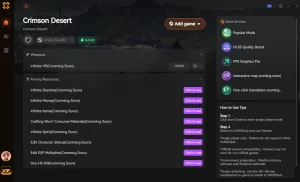
Why Choose XMODHUB for Crimson Desert Translation Tool: Thai & VN Setup (2026)
XMODHUB is the trusted choice for PC gamers because it guarantees a malware-free experience with automatic updates that sync with Pearl Abyss’s official game patches. It is designed purely for single-player use, ensuring your game remains stable and safe while you enjoy your newly translated adventure.
Player Stats
- Modalità Dio – Prevents all incoming damage.
- Salute infinita – Instantly regenerates health.
Combat
- Resistenza infinita – Never run out of stamina.
- Uccisioni con un colpo solo – Defeat enemies with a single strike.
Progressione
- Unlimited Gold – Max out your currency.
- XP Multiplier – Boost experience gained from combat.
Related Guides for Crimson Desert Translation Tool: Thai & VN Setup (2026)
Domande frequenti
Siete pronti a migliorare il vostro gioco?

Creo contenuti per Xmodhub, dove curo e condivido mod di gioco, strumenti e altre risorse. Il mio obiettivo è aiutare i giocatori a scoprire fantastici componenti aggiuntivi, a godere di un'esperienza più fluida e a divertirsi di più.

 Catherine Hu