Sintesi: This guide explains the full system requirements for Baby Steps, detailing both minimum and recommended PC specs so players can prepare for smooth gameplay.
Baby Steps is a physics-based adventure game that challenges players to guide Nate, an underachiever, as he stumbles his way through a mysterious world one step at a time.
With its mix of humor, creativity, and physics-driven gameplay, the title has caught the attention of indie game fans worldwide.
Before diving in, it’s essential to understand the requisiti di sistema to make sure your PC can handle the game smoothly.
This guide will cover the minimum and recommended specs, whether it’s playable on low-end PCs, how to check if your system can run it, and ways to enhance your overall experience using XMOD.
Indice dei contenuti
- Che cosa è Baby Steps?
- System Requirements for Baby Steps: Minimum and Recommended
- Can You Run Baby Steps on a Low-End PC?
- Can My PC Run Baby Steps?
- How to Enhance Gameplay Experience with XMOD?
- Conclusione
What is Baby Steps?

Baby Steps is a quirky, physics-based adventure game developed by Bennett Foddy, Gabe Cuzzillo, and Maxi Boch, where players control Nate, a jobless underachiever who suddenly finds himself in a strange new world. The core mechanic revolves around literally moving each of Nate’s legs step by step, turning the simple act of walking into a hilarious challenge. With its unpredictable physics, slapstick humor, and open-world exploration, the game blends comedy and creativity into an experience that feels both frustrating and rewarding. Designed in the spirit of titles like QWOP e Getting Over It, Baby Steps offers a fresh take on the walking simulator genre with a focus on persistence, laughter, and discovery.
System Requirements for Baby Steps: Minimum and Recommended
Before you dive into the clumsy but hilarious journey of Nate, it’s important to make sure your PC can handle Baby Steps. Below are the official minimum and recommended specifications:
Requisiti minimi di sistema
| Requirement |
Specification |
| OS |
Windows 10 (64 bit) |
| Processore |
Intel Core i7-7700K / AMD Ryzen 5 1500X |
| Memoria |
8 GB DI RAM |
| Grafica |
GeForce GTX 1650 / Radeon RX 570 / Arc A380 |
| DirectX |
Versione 11 |
| Immagazzinamento |
19 GB available space |
| Note |
Low Quality, 1080p, ~60 FPS |
These specs ensure the game is playable on modest setups while still delivering a smooth 1080p experience.
| Requirement |
Specification |
| OS |
Windows 11 (64 bit) |
| Processore |
Intel Core i7-10700 / AMD Ryzen 7 2700X |
| Memoria |
16 GB DI RAM |
| Grafica |
GeForce RTX 2060 Super / Radeon RX 5700 / Arc A580 |
| DirectX |
Versione 11 |
| Immagazzinamento |
19 GB available space |
| Note |
High Quality, 1080p, ~60 FPS |
With these recommended specs, players can enjoy the game’s full physics-driven charm, smoother animations, and better overall performance.
Can You Run Baby Steps on a Low-End PC?

Yes, you can run Baby Steps on a low-end PC, as long as it meets the minimum system requirements. With an Intel Core i7-7700K or AMD Ryzen 5 1500X, 8 GB of RAM, and a GTX 1650, RX 570, or Arc A380 graphics card, the game will run at Low Quality settings in 1080p at around 60 FPS. While performance may be stable, you might experience occasional slowdowns during complex physics interactions or longer exploration sections. Lowering graphics settings further or closing background applications can help maintain smoother gameplay on weaker hardware.
Can My PC Run Baby Steps?
To determine if your PC can run Baby Steps, compare your system specs with the game’s minimum and recommended requirements:
- Minimum Specs: Windows 10 (64-bit), Intel Core i7-7700K / AMD Ryzen 5 1500X, 8 GB RAM, GeForce GTX 1650 / Radeon RX 570 / Arc A380, DirectX 11, 19 GB storage. This allows you to play at low quality settings in 1080p at around 60 FPS.
- Recommended Specs: Windows 11 (64-bit), Intel Core i7-10700 / AMD Ryzen 7 2700X, 16 GB RAM, GeForce RTX 2060 Super / Radeon RX 5700 / Arc A580, DirectX 11, 19 GB storage. This ensures smooth gameplay at high quality settings in 1080p at 60 FPS.
If your PC meets or exceeds the minimum specs, you can play the game, though higher settings and smoother performance require the recommended specs. You can also use tools like Can You Run It or Steam’s system check to quickly verify compatibility.
How to Enhance Gameplay Experience with XMOD?
XMOD is a versatile platform that allows you to optimize performance, customize controls, and expand gameplay options. Here’s how it can improve your experience:
Custom Controls
- Remap keys or create macros for precise control over Nate’s steps.
- Adjust camera and movement sensitivity for more accurate navigation in tricky environments.
Mods and Add-Ons
- Install mods that enhance visuals, tweak UI elements, or add new gameplay features.
- Access quality-of-life improvements, such as faster load times or enhanced tutorials.
Trainers and Cheats
- Modify in-game values like stamina, speed, or physics variables to experiment with new playstyles.
- Unlock items or skip challenging sections to focus on exploration and story.

Additional Tools
- Translation tools for global players.
- FPS boosters, DLC unlockers, and other quality-of-life features.
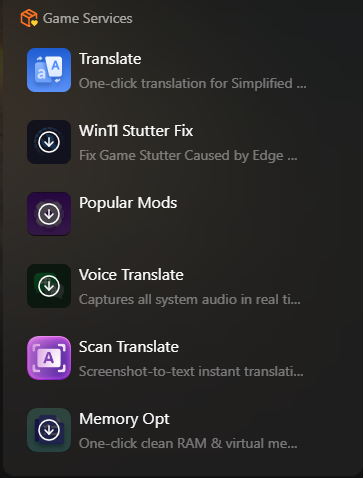
By using XMOD, players can fully customize how they experience Baby Steps, making the game more accessible, enjoyable, and tailored to individual playstyles.
Conclusione
Baby Steps delivers a unique blend of humor, physics-based challenge, and open-world exploration, offering a fresh take on the walking simulator genre. With its official release on September 23, 2025, for PC via Steam e PlayStation 5, players can enjoy Nate’s awkward but entertaining journey. Understanding the requisiti di sistema ensures smooth gameplay, even on low-end PCs, while recommended specs provide optimal performance and visuals. Tools like XMOD can further enhance the experience, giving players control over performance, customization, and additional gameplay options, making each step through the game as enjoyable as possible.
Sono un giocatore appassionato e uno scrittore di XMODhub, che si dedica a fornire le ultime notizie, consigli e approfondimenti sui giochi.
Collegatevi con me:
Profilo LinkedIn

 Catherine Hu

 Nancy Miller

