Sintesi: This guide covers the full system requirements for Dying Light: The Beast, including minimum, recommended, and optimal PC specs for the best experience.
Dying Light: The Beast is the newest chapter in Techland’s acclaimed survival horror franchise, blending fast-paced parkour with brutal combat and an expansive open world.
As with any modern AAA release, one of the first questions players ask is whether their PC can handle the game.
In this complete guide, we’ll break down the minimum and recommended system requirements, explore whether it’s possible to run the game on low-end PCs, and help you check if your setup is ready.
We’ll also show you how to further enhance your gameplay experience with XMOD, unlocking smoother performance, mods, and quality-of-life improvements.
Indice dei contenuti
- Che cosa è Dying Light: The Beast?
- System Requirements for Dying Light: The Beast: Minimum and Recommended
- Can You Run Dying Light: The Beast on a Low-End PC?
- Can My PC Run Dying Light: The Beast?
- How to Enhance Gameplay Experience with XMOD?
- Conclusione
What is Dying Light: The Beast?

Dying Light: The Beast is a standalone survival-horror action game from Techland, originally conceived as DLC for Dying Light 2: Stay Human but expanded into a full release. Set in the open-world region of Castor Woods, the game follows Kyle Crane, the protagonist of the first Dying Light, who escapes captivity after years of experiments by the sinister Baron. Now part human and part infected, Crane must survive using both parkour agility and new beast-like powers. Featuring a dynamic day-night cycle, cooperative play for up to four players, and a mix of exploration, combat, and horror, The Beast delivers a darker twist on the series’ signature gameplay.
System Requirements for Dying Light: The Beast: Minimum and Recommended
Before installing the game, it’s important to check your system specifications to ensure smooth performance. Below are the Minimum requirements, which represent the baseline needed to run the game without major issues:
Requisiti minimi di sistema
| Componente |
Requirement |
| OS |
Windows 10 or newer (64-bit) |
| Processore |
Intel i5-13400F / AMD Ryzen 7 5800X |
| Memoria |
16 GB DI RAM |
| Grafica |
NVIDIA GeForce GTX 1060 / AMD Radeon RX 5500 XT / Intel ARC A750 |
| Immagazzinamento |
70 GB available space |
| Additional Notes |
SSD Required |
For players looking for the best possible experience, the game also provides Recommended requirements. Meeting these ensures smoother performance, higher graphics settings, and more stable gameplay:
Requisiti di sistema consigliati
| Componente |
Requirement |
| OS |
Windows 10 or newer (64-bit) |
| Processore |
Intel i5-13400F / AMD Ryzen 7 7700 |
| Memoria |
16 GB DI RAM |
| Grafica |
NVIDIA GeForce RTX 3070 Ti / AMD Radeon RX 6750 XT / Intel ARC B580 |
| Immagazzinamento |
70 GB available space |
| Additional Notes |
SSD Required |
Can You Run Dying Light: The Beast on a Low-End PC?

Yes! You can run Dying Light: The Beast on a low-end PC if your system meets the minimum requirements: Windows 10 (64-bit), Intel i5-13400F or AMD Ryzen 7 5800X, 16 GB RAM, GTX 1060 / RX 5500 XT / Intel ARC A750, and 70 GB SSD. Performance will be lower with reduced graphics, but the game is playable. For a smoother experience at higher settings, the recommended specs are Intel i5-13400F / Ryzen 7 7700, 16 GB RAM, RTX 3070 Ti / RX 6750 XT / Intel ARC B580, and 70 GB SSD. To improve performance on a low-end PC, lower graphics settings, update drivers, and close background apps.
Can My PC Run Dying Light: The Beast?
You can check if your PC can run Dying Light: The Beast by comparing your system to the game’s requirements. The minimum specs for 1080p at 30fps are Windows 10 (64-bit), Intel i5-13400F or AMD Ryzen 7 5800X, 16 GB RAM, GTX 1060 / RX 5500 XT / Intel ARC A750, and 70 GB SSD. For smoother gameplay at higher settings (1440p, 60fps), the recommended specs are Intel i5-13400F or Ryzen 7 7700, 16 GB RAM, RTX 3070 Ti / RX 6750 XT / Intel ARC B580, and 70 GB SSD. On a low-end PC, performance can be improved by lowering graphics settings, updating drivers, and closing background applications.
How to Enhance Gameplay Experience with XMOD?
XMOD is a powerful tool designed to optimize and customize your gaming experience. You can enhance gameplay by:
- Installing Mods Easily: XMOD provides one-click installation for game mods, allowing you to add new features, skins, or mechanics without complicated setups.
- Ottimizzazione delle prestazioni: Adjust game settings, remove unnecessary effects, or unlock hidden performance options to make the game run smoother on your PC.
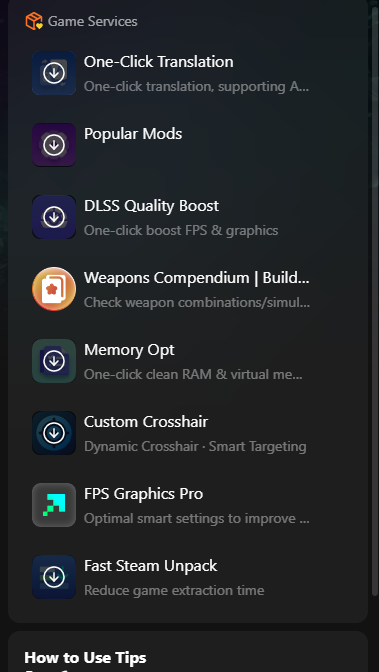
- Custom Controls and UI Tweaks: Modify user interfaces, key bindings, and HUD elements to better suit your playstyle.
- Cheats and Quality-of-Life Enhancements: Some XMOD tools offer safe in-game cheats like unlimited resources, faster leveling, or easier navigation, improving convenience without breaking the game balance.

- Multi-Language Support: Real-time translation and subtitle options make international games more accessible.
By combining these features, XMOD allows players to fully control how they play, making games more enjoyable, efficient, and personalized.
Conclusione
XMOD is a versatile tool that can significantly enhance your gaming experience. From easy mod installation and performance optimization to custom controls, quality-of-life improvements, and multi-language support, it gives players full control over how they play. Whether you want smoother gameplay, personalized settings, or added features, XMOD makes games more enjoyable, accessible, and tailored to your preferences.
Sono un giocatore appassionato e uno scrittore di XMODhub, che si dedica a fornire le ultime notizie, consigli e approfondimenti sui giochi.
Collegatevi con me:
Profilo LinkedIn

 Catherine Hu