Sintesi: This guide breaks down the system requirements for Fata Deum – The God Sim, covering minimum and recommended specs so players can prepare their PC for smooth gameplay.
Fata Deum is a unique god-simulation game that lets players shape civilizations, influence followers, and wield divine power in a living, dynamic world.
To fully enjoy the experience, it’s important to know whether your PC can handle the game smoothly.
In this guide, we’ll cover the minimum and recommended system requirements for Fata Deum, discuss its performance on low-end PCs, and help you figure out if your setup is ready.
We’ll also show you how tools like XMOD can enhance your gameplay, ensuring you get the most immersive and optimized experience possible.
Indice dei contenuti
- Che cosa è Fata Deum?
- System Requirements for Fata Deum: Minimum and Recommended
- Can You Run Fata Deum on a Low-End PC?
- Can My PC Run Fata Deum?
- How to Enhance Gameplay Experience with XMOD?
- Conclusione
What is Fata Deum?
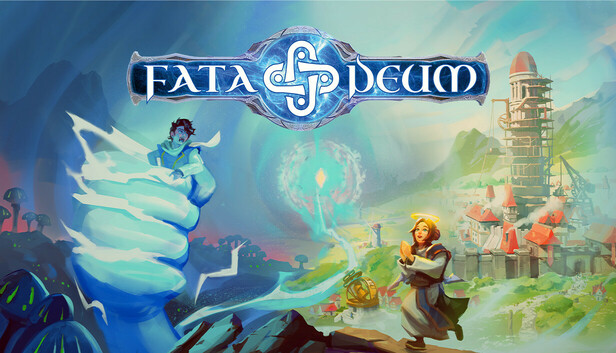
Fata Deum is a modern god-simulation game developed by 42 Bits Entertainment. Inspired by classics like Black & White, it lets you shape civilizations by guiding—or controlling—your followers through miracles, fear, or manipulation. The world reacts dynamically to your divine choices, whether you bring prosperity or unleash tyranny. Competing gods with unique traits challenge your influence, while a mix of city-building, morality systems, and real-time strategy ensures a deep and immersive experience.
System Requirements for Fata Deum: Minimum and Recommended
Before diving into the world of Fata Deum, it’s important to make sure your PC can handle the game. Below are the official minimum and recommended requirements to help you prepare.
Requisiti minimi di sistema
If you’re aiming to simply run the game, these specs will get you started. Expect lower graphical settings and reduced performance on this setup.
| Componente |
Specification |
| OS |
Windows 10 (64 bit) |
| Processore |
Intel Core i5-6600K / AMD Ryzen 3 1300X |
| Memoria |
12 GB RAM |
| Grafica |
Nvidia GTX 1060 (6GB) / AMD Radeon RX 570 |
| DirectX |
Versione 11 |
| Additional Notes |
SSD recommended |
Requisiti di sistema consigliati
For smoother gameplay and higher visual quality, it’s best to meet or exceed the recommended requirements. This ensures you can enjoy the immersive god-sim experience with minimal slowdowns.
| Componente |
Specification |
| OS |
Windows 10/11 (64 bit) |
| Processore |
Intel Core i5-10400F / AMD Ryzen 5 5600X |
| Memoria |
16 GB DI RAM |
| Grafica |
Nvidia RTX 3060 / AMD RX 5700XT |
| DirectX |
Versione 11 |
| Additional Notes |
SSD recommended |
Can You Run Fata Deum on a Low-End PC?
In corsa Fata Deum on a low-end PC will be challenging, as the game has fairly demanding requirements compared to many simulation titles. With 12 GB of RAM and a GTX 1060 (6GB) or RX 570 as the minimum standard, older or budget machines without a dedicated graphics card will likely struggle.
If your system falls slightly below the minimum specs—such as having only 8 GB of RAM or an entry-level GPU—you may still be able to launch the game, but expect long loading times, lower frame rates, and heavily reduced graphics settings. Features like large-scale simulations and detailed textures may not perform smoothly.
Can My PC Run Fata Deum?
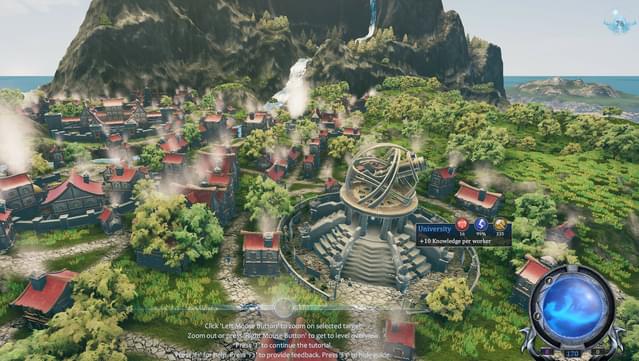
Whether your PC can run Fata Deum depends on how closely your hardware matches the official requirements. If your setup meets the minimum specs—for example, an Intel i5-6600K or Ryzen 3 1300X paired with a GTX 1060 (6GB) or RX 570—you should be able to play the game at low to medium settings, though performance may vary.
To enjoy smoother gameplay with higher graphics quality, your system should align with the recommended specs, such as an Intel i5-10400F or Ryzen 5 5600X and a modern GPU like the RTX 3060 or RX 5700XT. With 16 GB of RAM and an SSD, you’ll have a much better overall experience, from faster load times to stable frame rates.
If your PC is below minimum requirements, the game may not run or even start. Upgrading parts like the GPU, RAM, or storage may be needed.
How to Enhance Gameplay Experience with XMOD?
If you want to take Fata Deum beyond its standard gameplay, XMOD offers a powerful way to customize and optimize your experience. With its wide library of mods, trainers, and cheats, you can adjust the game to match your preferred playstyle.
- Mods let you enhance visuals, update textures, tweak the UI, or add new features that improve immersion.

- Scarpe da ginnastica allow you to modify in-game values such as health, resources, or follower behavior, making progression smoother or giving you room to experiment.
- Trucchi make it possible to unlock items, bypass tough sections, or instantly summon structures and resources, letting you focus more on exploration and divine decision-making.

Beyond these, XMOD also provides practical tools like FPS boosters for smoother performance, DLC unlockers, and even a translation tool for global players. Whether you want to ease the challenge, access hidden content, or fine-tune performance, XMOD gives you complete control over how you experience Fata Deum.
Conclusione
Fata Deum – The God Sim offers a rich and immersive experience for players who enjoy shaping worlds and commanding followers. However, its demanding system requirements mean that checking your PC’s specs is essential before diving in. While low-end setups may struggle, meeting the recommended requirements ensures smoother performance and fuller enjoyment of the game. For those looking to go even further, XMOD provides tools to customize, optimize, and enhance gameplay, giving full control over your divine journey.
Sono un giocatore appassionato e uno scrittore di XMODhub, che si dedica a fornire le ultime notizie, consigli e approfondimenti sui giochi.
Collegatevi con me:
Profilo LinkedIn

 Catherine Hu