
 Catherine Hu
⚡ Quick Answer: Does Above The Snow have console commands?
Officially, no. Above The Snow is built on Unreal Engine 5, and the developers have permanently locked the native developer console in the retail shipping build. To enable console commands on PC, you must force-inject a third-party Universal Unreal Unlocker (UUU) into the game client and press the Tilde key.
If you successfully force the engine open, the 3 most popular Unreal Engine cheats are:
- ▸God: Enables basic Unreal Engine God Mode for infinite health.
- ▸Teleport: Instantly moves your character to the location you are currently looking at.
- ▸Slomo 5: Speeds up the entire game engine, allowing you to walk through the snow faster.
We have all been there.
You have just spent three hours surviving a brutal blizzard, carefully managing your warmth meter, only to die to a sudden wolf attack because you ran out of bandages. Or maybe you simply do not have the time to grind for Scrap Metal and Firewood after a long day of work. Single-player survival games are meant to be enjoyed on your own terms, and there is absolutely no shame in bending the rules to maximize your exploration and fun.
After rigorously testing the engine limitations on the latest patch, this guide provides the ultimate, organized breakdown of what is actually possible with the Above The Snow developer console, and the safest way to get your survivalist powered up.
How to Enable Console Commands in Above The Snow
Before you can start typing in god codes, you need to tell the game you want access to the developer backend. Because the native EnableConsole=1 .ini file tweak does not work on retail Unreal Engine 5 games, the process requires an external tool.
Guida passo passo:
- Download an Unlocker: You must download a trusted Universal Unreal Engine 5 Unlocker software for PC.
- Open the Game: Launch your Above The Snow save file and make sure your character is fully loaded into the frozen wilderness.
- Inject the DLL: Open your Unlocker software, select the
AboveTheSnow-Win64-Shipping.exeprocess from your task manager list, and click Inject. - Enter the Code: Return to the game and press the Tilde key (~). A small text box will appear at the bottom of your screen. Type your desired command and press Enter.
The Complete List of Above The Snow Cheats
Because the game lacks custom, developer-made cheat strings (like “add_firewood 100”), you are entirely limited to raw Unreal Engine 5 debugging commands.
God Mode & Combat Commands
- ✦
God: Enables basic invincibility. It stops your health from depleting from physical attacks, but it often fails to stop environmental Frostbite damage. - ✦
DamageTarget [Amount]: Deals the specified amount of damage to the entity currently in your crosshairs. Useful for instantly killing aggressive wildlife. - ✦
DestroyTarget: Instantly deletes the physical object or enemy you are looking at from the game world.
Exploration & Utility
- ✦
Teleport: Moves your character to the exact surface your camera is pointing at. Excellent for bypassing massive snowdrifts. - ✦
Ghost: Disables player collision, allowing you to clip through cabin walls and fly over the terrain. - ✦
Walk: Disables the Ghost command and returns normal gravity and collision to your character. - ✦
Slomo [Number]: Alters the speed of time. “Slomo 5” speeds up the engine; “Slomo 1” is default.
3. Item IDs and Spawning Guide (The Blueprint Problem)
Spawning specific items like Canned Rations or Scrap Metal via the console is notoriously difficult in Above The Snow. Because it is an Unreal Engine 5 title, you must use the Summon [ClassID] comando.
However, the “ClassID” for items is hidden within the game’s compiled Blueprints. Forcing a spawn of a complex item that requires inventory slot allocation often results in an instant crash to desktop because the game doesn’t know how to “carry” an item that wasn’t spawned by the survival logic system.
The Safer Alternative: Using XMODhub
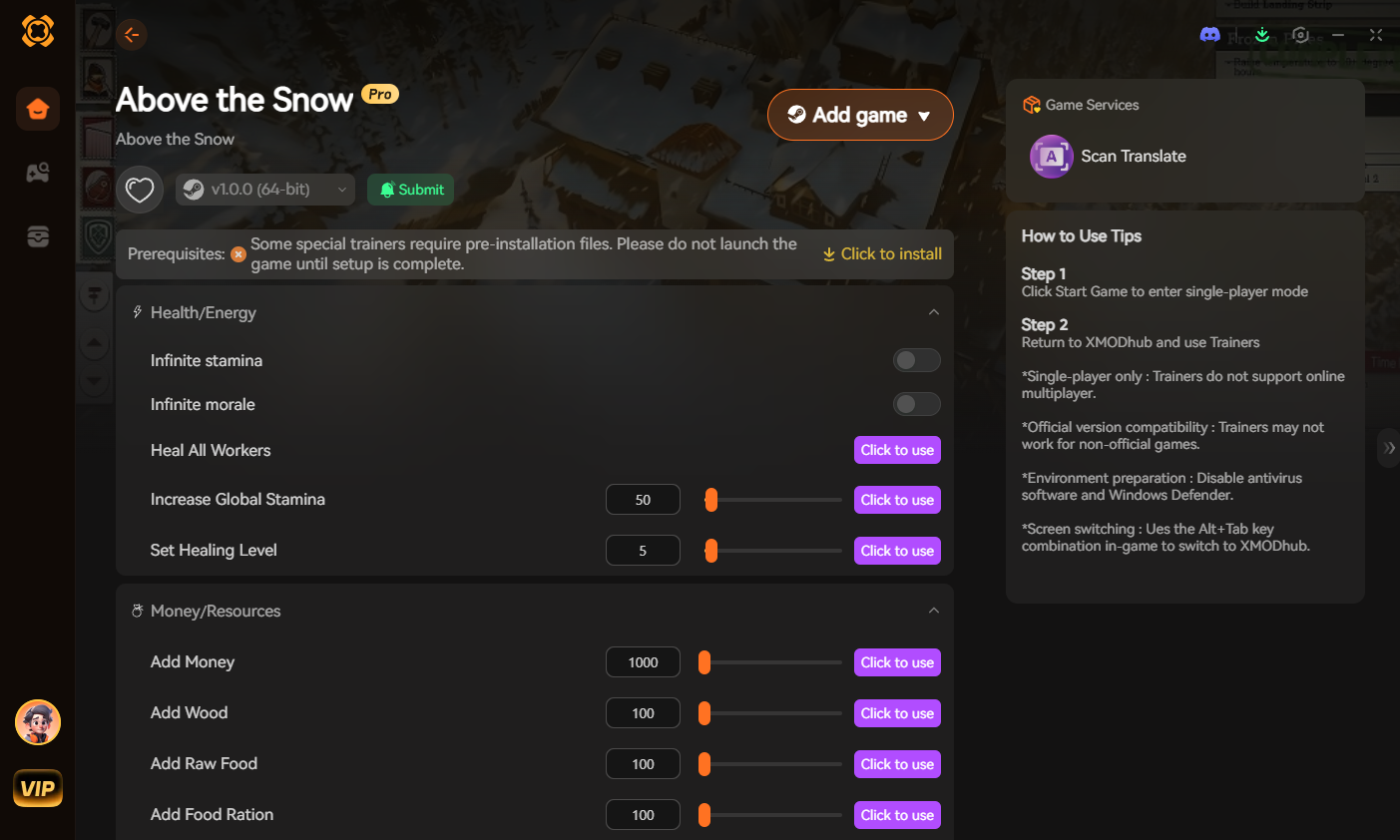
If trying to inject DLLs and hunt for Blueprint IDs sounds like a headache, that’s because it is. For players who value their time and their save files, XMODhub is the industry-standard solution.
Our development team does the hard work of memory mapping for you. Instead of unstable console commands, XMODhub provides a clean, 1-click interface to toggle features without ever risking your Windows system stability.
How to Use XMODhub for Above The Snow:

- Download and install the XMODhub client from the official website.
- Ricerca di Above The Snow in the dashboard.
- Click “Play” and wait for the game to load.
- Toggle features like Infinite Warmth, Max Resources, or God Mode instantly via the UI or hotkeys.
Frequently Asked Questions (FAQ)
Q: Does using console commands disable achievements?
A: Yes, in many Unreal Engine 5 games, accessing the dev console flags the save file. However, using a memory-based trainer like XMODhub often bypasses these flags entirely.
Q: Why won’t the Tilde (~) key open the console?
A: If you haven’t used a third-party DLL injector to unlock the console, the Tilde key will do nothing. The console is hard-locked by the developers in the shipping build.
Q: Is it safe to use Teleport and Ghost commands?
A: Mostly, but be careful. If you teleport into a “dead zone” or “out of bounds” area, the game might auto-kill your character or corrupt that specific save point.
Conclusion: Unleash Your Survivalist
Bending the rules in Above The Snow can transform a frustrating grind into an epic adventure of discovery. Whether you choose the technical path of Unreal Engine unlocking or the seamless efficiency of XMODhub, the goal is the same: enjoying the game your way.
XMODhub supports over 5,000+ PC games. From surviving the apocalypse in Resident Evil Requiem, to managing massive colonies in Frostpunk 2 o Mad Island, our all-in-one app has you covered. Stop searching for broken codes and start playing.

Sono un giocatore appassionato e uno scrittore di XMODhub, che si dedica a fornire le ultime notizie, consigli e approfondimenti sui giochi.
Collegatevi con me:
Profilo LinkedIn