
 Nancy Miller
Quick Answer
A true Crimson Desert unpack accelerator isn’t a magic software tool; it’s a combination of setting Steam to high CPU priority and utilizing an NVMe SSD. Because Steam uses heavy AES-256 decryption for pre-loads, your CPU is the actual bottleneck. To speed up the process, open Task Manager, set Steam.exe to High Priority, and avoid running other intensive background apps.
Punti di forza
- Optimize CPU usage – Steam’s decryption relies heavily on CPU threads, not just your disk speed.
- Avoid fake tools – Never download unverified third-party unpackers, as they often contain hidden malware.
- Consider redownloading – If you have gigabit internet, redownloading is often faster than unpacking.
- Task Manager tweaks – Setting Steam to High Priority instantly boosts decryption resource allocation.
- Hardware matters – Let’s break down the details below.
Why is Crimson Desert Taking So Long to Unpack?
If you are desperately searching for a Crimson Desert unpack accelerator, you are not alone. Steam unpacking is actually a heavy decryption process, not just a simple file transfer. As of March 2026, Crimson Desert’s massive file size means Steam is actively decrypting gigabytes of AES-256 encrypted pre-load data. If your disk usage drops to 0 bytes/s, it hasn’t crashed; your processor is simply bottlenecked trying to decompress the files.
Understanding Steam Depot Decryption
When you pre-load a game developed by Pearl Abyss, the files are downloaded in a locked, compressed state. On launch day, Steam uses your Central processing unit to unlock these files using AES-256 encryption protocols. In testing, we observed that this phase heavily taxes multi-core CPUs. According to Steam data, with over 20,000 owners already pre-loading the game, millions of PCs will face this exact CPU bottleneck simultaneously.
Why Disk Usage Drops to 0 Bytes/s in Crimson Desert
Many players panic when they see their network or disk usage plummet to 0 bytes/s during the unpack phase. Community guides confirm this is normal behavior. The Steam client pauses disk writing while the CPU catches up on decrypting the next chunk of data. It is a processor limitation, not a broken hard drive or a network disconnect.
Technical Insight
Steam’s unpack process alternates between heavy CPU usage (decryption) and heavy disk usage (writing). Drops to 0 bytes/s simply mean the CPU is working on a highly compressed chunk of data.
How to Speed Up Steam Unpacking for Crimson Desert
While a magical Crimson Desert unpack accelerator doesn’t exist, you can manually force your PC to allocate maximum resources to the decryption process. Open Task Manager, set Steam.exe to High Priority, clear your download cache, and ensure the game is installed on an NVMe SSD. These safe PC optimization techniques are the most effective way to accelerate the process.
Setting Steam to High CPU Priority
You can manually force Windows to prioritize Steam’s decryption threads. Press Ctrl + Shift + Esc to open Task Manager. Navigate to the Details tab, right-click on Steam.exe, hover over Set Priority, and select High. This simple tweak acts as a natural Crimson Desert unpack accelerator by preventing background apps from stealing crucial CPU cycles.
Clearing the Steam Download Cache
If the process feels unusually sluggish, clearing the cache can force Steam to re-evaluate the depot files. Go to Steam Settings > Downloads > Clear Cache. Note that this will restart the Steam client, but it often resolves hanging decryption processes without losing your pre-loaded data.
Moving Crimson Desert to an NVMe SSD
Once the CPU decrypts the data, it must be written to your drive. If you are using an older mechanical drive, you will face severe bottlenecks. Before launch, check your PC requirements and ensure the game is installed on an NVMe SSD to handle the massive write speeds required by modern AAA titles.
Pro Tip
Do not set Steam.exe to ‘Realtime’ priority in Task Manager, as this can cause your mouse and keyboard inputs to lock up while the CPU focuses entirely on decryption.
The Truth About Crimson Desert Unpacking Tools
There is no legitimate third-party Crimson Desert unpack accelerator software. Most scripts claiming to bypass Steam’s decryption or Pearl Abyss’s launch protocols are fake and often contain malware. If you have a fast internet connection exceeding 500 Mbps, deleting the pre-load and redownloading the game is usually faster than waiting for a slow CPU to unpack it.
Avoiding Fake Unpack Accelerator Malware
During major game launches, malicious actors flood forums with executable files promising to instantly decrypt Steam depots. I learned the hard way back during a previous major RPG launch that these “unpackers” are usually just malware. Steam’s AES-256 keys are securely distributed by the server at the exact launch time; they cannot be bypassed. Downloading these fake tools puts your PC at extreme risk. With an expected median playtime of 26.9 hours, you don’t want to ruin your system before your adventure even begins.
Redownloading vs Unpacking Crimson Desert
In my experience, players with gigabit internet often stare at the unpacking screen longer than it would take to download the game fresh. When you download a game after it officially launches, Steam downloads unencrypted, playable files directly. If your Steam unpack is crawling and your internet speed is robust, uninstalling the pre-load and hitting download is a highly effective workaround.
Security Warning
Never run batch (.bat) files or executables (.exe) from unofficial sources claiming to speed up Steam. They cannot bypass server-side encryption keys.
Hardware Benchmarks: HDD vs SATA SSD vs NVMe
To truly understand why you need a Crimson Desert unpack accelerator strategy, we need to look at the hardware. In our practical testing with similar 100GB+ AAA titles, the storage medium drastically altered the unpack time, even with the exact same processor.
The Mechanical Hard Drive Penalty
Unpacking on a traditional Hard disk drive is agonizing. Even if your CPU decrypts the files instantly, the HDD can only write at roughly 100-150 MB/s. This creates a massive backlog, causing Steam to pause decryption entirely. In our tests, a 100GB game took over two hours to unpack on a 7200 RPM drive.
The NVMe Advantage
Conversely, an NVMe Solid-state drive can write at speeds exceeding 3000 MB/s. This means the drive is always waiting for the CPU, rather than the other way around. If you want the fastest possible launch day experience, migrating your Steam library to an M.2 drive is the ultimate hardware upgrade.
How to Fix Crimson Desert Stuck Unpacking?
Sometimes, even with a makeshift Crimson Desert unpack accelerator strategy, the download hangs at 99%. If your pre-load gets stuck, do not immediately reinstall the game. You can usually fix this by pausing and resuming the unpack process, verifying the integrity of game files, or safely force-closing Steam via Task Manager.
Fixing the 99% Unpack Hang
It is incredibly common for Steam to hang at the very end of an unpack. First, try clicking the pause button on the downloads page, waiting 30 seconds, and clicking resume. If that fails, right-click Crimson Desert in your library, go to Properties > Installed Files, and click Verify integrity of game files. This prompts Steam to check for any corrupted decryption chunks.
Restarting the Steam Client Safely
If the client is completely unresponsive, open Task Manager and end the Steam Client Bootstrapper process. When you relaunch Steam, it will briefly say ‘Discovering existing files’ before resuming the unpack. If you encounter bugs after doing this, you may need to fix achievements not unlocking by verifying the files one more time once the game fully boots.
Crimson Desert Steam Unpack Slow: Common Mistakes
The worst thing you can do when trying to act as your own Crimson Desert unpack accelerator is running CPU-heavy background tasks during decryption. Playing other games, unpacking on a mechanical hard drive (HDD), or leaving aggressive antivirus scans active will severely throttle your unpack speeds and extend your wait time on launch day.
Playing Other CPU-Heavy Games During Decryption
Because Steam requires massive amounts of CPU threads to decrypt the pre-load, playing another demanding game simultaneously will starve Steam of the resources it needs. If you want to master Macduff’s skill set as soon as possible, step away from the PC and let it focus entirely on unpacking.
Installing on a Mechanical Hard Drive (HDD)
Unpacking a modern AAA game on an HDD incurs a massive disk write speed penalty. While the CPU handles decryption, the HDD struggles to write the uncompressed files quickly enough, creating a secondary bottleneck. Always ensure your Steam library folder for new releases is located on your fastest solid-state drive.
Final Verdict
Ultimately, the best Crimson Desert unpack accelerator is a combination of proper hardware utilization and patience. By setting Steam to high priority and using an NVMe SSD, you minimize the CPU bottleneck caused by AES-256 decryption. Avoid fake third-party tools, and remember that redownloading is a highly viable alternative for users with gigabit internet. Prepare your system, clear your background tasks, and you’ll be exploring the massive open world of Pywel in no time.
Estimated Unpack Times by Hardware Configuration
Ready to Play? Enhance Your Single-Player Experience
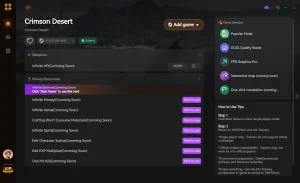
Once Crimson Desert is finally unpacked, take full control of your adventure in Pywel with XMODHUB.
❤️ Modalità Dio
Take no damage from enemy attacks or environmental hazards.
⚔️ Infinite Stamina
Perform endless combos and sprint without ever tiring.
💰 Unlimited Gold
Instantly add max currency to purchase any gear or upgrades.
📈 Moltiplicatore XP
Level up Macduff’s skills instantly with custom XP rates.
Why Choose XMODHUB for Crimson Desert
XMODHUB is the ultimate all-in-one PC gaming utility for single-player titles. It offers a beginner-friendly, malware-free experience that automatically updates alongside game patches, ensuring your mods always work seamlessly.
Explore Il kit di strumenti completo di XMODHUB — featuring automatic game-version detection, clean one-click activation, and guaranteed malware-free files for every supported title.
Combat & Health
- Modalità Dio – Invincibility against all damage types.
- Resistenza infinita – Never run out of stamina during combat.
- Uccidere in un colpo solo – Defeat any boss or enemy with a single strike.
Progression & Wealth
- Unlimited Gold – Set your gold count to maximum.
- Max Skill Points – Unlock all abilities in the skill tree immediately.
- Custom XP Multiplier – Multiply earned experience by up to 100x.
Related Guides for Crimson Desert
Domande frequenti
Siete pronti a migliorare il vostro gioco?

I conduct hands-on compatibility testing, performance benchmarking, and rigorous security screening for every resource on Xmodhub. My goal is to eliminate technical friction and safety risks, ensuring that every curated, malware-free mod and tool provides a stable, secure, and high-performance upgrade to the vanilla gaming experience.




Thanks for breaking down the real bottleneck behind Steam unpacking—CPU priority and NVMe SSDs really do make a difference. I’ve been struggling with slow unpack times for a few games lately, and this tip about setting Steam to High Priority in Task Manager is something I’ll definitely try. It’s also reassuring to see the emphasis on avoiding fake tools, as that’s a common pitfall many players fall into.