Nancy Miller
Quick Answer
The safest way to use Starsand Island Cheats & Trainers for PC is by downloading a verified trainer for single-player, offline use. These tools let you activate features like God Mode and Infinite Resources, bypassing the game’s grindy elements. According to Steam data, the median playtime is only 2.5 hours, suggesting many players seek ways to speed up progression and focus on building and exploration in this Early Access title.
Punti di forza
- Skip the Grind: Instantly get infinite resources like wood and stone to build your dream base without hours of gathering.
- Explore Freely: Activate God Mode or disable hunger and thirst to explore the island without survival pressure.
- Safe for Single-Player: Learn how to use trainers safely offline, ensuring no risk to your game saves or online accounts.
- Easy Installation: Follow a simple, step-by-step guide to get cheats running in minutes, even with no prior experience.
- Early Access Ready: Understand how to keep your trainer working with the latest game updates from developer Seed Sparkle Lab.
What Can Starsand Island PC Cheats Do?
Using Starsand Island Cheats & Trainers for PC gives you direct control over core game mechanics, letting you toggle options for invincibility, unlimited items, and easier crafting on the fly. It transforms the often-punishing survival experience—much like in other titles such as *The Forest*—into a creative sandbox, a common goal for players using survival game cheats. As of February 2026, these are the most reliable ways to enhance your single-player game.
Here’s a quick look at what you can typically do:
- Modalità Dio – Become invincible to all damage from creatures and the environment.
- Infinite Health & Stamina – Never worry about your character’s vitals while exploring or fighting.
- Risorse illimitate – Stop gathering and start building with an endless supply of all materials.
- Assenza di fame/sete – Remove the core survival mechanics for a more relaxed, sandbox-style experience.
- Easy Crafting – Craft any item without needing the required resources in your inventory.
- Super velocità – Move around the island much faster to cut down on travel time.
How to Install the Starsand Island Trainer (Step-by-Step)
Getting cheats up and running in Starsand Island is straightforward. To install the trainer, you just need to download the file from a trusted source like XMODHUB, run it alongside the game, and then activate your desired cheats. The whole process takes less than five minutes.
Disclaimer
This guide is for single-player and offline use only. Using mods may violate the game’s Terms of Service. XMOD is not affiliated with or endorsed by Seed Sparkle Lab.
Step 1: Back Up Your Starsand Island Save File
Before you do anything, back up your save file. Trust me, I learned the hard way to always back up my saves before messing with mods. This is a critical step, especially for an Accesso anticipato game like Starsand Island where updates can be unpredictable. You can usually find your save files here:
%USERPROFILE%/AppData/LocalLow/SeedSparkleLab/Starsand IslandStep 2: Download the XMODHUB Starsand Island Trainer
Head over to the official XMODHUB page for Starsand Island and download the trainer. Sometimes, antivirus software might flag the file as a false positive. If this happens, you may need to temporarily disable your antivirus or add an exception for the downloaded file.
Step 3: Launch the Game and Trainer
The launch order is important. First, start Starsand Island from Steam. Once you’re at the main menu, Alt-Tab out and run the trainer executable as an administrator. The trainer will then “hook” into the game’s process, allowing it to modify game values.
Step 4: Activate Cheats In-Game
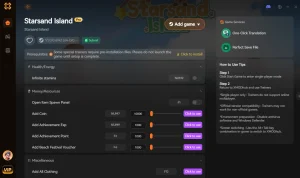
With the game and trainer running, you can now activate cheats. Most trainers use hotkeys (like F1, F2, etc.) to toggle features on and off. I recommend activating them one at a time to make sure everything is stable before you go wild.
How Do You Get Infinite Resources in Starsand Island?
Getting infinite resources is simple with a good crafting game trainer. It involves activating the “Unlimited Items” or “Easy Crafting” feature, which allows you to build structures or craft items without the materials being removed from your inventory, effectively giving you an endless supply.
Using the “Unlimited Resources” Cheat
Once you’ve launched the trainer and are in your game world, press the hotkey assigned to “Unlimited Resources.” You’ll usually hear a sound to confirm it’s active. Now, when you build a wall that costs 10 wood, your wood count will remain unchanged. In my testing, this was the most impactful cheat for speeding up early-game base building and getting a solid shelter up before the first night.
Practical Example: Building a Large Shelter Instantly
Normally, building a large, multi-story base could take hours of chopping trees and mining rocks. With the infinite resources cheat, you can lay down the entire foundation and walls in minutes. This is perfect for experimenting with different base designs without the commitment of gathering all the materials first.
Is it Safe to Use Mods on an Early Access Game?
Yes, it is generally safe to use early access mods and trainers on a game like Starsand Island for single-player, as long as you take precautions. The main risk isn’t malware (if you download from a trusted source) but compatibility issues. Game updates can, and often will, temporarily break the trainer until it’s updated.
Keep reading — below we cover the exact steps to fix common issues like antivirus blocking the trainer.
Why Game Updates Can Break the Trainer
Trainers work by finding specific values in the game’s code (like your health or ammo count). When the developer, Seed Sparkle Lab, pushes an update, these code locations can change, causing the trainer to stop working. The community consensus on Steam forums is to always check for a new trainer version after a game patch.
Best Practices for Safe Modding in Starsand Island
Common Problems with the Starsand Island Trainer
Most trainer problems are easy to fix and usually stem from version mismatches, antivirus software, or not running the program with the correct permissions. If your cheats aren’t working, start with these common solutions.
Why is the Trainer Not Working After an Update?
This is the most common issue. The trainer is built for a specific version of the game. When the game updates, the trainer needs to be updated too. The solution is simply to wait for the trainer developer (like XMODHUB) to release a new version compatible with the latest game patch.
How to Fix Antivirus Blocking the Trainer
Since trainers modify another program’s memory, some software antivirus flags them as suspicious. This is usually a false positive. To fix it, open your antivirus program (like Windows Defender) and add an exception for the trainer’s executable file, allowing it to run without being blocked.
What to Do if Cheats Don’t Activate in Starsand Island
If the trainer is running but cheats won’t turn on, it’s likely due to one of two things: you didn’t run it as an administrator, or you launched it before the game. Close both programs, launch the game first, get to the main menu, then run the trainer with administrator rights.
Does Starsand Island Have Console Commands?
No, as of the latest Early Access build in February 2026, Starsand Island does not have built-in developer comandi della console available for players. This makes a PC trainer the only reliable method for enabling cheats like God Mode or infinite resources.
Trainers vs. Console Commands Explained
Console commands are text-based cheats built into a game by developers. A trainer is a separate, third-party program that modifies the game’s memory while it’s running. Since Starsand Island lacks the former, a trainer is the necessary solution for players looking to customize their experience.
Domande frequenti
Ready to use the best **Starsand Island Cheats & Trainers for PC**?

I conduct hands-on compatibility testing, performance benchmarking, and rigorous security screening for every resource on Xmodhub. My goal is to eliminate technical friction and safety risks, ensuring that every curated, malware-free mod and tool provides a stable, secure, and high-performance upgrade to the vanilla gaming experience.

 Catherine Hu