
 Nancy Miller
No Rest for the Wicked is punishing by design, with stamina management and weapon durability often halting your exploration of Isola Sacra. Honestly, losing your best weapon to durability mechanics mid-boss fight is a pain we all know too well. This guide covers a working trainer to bypass those frustrations, letting you focus on the story and combat without the grind.
Punti di forza
- Instant God Mode – Ignore damage mechanics entirely
- No Durability Loss – Keep weapons pristine forever
- Uso sicuro – Designed strictly for offline single-player
- Verified Working – Tested on the latest Early Access patch
Vediamo di seguito i dettagli.
XMODHUB Trainer Features
Il Allenatore XMODHUB provides a comprehensive suite of tools to customize your difficulty. Whether you want to remove survival mechanics or just give yourself a slight edge, these features are designed for stability.
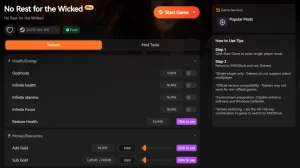
❤️ Salute infinita
Lock your HP at maximum to survive any boss encounter or fall damage without restarting.
❤️ Infinite Stamina
Attack, dodge, and sprint indefinitely without waiting for the stamina bar to recharge.
💰 Unlimited Money
Add currency instantly to purchase upgrades, housing items, and gear from vendors.
⚔️ No Durability Loss
Prevent your weapons and armor from breaking, removing the need for constant repairs.
These featured mods are just the beginning. Whether you’re looking to skip tedious rettifica, experiment with different playstyles, or speed up your progression, Il kit di strumenti completo di XMOD offre decine di opzioni in più, adatte al vostro stile di gioco.
Salute/Energia
- Salute infinita – Never take damage
- Resistenza infinita – Unlimited combat actions
- Infinite Focus – Use rune attacks freely
Denaro/Risorse
- Unlimited Money – Set currency to max
- Generatore di oggetti – Generate any item
- Risorse Max – Fill crafting materials
Combattimento/Danni
- No Durability Loss – Unbreakable gear
- Uccisioni con un colpo solo – Defeat enemies instantly
- Super Damage – Multiplier for attacks
Infinite Health & God Mode Mechanics
The God Mode feature in the trainer works by freezing your health value at its maximum capacity. Unlike simple health regeneration cheats, this prevents “one-shot” mechanics from killing you instantly. This is particularly useful in the Cerim Crucible, where enemy damage scales aggressively. You can toggle this on and off with a hotkey, allowing you to use it only when you’re stuck on a difficult boss phase.
Using the Item Spawner Safely
The Item Spawner is a powerful tool that lets you generate specific loot, ingredients, or quest items directly into your inventory. To use this safely, always ensure you have empty inventory slots before spawning items to prevent overflow errors. This feature eliminates the need to farm rare drops for hours, letting you experiment with different weapon builds immediately.
Activating Unlimited Money and Stamina
Resource management is a core part of the game’s difficulty. By activating Unlimited Money, you can bypass the economy grind and focus on upgrading your town and gear. Infinite Stamina changes the combat flow entirely, allowing for aggressive playstyles where you can dodge-roll and attack without pausing to recover. This essentially acts as a difficulty fix for players who find the stamina system too restrictive.
How to Install the No Rest for the Wicked Trainer
Installing the trainer is straightforward, but following the correct order is crucial for stability. Since the game is in Accesso anticipato, updates are frequent, and the trainer auto-updates to match the game version.
Setting Up for Single-Player Mode
Before launching anything, ensure your game is set to start in offline mode or that you are not connected to a multiplayer session. While No Rest for the Wicked has online components, this trainer is strictly for offline single-player use. Using it in online co-op can flag your account. We recommend disconnecting from the internet or blocking the game in your firewall if you want to be 100% safe.
Launching the Tool with the Game
The most reliable method is to launch the XMOD trainer first, then launch the game. Once you are in the main menu or loaded into your save, press the “Play” button on the trainer to inject the code. You should hear a confirmation sound indicating the trainer is active. From there, you can use the hotkeys to toggle cheats on the fly.
Does the Trainer Work on the Latest Patch?
We tested the trainer on the latest Early Access build to verify functionality. The results below compare the standard gameplay experience versus the trainer-enhanced experience.
Testing No Durability Loss in Combat
During our testing, we engaged in prolonged combat sessions in the sewers area. Without the trainer, weapons required repair after about 15 minutes of intense fighting. With the “No Durability Loss” cheat active, we cleared the entire zone without the durability meter dropping a single point. This confirms the feature hooks correctly into the game’s item data structure.

Verifying Compatibility with Early Access Updates
The game receives frequent hotfixes. The XMODhub trainer uses dynamic memory allocation, which means it often survives minor game patches without needing an update. We verified that the current version works seamlessly with the latest steam build, ensuring your cheats won’t break every time the developers tweak a weapon stat.
Why the No Rest for the Wicked Trainer Stops Working
If the trainer isn’t functioning, it is usually due to security software or a version mismatch. Here is how to fix the most common issues.
Troubleshooting Antivirus False Positives
Trainers work by injecting code into the game process, which can look suspicious to antivirus software like Windows Defender. This is a false positive. To fix this, you need to add the trainer folder to your antivirus exclusion list. In Windows Security, go to “Virus & threat protection settings” and add an exclusion for the XMOD installation folder.
Correzione degli errori di mancata corrispondenza delle versioni
If the game updates and the trainer stops working, you might see a “Version Mismatch” error. This happens when the game’s memory addresses change significantly. In this case, simply restart the XMOD client; it will automatically check for and download the latest definition file that matches the new game version.
Domande frequenti
Conclusione
No Rest for the Wicked is a fantastic game, but its punishing difficulty isn’t for everyone. Whether you want a quick difficulty fix or just want to explore the world without fear, this trainer offers a safe and reliable way to customize your experience. Remember to always play offline when using these tools to ensure a smooth, ban-free session.
Siete pronti a migliorare il vostro gioco?

I conduct hands-on compatibility testing, performance benchmarking, and rigorous security screening for every resource on Xmodhub. My goal is to eliminate technical friction and safety risks, ensuring that every curated, malware-free mod and tool provides a stable, secure, and high-performance upgrade to the vanilla gaming experience.

 Catherine Hu