
 Catherine Hu
Résumé : This guide covers the minimum and recommended system requirements for Warhammer 40,000: Dawn of War – Definitive Edition. Learn what hardware you need for smooth gameplay, compare your PC specs, and discover tips to optimize performance for the best experience.
Warhammer 40,000: Dawn of War – Definitive Edition is a remastered real-time strategy game that immerses players in the dark, futuristic universe of Warhammer 40,000.
Before diving into the game, it’s important to understand the system requirements to ensure smooth performance on your PC.
This guide covers both the minimum and recommended specifications, helping you determine if your hardware can handle the game.
Additionally, we’ll provide tips to optimize gameplay performance using tools like XMOD, so you can enjoy a seamless and enhanced gaming experience from the very start.
Table des matières
- Qu'est-ce que Warhammer 40,000: Dawn of War – Definitive Edition?
- Minimum System Requirements for Warhammer 40,000: Dawn of War – Definitive Edition
- Recommended System Requirements for Warhammer 40,000: Dawn of War – Definitive Edition
- Can You Run Warhammer on a Low-End PC?
- Can My PC Run Warhammer?
- Tips to Optimize Gameplay Performance
- Conclusion
Qu'est-ce que Warhammer 40,000: Dawn of War – Definitive Edition?
Warhammer 40,000: Dawn of War – Definitive Edition is a remastered version of the classic real-time strategy game set in the dark, futuristic Warhammer 40,000 universe. Players command unique factions like Space Marines, Orks, Eldar, and Chaos Space Marines, managing resources, building bases, and deploying troops to dominate the battlefield. This edition features updated graphics, improved AI, widescreen support, and all previously released expansions, making it fully compatible with modern PCs. With enhanced visuals and quality-of-life improvements, it preserves the strategic depth of the original while offering a smoother, more accessible experience for both new and veteran players.
Minimum System Requirements for Warhammer 40,000: Dawn of War – Definitive Edition
Meeting these recommended requirements ensures smoother gameplay, higher graphics settings, and better performance during large battles and intense moments.
| Specification | Requirement |
| OS | Windows 10 (64-bit) |
| Processeur | Intel i5 6th-gen or AMD Ryzen desktop processor with 4 cores @ 3GHz, or equivalent performance |
| Memory | 8 GB RAM |
| Graphique | NVIDIA GeForce GTX 950 / AMD Radeon R9 370, or equivalent performance |
| DirectX | Version 9.0c |
| Stockage | 25 GB available space |
| Notes | Requires 64-bit processor and operating system |
Recommended System Requirements for Warhammer 40,000: Dawn of War – Definitive Edition
The recommended specs are designed for higher graphics settings, smoother framerates during large battles, and better overall performance, especially on modern systems.
| Specification | Requirement |
| OS | Windows 10/11 (64-bit) |
| Processeur | Intel i7 7th-gen or AMD Ryzen 5 3600, or equivalent performance |
| Memory | 16 GO DE RAM |
| Graphique | NVIDIA GeForce GTX 1660 / AMD Radeon RX 5600 XT, or equivalent performance |
| DirectX | Version 11 |
| Stockage | 25 GB available space |
| Notes | 64-bit processor and operating system recommended for best performance |
Can You Run Warhammer on a Low-End PC?
Whether you can run Warhammer on a low-end PC depends on your hardware compared to the game’s minimum system requirements. While meeting the minimum specs allows the game to launch, you may experience lower frame rates, reduced graphics quality, and occasional lag.
To improve performance on a low-end PC:
- Lower Graphics Settings: Reduce resolution, shadows, textures, and effects in-game.
- Close Background Programs: Free up memory and processing power.
- Update Drivers: Ensure your GPU and system drivers are up to date.
- Use Performance-Enhancing Tools: Platforms like XMOD (if supported) can provide mods, optimizations, or cheats that make gameplay smoother and more enjoyable.
If your PC struggles even with these adjustments, consider upgrading key components like your GPU, CPU, or RAM to meet the recommended system requirements.
Can My PC Run Warhammer?
To determine if your PC can run Warhammer, compare your system specifications with the game’s minimum and recommended requirements. Meeting the minimum requirements will allow you to launch the game, but for smoother gameplay, higher graphics settings, and a fully immersive experience, your system should meet or exceed the recommended specs.
You can also use tools like Can You Run It to automatically check your PC’s compatibility. This tool scans your hardware and provides an easy-to-understand report, helping you identify any upgrades needed for optimal performance. Additionally, keeping your drivers updated and closing unnecessary background applications can further enhance your gaming experience.
Tips to Optimize Gameplay Performance
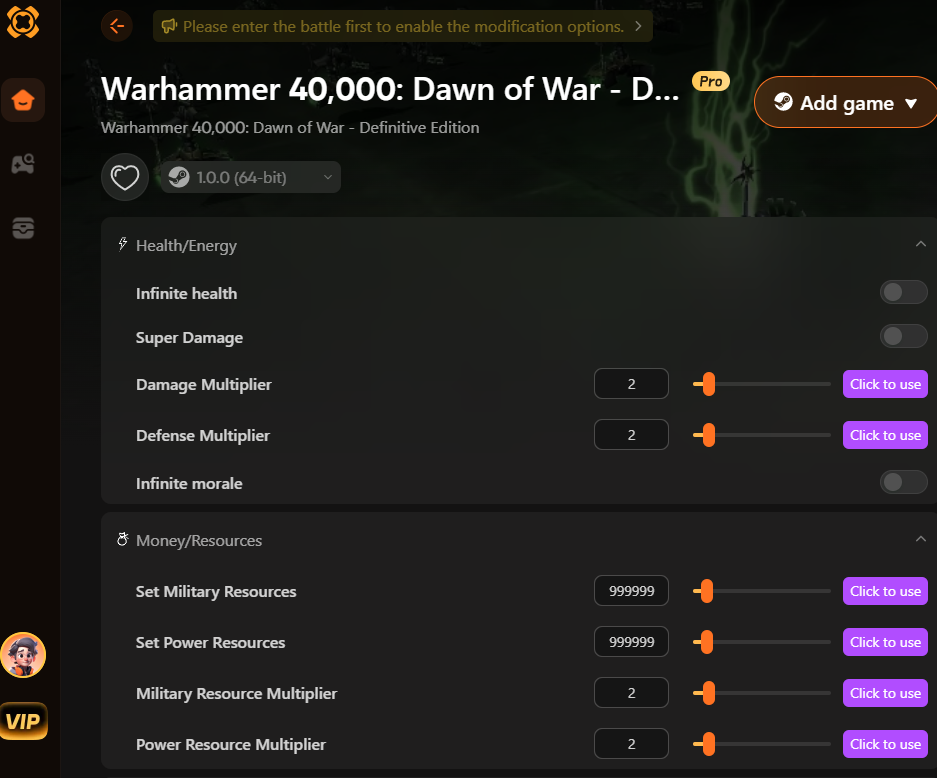
XMOD is an all-in-one platform designed to make managing mods, cheats, and trainers for a wide variety of games quick and convenient. Its centralized interface allows players to easily organize, enable, or disable enhancements, ensuring mods work smoothly without causing conflicts or crashes. Instead of searching multiple sources online, users can access a curated library of verified tools directly within the platform, saving time and improving reliability. Even without dedicated game services, XMOD helps optimize gameplay performance by giving players full control over their enhancements, streamlining their gaming experience, and allowing them to focus on enjoying their games.
Conclusion
In summary, Warhammer 40,000: Dawn of War – Definitive Edition offers a modernized RTS experience that combines strategic depth with enhanced visuals and updated features. Ensuring your PC meets the minimum or recommended system requirements is crucial for smooth gameplay, while meeting the recommended specs provides higher performance and better visual quality. Tools like XMOD further enhance the experience by providing convenient access to mods, cheats, and trainers, all in one safe, centralized platform. By combining proper hardware preparation with XMOD’s organizational and optimization features, players can enjoy a more immersive, seamless, and customizable gaming experience.

Je suis un joueur passionné et j'écris sur XMODhub, qui se consacre à vous apporter les dernières nouvelles, astuces et idées en matière de jeux.
Connectez-vous avec moi :
Profil LinkedIn

 Nancy Miller

