Résumé : This guide covers all the system requirements for Sword of the Sea, including minimum and recommended specifications, helping you ensure smooth and immersive gameplay.
Sword of the Sea is an action-packed adventure game that immerses players in a vast oceanic world filled with exploration, combat, and strategic challenges.
Before diving in, it’s important to understand the system requirements to ensure your PC can handle the game smoothly.
Knowing whether your setup meets these requirements helps prevent performance issues and allows you to enjoy the game as intended.
Additionally, there are ways to enhance your gameplay experience, from optimizing settings to using helpful tools and strategies.
This guide covers what Sword of the Sea is, its system requirements, how to check if your PC can run it, and tips to maximize your gaming adventure.
Table des matières
- Qu'est-ce que Sword of the Sea?
- System Requirements: All You Need to Know
- Can I Run Sword of the Sea on a Low-End PC?
- Can My PC Run the Game Smoothly?
- How to Enhance Your Gameplay Experience with XMOD?
- Conclusion
Qu'est-ce que Sword of the Sea?
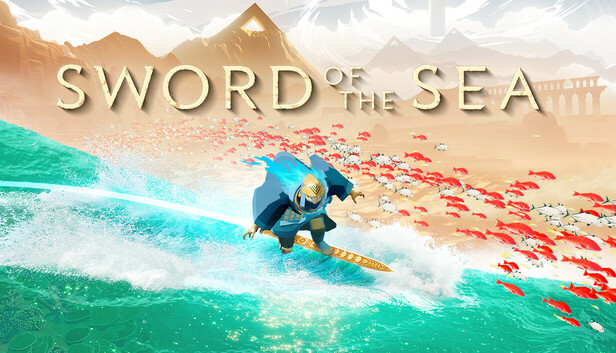
Sword of the Sea is an atmospheric adventure game developed by Giant Squid, the studio behind ABZÛ, The Pathless, et Journey. Directed by Matt Nava, the game immerses players in a desolate world where they control a Wraith, a resurrected being tasked with restoring life to the land. The primary mode of traversal is the Hoversword, a dynamic movement tool that combines elements of skateboarding, snowboarding, and hoverboarding. This allows players to glide across vast, undulating terrains, from sandy deserts to glistening waters, reminiscent of skatepark-like ruins.
The gameplay emphasizes fluid movement and exploration over combat. Players collect Ocean Seeds to rejuvenate the environment, bringing back water and marine life, which in turn opens up new areas and challenges. Encounters with massive creatures, known as leviathans, provide cinematic moments that test the player’s skills without traditional combat mechanics.
The game’s design draws inspiration from extreme sports, aiming to capture the meditative and spiritual connection with nature that activities like surfing and snowboarding evoke. With a focus on movement, environmental storytelling, and a rich musical score by Austin Wintory, Sword of the Sea offers a unique and immersive experience for players seeking a blend of adventure and tranquility
System Requirements for Sword of the Sea
Here are the official system requirements for Sword of the Sea, an atmospheric surfing adventure developed by Giant Squid, set to release on August 19, 2025:
Exigences minimales
| Composant |
Specification |
| Requires |
Processeur et système d'exploitation 64 bits |
| OS |
Windows 10 |
| Processeur |
Intel Core i5-9400 or AMD Ryzen 5 2600 (AVX2 instruction set required) |
| Memory |
12 GO DE RAM |
| Graphique |
NVIDIA GeForce GTX 1070 (8GB) or AMD Radeon RX 5600 (6GB) |
| DirectX |
Version 12 |
| Stockage |
15 GB available space |
| Sound Card |
Any |
| VR Support |
Non |
| Additional Notes |
Full DualSense controller support – disable Steam Input |
Exigences recommandées
| Composant |
Specification |
| Requires |
Processeur et système d'exploitation 64 bits |
| OS |
Windows 11 |
| Processeur |
Intel Core i5-12600K or AMD Ryzen 7 5700X |
| Memory |
16 GO DE RAM |
| Graphique |
NVIDIA GeForce RTX 2080 Ti (11GB) or AMD Radeon VII (16GB) |
| DirectX |
Version 12 |
| Stockage |
15 GB available space |
| Sound Card |
Any |
| VR Support |
Non |
| Additional Notes |
Full DualSense controller support – disable Steam Input |
Sword of the Sea features a unique movement mechanic called the Hoversword, combining elements of snowboarding, skateboarding, and hoverboarding.Players explore a surreal world, surfing across waves of sand and water, aiming to restore a lost ocean.The game emphasizes fluid movement and environmental storytelling, with influences from titles like Journey et Shadow of the Colossus.
Can I Run Sword of the Sea on a Low-End PC?

Yes, you can run Sword of the Sea on a low-end PC, but performance will be limited. The minimum requirements—Windows 10 (64-bit), Intel Core i5-9400 or AMD Ryzen 5 2600, 12 GB RAM, and NVIDIA GTX 1070 or AMD RX 5600—represent the lowest hardware for playable performance. On a system below these specs, you may experience reduced frame rates, lower graphics settings, and longer load times. However, the game is not extremely demanding, so with careful adjustment of resolution and graphics settings, a modest PC can still handle the game at a basic level.
Can My PC Run the Game Smoothly?
To determine if your PC can run Sword of the Sea smoothly, compare your system specifications with the game’s minimum and recommended requirements. Meeting the minimum requirements allows the game to run at lower settings, but for a fully immersive experience with high-quality graphics and fluid performance, your system should meet or exceed the recommended specifications.
You can also use tools like Can You Run It to automatically scan your PC and see if it meets the game’s requirements. Ensuring your hardware is up to date, including drivers and memory optimization, will help you enjoy the game with fewer lags, smoother visuals, and better overall performance.
How to Enhance Your Gameplay Experience?
To get the most out of Sword of the Sea, consider the following tips:
- Optimize Graphics Settings: Adjust resolution, shadows, and effects based on your system’s capabilities to maintain smooth performance.
- Update Drivers: Keep your GPU and system drivers up to date to avoid crashes and improve stability.
- Fermer les applications d'arrière-plan : Free up system resources by shutting down unnecessary programs while playing.
- Use XMOD Tools: Once the game launches, XMOD can provide cheats, trainers, and other enhancements to help you explore, experiment, and enjoy the game more freely.

- Controller Support: For a more immersive experience, use a DualSense controller and disable Steam Input, as recommended by the developers.
- Explore Thoroughly: Take time to discover hidden areas, secrets, and environmental interactions that enrich your gameplay experience.
By following these strategies and leveraging tools like XMOD, you can enjoy smoother gameplay, enhanced exploration, and a more immersive adventure on the high seas.
Conclusion
Sword of the Sea offers an immersive, action-packed adventure across stunning oceanic landscapes. Understanding the system requirements ensures your PC can run the game smoothly, while tools like XMOD provide additional ways to enhance gameplay through cheats, trainers, and customizable features. By preparing your system, optimizing settings, and exploring the game thoroughly, players can enjoy a seamless and captivating experience, fully embracing the world of Sword of the Sea.
Je suis un joueur passionné et j'écris sur XMODhub, qui se consacre à vous apporter les dernières nouvelles, astuces et idées en matière de jeux.
Connectez-vous avec moi :
Profil LinkedIn

 Catherine Hu

 Nancy Miller

