
 Catherine Hu
Let’s speak player to player. You spent hours building your perfect Dungeons & Dragons 5e party in Solasta 2, only for a sudden Unity crash or cloud sync error to threaten your entire save. Losing a 60-hour CRPG campaign is painful.
And if you are searching for the save location, chances are you also want control over the brutal 5e RNG—tired of a Natural 1 ruining a perfect Rogue setup or constantly pressing F5/F8 just to recover your Wizard’s empty Spell Slots.
In this guide, you’ll learn exactly where Solasta 2 save files are stored on PC so you can back them up safely. Then we’ll introduce XMODhub, a tool that lets you control the dice and unlock infinite magic without risking corrupted saves.
Solasta II: Cheat Engine Table vs. XMODhub Trainer (Best Free Alternative)
🛠️ TL;DR: Where is the Solasta 2 Save File Location?
The exact folder path for your Solasta 2 local save files on a Windows PC is located in your hidden AppData folder:
C:\Users\[Your Username]\AppData\LocalLow\Tactical Adventures\Solasta 2\SaveFilesC:\Users\[Your Username]\AppData\LocalLow\Tactical Adventures\Solasta 2\UserCampaigns%appdata% and hit Enter. Go back one folder to the main AppData directory, then follow the path to LocalLow -> Tactical Adventures -> Solasta 2.1. Solasta 2 Save File Location (Steam & Epic Games)
Whether you purchased the game on Steam or the Epic Games Store, the PC save file structure remains exactly the same. The engine always routes your .sav files to the LocalLow directory.
When troubleshooting, your first step should always be to back up your manual saves. Simply copy the entire SaveFiles folder and paste it onto your Desktop or an external drive. If you are experiencing an infinite loading screen, sort the folder by “Date modified” and delete the most recent AutoSave.sav file, as it is likely corrupted.
2. Where to Find Dungeon Maker Custom Campaign Saves
Solasta 2 is famous for its Dungeon Maker, allowing players to download incredible community-made 5e modules. However, many players panic when they cannot find their custom campaign progress in the standard save folder.
Community campaigns are stored in a slightly different location to prevent overwriting the official storyline. To back these up, navigate to:
C:\Users\[Your Username]\AppData\LocalLow\Tactical Adventures\Solasta 2\UserCampaigns
➤ Note: Always back this folder up before installing large updates, as major patches can sometimes break player-made scripts.
3. How to Fix “Solasta 2 Missing Save Files” Error
Did you launch the game only to find the “Load Game” button grayed out? This usually happens due to a Steam Cloud Sync Conflict. If Steam uploads a fragmented file, it can hide your local saves.
Close the game.
Go to your Steam Library, right-click Solasta 2, and select Propriétés.
Under the General tab, toggle Steam Cloud OFF.
Navigate to your local SaveFiles folder. You might see files ending in
.tmp ou .bak. Rename them back to .sav.Relaunch the game. Your files should reappear.
4. Can You Edit Solasta 2 Save Files? (The Corruption Risk)
Because the D20 RNG is so punishing, many players try to open their .sav files with a Hex Editor or Notepad++ to manually change their characters’ Strength to 20 or add infinite gold.
Solasta 2 relies on strict tabletop arithmetic. If you manually alter a stat value without modifying the corresponding skill modifiers linked elsewhere in the code, the game will hard crash the next time you enter combat. Editing raw save files or downloading traditional .pak mods is the fastest way to permanently corrupt a 60-hour campaign.
5. Stop Save-Scumming: Why XMODhub is the Ultimate Solution
You are playing to have fun, not to suffer statistical variance or risk destroying your files with Hex Editors. The constant F5/F8 loop of Save-Scumming just to avoid a party wipe from a bad dice roll is exhausting.
XMODhub is the ultimate, crash-free solution. It is a clean memory trainer that injects directly into your PC’s active RAM. Because it does not touch your physical save files, your campaign data remains 100% safe, pure, and uncorrupted.
- ✨
Always Roll 20: Guarantee a critical success on every persuasion check, stealth roll, and melee attack. Stop reloading saves just to win a conversation. - ✨
Infinite Spell Slots: Allow your casters to cast Chain Lightning in every single fight without ever taking a Long Rest. End the 15-minute adventuring day. - ✨
Max Attributes: Instantly set your stats to 20 during character creation, bypassing the agonizing 4d6 reroll grind securely.
6. How to Use XMODhub for Solasta 2?
Stop risking your save files with dangerous mods or hex editors. Getting XMODhub running is incredibly simple, safe, and takes less than a minute. Here is the step-by-step process:

Grab the verified, virus-free XMODhub desktop application from our official homepage and install it on your PC.
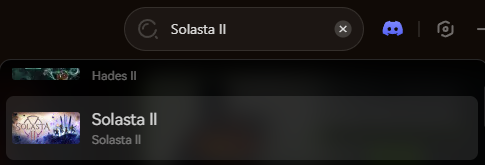
Open the XMODhub client and use the search bar to find Solasta 2. The app will automatically detect your game directory.
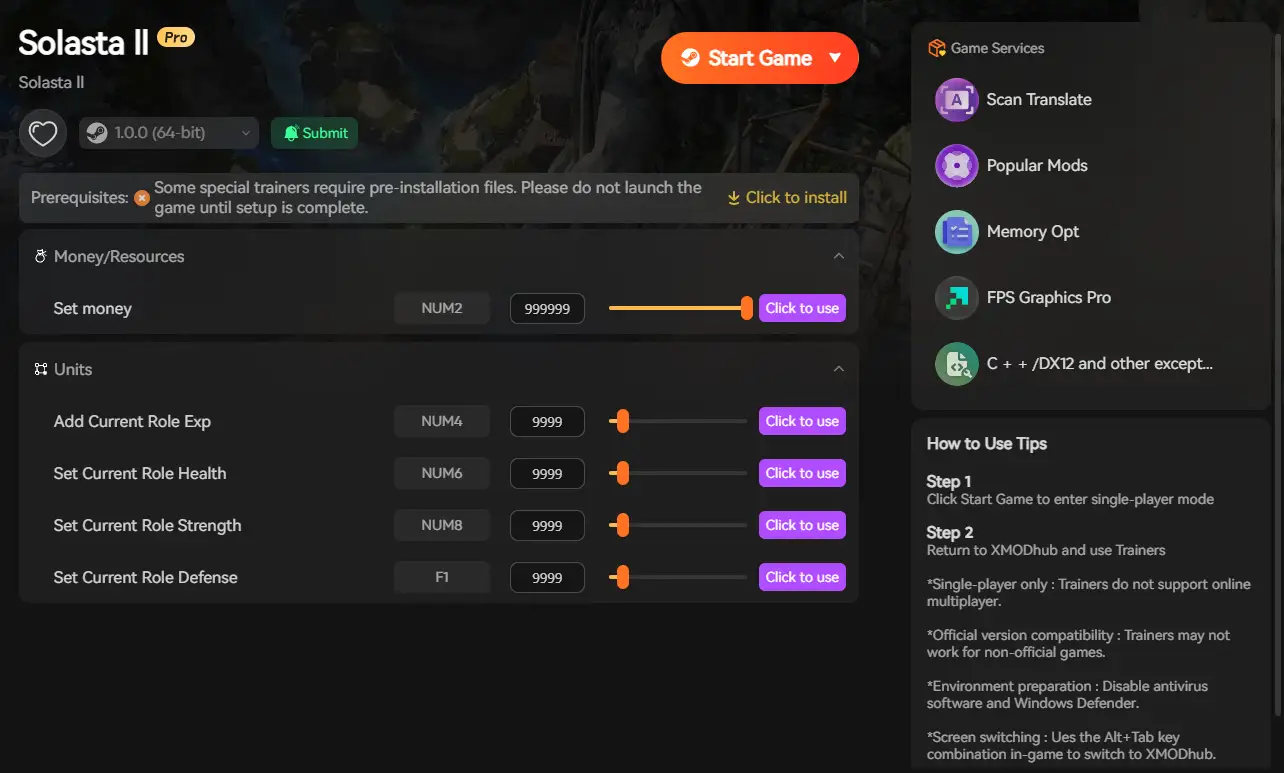
Click the prominent Play button within the XMODhub app. This safely links the software to the game’s memory. Once in-game, simply toggle your cheats via the overlay to instantly activate your powers.
7. Conclusion: Protect Your Campaign
Your Solasta 2 journey should be defined by epic loot, tactical triumphs, and memorable stories—not by managing corrupted .sav files, wrestling with Steam Cloud conflicts, or suffering through the artificial difficulty of bad RNG. Manually editing your saves is a gamble that usually ends in disaster.
By backing up your files to a secure folder and utilizing a clean memory injector like XMODhub, you get the best of both worlds. You protect your hard-earned progress while gaining the power to bypass the most frustrating aspects of the tabletop ruleset.
Take control of your campaign, end the endless cycle of save-scumming, and become the true Dungeon Master today.
Related Posts:
➤
Solasta 2 Cheats & Trainers: Always Roll 20 & Max Stats (2026) | XMODhub
➤
Solasta 2 Ultimate Beginner’s Guide: D&D 5e Rules Explained (2026) | XMODhub
➤
Top 20 Best Solasta 2 Mods (UI, Classes & Custom Maps) | XMODhub
➤
Solasta 2 Dungeon Maker Guide: Best Custom Campaigns (2026) | XMODhub

Je suis un joueur passionné et j'écris sur XMODhub, qui se consacre à vous apporter les dernières nouvelles, astuces et idées en matière de jeux.
Connectez-vous avec moi :
Profil LinkedIn

 Nancy Miller