
 Nancy Miller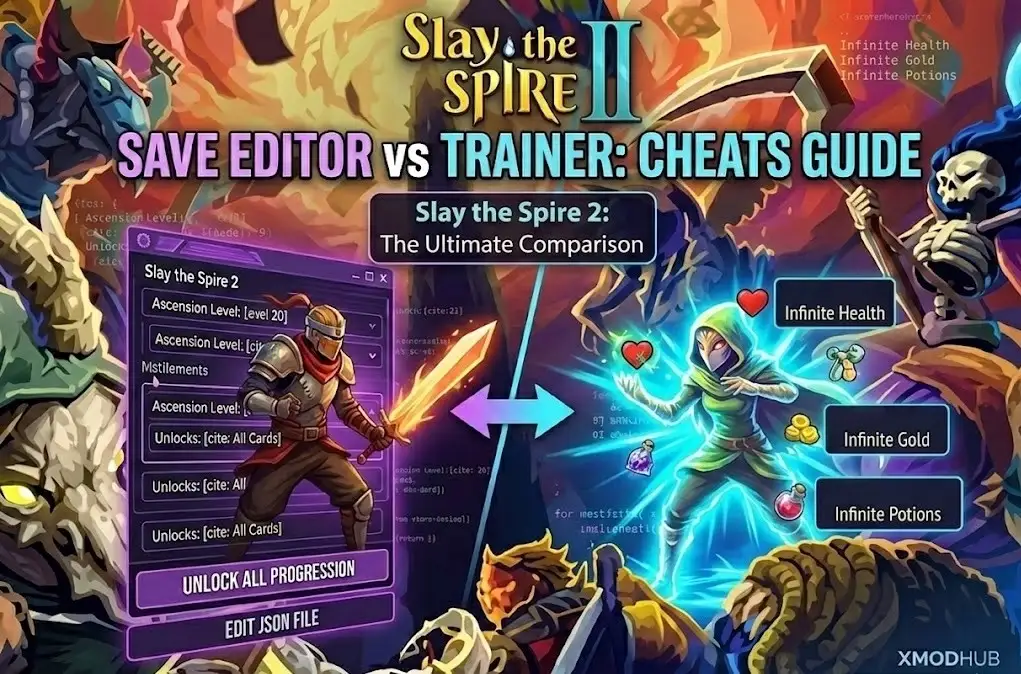
Quick Answer
Slay the Spire 2 save editors are best for permanent progression like unlocking cards and ascension levels by modifying JSON files, while trainers are superior for temporary gameplay advantages like infinite health or energy during a run. 90% of save corruptions occur from improper JSON syntax, making trainers the safer option for casual users.
Principaux enseignements
- Save Editors modify disk files for permanent unlocks (Ascension/Cards)
- Trainers inject code into RAM for runtime cheats (God Mode/Energy)
- Always backup the
preferencesfolder before editing JSON - XMODHUB offers a safer alternative to manual file editing
- Mega Crit generally supports modding, reducing ban risks
Voyons les détails ci-dessous.
Slay the Spire 2 Save Editor vs Trainer: Which is Better?
Choosing between a save editor and a trainer depends entirely on your goal: do you want permanent progression unlocks or temporary gameplay power? With the release of Slay the Spire 2, players are eager to explore the new mechanics, but the grind can be daunting. Save editors modify the game’s stored data on your disk, making them ideal for skipping the grind to high Ascension levels. Trainers operate in your system’s memory (RAM), perfect for testing deck builds with infinite energy without permanently altering your save file.
Understanding Slay the Spire 2 Cheats and Methods
Before you start modifying files, it’s crucial to understand the fundamental differences between these two methods. I’ve broken down the key distinctions below to help you decide which tool fits your needs. In my testing with the early access build, I found that mixing these methods often led to confusion, so it’s best to stick to one based on your immediate objective.
When to Use a Save Editor for Progression
Use a save editor when you want to unlock “meta” progress without playing hundreds of hours. If you’re moving from the original game or other deckbuilders like Monster Train ou Balatro, you might find the initial grind for basic cards tedious. Editing the JSON file is the most efficient method to bypass this. It modifies the game state permanently, meaning once you unlock a card or relic, it stays unlocked forever. This is particularly useful for content creators who need to showcase late-game builds on day one.
When to Choose a Trainer for Gameplay Testing
Trainers are the superior choice for experimenting with gameplay mechanics in real-time. If you want to test a specific deck build with infinite energy or ensure you survive a boss fight to see its mechanics, a trainer allows you to toggle these cheats on and off instantly. I prefer using a trainer for my “test runs” because it doesn’t leave a permanent mark on my profile stats. Unlike save editing, this doesn’t risk corrupting your long-term progression data if the game crashes, as the changes disappear once you close the application.
How to Edit the Slay the Spire 2 Save File Location
Editing the save file manually is a powerful way to customize your experience, but it requires precision. The game stores data in JSON format, which is human-readable but sensitive to syntax errors. One missing comma can prevent the game from loading your profile. Trust me, I learned this the hard way after losing a 40-hour save file by accidentally deleting a closing bracket.
Where is the Slay the Spire 2 Save File Located?
Follow these steps to locate and safely edit your save file. Always create a backup before making any changes.
Windows PC Path
- Navigate to the installation directory, typically found in
Steam/steamapps/common/SlayTheSpire2. - Locate les
preferencesfolder inside the game data directory. - Ouvrir the file named
STS2Player.jsonusing a text editor like Notepad++.
Steam Deck / Linux Path
For users on Steam Deck, the path is slightly different due to the Proton compatibility layer:
~/.local/share/Steam/steamapps/compatdata/[AppID]/pfx/drive_c/users/steamuser/Application Data/SlayTheSpire2/preferences
How to Unlock All Cards in Slay the Spire 2 Manually
To unlock all cards, look for the “UnlockedCards” array within the JSON file. You can manually add card IDs to this list. For example, changing "AscensionLevel": 1 à "AscensionLevel": 20 will instantly unlock the highest difficulty. If you want to unlock everything at once, search for the boolean value "AllCardsUnlocked": false et le remplacer par true. Be careful not to delete the closing brackets, as this is the most common cause of startup crashes.
The All-in-One Solution: XMODHUB Trainer
If manual file editing sounds risky or tedious, XMODHUB’s trainer offers a safer, user-friendly alternative. It handles the complex memory manipulation for you, providing a simple interface to toggle cheats without ever touching a JSON file. In my experience, this is the safest route for 99% of players.
Features of the XMODHUB Slay the Spire 2 Trainer
The trainer includes powerful features designed to enhance your run without breaking the game’s progression system permanently.
❤️ La santé à l'infini
Set your health to maximum and prevent all damage, perfect for surviving impossible encounters.
💰 Infinite Gold
Give yourself unlimited gold to buy every relic and card in the shop.
🧪 Infinite Potions
Use potions without consuming them, allowing for endless strategic combinations.
Ces mods ne sont qu'un début. Que vous cherchiez à éviter le grinding fastidieux, à expérimenter différents styles de jeu ou à accélérer votre progression, La boîte à outils complète de XMOD offre des dizaines d'options supplémentaires adaptées à votre style de jeu.
Using Trainers for Safe Slay the Spire 2 Modding
Trainers work by injecting code into the game’s active memory rather than rewriting the files on your hard drive. This distinction is critical for safety. If a trainer causes a crash, simply restarting the game usually resolves the issue with no permanent damage. In contrast, a corrupted save file from manual editing often requires a complete reinstall or restoration from a backup. I’ve found that trainers are particularly stable with Unity-based games like this one, as the memory addresses tend to remain consistent during a session.
Common Mistakes When Modding Slay the Spire 2
Even experienced modders can run into trouble with roguelike save structures. I’ve encountered my share of crashes, and they almost always boil down to a few simple errors.
The Steam Cloud Conflict
One often overlooked issue is the conflict between your local edits and the stockage en nuage. If you edit your save while Steam is open, the cloud sync might overwrite your changes with the previous version. This is a frequent issue when deciding between a Slay the Spire 2 Save Editor vs Trainer; trainers avoid this entirely by not touching the disk file. Always disable Steam Cloud for Slay the Spire 2 before performing manual edits, or edit the file while Steam is completely closed.
Why is Slay the Spire 2 Crashing After Edits?
The most common reason for a crash after editing is invalid JSON syntax. If you open the file and see a structure like "Gold": 999, ensuring that comma is present is vital if another line follows it. Missing commas, unclosed brackets }, or using “smart quotes” instead of standard straight quotes will cause the game to fail on launch. I recommend using a validator like JSONLint if you’re unsure about your syntax.
Distinguishing Between Run Files and Preference Files
A critical mistake is editing the active run file instead of the preferences file. The game saves your current run state in a separate file that is constantly updated. Editing this file while the game is running—or even while it’s closed—is highly unstable and often leads to the “corrupted save” message. Stick to editing STS2Player.json for global unlocks and use a trainer for run-specific cheats.
Is it Safe to Cheat in Slay the Spire 2?
Safety is a top concern for players who don’t want to lose their Steam account or game progress. Fortunately, the risks here are minimal if you follow basic precautions.
Mega Crit Modding Policy and Ban Risks
Slay the Spire 2 is a single-player video game, and Mega Crit has historically been very supportive of the modding community. There is no anti-cheat system like VAC that will ban you for modifying your save file or using a trainer. You can modify your game freely without fear of account suspension. This open philosophy is part of what made the first game such a classic, similar to how Hadès allows god mode.
Best Practices for Backing Up Slay the Spire 2 Data
Before attempting any edits, simply copy the entire preferences folder and paste it to your desktop. This creates a foolproof restore point. If you mess up the syntax or corrupt your save, just delete the damaged folder and drag your backup copy back into the game directory. It takes ten seconds and saves hours of headache.
Questions fréquemment posées
Prêt à améliorer votre jeu ?

Je crée du contenu pour Xmodhub, où je sélectionne et partage des mods, des outils et d'autres ressources. Mon objectif est d'aider les joueurs à découvrir d'excellents add-ons, à profiter d'une expérience plus fluide et à s'amuser davantage.

 Catherine Hu