Nancy Miller
Summary Sentence: Xmod is a Cheat Engine alternative for Hogwarts Legacy that helps you safely customize single-player gameplay with 58 trainers & mods, including movement speed controls, with one-click mod management et frequent updates across Steam, Epic, and Microsoft Store versions.
Hogwarts Legacy is built for exploration, progression, and experimentation—but many players eventually want a faster, more flexible way to tailor pacing for second playthroughs, collectible runs, or relaxed “story mode” sessions. The challenge is that traditional memory-editing workflows can be complicated, fragile after patches, and often associated with security concerns—so more players search for a safe, beginner-friendly trainer + mod approach instead.
Table des matières
- What Is Hogwarts Legacy?
- Why Players Look for a Cheat Engine Alternative
- Why Xmod Is a Strong Fit for Hogwarts Legacy Trainers & Mods
- Key Features to Use First (Start With Movement Speed)
- How to Use Xmod for Hogwarts Legacy (Step by Step)
- Benefits of Xmod vs Cheat Engine
- Tips for Balanced Play (Without Ruining Progression)
- Troubleshooting: Trainer Not Working, Patch Updates, Platform Mismatch
- Other Games You Can Enhance with Xmod
- FAQ
- Final Thoughts
What Is Hogwarts Legacy?
Hogwarts Legacy is a single-player action RPG where players explore an open world, learn spells, complete quests, and build a character over time. Because much of its fun comes from pacing (exploration + progression), “customization tools” are most valuable when they help you fine-tune the experience rather than instantly delete all challenge.

Why Players Look for a Cheat Engine Alternative
Cheat Engine is widely known for manually editing in-game values, but many players seek an alternative due to common pain points: manual memory scanning, stability risk, antivirus flags, and the fact that patches can break scripts or tables. These drawbacks are repeatedly highlighted in Xmod’s own “Cheat Engine alternative” blog format across different games.
For Hogwarts Legacy specifically, the demand usually clusters around:
- Quality-of-life pacing (movement speed, travel cadence)
- Convenience options (reducing repetitive loops)
- Controlled difficulty relief (making casual runs smoother)
Why Xmod Is a Strong Fit for Hogwarts Legacy Trainers & Mods
Xmod’s Hogwarts Legacy page is positioned around a few clear product promises:
- 58 trainers & mods available for Hogwarts Legacy (including Increase movement speed et Decrease movement speed)
- Works across Steam / MS-Store / Epic builds
- Safer than traditional trainers with the claim: “No viruses, no risky file changes—100% clean and secure.”
- One-click mod management inside a single app
- Frequent updates to keep trainers compatible with new game versions
- Discord community support for download/installation help

Key Features to Use First
If you want the best “trainer + mod” experience without destroying progression, start small.
Movement Speed (Best beginner category)
Xmod explicitly lists:
- Increase movement speed
- Decrease movement speed Xmod Hub
How to use it well:
- Utilisation Increase movement speed for exploration cleanup, long commutes, and repetitive collection routes.
- Utilisation Decrease movement speed for cinematic pacing, smoother footage capture, or more controlled indoor movement.
What players commonly want next (industry pattern)
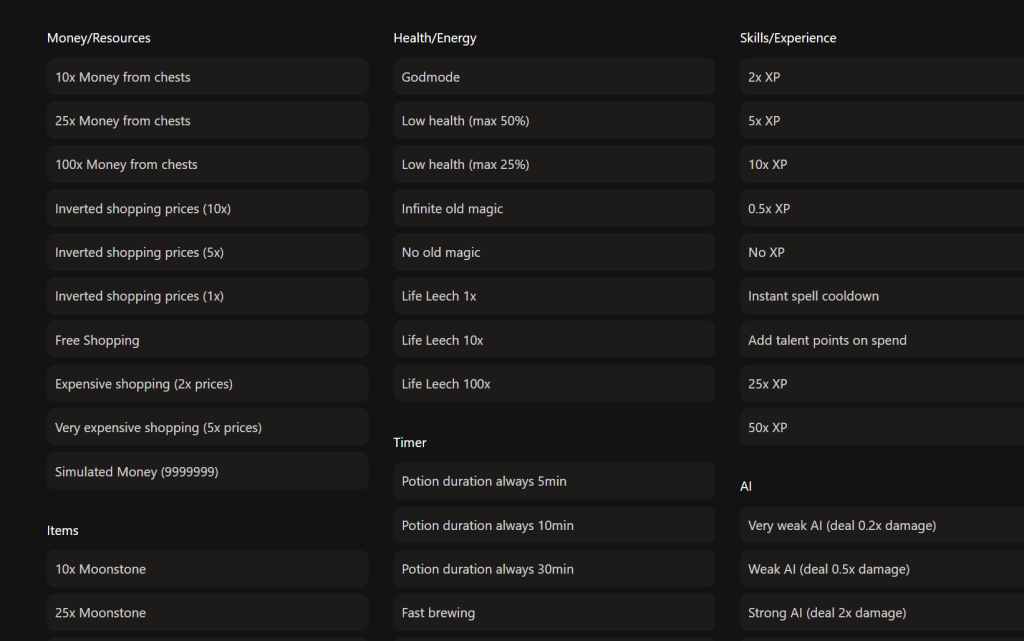
Across the broader Hogwarts Legacy trainer ecosystem, popular options often include toggles for survivability, cooldown pacing, speed control, and “light grind reduction.” You can see this demand reflected in mainstream trainer listings (e.g., WeMod and FLiNG) that emphasize speed and cooldown-related controls. FLiNG Trainer+1
Important note: the exact set of 58 Xmod options can vary by build/version—so treat this section as what users typically look for, and use Xmod’s in-app list as the source of truth.
How to Use Xmod for Hogwarts Legacy (Step by Step)
Xmod’s product page provides a simple 4-step workflow: Xmod Hub
- Télécharger — Download and install Xmod for free.
- Lancer Xmod — Open Xmod and find Hogwarts Legacy in the game list.
- Launch the Game — Apply available trainers, then start your game.
- Game On and Enjoy — Customize gameplay easily while playing.
If you need help with download or installation, Xmod points users to its Discord community for support. Xmod Hub

Benefits of Xmod vs Cheat Engine
This section mirrors the structure used across Xmod’s “Cheat Engine alternative” blog posts, because it answers the highest-intent user question quickly: “Why not just use CE?”
| Catégorie | Cheat Engine (typical) | Xmod approach |
|---|---|---|
| Setup | Manual scanning / tables | One-click trainers & mods in-app |
| Patch compatibility | Often breaks after updates | “Frequent updates” to stay compatible |
| Safety posture | Often flagged / risky downloads | Claims “no viruses, no risky file changes” |
| Usability | Technical learning curve | “Beginner-friendly interface” |
| Soutien | Community-driven, varies | Discord community support |
Tips for Balanced Play
Use these to keep the game fun and to reduce “bounce” (people enabling everything and quitting because nothing matters):
- Start with pacing mods first (movement speed), then add convenience options gradually.
- Change one thing at a time, test, then continue—this isolates issues and prevents “stacked” side effects.
- Back up saves before major changes (best practice for any single-player customization tool).
- Be mindful of achievements: some trainer/mod usage can affect achievement tracking (this is a common caveat raised in Xmod’s blog template).
Dépannage
“Trainer doesn’t work / nothing changes”
Work through these in order:
- Confirm your platform build is supported (Steam / MS-Store / Epic).
- Follow the activation order: apply trainers → launch the game.
- Test with a simple, visible option like movement speed first.
- If still stuck, use Discord support for guided help.
“A patch broke compatibility”
Xmod explicitly emphasizes frequent updates to maintain compatibility with the latest game versions—so the best response after a patch is to check for updates before changing anything else.
Other Games You Can Enhance with Xmod
Xmod positions itself as a broader modding platform with thousands of titles and a library that keeps expanding. The Hogwarts Legacy trainers page also links to “All 5000+ Games” and highlights ongoing additions.
FAQ
Does Xmod support Hogwarts Legacy on Steam, Epic, and Microsoft Store?
Yes—Xmod lists Steam, MS-Store, and Epic as supported platforms for Hogwarts Legacy trainers & mods.
How many trainers and mods are available for Hogwarts Legacy in Xmod?
The page states 58, including movement speed controls and 56 additional options.
What should I enable first if I’m new to trainers/mods?
Start with movement speed because it improves pacing without trivializing combat or progression.
Is Xmod safe?
Xmod positions itself as “safer than traditional trainers” and states “No viruses, no risky file changes—100% clean and secure.”
Where do I get help if I have installation issues?
Xmod directs users to its Discord community for download and installation support.
Final Thoughts
If your goal is Hogwarts Legacy trainers and mods with minimal friction, Xmod’s approach is straightforward: a single app, one-click management, and 58 available options on Steam/Epic/MS-Store, starting with high-impact quality-of-life controls like movement speed.
For a cleaner experience (and fewer patch headaches than traditional memory-editing workflows), this “trainer + mod” model is usually the most sustainable way to personalize a single-player RPG—especially if you want customization that’s easy to toggle, easy to troubleshoot, and easy to keep updated.

Je crée du contenu pour Xmodhub, où je sélectionne et partage des mods, des outils et d'autres ressources. Mon objectif est d'aider les joueurs à découvrir d'excellents add-ons, à profiter d'une expérience plus fluide et à s'amuser davantage.

 Catherine Hu