Résumé : This guide provides a complete guide of the Monsters are Coming! Rock & Road system requirements. We detail how this action-packed vehicular combat game pairs with XMOD for crucial performance optimization and enhanced customization features.
Monsters are Coming! Rock & Road is a mix of monster truck racing, destruction, and combat, featuring physics-based mayhem and intense driving challenges across various terrains.
We break down the minimum specs (e.g., Intel Core i5-4460, 8 GB RAM, GTX 750Ti) and the recommended specs (e.g., Intel Core i7-6700K or AMD Ryzen 5 1600, 16 GB RAM, GTX 1070) so you can quickly check compatibility.
You’ll also learn whether low-end PCs can handle the game and how to verify your own setup.
Finally, we cover how tools like XMOD can enhance your experience—from performance tweaks to quality-of-life features—so you get the most out of your monster-driving gameplay.
Table des matières
- Qu'est-ce que Monsters are Coming! Rock & Road?
- System Requirements for Monsters are Coming! Rock & Road: Minimum and Recommended
- Can You Run Monsters are Coming! Rock & Road on a Low-End PC?
- Can My PC Run Monsters are Coming! Rock & Road?
- How to Enhance Gameplay Experience with XMOD?
- Conclusion
Qu'est-ce que Monsters are Coming! Rock & Road?

Monsters are Coming! Rock & Road is an action-packed vehicular combat and driving game developed by Rock & Road Studio. The core gameplay focuses on customizing and piloting huge monster trucks to race, destroy environments, and engage in brutal combat against enemies across rough terrain. With its emphasis on realistic physics, environmental destruction, and fast-paced vehicle action, the game appeals to players who enjoy driving, destruction, and chaotic vehicular combat.
System Requirements for Monsters are Coming! Rock & Road: Minimum and Recommended
Before installing the game (and applying any enhancements via XMOD), you should verify your PC meets the required specs. Below are the minimum and recommended requirements based on the latest available data.
Exigences minimales
| Composant |
Specification |
| OS |
Windows 7 / 8 / 10 (64-bit) |
| Processeur |
Intel Core i5-4460 or AMD FX-6300 |
| Memory |
8 GB RAM |
| Graphique |
NVIDIA GeForce GTX 750 Ti or AMD Radeon R7 260X (2 GB VRAM) |
| Stockage |
2 GB available space |
| DirectX |
Version 11 |
Exigences recommandées
For the smoothest experience, especially during high-speed action, large environmental destruction, or when using XMOD features:
| Composant |
Specification |
| OS |
Windows 10 (64-bit) |
| Processeur |
Intel Core i7-6700K or AMD Ryzen 5 1600 |
| Memory |
16 GO DE RAM |
| Graphique |
NVIDIA GeForce GTX 1070 or AMD equivalent (4 GB VRAM or better) |
| Stockage |
2 GB available space (SSD preferred for faster loading) |
| DirectX |
Version 11 |
Can You Run Monsters are Coming! Rock & Road on a Low-End PC?
Yes, the minimum requirements for Monsters are Coming! Rock & Road are quite modest compared to modern AAA titles. A system matching the minimum specs (i5-4460/FX-6300, 8 GB RAM, GTX 750 Ti/R7 260X) should be able to run the game.
However, bear in mind the following if running on a budget machine:
- Physics Load: The game involves intense physics calculations (destruction, vehicle handling). A minimum spec CPU might struggle, leading to frame rate drops during high-impact collisions or large-scale destruction events.
- VRAM: If your GPU has less than 2 GB VRAM, you will need to lower texture quality and resolution significantly to maintain playable frame rates.
- XMOD Overhead: If you plan to use XMOD tools (mods, graphics enhancers, trainers), the added processing load means you will need more headroom above the bare minimum specs to avoid stuttering.
In short: It is playable on lower-end hardware, but for a consistently smooth, high-fidelity experience during chaotic vehicular combat, a mid-tier setup matching the recommended specs is strongly advised.
Can My PC Run Monsters are Coming! Rock & Road?
To quickly check your PC’s compatibility:
- System Information: Use the Windows Search bar to find “System Information” or run “dxdiag” (Windows + R ->
dxdiag).
- Locate Specs: Identify your OS, Processor, installed RAM, and Graphics Card model/VRAM.
- Compare: Match your components against the Minimum and Recommended lists provided above.
If your hardware meets or exceeds the minimum requirements, the game should launch, though you may need to adjust graphical settings (resolution, shadows, effects) downward. If you meet the recommended tier, you will enjoy smoother frame rates and higher visual quality—a prerequisite for getting the most out of XMOD enhancements.
How to Enhance Gameplay Experience with XMOD?

Utilisation XMOD with Monsters are Coming! Rock & Road can introduce new levels of fun, control, and customization beyond the base game.
Here’s how you can leverage XMOD in this vehicular action title:
- Vehicle Mods & Customization:XMOD can provide access to custom vehicle models, unique weapon attachments, new chassis types, or expanded cosmetic options not available in the stock game—enhancing visual appeal and creativity.
- Trainer Tools / Cheats: Utilizing trainers from an XMOD platform allows you to adjust in-game variables such as unlimited vehicle health, unlimited ammo/fuel, instant repair, or increased speed/jumping power. This is great for experimentation or simply enjoying stress-free destruction.
- Performance Tweaks:XMOD often includes FPS boosters, optimization scripts, or compatibility patches that can help stabilize frame rates on different hardware configurations—crucial for maintaining control during fast-paced driving and physics-heavy destruction.
- Content Unlocks: Instantly unlock all vehicles, maps, or customization parts, allowing players to jump straight into advanced gameplay without the initial grind.
Best Practices when using XMOD with Monsters are Coming! Rock & Road:
- Stability First: Ensure the core game runs smoothly before applying complex mods or trainers; added features can introduce load.
- Backup Saves: Always back up your game files and save data before installing new mods via XMOD.
- Updated Drivers: Keep your graphics drivers updated, as this is essential for performance and compatibility, especially when using third-party enhancers.
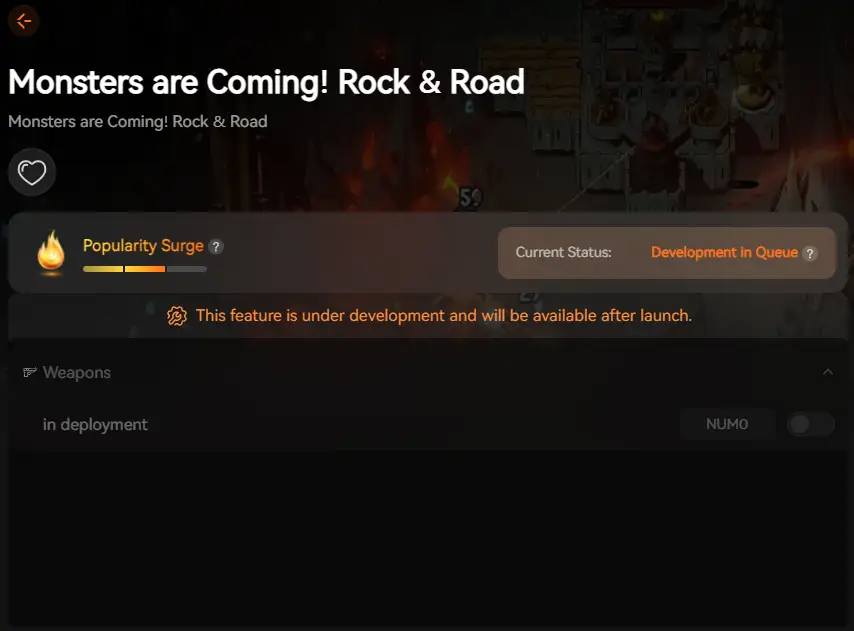
XMOD fournira une assistance complète aux formateurs dès la sortie officielle du jeu, garantissant ainsi la compatibilité et la stabilité dès le premier jour.
Conclusion
Monsters are Coming! Rock & Road provides a thrilling blend of monster truck mayhem, physics-based destruction, and vehicular combat. Checking your PC against the minimum and recommended system requirements is the necessary first step to ensure smooth and enjoyable gameplay, especially given the heavy physics load. Once your hardware is confirmed, integrating XMOD tools opens up exciting avenues for customization, performance optimization, and unrestricted experimentation. With the right setup and the power of XMOD, you can unleash total, optimized destruction.
Je suis un joueur passionné et j'écris sur XMODhub, qui se consacre à vous apporter les dernières nouvelles, astuces et idées en matière de jeux.
Connectez-vous avec moi :
Profil LinkedIn

 Catherine Hu

 Nancy Miller

