
 Catherine Hu
Restoring the forgotten neighborhood in Hozy is meant to be a relaxing, wholesome experience. Whether you are stuck trying to find that last invisible speck of dirt, tired of grinding to unlock the full furniture catalog, or simply want to break the physical boundaries to design your dream room without material limits, using console commands is the fastest way to change the rules.
However, accessing the developer debug menu in modern simulation releases isn’t always as simple as pressing the tilde key. Below is the ultimate guide on how to force the console open, the truth about the current command list, and the safest way to inject cheats if the developers have locked the console.
 You may also like:
Hozy Cheat Engine Table vs. XMODhub: Best Free Trainer (2026)
How to Enable Console Commands in Hozy
If the developer debug menu is active in your current build of Hozy, follow these exact steps to open it:
Launch Hozy and load into your saved renovation project.
Press the Tilde key (~) or Backtick key located under the Escape key on your keyboard.
If the console does not drop down, exit the game and open your Steam Library.
Right-click Hozy > Propriétés > General.
Scroll down to Launch Options and type
-console ou -debug_mode.Relaunch the game and press ~ again to start typing commands.
Expert Note: Are Commands Locked in Hozy?
“Because Hozy runs on a modern physics-heavy engine, the developers at Come On Studio completely compiled out the native command console in the final retail release to prevent game-breaking physics bugs and memory leaks. If the Launch Options method above fails, it means the console is hard-locked at the code level. Modifying the configuration files to force it open often results in fatal crash loops with the game’s dynamic dirt and lighting systems. In these cases, an external memory injector like XMODhub is the only functional way to use cheats.”
— Catherine Hu, Senior Modding Specialist at XMODhub
Essential Hozy Console Commands List
If you managed to open the command line using a third-party engine unlocker mod, you will find that traditional cheats do not exist natively. Instead, you can use these universal engine debug codes. For gameplay cheats, you must rely on a trainer.
| Command Syntax | Cheat Effect |
|---|---|
ghost |
Activates noclip, allowing you to fly through solid walls to find hidden trash. |
slomo 0.5 |
Slows down the world physics, making it easier to arrange complex items perfectly. |
show collision |
Displays hitboxes, helping you locate stuck dirt or objects that refuse to be cleaned. |
stat fps |
Toggles the frame rate and performance overlay. |
N/A (No Native Command) |
Instantly cleans the entire room (Requires XMODhub Trainer). |
N/A (No Native Command) |
Grants infinite paint and building materials (Requires XMODhub Trainer). |
N/A (No Native Command) |
Unlocks all furniture in the catalog instantly (Requires XMODhub Trainer). |
How to Spawn Items: Hozy Item IDs
To spawn specific gear in most games, you generally use a syntax like give_item.
However, Hozy does not use simple text strings for its items. Furniture, paint buckets, and cleaning tools are handled as complex engine prefabs. Forcing a spawn via a generic console unlocker without knowing the exact memory path is highly unstable and will often crash the physics engine, sending your new sofa flying out of bounds.
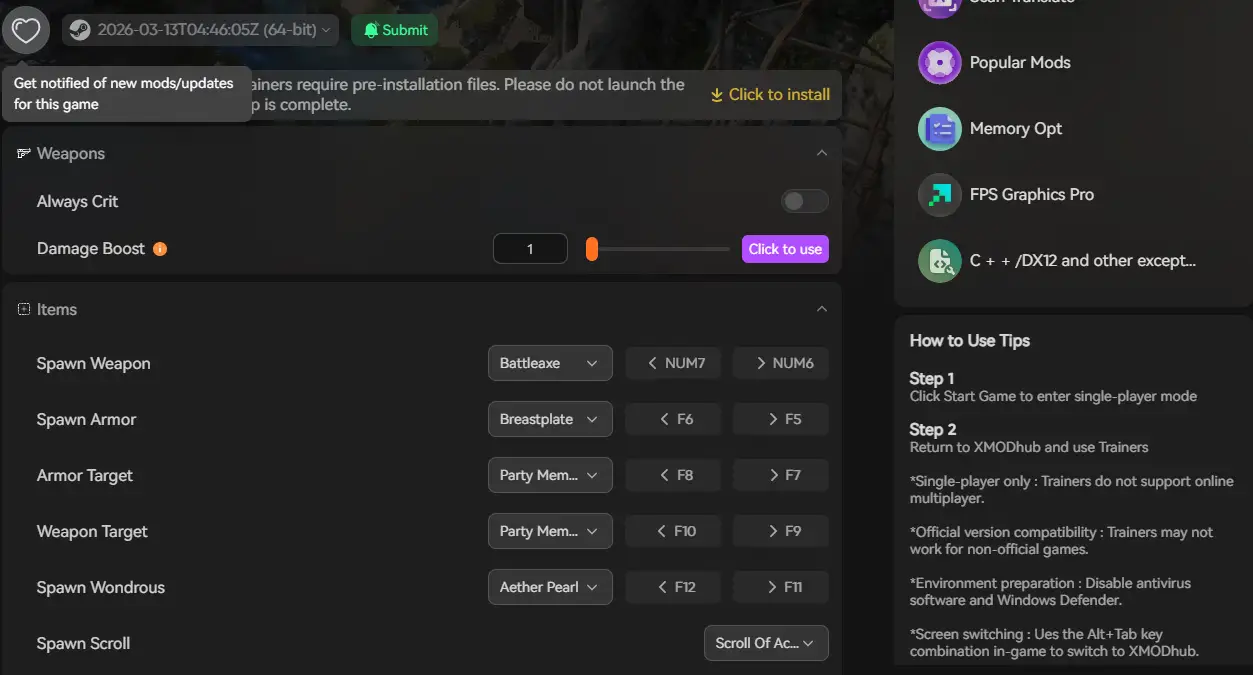
Tired of looking up complex memory addresses just to get a specific rug? The XMODhub application features a built-in visual item spawner. Just select the decor item, wallpaper, or tool from a dropdown menu and click Add.
The Trap: Do Cheats Disable Achievements in Hozy?
🔥 Yes. Using native developer console unlockers comes with a severe drawback. The moment you inject a debug command into the engine, the game flags your save file.
This will permanently disable Steam Achievements for that specific neighborhood restoration playthrough. Furthermore, forcibly spawning endgame furniture out of order via debug mods can corrupt your catalog script triggers, ruining a beautifully decorated save file.
The Better Alternative: XMODhub Trainer (No Typing, No Bans)
If the console is locked, or if you want to keep earning achievements while enjoying a stress-free sandbox, the XMODhub PC Trainer is the superior solution. It acts as an external overlay, completely bypassing the game’s internal command restrictions.
| Fonctionnalité | In-Game Console Commands | Formateur XMODhub |
|---|---|---|
| Activation | Memorizing and typing text strings | One-click UI toggles and hotkeys |
| Achievement Status | Disabled instantly (High Risk) | Safe (Achievements remain active) |
| Item Spawning | Requires exact internal memory paths | Visual dropdown menu |
| Mises à jour des jeux | Patches often lock the console | Cloud-synced auto-updates |
How to Use XMODhub for Hozy
Don’t waste time editing config files or installing risky script loaders.

Lancement : Open XMODhub; it will automatically detect your Steam installation of Hozy.

Play: Click Play and use the simple sliders to enable Instant Clean, Infinite Paint, Unlock All Furniture, and more.
Frequently Asked Questions (FAQ)
Q: Can I use console commands in Hozy Multiplayer?
A : Hozy is a single-player cozy simulation game. XMODhub is built strictly for Single-Player offline modes to enhance your personal decorating experience.
Q: I tried a debug command and Hozy crashed. Why?
A : Spawning an item prefab that doesn’t exist in your current game version, or bypassing a room transition using noclip, causes severe memory leaks with the game’s physics engine. Always back up your save file before using raw console mods.
Conclusion: Cheat Smarter, Not Harder
While classic console commands carry a sense of PC gaming nostalgia, they are increasingly risky, clunky, and often disabled entirely in modern releases like Hozy.
The XMODhub PC Trainer offers a highly secure, visual, and achievement-friendly way to customize your cozy renovation experience without memorizing lines of code or fighting with physics bugs.
XMODhub is the ultimate cheat utility, supporting over 5,000 PC games, including massive hits and genre similarities like House Flipper 2 and Unpacking.

Je suis un joueur passionné et j'écris sur XMODhub, qui se consacre à vous apporter les dernières nouvelles, astuces et idées en matière de jeux.
Connectez-vous avec moi :
Profil LinkedIn