Résumé : This guide provides a detailed overview of BLACK SOULS system requirements, covering both minimum and recommended specifications.
BLACK SOULS is an action-packed RPG that has captured the attention of gamers with its dark fantasy world, challenging combat, and immersive storytelling.
Understanding the system requirements is crucial for players who want a smooth and enjoyable gaming experience.
This complete guide will cover the minimum and recommended specifications, helping you ensure your PC is ready to run the game at its best and offering tips to optimize your overall gameplay performance.
Table des matières
- Introduction of BLACK SOULS
- System Requirements of BLACK SOULS: Minimum & Recommended
- Can You Run BLACK SOULS on a Low-End PC?
- Can My PC Run BLACK SOULS?
- Tips for a Better Gaming Experience
- How can you enhance gaming with XMOD?
- Conclusion
Introduction of BLACK SOULS
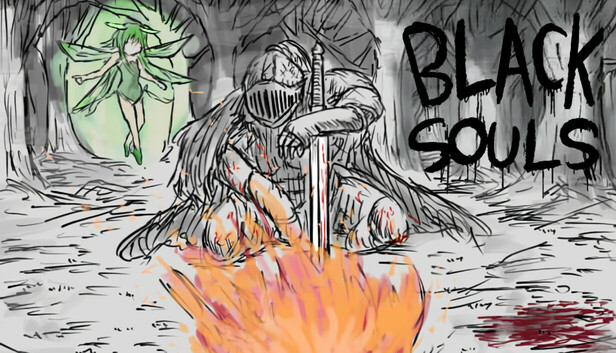
BLACK SOULS is an upcoming action RPG developed by Eeny, Meeny, Miny, Moe? and published by OTAKU Plan, scheduled for release on August 16, 2025. The game immerses players in a dark fantasy world inspired by classic fairy tales and Lovecraftian horror. Players control a nameless undead navigating a mysterious kingdom filled with dangerous creatures, challenging combat encounters, and intricate environmental storytelling.
The game emphasizes exploration, strategy, and survival as players uncover the secrets of the kingdom and face formidable enemies. With its atmospheric visuals, intense combat mechanics, and deep narrative, BLACK SOULS promises a gripping and memorable experience for action RPG fans.
System Requirements of BLACK SOULS: Minimum & Recommended
Below, we’ve outlined both the minimum specifications you’ll need to run BLACK SOULS and the recommended setup for the best experience.
Minimum System Requirements:
- OS : Windows 10
- Processeur : 3+ GHz Processor
- Mémoire : 4 GB RAM
- Graphiques : DirectX 10/OpenGL 4.1 capable GPU
- DirectX : Version 10
- Stockage : 1 GB available space
Recommandé System Requirements:
- OS : Windows 11
- Processeur : 3+ GHz Processor
- Mémoire : 8 GB RAM
- Graphiques : OpenGL ES 2.0 hardware driver support required for WebGL acceleration. (AMD Catalyst 10.9, nVidia 358.50)
- DirectX : Version 11
- Stockage : 2 GB available space
Can You Run BLACK SOULS on a Low-End PC?
Yes, Black Souls can run on most low-end PCs thanks to its lightweight design using RPG Maker VX Ace. Typical system requirements include Windows XP or newer, a 1.0 GHz processor, 2 GB RAM, a DirectX-compatible graphics card, and 500 MB–1 GB of storage. To optimize performance, you can lower the game’s resolution, close background applications, and keep your graphics drivers updated, ensuring smooth gameplay even on older hardware.
Can My PC Run BLACK SOULS?
To see if your PC can run Black Souls, you can use the online tool Can I Run It, which compares your system’s hardware—CPU, GPU, RAM, and operating system—against the game’s requirements. Typical specs for Black Souls include Windows XP or newer, a 1.0 GHz processor, 2 GB RAM, a DirectX-compatible graphics card, and 500 MB–1 GB of storage. Can I Run It will quickly tell you if your system can handle the game smoothly and suggest settings adjustments, such as lowering resolution or closing background apps, to optimize performance on older or low-end PCs.
Tips for a Better Gaming Experience
To get the most out of BLACK SOULS, consider the following tips:
- Meet Recommended Requirements: Ensure your PC meets or exceeds the recommended specs for smoother gameplay and better graphics.
- Update Drivers: Keep your graphics and system drivers up to date to avoid crashes and improve stability.
- Adjust In-Game Settings: Fine-tune graphics, resolution, and effects to balance visual quality and frame rate.
- Use a Game Controller (Optional): Some players find controllers provide more precise control in action RPGs.
- Optimize Background Applications: Close unnecessary apps to free up system resources and reduce lag.
- Explore the World Thoroughly: BLACK SOULS rewards exploration with hidden items, lore, and secrets.
- Use XMOD for Enhanced Gameplay: XMOD can translate in-game text, provide helpful overlays, and assist with mod management, making the game easier to navigate and more enjoyable.

- Save Frequently: Use in-game save points wisely to avoid losing progress during difficult encounters.
By combining these strategies with XMOD’s features, players can enjoy a smoother, more immersive, and accessible experience in BLACK SOULS.

Conclusion
BLACK SOULS offers an immersive action RPG experience with its dark fantasy world, challenging combat, and rich storytelling. Ensuring your system meets the minimum or recommended requirements allows for smooth gameplay, while tips like updating drivers, optimizing settings, and exploring thoroughly enhance your overall experience.
Des outils comme XMOD further improve accessibility and gameplay by providing translations, overlays, and mod management. Combining the right setup with these strategies ensures you can fully enjoy everything BLACK SOULS a à offrir.
Je suis un joueur passionné et j'écris sur XMODhub, qui se consacre à vous apporter les dernières nouvelles, astuces et idées en matière de jeux.
Connectez-vous avec moi :
Profil LinkedIn

 Catherine Hu

 Nancy Miller

