Résumé : XMOD’s Portuguese Translation Tool makes Where Winds Meet fully accessible for Portuguese-speaking players, offering fast, accurate, and seamless translation for a smoother and more immersive adventure.
Where Winds Meet is a highly anticipated open-world Wuxia RPG featuring martial arts, epic storytelling, and a richly crafted Chinese-inspired world. However, for many Portuguese-speaking players, the lack of official Portuguese localization presents a challenge.
Thankfully, XMOD offers a Portuguese Translation Tool that allows players to experience the full game—quests, menus, dialogues, and system text—in Portuguese.
This guide explains how XMOD makes Where Winds Meet accessible for Portuguese speakers.
Table des matières
- What Is XMOD’s Portuguese Translation Tool?
- Why Portuguese Players Need a Translation Solution
- Key Features of the Portuguese Translation Tool
- How to Install and Use the Portuguese Translation Tool (Step-by-Step Guide)
- Benefits of Playing Where Winds Meet in Portuguese
- Is XMOD Safe to Use?
- Other Games Supported by XMOD
- Frequently Asked Questions (FAQ)
- Final Thoughts
What Is XMOD’s Portuguese Translation Tool?
XMOD provides a dedicated translation module that converts all major in-game text into natural Portuguese, including:
- dialogues
- menus
- quest instructions
- system messages
- character interactions
It works in real time, requires no technical knowledge, and does not involve risky file modifications.
Why Portuguese Players Need a Translation Solution
Where Winds Meet includes:
- intricate storylines
- detailed dialogue and lore
- complex combat mechanics
- challenging quests
Without Portuguese translation, players may struggle with story comprehension, quest objectives, and game mechanics. XMOD solves this problem, enabling Portuguese-speaking players to fully enjoy the game from start to finish.
Key Features of the Portuguese Translation Tool
Real-Time Portuguese Translation
Instant translation while playing—no restarts needed.
Natural and Contextual Language
Smooth, readable Portuguese that preserves meaning.
Easy Activation
One-click toggle to enable translation.
Compatible With Updates
Automatically supports new patches and content.
Lightweight and Fast
Minimal performance impact on any PC.
Optional Gameplay Enhancements
Depending on compatibility, XMOD may offer additional quality-of-life features.
How to Install and Use the Portuguese Translation Tool
Step 1 — Download XMOD
Install the official XMOD PC application from the website.

Step 2 — Launch XMOD
Open the app and browse the supported game list.

Step 3 — Search “Where Winds Meet”
Locate the translation module.

Step 4 — Enable Portuguese Translation
Turn on the Portuguese toggle option.
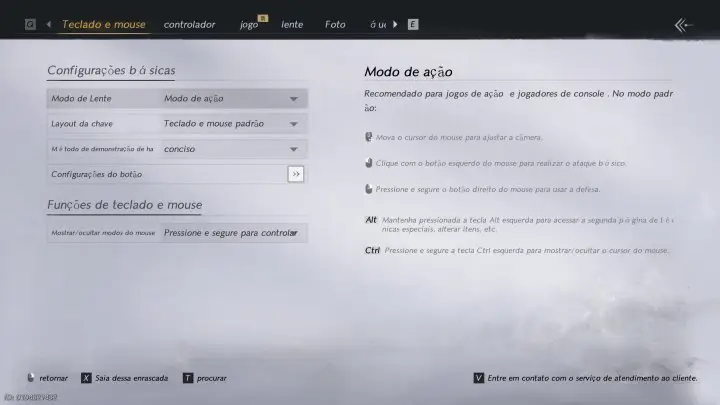
Step 5 — Launch the Game Through XMOD
Ensures full translation support.

Step 6 — Play Fully in Portuguese
All dialogues, menus, and quests are now displayed in Portuguese.
Benefits of Playing Where Winds Meet in Portuguese
Complete Story Comprehension
Follow the plot, characters, and dialogue in your native language.
Accurate Quest Progression
Clear objectives without guessing.
Better Combat Understanding
Skill descriptions, stats, and mechanics are fully readable.
Enhanced Immersion
Enjoy the Wuxia world without language barriers.
Ideal for Beginners
Makes the game more approachable for new players.
Is XMOD Safe to Use?
Yes. XMOD is designed for safe single-player enhancements:
- No bans
- No corrupted files
- No harmful scripts
- No interference with online services
It is trusted by thousands of global players.
Other Games Supported by XMOD
XMOD also supports translation and enhancements for many popular PC games, including:
It serves as a universal tool to improve gameplay, reduce grind, and enhance immersion across your PC library.
Frequently Asked Questions (FAQ)
- Does XMOD support the latest patch of the game?
Yes, the Portuguese translation module is updated for the latest version.
- Will it affect PC performance?
No, it is lightweight and optimized.
- Is it safe for Steam or game accounts?
Yes, XMOD is only for single-player use.
- Can I toggle translation on/off?
Yes, it can be enabled or disabled anytime.
- Is this an official Portuguese localization?
No. XMOD provides a third-party translation solution for Portuguese players.
Final Thoughts
For Portuguese-speaking players eager to enjoy Where Winds Meet, XMOD’s Portuguese Translation Tool is the fastest, easiest, and safest way to play. With real-time translation, simple setup, and full localization, the game becomes fully accessible and immersive in Portuguese.
Je suis un joueur passionné et j'écris sur XMODhub, qui se consacre à vous apporter les dernières nouvelles, astuces et idées en matière de jeux.
Connectez-vous avec moi :
Profil LinkedIn

 Catherine Hu
As someone who’s struggled with games lacking a proper localization, this tool is a great solution. It’s nice to see developers and modders stepping up to make the game more inclusive for different language communities.