Catherine Hu
⚡ Réponse rapide :
Does TerraTech Legion have console commands?
Officially, no. TerraTech Legion is built on Unreal Engine 5, and the developers at Payload Studios have permanently locked the native developer console in the retail PC build. You cannot simply press the Tilde (~) key to open a text box.
Because traditional text-based commands are completely disabled by the engine, the 3 most popular cheat features require an external memory trainer like XMODhub:
📋 Editor’s Note:
This guide was last updated and verified against the latest 2026 Early Access patch of TerraTech Legion. Because the developers have locked the native console, forcing it open via external Unreal script injectors causes massive instability within the game’s physics and procedural enemy spawning. There are no magical text codes you can type natively. Please back up your local save files before modifying game memory, as unstable bypass tools frequently cause fatal Unreal Engine crashes.
We have all been there.
You have just spent three hours carefully constructing the perfect combat vehicle, attaching dozens of lasers and shields, only to get obliterated by a sudden swarm of Planetary Bosses in seconds. Or maybe you simply do not have the time to endlessly grind for XP just to unlock the heavy plasma cannons after a long day at work. Single-player roguelites and bullet-heavens are meant to be enjoyed on your own terms, and there is absolutely no shame in bending the rules to maximize your fun and keep your run alive.
After rigorously testing the engine limitations on the latest patch, this guide provides the ultimate, organized breakdown of what is actually possible with the TerraTech Legion developer console, and the safest way to get your mechanical juggernaut powered up.
💻 How to Enable Console Commands in TerraTech Legion
Before you can start typing in god codes to survive the enemy swarms, you need to understand the reality of the game’s backend. In older PC games, you could simply press Enter and type a cheat code. TerraTech Legion does not work this way.
The Unreal Engine 5 Reality:
No Configuration Tweaks: In many games, you can navigate to your local game folder, open a configuration file, and change
EnableConsole=0 à EnableConsole=1. This does not work here. The UE5 architecture completely strips the console UI from the compiled retail code.The Injection Risk: To force a text box to appear, advanced modders have to inject third-party Universal Unreal Unlockers (UUU) into the active memory.
The Result: Even if you force the console open using an unstable injector, typing old UE4 commands will return an Unrecognized Command error. The developers completely removed the cheat logic from the game to preserve the roguelite economy.
Because of this hard lock, the only reliable way to enable cheats in TerraTech Legion is to use a dedicated memory editing application.
🚀 The Complete List of TerraTech Legion Cheats
Because the native text console is permanently disabled, traditional text-based cheat codes (like typing add_xp 99999) do not exist. Strictly avoid websites that provide fake lists of text codes for this game; they are fabricating features for clicks.
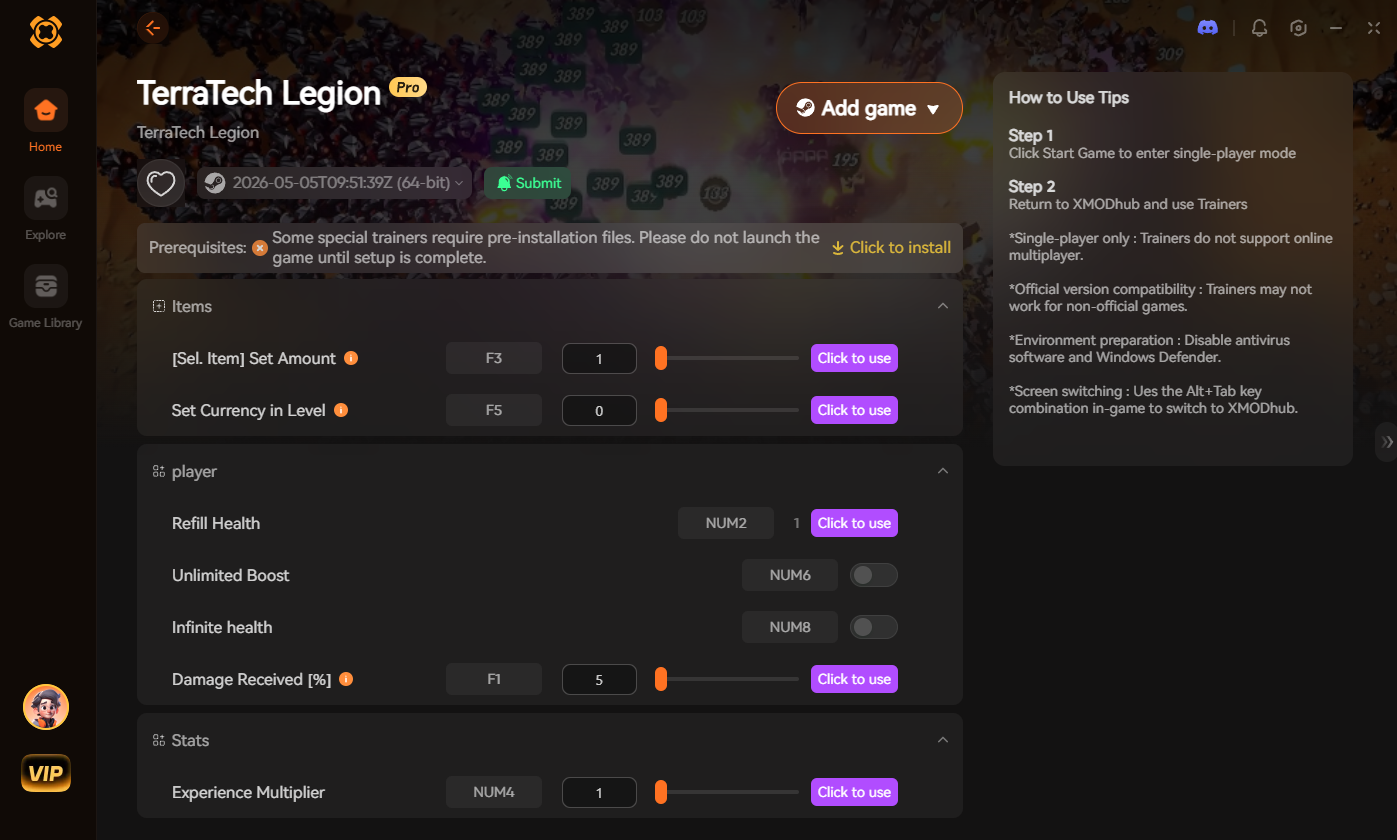
However, by safely attaching the XMODhub trainer to your game process, you instantly gain access to the following real-time memory cheats without typing a single line of code:
God Mode & Combat Commands
Exploration & Utility
Progression & Stats
🧰 Item IDs and Spawning Guide (The UE5 Reality)
Spawning items in a modern Unreal Engine 5 vehicle builder is entirely different from toggling God Mode. You cannot simply spawn a “Plasma Cannon” by typing a simple word.
In UE5, an item is a highly complex Blueprint class.
If you manage to force the console open with a UUU injector, the command format requires the exact engine path:
Format de la commande : Summon [Blueprint Path]
Popular Blueprint Examples:
BP_Weapon_Gatling_Basic_CBP_Weapon_PlasmaCannon_Heavy_CBP_Block_Armor_Titanium_CBP_Movement_Hover_Advanced_CExpert Warning: Attempting to force-spawn a Blueprint using an unauthorized script injector frequently drops the physical 3D object directly at your coordinates. If the block clips into your existing vehicle chassis, the UE5 physics engine cannot resolve the collision, resulting in an immediate and fatal crash to the desktop. It is much safer to use XMODhub’s Infinite XP cheat to simply unlock and craft the blocks legitimately through the game’s intended UI.
🏆 Do Cheats Disable Achievements?
Yes, they absolutely do if you modify the game incorrectly. This is the biggest catch when using forced DLL injectors or Universal Unreal Unlockers.
In TerraTech Legion, the moment the game detects an injected script hook altering the engine, it permanently flags your save profile. From that point forward, you will not be able to unlock any official Steam achievements for that run.
If you are an achievement hunter or completionist, forcing the console open is a fast way to ruin your progression.
🛑 Why Native Cheats Can Break Your Save Files
Beyond the achievement lock, developer consoles forced open via injectors are notoriously unstable. These backend commands were originally built for developers to test uncompiled assets in a safe editor environment, not for everyday roguelite gameplay.
Forcing the game to skip waves or spawn late-game bosses using a backend command can cause crucial procedural generation scripts to completely break. Memory leaks, corrupted physics meshes, and sudden crashes to the desktop are incredibly common when you bypass intended progression triggers in a game tracking thousands of moving parts.
🛡️ The Safer Alternative: Using XMODhub
If you want the benefits of cheats—like infinite health, unlimited block capacity, or skipping the heavy XP grind—without risking your save files or locking your achievements, you need a dedicated game modification tool instead of the raw, unstable console.
This is exactly what XMODhub is built for.
Instead of typing risky Blueprint paths that might corrupt your physics engine, the XMODhub app hooks into TerraTech Legion safely and cleanly.
⚙️ How to Use XMODhub for TerraTech Legion

⚠️ Troubleshooting: Console Not Opening
If you are pressing the Tilde key and nothing is happening, try these quick fixes:
💬 Frequently Asked Questions (FAQ)
Q: Can I use these console commands on PlayStation or Xbox?
A: No. The memory editing tools and unlockers for TerraTech Legion are strictly limited to the PC version. Console players cannot access the backend architecture required to activate these cheats.
Q: Is there a penalty for using cheats in single-player?
A: There is no account ban or official penalty for cheating in a single-player PvE environment. The only downsides are the potential for corrupted save files and disabled achievements when using dirty script injectors, which can be avoided by using a professional trainer like XMODhub.
Q: How do I turn a cheat off?
A: Most toggle cheats in XMODhub, such as God Mode or Max Block Capacity, can be deactivated by simply clicking the toggle switch a second time or hitting your assigned keyboard hotkey.
🚀 Conclusion
While using built-in console commands can be a fun way to experiment with a game’s engine, the modern UE5 architecture of TerraTech Legion strictly prevents traditional text cheating. Attempting to force the engine open comes with significant risks to your save files, physics engine, and achievements.
For a flawless, risk-free experience, using a dedicated modification tool is always the smarter choice. Whether you are trying to survive the brutal endgame swarms of TerraTech Legion, or exploring other massive action roguelites like Deep Rock Galactic: Survivor, Soulstone Survivors, et Survivants du vampire, XMODhub has you covered. With secure support for over 5,000+ single-player PC games, you can easily customize your gameplay, skip the tedious grind, and play exactly the way you want.

Je suis un joueur passionné et j'écris sur XMODhub, qui se consacre à vous apporter les dernières nouvelles, astuces et idées en matière de jeux.
Connectez-vous avec moi :
Profil LinkedIn

 Nancy Miller