
 Catherine Hu
You have mastered the Hellfire Revolver, learned the intricate combos of the Lightning Chain spell, and successfully extracted from the Spooky West dozens of times. Vanilla gameplay is phenomenal, but eventually, you want to tailor the experience to your exact preferences. Whether you are looking to add custom cowboy outfits, overhaul the game’s lighting, or tweak the Wendigo horde spawn rates, the community has already created incredible modifications.
However, modifying an Unreal Engine 5 title can be a terrifying prospect for beginners. Executing a Far Far West mod install incorrectly can lead to catastrophic consequences. One misplaced file or incompatible script can cause a fatal engine crash right in the middle of a high-tier extraction, potentially corrupting your hard-earned local save data. We have seen countless bounty hunters lose their entire Spectral Iron stash simply because they dragged a file into the wrong directory.
Preparing Your Far Far West Game Files
Before you download a single custom file, you must locate your game directory. Unreal Engine 5 requires strict folder hierarchies. If you place a file one folder too deep, the engine will simply ignore it.
Here are the default installation paths depending on your digital storefront:
| Platform | Default Installation Path |
|---|---|
| Vapeur | C:\Program Files (x86)\Steam\steamapps\common\Far Far West\FarFarWest\ |
| Epic Games | C:\Program Files\Epic Games\Far Far West\FarFarWest\ |
| Save Data Backup | C:\Users\YourUsername\AppData\Local\FarFarWest\Saved\ |
Before proceeding with any Far Far West mod install, copy the entire Sauvegardé folder to your desktop. If a custom script corrupts your bounty hunter profile, you can simply paste this backup back into the directory to restore your progress.
Comparing Far Far West Modding Methods
Depending on what you want to achieve, there are different avenues for modifying the game.
| Installation Method | Best Used For | Niveau de risque | Technical Skill Required |
|---|---|---|---|
| Manual Folder Drop | Simple visual changes, UI tweaks, texture replacements. | Medium | Beginner |
| Mod Manager Tool | Managing large mod lists, sorting complex load orders. | Medium | Intermediate |
| XMODhub Memory Injection | Instant progression, God Mode, infinite ammo, bypassing grinds. | Zero Risk | Aucun |
Method 1: The Manual Far Far West Mod Install
For basic visual replacements, Unreal Engine 5 uses standard packed files. This is the most common Far Far West mod install method for simple community creations.
If you are wondering which visual overhauls or UI tweaks are actually worth your time, check out our comprehensive breakdown: The 15 Best Far Far West Mods You Need in 2026 (Ranked).
- ✦Step 1: Locate the Paks Directory: Navigate to your game installation path. From the main
FarFarWestfolder, open theContentfolder, and then open thePaksdossier. - ✦Step 2: Create the Override Folder: Inside the Paks folder, you must create a brand new folder. Name this folder exactly
~mods. The tilde symbol is absolutely mandatory, as it tells the Unreal Engine to load these files last, overwriting the vanilla game files. - ✦Step 3: Install the Files: Download your desired modification from a trusted community site. Extract the downloaded archive. You are looking for files ending in
.pak,.ucas, et.utoc. Drag and drop all three of these files directly into your newly created~modsfolder. Launch the game, and the visual changes should take effect immediately.
Method 2: Using a Dedicated Mod Manager
If you plan on installing more than five modifications, doing it manually becomes a chaotic mess. You will quickly lose track of which file does what, making troubleshooting impossible when the game inevitably crashes.
For heavy customization, you need a Far Far West mod manager. Community favorites like Vortex or Thunderstore (r2modman) are excellent choices.
- Download and install your preferred mod manager.
- Search for Far Far West within the manager’s supported games list.
- Allow the manager to automatically detect your game executable path.
- Download files directly through the manager’s interface. The software will automatically place the .pak files into a virtual directory, keeping your actual game folder completely clean and untouched.
The UE4SS Script Extender Requirement
Simple texture swaps are easy, but what if you want to alter the core gameplay? If a community creator has built a custom magic spell or altered the Wendigo AI behavior, standard .pak files are not enough.
Unreal Engine 5 strictly protects its core logic. To run gameplay modifications, you will be required to download the Universal Unreal Engine 5 Scripting System (UE4SS). This background utility forces the engine to accept third-party C++ logic. Installing UE4SS requires you to drop specific .dll files directly into the game’s binary folders. It is a highly technical process, and if the Far Far West developers release a minor hotfix, UE4SS will immediately break, locking you out of your game until the utility is updated.
The Brutal Reality of Load Order Crashes
This brings us to the ultimate pain point of traditional modding. Let us say you spend three hours carefully executing your Far Far West mod install. You have a custom horse, a new UI, and a script that alters weapon damage. You load into a co-op lobby, trigger an extraction horde wave, and the moment a boss spawns, your game freezes and crashes to the desktop.
Troubleshooting load order conflicts in a multiplayer-focused game is a nightmare. If your files do not perfectly match the host’s files, the game will desynchronize. For adult gamers with limited free time, spending your Friday night digging through crash logs instead of actually playing the game is unacceptable.
Method 3: The Safest, Crash-Free Alternative
If your primary reason for seeking out a Far Far West mod manager is to gain an advantage—perhaps you want to bypass the grueling Bounty Coin grind, give yourself infinite heavy ammo for your Winchester Repeater, or activate God Mode to carry your friends through a Nightmare difficulty extraction—you do not need to risk breaking your game directory with complex .pak des dossiers.
You need a professional, memory-based solution. You need XMODhub.
XMODhub completely bypasses the traditional Far Far West mod install process. It does not overwrite any Unreal Engine files, and it does not require you to create ~mods folders or install unstable script extenders. It is a standalone application that injects powerful enhancements directly into your game’s active memory. Because it leaves zero footprint on your hard drive, load order crashes are literally impossible.
How to Get Started with XMODhub
Setting up XMODhub is infinitely faster than wrestling with traditional community managers.
- ✓Télécharger XMODhub : Visit the official site and download the secure, lightweight desktop client.

- ✓Auto-Detect Game Path: Launch XMODhub. The software will automatically detect your Far Far West installation, whether you are playing on Steam or Epic Games. Click Play to launch the game securely.
- ✓Toggle Trainers and Cheats: Once you are in the Spooky West, simply open the XMODhub overlay. With a single click, you can toggle Infinite Health, Unlimited Bounty Coins, Zero Spell Cooldowns, and No Reloads.
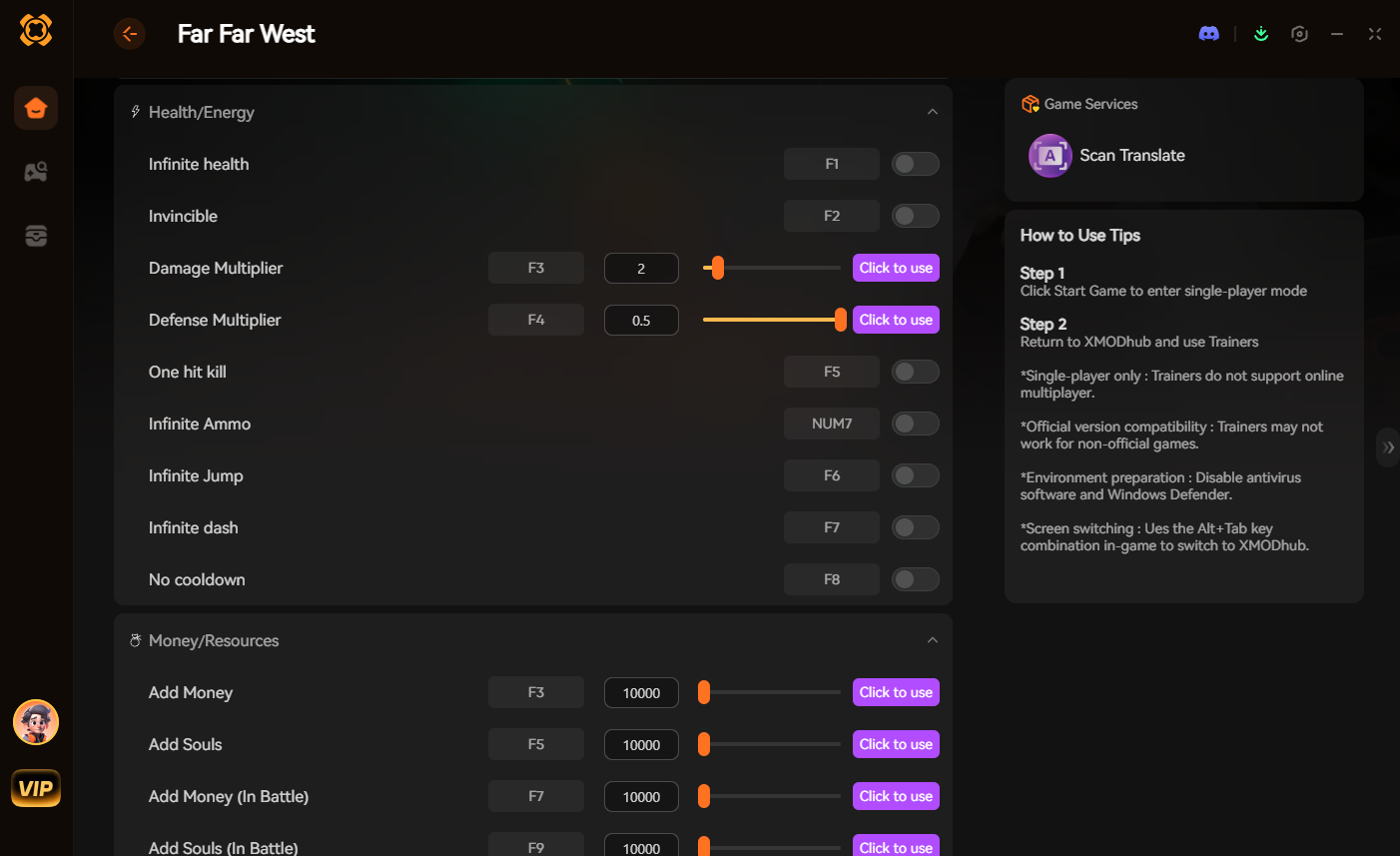
Bypass the frustration of broken scripts and corrupted save files. Take total control of your gaming session instantly.
Frequently Asked Questions (FAQ)
Q: Can a Far Far West mod install corrupt my multiplayer extraction saves?
A: Yes, absolutely. If you install script-heavy gameplay modifications and attempt to join a co-op lobby, your game client will desynchronize from the host. This can cause severe fatal errors, and if the game crashes while writing to your local save file during an extraction, you can lose all your character progression and Spectral Iron.
Q: Where is the exact Far Far West mod folder located on Steam and Epic Games?
A: The game does not come with a dedicated folder out of the box. You must navigate to your installation path (e.g., Steam/steamapps/common/Far Far West/FarFarWest/Content/Paks) and manually create a new folder named exactly ~mods. You will place your custom .pak files into this new folder.
Q: Do I need a mod manager to use XMODhub in Far Far West?
A: No, you do not need any external community managers to use XMODhub. It operates as a completely independent, standalone desktop client. You do not need to manage load orders or move files around; XMODhub dynamically interacts with the game’s memory in real-time.
Conclusion: Conquer the Frontier
Tailoring your journey through the Spooky West is one of the most rewarding aspects of PC gaming. Whether you choose to manually organize your Unreal Engine files or rely on a dedicated Far Far West mod manager to handle the heavy lifting, always prioritize the safety of your save files by creating backups.
However, if you are looking to skip the tedious economy grind, survive unfair boss encounters, and just enjoy the spectacular combat without the technical headaches, XMODhub is the superior choice.
With dedicated, crash-free support for over 5,000+ single-player and co-op PC games including Fallout 4, Champ d'étoiles, Cyberpunk 2077, XMODhub is the ultimate toolkit for gamers who value their time.
Download the XMODhub app today and reclaim your gaming experience!

Je suis un joueur passionné et j'écris sur XMODhub, qui se consacre à vous apporter les dernières nouvelles, astuces et idées en matière de jeux.
Connectez-vous avec moi :
Profil LinkedIn