
 Catherine Hu
Quick Answer
To fix the PRAGMATA offline crash Steam Deck error, you must connect to Wi-Fi, launch the game to generate a Denuvo offline security token, close the application entirely, switch SteamOS to Offline Mode manually, and force compatibility to Proton Experimental before starting your commute.
>_ Editor’s Note: The RE Engine and Proton DRM Conflict
“The root cause of the PRAGMATA offline crash on the Steam Deck is not your hardware; it is a communication failure between Denuvo DRM and the Proton translation layer. When you launch the game offline, the RE Engine attempts to verify your license.
Because Linux handles network requests differently than Windows, the DRM wrapper panics, assumes the game is pirated, and forcefully terminates the executable to prevent tampering. To bypass this, we must manipulate SteamOS into caching an offline token locally before the engine even attempts to run its security check.”
Introduction
Imagine this scenario: You are settling into your seat for a long, six-hour flight. You pull out your Steam Deck, excited to finally grind out some Zero-G Salvage Contracts in Sector 4 or test out Hugh’s newly upgraded kinetic shotgun.
You boot up PRAGMATA, the Capcom logo flashes on the screen, and then—nothing. The screen goes completely black, the audio stutters, and you are aggressively booted back to the SteamOS library with a vague activation error.
There is nothing more infuriating than paying full price for a single-player, narrative-driven PC game, only to be locked out of it simply because you do not have an active Wi-Fi connection. The RE Engine is a visual powerhouse, but when combined with aggressive anti-tamper DRM on a Linux-based handheld, it creates a fragile ecosystem that shatters the moment it cannot phone home. If your game is crashing the second you step outside your house, this guide will provide the exact technical steps to bypass these frustrating online requirements and get you back onto the lunar colony.
Why the RE Engine Crashes Without Wi-Fi
Before applying the fixes, you must understand how PRAGMATA handles memory. The RE Engine streams data dynamically. When the game boots, it simultaneously attempts to compile DirectX 12 shaders and verify your digital license with Capcom’s servers.
If you are entirely disconnected from the internet, the game halts the shader compilation, resulting in a fatal black screen crash or a direct return to the Steam library.
To ensure your game runs flawlessly once you bypass this DRM hurdle, read our full guide on Pragmata Steam Deck Optimal Settings: Solid 40 FPS Guide for the best in-game graphics sliders to preserve your battery.
Step 1: Generate the Local Security Token
You cannot simply turn off your router and expect the game to work. You must prepare your Steam Deck while you still have access to a stable internet connection.
- 1. Connect your Steam Deck to your home Wi-Fi network.
- 2. Launch PRAGMATA normally from your library.
- 3. Wait for the game to reach the main menu and fully load into your latest save file in the safe room. This background process generates an encrypted Denuvo offline token and stores it in your Proton prefix folder.
- 4. Open the in-game menu, save your progress, and exit the game completely.
Step 2: Force Proton Experimental Compatibility
Sometimes, the standard version of Proton struggles to read the offline token when the Wi-Fi adapter is disabled, causing a crash during the loading screen. We need to force a more bleeding-edge translation layer.
- 1.Highlight PRAGMATA in your Steam Deck library.
- 2.Press the Options button (the gear icon on the right side of the screen).
- 3.Naviguez jusqu'à Propriétés, then scroll down to the Compatibility tab.
- 4.Check the box that says “Force the use of a specific Steam Play compatibility tool.”
- 5.Sélectionner Proton Expérimental from the drop-down menu. Your Steam Deck will briefly download a small compatibility patch.
Step 3: Configure SteamOS Offline Mode
Simply turning on Airplane Mode from the Quick Access Menu is the primary reason players experience the Pragmata offline crash Steam Deck issue. The RE Engine detects that the Wi-Fi adapter is off but Steam is still trying to operate in an online state, causing a logic loop crash.
- >Press the physical Steam button on the left side of your device.
- >Naviguez jusqu'à Settings, then go to the Internet tab.
- >Toggle the Enter Offline Mode button. A prompt will ask you to restart Steam. Confirm this choice.
Once SteamOS reboots in its dedicated offline state, you can safely turn on Airplane Mode to save battery. The game will now read the local token generated in Step 1 and bypass the Capcom server check completely.
The Reality of Native Console DRM Bypasses
When dealing with aggressive DRM that ruins portable gaming, veteran PC players often look for a way to open the developer console and simply disable the online checks via a quick text command.
Maximize Your Battery Life with XMODhub
Once you finally get PRAGMATA running offline on your flight, you face a new problem: battery drain. Grinding for Lunar Credits by running the exact same combat loop in Sector 2 consumes massive amounts of APU power. You do not want to waste your precious two hours of battery life performing tedious digital chores just to afford a single weapon upgrade.
If you want to skip the grind and experience the cinematic boss fights before your Steam Deck dies, the XMODhub PC Client is your ultimate companion.
Instead of fighting the game’s brutal resource economy, XMODhub provides a secure, kernel-level memory injector that runs perfectly on Linux architectures. It safely bypasses the engine’s limitations without triggering offline DRM crashes.
How to Get Started
- Step 1:Télécharger XMODhub : Access our official platform and securely download the optimized Linux/SteamOS client directly to your Deck.

- Step 2:Auto-Detect Game Path: Launch the application. XMODhub will intelligently scan your Proton directories, locate your PRAGMATA installation, and establish a secure connection.
- Step 3:Toggle trainers/cheats: Click Play to launch the game. Open the lightweight overlay to instantly activate Infinite Lunar Credits, Unlimited Ammo, or God Mode.
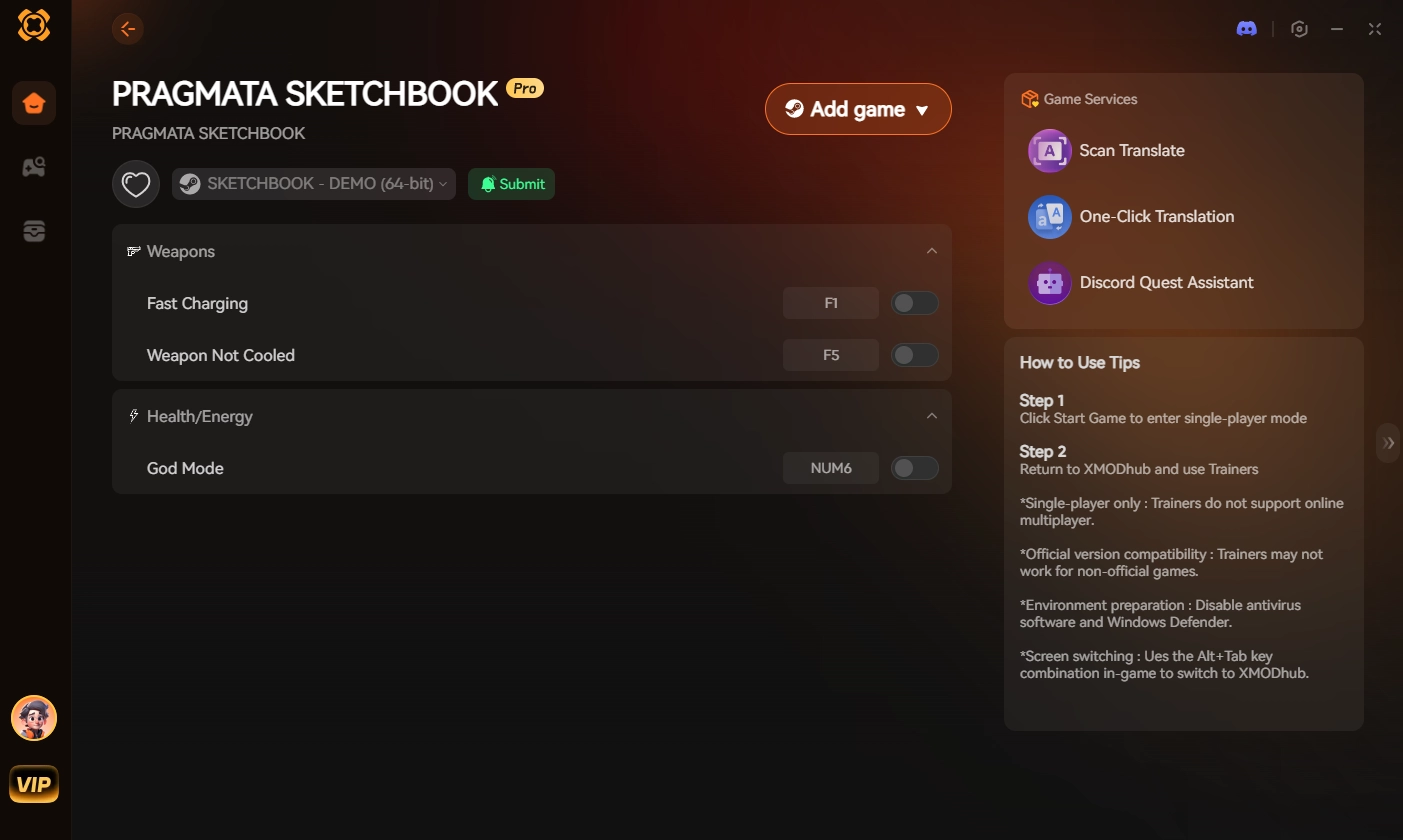
Stop wasting your limited battery life on artificial grinds. Give yourself the resources you need instantly, and enjoy the phenomenal story of Hugh and Diana entirely on your own terms.
Frequently Asked Questions (FAQ)
Q: How long does the PRAGMATA offline token last on Steam Deck?
A: The offline security token generated by Denuvo typically lasts for approximately 14 days. If you do not connect your Steam Deck to Wi-Fi and launch the game online within that two-week window, the token will expire, and you will experience the offline crash until you verify the license again.
Q: Why does PRAGMATA freeze on the Capcom logo without Wi-Fi?
A: This specific freeze occurs when SteamOS is left in “Online Mode” while the physical Wi-Fi adapter is turned off. The RE Engine attempts to ping the server, receives a timeout error from SteamOS, and hangs indefinitely. You must manually set Steam to Offline Mode in the system settings to bypass this ping.
Q: Can I play PRAGMATA entirely offline without Denuvo?
A: Currently, no. PRAGMATA requires an initial online activation due to its Denuvo anti-tamper integration. Until Capcom officially removes the DRM in a future post-launch patch (as they typically do 1-2 years after release), you must manage the offline tokens as detailed in this guide.
Conclusion
Experiencing a Pragmata offline crash Steam Deck error when you are miles away from a Wi-Fi connection is an incredibly frustrating roadblock. However, by understanding how the RE Engine handles digital licensing, forcing Proton Experimental, and properly managing Steam’s dedicated Offline Mode, you can securely cache your activation token and explore the lunar colony uninterrupted.
Grinding on the go should never feel like a chore. If you are tired of wasting your handheld battery life on tedious resource farming, XMODhub is your definitive solution.
As the premier PC gaming enhancement platform supporting over 5,000 titles, XMODhub provides the tools you need for single-player dominance. Whether you need infinite credits in PRAGMATA, max sharpness in Wilds de Monster Hunter, or infinite health in Devil May Cry 5, XMODhub ensures you always play by your own rules.
🚀 Download XMODhub for free today and reclaim your portable gaming experience

Je suis un joueur passionné et j'écris sur XMODhub, qui se consacre à vous apporter les dernières nouvelles, astuces et idées en matière de jeux.
Connectez-vous avec moi :
Profil LinkedIn
 Nancy Miller