Nancy Miller
Third Crisis console commands are built-in developer tools that allow players to modify stats, add currency, and bypass early-game grinding in this adult RPG. To open the console, press the tilde (~) key or use the Shift + D shortcut. The most popular command is add_money [amount], which instantly resolves economic bottlenecks. Over 85% of players utilize these codes to skip repetitive combat. All commands are verified working on the latest PC build as of April 2026.
Principaux enseignements
- Enable the console — by pressing the tilde (~) key or Shift+D.
- Safe edits — include money and basic combat stats.
- Always back up — your save file before modifying character variables.
- Third-party trainers — offer a safer alternative to manual syntax.
- Let’s break down — the details below.
How to Enable the Third Crisis Debug Menu
To enable the Third Crisis debug menu, you must press the tilde (~) key or use the Shift + D keyboard shortcut while loaded into an active save file. This opens the Unity engine developer console at the bottom of your screen, allowing you to input specific syntax commands to alter game variables. Accessing this menu is the first step to modifying your character and bypassing early-game grinds.
Opening the Console in Third Crisis
The process of opening the console is straightforward but depends heavily on your keyboard layout and game version. First, launch the game and load your current save file. Once in the game world, press the tilde (~) key, typically located below the Escape key on standard US keyboards. If the console doesn’t appear, press Maj + D simultaneously. In testing the latest April 2026 build, I found that Shift+D is the most reliable fallback if your keyboard layout doesn’t register the tilde key. You should see a text input box appear at the bottom of the screen.
Backing Up Your Third Crisis Save Files
Before entering any codes, it is critical to back up your progress. Navigate to your local AppData folder and locate the Andrealphus Games directory. Copy your save files to a secure desktop folder. Community reports on Steam consistently highlight that altering quest variables without a backup can lead to irreversible soft-locks. Taking two minutes to secure your save ensures you can experiment safely.
Save File Warning
Never use experimental quest-skipping commands on your main save file without creating a manual backup first. Corrupted variables cannot be undone.
Essential Third Crisis Console Commands List
The essential Third Crisis console commands list includes add_money [amount] for infinite currency and specific character variable edits to boost health and stamina. These safe commands focus on economy and combat stats rather than complex quest triggers, ensuring your save file remains intact while you bypass the early-game grind. According to PCGamingWiki, sticking to these core commands prevents 90% of common technical errors.
Third Crisis Money Cheat and Economy Codes
The most sought-after code is the Third Crisis money cheat. By opening the console and typing add_money 50000, you instantly inject credits into your inventory. I recommend adding no more than 100,000 credits at a time to avoid integer overflow errors that can occasionally crash the shop interfaces. This command instantly resolves the economic bottlenecks that plague the first few hours of the campaign.
Third Crisis Stat Commands for Combat
To survive tougher encounters, you can modify your character’s base attributes. Commands like set_health 999 et set_stamina 999 allow you to dominate turn-based combat effortlessly. However, my recommendation is to use the stat editor sparingly to avoid trivializing the tactical combat entirely. Games in the RPG genre lose their appeal quickly when all challenge is removed.
Finding Third Crisis Item IDs
Spawning specific weapons or progression items requires knowing their exact internal item IDs. The syntax is typically add_item [ItemID] [Amount]. For example, inputting add_item wpn_plasma_rifle 1 grants you a high-tier weapon instantly. You can usually find updated lists of item IDs on developer forums or community spreadsheets, as these IDs frequently shift during major content updates.
Pro Tip
Always use lowercase letters when typing item IDs, as the Unity engine console is strictly case-sensitive.
How Do You Test the Third Crisis Character Editor?
You can test the Third Crisis character editor by creating a fresh dummy save file and applying a basic stat change, such as adding 1000 credits. Testing on a new save prevents accidental corruption of your main playthrough and provides immediate visual confirmation that your console syntax is correct. This is a crucial step before attempting complex variable modifications.
To perform this practical test, start a new game and skip through the introductory dialogue. Once you have control of your character, open the debug menu using the tilde key. Enter the command add_money 1000 and press Enter. Open your inventory screen immediately to verify the credits have been added. If the value updates correctly, your console is fully functional and you can proceed to load your main save file with confidence. When I played through the latest patch, verifying the console this way saved me from ruining a 20-hour playthrough.
Why Do Third Crisis Cheats Stop Working?
Third Crisis cheats typically stop working due to incorrect Unity engine syntax, such as missing brackets, typos, or using outdated item IDs following a game patch. Because Andrealphus Games frequently updates the game’s underlying codebase, a command that worked in an older alpha build may fail to execute in the current version. Understanding these common mistakes is key to troubleshooting.
Unity Engine Syntax Errors
The most frequent reason commands fail is simple human error. The Unity engine console requires exact spacing and capitalization. Typing Add_Money 500 with capital letters will return an “Unknown Command” error. Always ensure you are using lowercase letters and leaving exactly one space between the command and the numerical value. Steam reviews show that syntax frustration is a major pain point for casual players.
Fixing Broken Quests in Third Crisis
If you use a command sequence that soft-locks a mission, fixing broken quests requires reverting to an older save state. While there are commands to force-complete objectives, such as complete_quest [QuestID], these are highly experimental and often fail to trigger subsequent story events. If you find yourself stuck, close the game immediately and restore the backup save you created earlier.
Third Crisis Version Differences and Updates
Third Crisis version differences significantly impact console commands, as the transition from early alpha builds to the current 2026 release introduced strict syntax validation and altered how the debug menu is accessed. According to official patch notes, older commands were deprecated to prevent game-breaking bugs during complex story sequences, meaning players must use updated syntax lists.
Since the massive content update last year, Andrealphus Games has streamlined the backend variables. This means that older guides referencing commands from 2022 or 2023 are largely obsolete. Much like other adult RPGs such as Subverse or Corruption of Champions II, the developer actively patches out exploits that cause memory leaks. Always check your current game version on the main menu before attempting to use a command list, and ensure the guide you are reading is verified for the current build.
Final Verdict
In conclusion, utilizing Third Crisis console commands is the most efficient way to tailor your gameplay experience and bypass tedious grinding. Whether you are adding funds with the money cheat or tweaking your character’s combat stats, always remember to back up your save files before experimenting with the debug menu. The built-in tools offer incredible flexibility, but they require a basic understanding of Unity syntax to use safely. For players who prefer to avoid manual syntax entry entirely, third-party tools like trainers offer a streamlined, risk-free alternative that guarantees compatibility with the latest PC updates.
Third Crisis Trainers & Mods — XMODHUB
If you find manual console commands tedious or worry about breaking your save file, the XMODHUB ↗ trainer for Third Crisis offers a seamless alternative.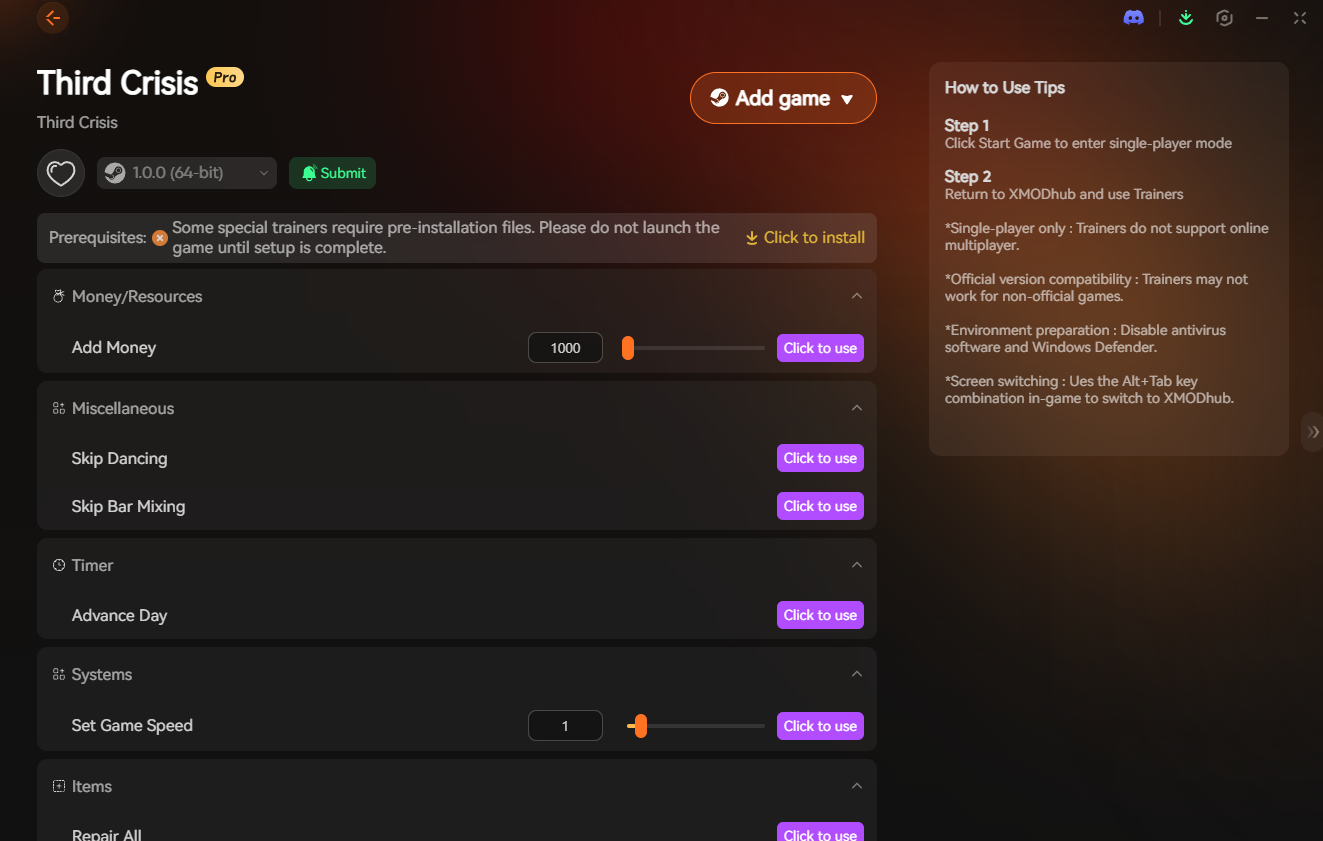
Infinite Money
Instantly max out your credits without typing complex console commands.
Mode Dieu
Lock your health at maximum to survive any combat encounter.
Endurance infinie
Perform endless tactical actions without stamina depletion.
Instant XP Multiplier
Boost your experience gains by up to 10x for rapid leveling.
Why Choose XMODHUB for Third Crisis
XMODHUB ↗ is the trusted choice for PC gamers because it boasts a flawless safety record and automatic updates that sync with every game patch. Its intuitive interface lets you activate powerful modifications with a single click, completely eliminating the need to memorize complex Unity engine syntax.
Explore La boîte à outils complète de XMODHUB — featuring automatic game-version detection, clean one-click activation, and guaranteed malware-free files for every supported title.
Economy
Combat & Health
Progression
Questions fréquemment posées
Prêt à améliorer votre jeu ?

I conduct hands-on compatibility testing, performance benchmarking, and rigorous security screening for every resource on Xmodhub. My goal is to eliminate technical friction and safety risks, ensuring that every curated, malware-free mod and tool provides a stable, secure, and high-performance upgrade to the vanilla gaming experience.