
 Catherine Hu
To find the Road to Vostok keycard alpha spawn, thoroughly search the military checkpoint command desks and the flooded underground bunker generator room. If the keycard is completely missing from these areas, clear your Godot engine shader cache in your Windows AppData folder and verify your game files to fix the loot rendering glitch.
Many players immediately assume their playthrough is soft-locked and take to the forums to report a bug. However, the missing keycard is rarely a broken quest. Instead, it is usually a combination of the game’s brutal randomized loot tables and specific rendering hiccups within the game engine causing the item to clip through the geometry. Before you abandon your highly geared character and restart your run, read our complete guide to securing this vital item.
Vous pouvez aussi aimer : All Hidden Bunkers Locations in Road to Vostok & How to Enter
Editor’s Note: The Godot Engine Transition
“When the solo developer of Road to Vostok boldly ported the entire game from Unity to the Godot 4 engine, the loot generation and physics scripts were completely rebuilt. Sometimes, small items like keycards can load before the desk geometry does, causing the card to fall through the floor. I have lost countless high-tier loadouts to these physics quirks. Mastering the technical fixes below is the only way to ensure your survival on the border.”
Exact Keycard Alpha Spawn Locations
Before applying any technical fixes, you must ensure you are actually looking in the right places. The Road to Vostok keycard alpha spawn is not entirely static; it rotates between a few highly contested military zones.
- ▹The Border Checkpoint Command Tent: Look on top of the green tactical folding tables near the radio equipment.
- ▹The Flooded Bunker Generator Room: Search the metal shelving units near the main diesel generator. You will need a flashlight to spot it in the dark corners.
- ▹Fallen Guard Patrols: Occasionally, a heavily armored AI guard patrolling the inner perimeter will carry the keycard in his tactical rig.
Technical Fix 1: Clear the Godot Engine Cache
If you have cleared all the above locations and the keycard is genuinely missing, you are likely experiencing a Godot engine level-streaming bug. When the game loads the map chunks, corrupted temporary files can prevent specific loot node meshes from rendering.
To fix this, you need to clear the engine’s cache:
- ✓Press the Windows Key + R to open the Run dialog.
- ✓Type
%appdata%and press Enter. - ✓Navigate to the Godot folder, then open
app_userdata. - ✓Find the Road to Vostok folder.
- ✕Delete the ShaderCache and TempLoot folders. Do not delete your main save file!
- ✓Relaunch the game. The engine will compile fresh shaders and properly render the missing items on the tables.
Technical Fix 2: DirectX 11 and Administrator Rights
Sometimes, the game fails to spawn critical quest items because the background scripts lack the proper Windows permissions to write to the memory pool, leading to silent crashes or broken loot tables.
Navigate to your Steam library, right-click Road to Vostok, and select Properties. In the Launch Options box, type -force-d3d11 to force the game to run in a more stable DirectX 11 mode. Next, browse to your local game files, right-click the main Road to Vostok executable, select the Compatibility tab, and check Run this program as an administrator. This ensures the game has full priority over your system’s memory allocation.
The Problem with Native Console Commands
When an item glitches through the floor in other survival games, players simply hit the tilde key and type a spawn code. However, because Road to Vostok is a hardcore survival simulator, the developer has completely locked out the native command console in the public build.
There are no universally working item IDs or debug menus available for players to use. Attempting to force the developer console open by modifying the game’s assembly files will immediately trigger a fatal crash loop, completely wiping your current permadeath character. You cannot type your way out of a bugged loot spawn.
The Ultimate Workaround: XMODhub Item Spawner
Losing hours of meticulous looting, surviving harsh weather, and fighting through military blockades just because a tiny plastic keycard clipped through a table is absolutely devastating. Having your game crash and losing an entire shelter’s worth of gear because of an engine bug is enough to make anyone quit playing.
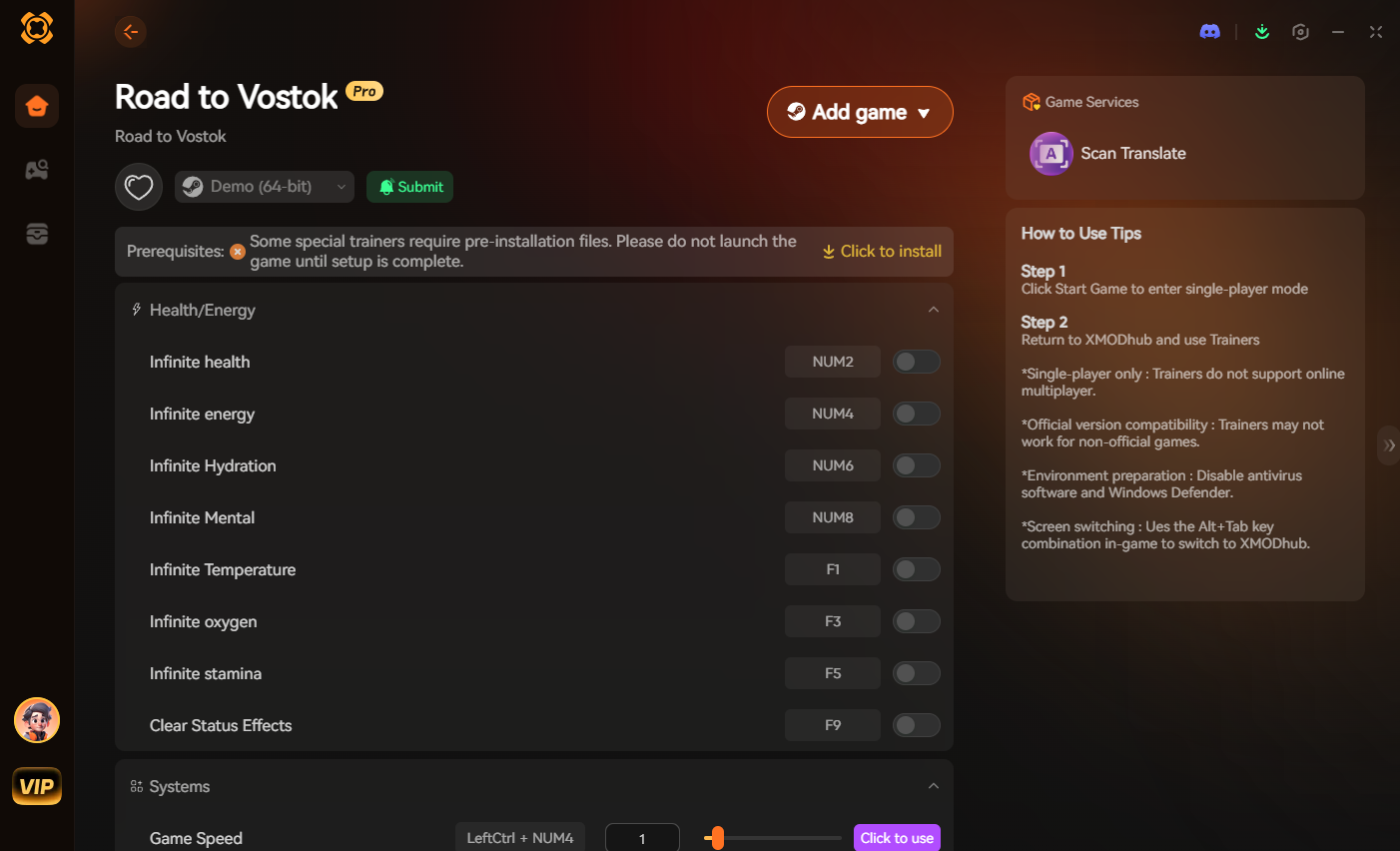
Instead of losing your mind over corrupted loot spawns, you can use the XMODhub PC Client to instantly recover your lost progress. Our secure memory injector features a Visual Item Spawner specifically tailored for the Godot engine architecture.
- 1.Télécharger XMODhub : Navigate to our official website and securely download the desktop client.

- 2.Auto-Detect Game Path: Launch the application. XMODhub will automatically locate your Road to Vostok installation folder and safely hook into the game without triggering anti-cheat errors.
- 3.Toggle trainers/cheats: Click Play and open the overlay. Simply open the visual spawner, select the Keycard Alpha, and add it directly to your inventory. You can also toggle Infinite Health or Unlimited Stamina to safely extract your hard-earned loot.
Frequently Asked Questions (FAQ)
Q.Does the Road to Vostok keycard alpha spawn in the exact same place every single time?
No. The hardcore loot economy relies on a semi-randomized table. While the keycard is guaranteed to spawn somewhere within the high-security military zones, its exact location rotates between command desks, bunker shelves, and high-tier AI enemy drops.
Q.Will clearing the Godot engine cache delete my Road to Vostok save file?
No, as long as you strictly delete only the temporary shader cache and loot cache folders. Your actual character progression and permadeath save state are stored in a separate persistent data file within the same directory. Always double-check before deleting folders.
Q.Can I use console commands to spawn the keycard alpha in Road to Vostok?
Unfortunately, you cannot. The developer has completely disabled the native debug console in the public builds to maintain the hardcore integrity of the game. If you suffer a game-breaking bug and lose an item, you must use an external memory tool like XMODhub to inject the item back into your inventory.
Conclusion
Finding the Road to Vostok keycard alpha spawn is the ultimate test of your scavenging skills and patience. By thoroughly checking the military checkpoints, clearing your engine cache to fix rendering glitches, and optimizing your launch settings, you can ensure you never miss your extraction.
However, we know that technical bugs can ruin the hardcore survival experience. XMODhub is here to protect your valuable time. As a comprehensive platform supporting over 5,000 games, we provide the ultimate safety net. Whether you need an item spawner for Road to Vostok, or you want to enhance similar hardcore survival shooters like Escape from Tarkov, XMODhub ensures you always have the best tactical tools ready.

Je suis un joueur passionné et j'écris sur XMODhub, qui se consacre à vous apporter les dernières nouvelles, astuces et idées en matière de jeux.
Connectez-vous avec moi :
Profil LinkedIn
 Nancy Miller