
 Catherine Hu
Quick Answer: What are the best Goblin Nest mods right now?
Based on community downloads, stability, and our own 2026 testing across Steam and DLSite, the top 5 must-have Goblin Nest mods are:
- BepInEx Engine Tweaker: Best for overall Unity engine optimization, fixing late-game FPS drops, and resolving pathfinding bugs during massive raids.
- Advanced Roster UI: Completely overhauls the vanilla captive and goblin management UI for better sorting by traits, genetics, and obedience levels.
- Auto-Feed & Resource Manager: Removes the tedious micro-management of manually distributing Meat to specific dungeon cells.
- HD Portrait & Sprite Upscaler: Enhances the 2D environmental textures and upscales character sprites to a much cleaner resolution.
- Instant Event Trigger: Allows you to fast-forward or force-trigger specific breeding or raid events without waiting for the daily cycle to end.
Editor’s Note on Testing Methodology
The mods featured in this guide were manually tested by our team on a high-end PC rig (RTX 4090, 64GB RAM) running Goblin Nest Patch 1.14. Because this is a Unity game with fragile JSON files, we have verified that these mods are currently functional and compatible with each other. Always remember to back up your original SaveData.json files located at C:\Users\YourUsername\AppData\LocalLow\BadColor\GoblinNest\ before altering your game directory.
Introduction
Playing Goblin Nest in its vanilla state is a uniquely engaging management experience. Building your underground empire, managing genetics, and capturing high-tier heroines provides hours of content. But the modding community has taken BadColor’s indie hit to a completely different level. Whether you are annoyed by a clunky roster system, want to push the visual quality, or simply want to skip the tedious resource-grinding mechanics to focus on base building, there is a mod for exactly that.
However, diving into Unity modding can be overwhelming. With hundreds of community scripts available on alternative forums, figuring out which ones actually work—and which ones will permanently corrupt your save file—is a massive headache.
After spending dozens of hours tweaking load orders and testing compatibility across the Steam and Itch.io versions, we have compiled the definitive list of the best Goblin Nest mods you need to install right now.
Vous pouvez aussi aimer : Goblin Nest Cheat Engine Table vs. XMODhub Trainer: The Best Free Alternative (2026)
How to Install Mods for Goblin Nest Safely
Before downloading anything, you need to set up your game directory to accept modified files. For Goblin Nest, the community relies entirely on Unity script injectors, meaning manual installation is usually required.
Step-by-Step Installation:
- Download the Script Hook: You must install BepInEx (specifically the version for x64 Unity games).
- Extract to Root: Drop the BepInEx files directly into your Goblin Nest root game folder (where the
GoblinNest.exeis located). - Run the Game Once: Launch the game once and close it. This generates the necessary
pluginsfolder inside the new BepInEx directory. - Install and Deploy: Download your chosen
.dllmod files from the community and place them into theBepInEx/plugins/dossier.
Top Quality of Life (QoL) Mods
These mods do not drastically change the core management game; they just remove the annoyances that waste your time during the daily cycle.
- Mass Breeder Tool: Upgrades the nest management menu. This eliminates constant clicking and lets you assign multiple goblins to specific tasks simultaneously.
- Instant Gestation Animation: Skips unskippable event cutscenes and dramatically speeds up the daily transition animations.
- Auto-Sanity Balancer: Automatically utilizes resources to prevent captives from suffering mental breaks when their sanity drops too low.
Best Visual and UI Mods
If you want a cleaner experience, these mods will make your dungeon interface significantly more readable.
- Dark Mode UI: Completely revamps the game’s blindingly bright menus into a sleek, dark aesthetic.
- Uncensored Patch (Steam Version): Restores the original 18+ artwork and event CGs that were removed or altered for the Steam release (making it identical to the DLSite version).
- Detailed Stat Overlay: Displays hidden genetic values, exact obedience numbers, and exact percentage chances for raid successes directly on the screen.
Top Gameplay and Overhaul Mods
Looking to change how the nest is actually managed? These mods adjust combat, economy, and progression.
- Hardcore Raiding Overhaul: Rebalances enemy adventurer AI, making the humans significantly stronger and your raids much riskier.
- Expanded Genetics Pool: Adds entirely new traits, mutations, and goblin classes to your breeding pool.
- Generous Merchants: Adjusts the traveling vendor prices and loot drop rates, making Gold and Rations much easier to acquire in the early game.
Modding Alternatives for Goblin Nest
Because Goblin Nest features adult content and is a niche indie title, you will not find it on mainstream sites like Nexus Mods. Depending on the type of content you are looking for, you must check alternative hubs:
- F95Zone / Anime Sharing: The undisputed primary hub for adult-oriented indie game mods, save files, and fan translations.
- Discord: Many advanced mod authors host their custom BepInEx
.dllbuilds and exclusive content on the developer’s or fan-made private servers. - GitHub: For open-source quality-of-life UI tweaks.
Is There a Mod Limit in Goblin Nest?
Yes, depending on the Unity engine, there is often a hard cap on how many script mods you can run simultaneously without causing massive memory leaks. For Goblin Nest, pushing past 15-20 heavy BepInEx .dll plugins will often cause the daily transition logic to fail or freeze entirely.
The Danger of Mod Conflicts and Corrupted Saves
While UI mods are usually safe, gameplay mods that alter resource generation, captive traits, or core stats can be incredibly dangerous to your SaveData.json fichier.
The biggest issue in Goblin Nest modding is script conflicts. If Mod A and Mod B try to change the same daily event trigger, your game will crash to the desktop immediately. Furthermore, every time the developer pushes an official update, script-heavy mods break. If you load a save file attached to a broken mod, that JSON save can become permanently corrupted, turning your hours of progress into unreadable text.
The Easier Alternative to Gameplay Mods: XMODhub
If your main goal for modding is just to make the game more enjoyable—like giving yourself infinite Meat, unlimited Gold, or maximum Obedience to bypass a frustrating management grind—you do not need to risk breaking your game with outdated BepInEx scripts.
This is where XMODhub shines as the ultimate gameplay enhancer.
Instead of downloading outdated .dll mods that conflict with each other and corrupt your JSON files, the XMODhub app runs safely alongside Goblin Nest.
- Zero Installation Conflicts: Because it alters memory dynamically, there are no files to drag and drop, and absolutely no load order nightmares.
- Update Proof: XMODhub updates its features automatically when BadColor patches the game, so you never lose access to your resource cheats.
- Save File & Achievement Safe: Unlike traditional save editors that permanently brand your save file or corrupt your data, XMODhub leaves zero trace on your hard drive when you close it.
How to Use XMODhub for Goblin Nest
- Download and Launch the free XMODhub desktop app.

- Search for Goblin Nest.
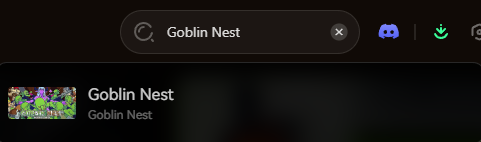
- Click “Play”.
- Toggle your desired cheats (Infinite Gold, Max Mood, Fast Gestation) directly from the clean UI or via hotkeys.
- Done.
🚀 Download the Goblin Nest XMODhub Trainer Here
Troubleshooting: Mods Crashing on Startup
If your game is crashing to a black screen after installing community mods, check these common culprits:
- Missing BepInEx: You installed a
.dllmod into your game folder but forgot to install the actual BepInEx hook to make it run. - Outdated Mods: Check if the mod has been updated for the latest Goblin Nest patch. If it has not been updated since version 1.0, delete it immediately.
- Verify Game Files: Go to Steam, right-click Goblin Nest > Properties > Installed Files > Verify integrity of game files to wipe the broken mods and start fresh.
Frequently Asked Questions (FAQ)
Will installing mods ban me from Goblin Nest?
No. Because Goblin Nest is a single-player management experience, developers do not ban players for modifying their own game files. There is no anti-cheat software in this game.
Do mods disable Steam achievements in Goblin Nest?
In many cases, yes. The engine can detect heavily modified memory values and will lock achievement progression. You often have to use a secure memory tool like XMODhub, which safely bypasses the detection entirely while you use infinite resources.
Conclusion
Modding Goblin Nest is a fantastic way to breathe new life into a management game you already love. While UI tweaks and uncensored patches require traditional file placement, altering your dungeon’s economy or captive stats does not have to be a complicated, crash-prone process.
For a seamless, risk-free way to customize your difficulty, bypass the resource grind, and truly build your monster empire by your own rules, XMODhub is the superior choice. With dedicated support for Goblin Nest and over 5,000+ other single-player PC games—including indie management hits like Cult of the Lamb, KeeperRL—XMODhub ensures you spend your time actually playing, rather than troubleshooting broken JSON files.

Je suis un joueur passionné et j'écris sur XMODhub, qui se consacre à vous apporter les dernières nouvelles, astuces et idées en matière de jeux.
Connectez-vous avec moi :
Profil LinkedIn
 Nancy Miller
Thanks for putting together such a thorough and well-researched list—especially the BepInEx Engine Tweaker and Auto-Feed & Resource Manager mods, which are game-changers for stability and streamlined gameplay. I’ve been running into those FPS drops and manual resource management issues myself, so this is exactly the kind of insight the community needs. The testing methodology you outlined also gives a lot of confidence in the compatibility and reliability of these mods.