
 Catherine Hu
Let’s be honest: The absolute worst feeling in Solasta 2 isn’t losing a fair fight—it’s spending 45 minutes meticulously positioning your party in a Cataclysm-difficulty boss encounter, only to have the game completely freeze because a goblin got stuck inside a wall. If you want to salvage your hard-earned progress and avoid replaying massive dungeons, you need to know exactly how to break these softlocks.
In this technical troubleshooting guide, we are going to demystify the pathfinding and camera mechanics in Solasta 2. We will show you the exact native keybinds to snap your camera back to reality, explain why the enemy AI occasionally breaks the game, and—if you are dealing with a permanent “stuck turn” bug—how to use the XMODhub PC Trainer to forcefully override the combat sequence and save your run.
Editor’s Note
By Catherine Hu, Senior Editor at XMODhub.
Our technical QA team has reproduced and tested these exact softlocks on the Day 1 Steam build of Solasta 2. A quick warning for frustrated players: Do not mash your keyboard if the enemy turn is stuck! Mashing can cause the Unity engine to queue up conflicting inputs, which may corrupt your autosave if the game crashes. If the native camera reset buttons fail, carefully read our XMODhub “Force End Turn” bypass section below.
Vous pouvez aussi aimer : Solasta II Cheat Engine Alternative Guide
Quick Answer: How to Reset the Camera
(Is your screen currently staring at a pitch-black wall or stuck under the floorboards? Use these default inputs to snap it back to your party.)
- ✦ Double-Click a Portrait: The fastest way to fix a detached camera is to double-click any of your characters’ portraits on the bottom UI bar. This forces the camera to instantly center on their exact coordinates.
- ✦ Manual Pan & Rotate: Press and hold the Middle Mouse Button (the scroll wheel) and drag to rotate the camera out of the geometry. Alternatively, use the WASD keys to manually pan away from the glitched terrain.
- ✦ Change Elevation: Solasta 2 features heavy verticality. Scroll the Mouse Wheel up or down to change the camera’s elevation plane. You might just be looking at the ceiling of the dungeon instead of the floor.
Fixing the “Stuck in Combat” AI Bug
Sometimes the camera is fine, but the combat sequence simply stops. It is the enemy’s turn, their portrait is highlighted, but they just stand there doing absolutely nothing.
Wait it Out
Give the game exactly 60 seconds. Solasta 2 has a built-in failsafe timer. If an AI takes longer than a minute to calculate a path, the engine will often force-skip their turn automatically.
The UI Refresh
Press ESC to open the pause menu, then close it. Opening an overlapping UI menu can sometimes jumpstart a stalled animation script.
Reload the Autosave
If the enemy is permanently stuck in a running animation against a wall, the combat script has fatally crashed. You must press F8 to quickload your most recent save. The game generously autosaves at the start of most encounters.
The Core Engine Lock: Why the Game Freezes
The developers do not leave these bugs in the game intentionally. Solasta 2 runs on the Unity Engine and utilizes an incredibly complex 3D “NavMesh” (Navigation Mesh) to dictate where characters can walk, jump, or fly.
When a Sorak archer tries to move behind cover, the AI calculates a path. However, if a physics object (like a broken barrel) gets wedged into that specific grid square during the fight, the AI gets trapped in an infinite calculation loop. It wants to move to the square, but the engine says the square is occupied. Because the Unity Engine is waiting for the movement animation to finish before passing the turn back to you, the game softlocks.
The Ultimate Solution: XMODhub Combat Hacks
You should not have to forfeit an hour of brilliant tactical gameplay just because a single monster’s pathfinding script broke. Furthermore, because Solasta 2 completely lacks a native developer console, you cannot type a command to manually end the enemy’s turn.
The XMODhub PC Trainer bypasses these frustrating engine locks by giving you direct control over the combat state:
- Force End Turn
Injects a command that instantly terminates the current actor’s turn, bypassing the AI calculation loop and giving control back to your Paladin. - Kill All Enemies
If a monster has glitched entirely inside a wall and cannot be targeted by your spells, this hotkey will instantly reduce all hostile HP to zero, ending the combat encounter and allowing you to collect your loot. - Free Camera Mode
Detaches the camera from the game’s strict bounding boxes, allowing you to fly through walls and locate missing enemies or interactables that fell out of bounds.
Activating the Override Command
Gaining control of your combat state requires no complex file editing. The process is completely streamlined through our desktop application:
- Download the XMODhub application from our official homepage.

- Search for Solasta 2 within your library dashboard.
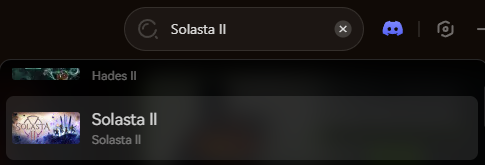
- Boot up your game via Steam and load your glitched save file.
- Link the software directly to the Unity Engine’s memory by hitting the “Play” module.
- Activate the Force End Turn or Kill All modifiers via the clean overlay or your assigned hotkeys to instantly break the softlock.
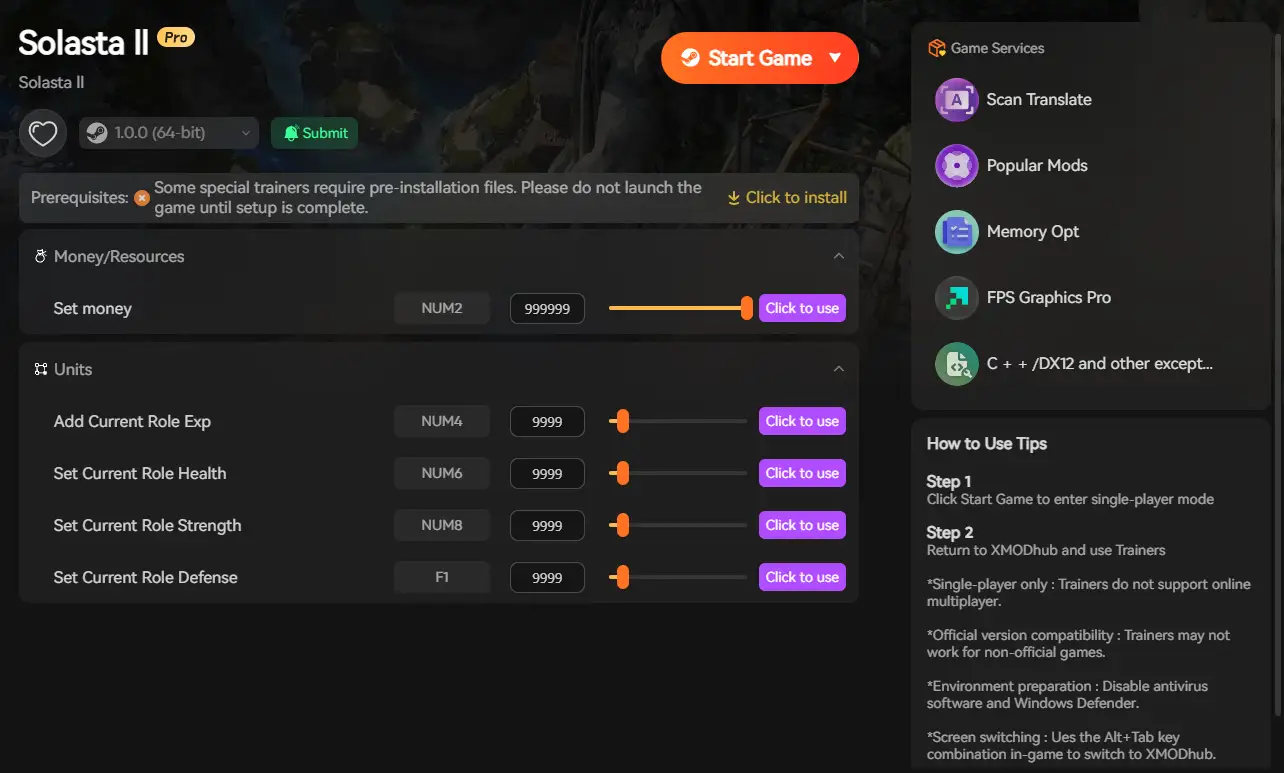
The software seamlessly forces the game to advance to the next state, preventing the fatal crashes normally associated with stalled scripts.
XMODhub Trainer vs. Traditional Modding
Many PC gamers attempt to use basic memory scanners (like Cheat Engine) to locate the enemy’s HP and freeze it. For games running on modern Unity builds, this is an incredibly unstable approach.
Manually altering memory addresses during an active combat loop often results in an immediate crash to the desktop, completely deleting your unsaved progress. Furthermore, traditional cheat tables usually break permanently after the developers release a minor hotfix.
In contrast, the XMODhub dedicated trainer is custom-built to safely manipulate the encounter flags in real-time. It requires no manual hex editing, auto-updates within hours of a patch, and ensures that your override commands transition you safely back into exploration without corrupting your campaign data.
Anti-Cheat Evasion: Will I Get Banned?
The short answer is absolutely not.
Solasta 2 operates on a peer-to-peer networking system. While the game features cooperative dungeons, your combat states and camera positioning are handled entirely locally. There is no central server dictating your single-player combat variables.
Our tool strictly processes the memory on your local hardware and does not alter your encrypted core files. However, you must exercise common sense. Forcing a “Kill All Enemies” command while playing a synchronized boss fight with a co-op partner will cause a severe network desynchronization. Always ensure you are the host of the lobby if you intend to use combat overrides to save a glitched multiplayer run.
Frequently Asked Questions (FAQ)
Q: Will double-clicking a portrait work if my character is dead?
A: Yes. Double-clicking will snap the camera to their corpse, which is highly useful if you need to locate their body to cast a Revivify spell in the dark.
Q: I used Force End Turn, but the next enemy is also stuck. What do I do?
A: If multiple enemies share the same broken pathfinding node, they will all get stuck consecutively. You can either spam the Force End Turn hotkey until it reaches your characters, or use the Kill All Enemies feature to clear the broken encounter completely.
Q: Does using the Free Camera disable Steam achievements?
A: No. Detaching the camera or using combat overrides through the XMODhub app does not disable your ability to earn Steam achievements. You are simply fixing a bug, not altering the achievement trigger code.
Conclusion: Reclaim Your Campaign
Solasta 2 is a masterpiece of tactical roleplaying, but no game is immune to the occasional engine glitch. By mastering the native camera controls, understanding the 60-second AI failsafe, and knowing when to quickly reload, you can mitigate the vast majority of visual bugs.
But if you are tired of losing your hard-earned progress to a goblin stuck in a floorboard, remember that you have the ultimate failsafe. Download the XMODhub Solasta 2 PC Trainer today, activate the combat overrides, and never let a software bug ruin your adventure again!

Je suis un joueur passionné et j'écris sur XMODhub, qui se consacre à vous apporter les dernières nouvelles, astuces et idées en matière de jeux.
Connectez-vous avec moi :
Profil LinkedIn