
 Nancy Miller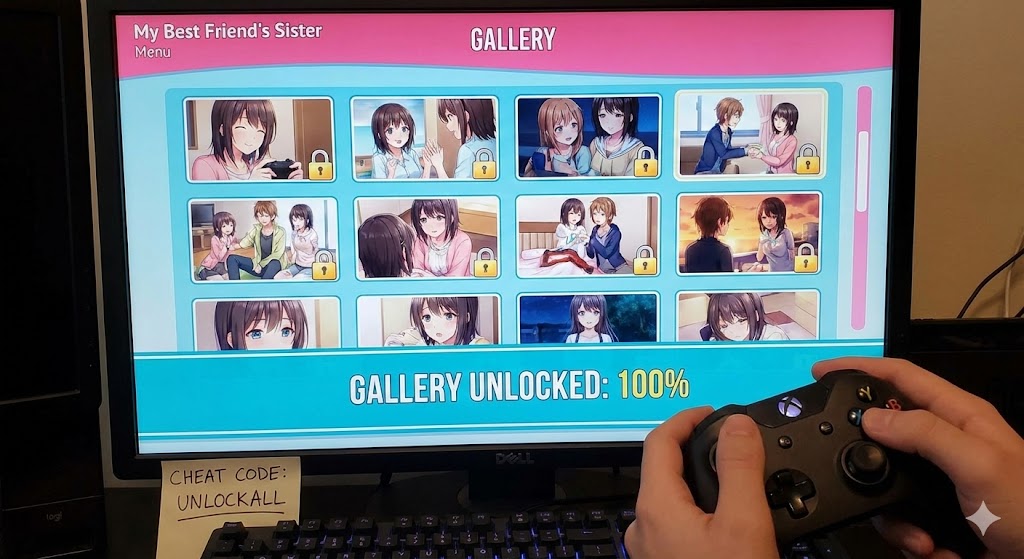
Grinding through every single dialogue option just to see one missing scene in My Best Friend’s Sister can be exhausting. Whether you lost your save file after an update or just want to skip straight to the good stuff, I’ve been there. While a detailed My Best Friend’s Sister walkthrough is useful for story purists, this guide covers everything from simple save file swaps to using the console, so you can unlock that 100% gallery without replaying the first three chapters for the tenth time.
Principaux enseignements
- Accès instantané – Unlock all gallery images and scenes immediately.
- Safe Methods – Use verified save files or console commands without crashing.
- Cross-Platform – Works on Windows, Mac, Linux, and Android versions.
- No Grinding – Bypass repetitive gameplay to see all endings.
Voyons les détails ci-dessous.
Key Takeaways for My Best Friend’s Sister Players
Before you start modifying files, it’s crucial to understand the landscape of roman visuel cheating. Most players assume
they need complex tools, but often a simple file swap is enough.
Quick Cheat Options Summary
You generally have three paths: replacing your save file (easiest), using console commands (most flexible), or using a trainer (most convenient). Save files are great for a one-time unlock, while console commands let you tweak specific stats like affection levels on the fly.
Safety Warnings for Game Files
Always backup your saves folder before attempting any My Best Friend’s Sister gallery cheat. If you overwrite your progress with a corrupt file, you might lose hours of gameplay. I usually just zip the entire folder and toss it on my desktop before tinkering.
How to Use the My Best Friend’s Sister Gallery Cheat
The most reliable method involves enabling the built-in developer tools or installing a specific “unlock all” mod designed for the Ren'Py engine.
Installing the My Best Friend’s Sister Unlock All Mod
To install the unlocker mod, you’ll need to drop the .rpy file into your game’s directory. This script runs once when you launch the game, automatically flagging all images as “seen” in the persistent data file.
/game/renpy/common/unlock_gallery.rpyActivating the RenPy Cheat Menu In-Game
Once the mod is installed or developer mode is active, you can access the debug menu. In most versions of My Best Friend’s Sister, this is done by pressing Maj + O ou Maj + D during gameplay. This opens a menu where you can click “Unlock All Images” directly.
Manual Script Editing (Advanced)
If you can’t open the console, you can force the game to unlock the gallery by editing the script.rpy file (if accessible). This is a bit more technical but works if the developer has disabled the console.
- Open the
gamefolder in your installation directory. - Look for
script.rpyougallery.rpy. - Open it with a text editor (Notepad++ is recommended).
- Search for variables like
g.locked = Trueand replace them withg.locked = False. - Save the file and launch the game.
Warning: This can break the game logic if you aren’t careful, so always backup files first.
Can You Use a My Best Friend’s Sister Save File?
Yes, replacing your save file is often the fastest way to get results. You are essentially tricking the game into thinking you’ve already completed every route.
Where to Place the My Best Friend’s Sister Save File
Le jeu sauvegardé location varies by operating system. For Windows users, it’s typically hidden in the AppData folder.
C:\Users\[YourName]\AppData\Roaming\RenPy\MyBestFriendsSister\Astuce de pro : Presse Touche Windows + R and type %appdata% to jump straight to the Roaming folder, then look for the RenPy directory. For Mac users, check the Library/RenPy folder. Ensure you delete the existing persistent file before pasting the new one to avoid conflicts.
Unlocking on Android Devices
Mobile gaming is huge for visual novels. If you’re playing My Best Friend’s
Sister on Android, you can still cheat, but it requires
a file manager like ZArchiver. The Ren’Py engine is cross-compatible, meaning PC save files usually work on
mobile.
- Connect your phone to your PC or use a file manager app.
- Naviguez jusqu'à
Internal Storage > Android > data. - Find the folder named
com.developer.mybestfriendssister(the name may vary slightly). - Paste the
persistentfile into thefiles/savessubdirectory.
Note: Android 11+ restricts access to the data folder, so you might need to use a PC to transfer the files.
Verifying the 100% Completion Save Loads Correctly
After copying the files, launch the game and head straight to the “Gallery” or “Extras” menu. If the My Best Friend’s Sister save file worked, you should see every thumbnail populated. If they are still locked, double-check that you placed the file in the correct user directory.
What Are the Best My Best Friend’s Sister Console Commands?
For those who want surgical precision, console commands are the way to go. This requires enabling the developer console first. This method is a classic form of cheating in video games that gives you total control.
Enabling the Console in My Best Friend’s Sister
Navigate to your game folder and look for a file named options.rpy ou script.rpy. Open it with a text editor and add the following line at the top:
config.developer = TrueEssential Commands for Gallery Unlocks
Once the console is open (usually Maj + O), you can type these commands to manipulate the game state. Here are the most useful ones for unlocking content:
Key Character Stat Variables
Beyond simple unlocks, you can manipulate specific relationship values to trigger endings naturally. Here are common variables found in the latest build (variable names may vary slightly by version):
Easy Gallery Unlock for My Best Friend’s Sister with XMODHUB
If messing with Python scripts and hidden folders sounds like a headache, I recommend using a dedicated trainer. XMODhub offers a streamlined solution that handles the heavy lifting for you.

Using XMODHUB for My Best Friend’s Sister
The setup is straightforward: download the tool, launch it alongside your game, and click the features you want. It detects your game version automatically, which saves a lot of troubleshooting time.
⏱️ Fast Forward
Speed through text and unskippable
scenes to reach key decision points instantly.
💰 Infinite Money
Never worry about affording gifts or
dates; sets your currency to maximum.
📈 Max Stats
Instantly max out intelligence,
charm, or strength to pass any stat check effortlessly.
Ces mods ne sont qu'un début. Que vous cherchiez à éviter le grinding fastidieux, à expérimenter différents styles de jeu ou à accélérer votre progression, La boîte à outils complète de XMODhub offre des dizaines d'options supplémentaires adaptées à votre style de jeu.
Benefits of the XMODHUB Trainer
Unlike manual file editing, the trainer runs in memory. This means you aren’t permanently altering your game files, reducing the risk of corruption. If something goes wrong, you just restart the game, and everything is back to normal.
Why Is My Best Friend’s Sister Gallery Cheat Not Working?
Even with the best tools, things can go sideways. Here are the most common issues I’ve encountered when trying to unlock the gallery.
Fixing Save File Location Errors in My Best Friend’s Sister
If the game isn’t reading your new save, you likely placed it in the wrong folder. Some versions of the game (especially Steam vs. standalone) use different directories. Check both AppData/Roaming and the game’s local installation folder for the saves directory.
Handling Version Mismatches and Updates
Game updates often break save files. A save from version 0.5 won’t always work on version 0.9. If your game crashes on load, you need a save file that matches your specific version number. XMODhub’s trainer is usually safer here as it updates automatically to match the game process.
Android Permissions Issues
If you are on Android 11, 12, or 13, you might not see the data folder due to system restrictions. In this case, connect your phone to a PC via USB and transfer the save file using Windows Explorer, which bypasses the mobile permission lock.
My Best Friend’s Sister Gallery Cheat FAQ
Common Questions About Unlocking Content
Prêt à améliorer votre jeu ?

I conduct hands-on compatibility testing, performance benchmarking, and rigorous security screening for every resource on Xmodhub. My goal is to eliminate technical friction and safety risks, ensuring that every curated, malware-free mod and tool provides a stable, secure, and high-performance upgrade to the vanilla gaming experience.

 Catherine Hu