Resumen: This article outlines the minimum and recommended system requirements for The Elder Scrolls IV: Oblivion remasterizado, ensuring players can assess their PC’s compatibility for optimal gameplay.
Bethesda’s The Elder Scrolls IV: Oblivion remasterizado has officially launched, bringing enhanced graphics and modernized gameplay to the classic RPG. Powered by Unreal Engine 5, the remaster offers a significantly improved visual experience, but it also demands more from your hardware. To ensure smooth performance, it’s crucial to verify that your PC meets or exceeds the game’s system requirements.
This guide provides detailed information on both the minimum and recommended specifications, helping you determine if your system is ready to explore the enhanced world of Tamriel.
the elder scrolls iv oblivion remastered requirements
Índice
The Elder Scrolls IV: Oblivion Remastered Minimum System Requirements
The Elder Scrolls IV: Oblivion Remastered Recommended Requirements
Can My PC Run The Elder Scrolls IV: Oblivion Remastered?
Can I Play It on Steam Deck?
How Can You Ensure Your Gaming Experience on Both PC and Steam Deck
Conclusión
The Elder Scrolls IV: Oblivion Remastered Minimum System Requirements
Here are the System Requirements (Minimum):
Componente
Requisito
CPU
AMD Ryzen 5 2600X, Intel Core i7-6800K
RAM
16 GB
Video Card
AMD Radeon RX 5700, NVIDIA GeForce 1070 Ti
Dedicated Video RAM
8192 MB
OS
Windows 10 64 bits
Shader Model Version
6.0
Free Disk Space
125 GB
Once you’ve seen the minimum requirements, let’s move on to what’s recommended for the best experience.
The Elder Scrolls IV: Oblivion Remastered Recommended Requirements
Here are the System Requirements (Recommended):
Componente
Requisito
CPU
AMD Ryzen 5 3600X, Intel Core i5-10600K
RAM
32 GB
Video Card
AMD Radeon RX 6800XT, NVIDIA RTX 2080
Dedicated Video RAM
8192 MB
OS
Windows 10 64 bits
Shader Model Version
6.0
Free Disk Space
125 GB
Now that you’ve seen the recommended requirements, let’s determine if your PC is up to the task of running the game.
Can My PC Run The Elder Scrolls IV: Oblivion Remastered?
To find out if your PC can run the game, compare your system specs to the game’s minimum and recommended requirements above.
If your PC meets or exceeds these specs, you’re good to go!
Now that you know whether your PC meets the requirements, let’s explore if The Elder Scrolls IV: Oblivion remasterizado is playable on the Steam Deck.
Can I Play It on Steam Deck?
The Elder Scrolls IV: Oblivion remasterizado is fully compatible with the Cubierta de vapor. Bethesda’s remastered edition has been officially verified by Valve, ensuring smooth gameplay and full controller support out of the box. This means you can enjoy the enhanced visuals and performance of the remaster seamlessly on your handheld device.
However, it’s important to note that the remastered version has a significantly larger file size compared to the original. While the original Oblivion was approximately 4.6 GB, the remastered edition is around 119 GB. This substantial increase may require additional storage space on your Steam Deck.
How Can You Ensure Your Gaming Experience on Both PC and Steam Deck?
To get the most out of The Elder Scrolls IV: Oblivion remasterizado—whether you’re playing on a high-end PC or a portable Steam Deck—optimization and customization are key.
One powerful tool to enhance your single-player experience is Xmod.
Originally popular for games like Red Dead Redemption 2, Xmod allows you to access cheats, trainers, and mods that can transform your gameplay into something truly personalized and fun.
Here’s how to use Xmod for a better gaming experience:
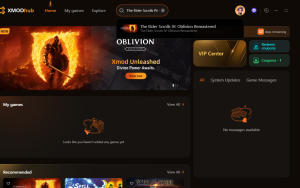
Descarga la aplicación Xmod.
xmod descargar
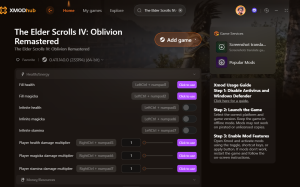
Search for the game you want to play, such as Red Dead Redemption 2 or, potentially, Oblivion Remastered as support expands.
The Elder Scrolls IV Oblivion remasterizado
Launch the game directly from the app.
Activate your chosen mods within Xmod for a customized and enhanced experience.
Mods de The Elder Scrolls IV Oblivion Remastered
Using Xmod lets you tailor gameplay to your liking—whether you’re questing from your desktop or on the go with your Steam Deck.
Conclusión
Whether you’re gearing up to play The Elder Scrolls IV: Oblivion remasterizado on a powerful PC or the portable Steam Deck, knowing the system requirements is the first step to a smooth experience. With upgraded visuals and Unreal Engine 5 enhancements, this remastered classic brings Cyrodiil to life like never before. And for players looking to customize their journey even further, tools like Xmod offer an extra layer of personalization and fun. No matter your setup, there are plenty of ways to enjoy this iconic adventure—your way.
Soy un jugador apasionado y escritor en XMODhub, dedicado a traerte las últimas noticias de juegos, consejos y puntos de vista.
Conecta conmigo:
Perfil en LinkedIn
Mastering Monster Hunter Stories 3: Twisted Reflection Reflection can be a brutal grind. Whether you are stuck on a difficult Twisted Elder Dragon, trying to farm the perfect Rainbow Egg for your gene…
Monster Hunter Stories 3: Twisted Reflection Cheat Engine Table vs. XMODhub Trainer: Best Free Alternative (2026)
You have spent the last 20 minutes scouring forums for a working Monster Hunter Stories 3: Twisted Reflection Cheat Engine table (.ct file). You finally found one, hoping to lock your Kinship Gauge or…

 Catherine Hu


 Nancy Miller