
 Catherine Hu
Let’s get straight to the point. You spent hours drafting the ultimate D&D 5e party, balancing tanks with casters for Solasta 2tactical combat.
Losing a core member completely shatters your campaign. You’ll face the agony of rolling Natural 1 on Death Saving Throws, burning all Spell Slots on healing and spamming weak cantrips, and the fatigue of constantly save-scumming (F5/F8) through lethal encounters.
This guide provides exact methods to revive dead companions using in-game mechanics. Then we introduce XMODhub—your digital Dungeon Master to bypass brutal RNG, secure infinite magic, and ensure your party never sees “Game Over” again.
Solasta II: Cheat Engine Table vs. XMODhub Trainer (Best Free Alternative)
🛠️ TL;DR: How to Revive Characters in Solasta 2
If your companion’s portrait is grayed out and they are permanently dead, here is exactly how you can bring them back to life:
➤
Use the Revivify Spell: Clerics and Paladins unlock the Revivify spell at Level 5 (requiring a 3rd-level Spell Slot). You must cast this within 10 rounds (1 minute in-game) of the character’s death, and it consumes a Diamond worth 300 gold pieces.
➤
Use a Scroll of Revivify: If your healer is the one who died, or if you don’t have the spell prepared, any character with the correct class proficiency can read a Scroll of Revivify from their inventory while standing next to the corpse.
➤
Use the Raise Dead Spell: If more than 10 rounds have passed, Revivify will not work. You must use the 5th-level spell Raise Dead (or a Scroll of Raise Dead), which gives the revived character severe stat penalties until they take a Long Rest.
➤
Faction Vendors (Antiquarians): If you do not have the spell or the scrolls, you can purchase Scrolls of Revivify and Diamonds from the Antiquarians faction vendor in the main city, provided your reputation is high enough.
1. Understanding Death Saving Throws in Solasta 2
In Solasta 2, hitting 0 HP does not mean instant death. Instead, the character falls unconscious and enters the Death Saving Throws phase. At the start of their turn, they must roll a standard D20.
1 Success.
1 Failure.
Instantly wake up with 1 HP.
Accrue 2 Failures instantly.
If they accumulate 3 Successes, they stabilize. If they accumulate 3 Failures, they are permanently dead. To prevent death, another party member must use a healer’s kit, cast Spare the Dying, or use a healing spell (like Cure Wounds) before the 3rd failure.
2. Where to Buy a Scroll of Revivify and Diamonds
Because managing a 300gp Diamond inventory is a massive gold sink early in the game, you should always keep a Scroll of Revivify on your backline casters for emergencies.
✦
The Antiquarians Faction: In the main hub city, locate the Antiquarians representative.
✦
Reputation Requirements: You need at least a “Brotherhood” reputation level with them to unlock premium magical scrolls.
✦
Cost: Expect to pay upwards of 600-800 gold per scroll depending on your faction standing. You can turn in ancient relics found in dungeons to boost this reputation quickly.
3. The Real Campaign Killer: D&D 5e RNG and Rules
Even if you stockpile scrolls and diamonds, the real battle against the ruleset is exhausting. The D20 dice system has absolutely no mercy on your party.
❌
The Agony of the D20: Your Rogue rolls Investigation on a secret door and hits a Natural 1 (Critical Failure). Automatic failure. The door stays locked forever, forcing a reload.
❌
The 15-Minute Adventuring Day: Your Wizard casts powerful spells to survive a brutal room. Now out of Spell Slots, your archmage is useless—stuck throwing weak cantrips until you can rest.
❌
Save-Scumming Fatigue: To avoid missing loot or dying to traps, players quicksave (F5) before every room and quickload (F8) after every missed check, ruining the pacing.
4. Safe Modding: Why XMODhub Beats Traditional .pak Files
You’re playing to have fun, not suffer statistical variance or manage expensive Revivify diamonds. Many players try fixing these punishing mechanics using traditional .pak mods from community forums.
These physically overwrite your hard drive files. When you load a custom map or the game updates, files conflict—causing crashes and corrupted saves.
XMODhub operates differently. It’s a clean memory trainer that injects into your PC’s active RAM, keeping your game files 100% safe.
Toggle Always Roll 20 to never fail Death Saving Throws. Enable Infinite Spell Slots to cast Revivify or Mass Heal without resting. Force Max Attributes at character creation for maximum HP from the start.
5. How to Use XMODhub for Solasta 2?
Getting XMODhub running is incredibly simple and perfectly safe for your PC. Here is the exact step-by-step process:

Grab the verified, virus-free XMODhub desktop application from our official homepage and install it on your PC.
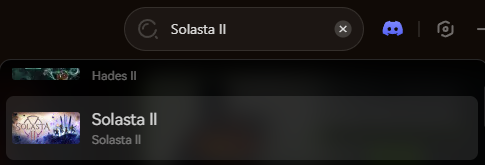
Open the XMODhub client and use the search bar to find Solasta 2. The app will automatically detect your game installation path.
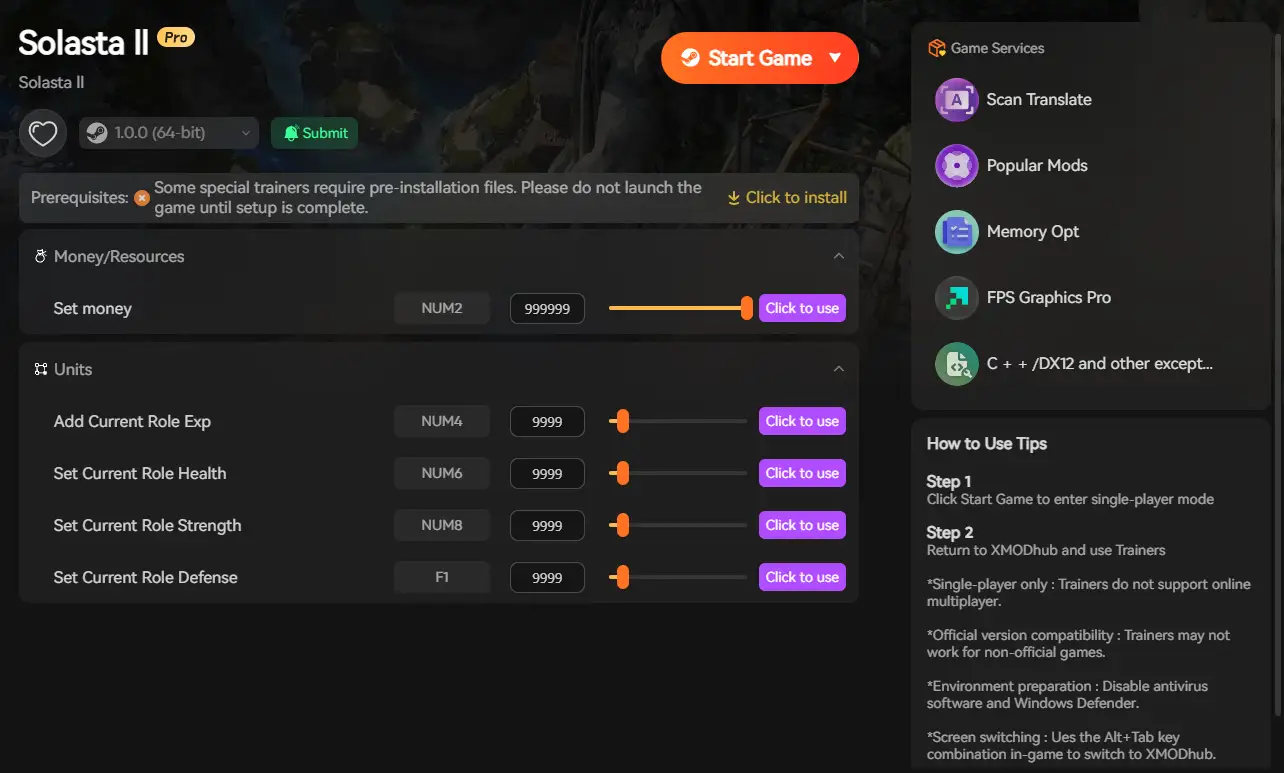
Click the prominent Play button within the XMODhub app. This safely links the software to the game’s memory. Once in-game, simply toggle your cheats to instantly activate your powers and bring your party back from the brink of death.
6. Conclusion: Protect Your Campaign
Su Solasta 2 journey should be defined by epic loot, tactical triumphs, and memorable stories—not by the anxiety of permanent character death or the artificial difficulty of punishing RNG. Knowing how to use a Scroll of Revivify is essential, but it is only a band-aid for the game’s brutal difficulty spikes.
By utilizing a clean memory injector like XMODhub, you protect your hard-earned progress while gaining the power to bypass the most frustrating aspects of the tabletop ruleset.
Take control of your campaign, end the exhausting cycle of F5/F8 save-scumming, and become the true Dungeon Master today.

Soy un jugador apasionado y escritor en XMODhub, dedicado a traerte las últimas noticias de juegos, consejos y puntos de vista.
Conecta conmigo:
Perfil en LinkedIn

 Nancy Miller

