The wait is over. Hollow Knight: Silksong has finally invited us to the Kingdom of Pharloom. But just like Hallownest, this new world is brutal. Whether you are stuck on a frantic boss fight against Lace or lost in the Deep Docks without a map, you might be looking for a way to “cheat” the system.
If you are Googling for “Silksong console commands,” you might be confused why the ~ (Tilde) key isn’t opening anything.
Here is the hard truth: Just like the original game, Silksong does not have a developer console enabled by default.
To use commands like God Mode or Noclip, you need to use an external tool to inject these features.
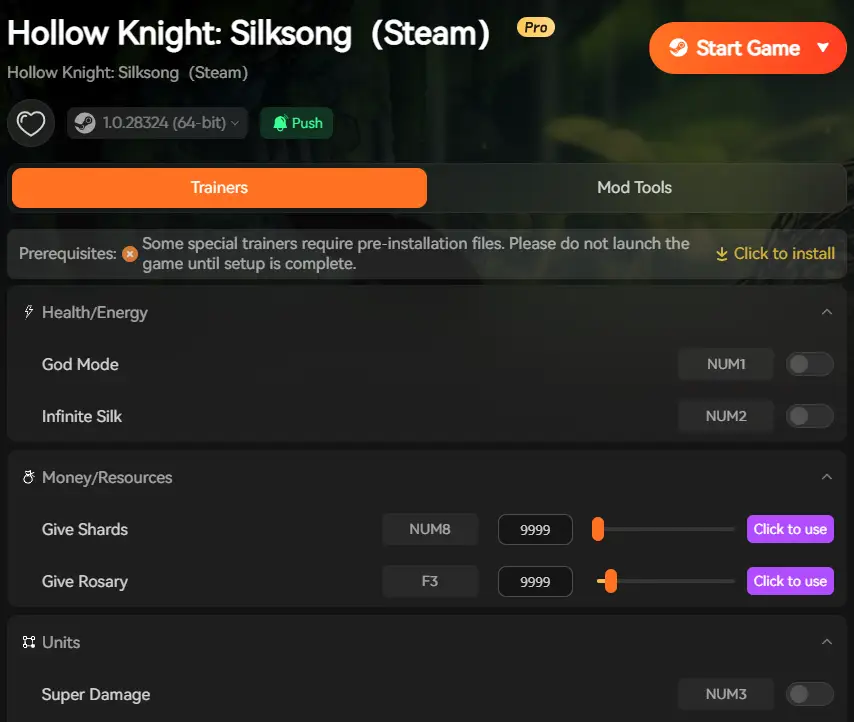
I recommend the Entrenador XMOD, which acts as a user-friendly “Debug Console” and works perfectly on both Vapor y Xbox Game Pass.
Cheat Sheet: Common Console Commands
For those looking for specific functions, here is how the internal Debug Logic maps to the Entrenador XMOD functions.
Command / Effect
Debug Logic
XMOD Hotkey
Description
Modo Dios
hero.invincible
F1
Prevents Hornet from taking damage.
Infinite Rosaries
hero.addRosaries
F2
Max out your currency for crafting Tools.
Infinite Silk
hero.setSilk(max)
F3
Unlimited healing (Bind) and Silk Arts usage.
Noclip
hero.noclip
F4
Fly through walls to bypass locked doors.
Instant Stagger
enemy.stun()
F5
Instantly breaks the boss’s guard.
Unlock All Tools
inventory.unlock
F6
Unlocks all Crests and Tools immediately.
Índice
The Truth: Does Silksong Have a Native Console?
The Solution: XMOD Trainer as a “Visual Console”
Deep Dive: How to Use These Commands
Strategy Guide: When to Use Cheats Intelligently
Step-by-Step Guide to Installation
Solución de problemas y preguntas frecuentes
Conclusión
The Truth: Does Silksong Have a Native Console?
Many Unity games allow developers to leave a “Debug Console” for testing, but Team Cherry has disabled this in the public release of Hollow Knight: Silksong.
You cannot simply type cheats.
In Skyrim, players can type tgm to activate God Mode instantly. By contrast, in Silksong, typing on the keyboard has no effect. Previously, in the original Hollow Knight, players needed the DebugMod via the Scarab Mod Loader to access such features. The situation is identical here: You need third-party software to modify the game’s memory to simulate console commands.
The Solution: XMOD Trainer as a “Visual Console”
Instead of installing a potentially unstable Mod Loader (like Scarab) that breaks every time Team Cherry releases a patch, use the Entrenador XMOD.
Why it’s better for Game Pass:
If you play on Xbox Game Pass (PC), the game files are encrypted in the WindowsApps folder, making traditional modding extremely difficult. XMOD bypasses this issue entirely because it modifies the game’s memory (RAM) instead of the game files on your disk.
Deep Dive: How to Use These Commands
Here is how these “Console Commands” help you in Pharloom:
1. God Mode (F1)
Essential for learning boss patterns. Silksong’s bosses are faster and more aggressive than in the first game. Use God Mode to practice parrying without the frustration of running back from the Bench every time you die.
2. Infinite Rosaries (F2)
Rosaries are the new Geo. You need them to craft tools and repair your shell. This cheat sets your value to 9999, ensuring you can buy out every merchant in the Citadel.
3. Noclip (F4)
Got stuck in a wall due to a launch bug? Or maybe you want to see if there is a secret room above the ceiling? Noclip allows Hornet to float freely through the map geometry.
Advertencia: Be careful not to fly outside the map boundaries, or you might fall endlessly.
Strategy Guide: When to Use Cheats Intelligently
Cheating doesn’t mean you have to ruin the challenge.
Here is how veterans use the Entrenador XMOD to enhance their experience without breaking the game loop:
1. The “Boss Practice” Method (Lace & Seth)
The boss fights against Lace are incredibly fast and parry-heavy. Instead of turning on God Mode (which makes you lazy), try toggling Infinite Silk (F3).
Why? This allows you to heal (Bind) infinitely. You still take damage and get knocked back, so you learn the dodge timings, but you don’t have to restart the fight 50 times. It turns the fight into a “Training Mode.”
2. Skipping Tedious Platforming
Some areas in the Deep Docks or Moss Grotto require pixel-perfect jumps over spikes. If you have fallen for the 10th time and are about to rage-quit, just toggle Noclip (F4) for 5 seconds to fly over the obstacle, then turn it off. Keep the pacing fast and fun.
3. Speedrunning / Second Playthrough
Already beat the game on Xbox and switching to Steam? Use Unlock All Tools (F6) to skip the early game grind. Build your perfect Crest loadout immediately and focus on exploring the alternative questlines you missed the first time.
Note: You do not need to modify game files or verify integrity.
3. Activate the “Console”
Once you are in-game (controlling Hornet), open the XMOD overlay. You will see the list of toggles ready to use.
4. Customize
You can map these functions to different keys if F1-F6 conflicts with your gameplay controls.
Solución de problemas y preguntas frecuentes
Q: Does this work on the Game Pass version?
A: Yes. Unlike most mods that require file access (which Game Pass blocks), XMOD injects into the memory process. It works perfectly on the Xbox App / Microsoft Store version without needing to decrypt files.
Q: Will this disable achievements?
A: No. You can still unlock Steam Achievements or Xbox Gamerscore (Achievements) like “Song of Pharloom” while using cheats.
Q: Can I spawn specific items (Tools)?
A: Yes. The “Item Editor” tab in the trainer allows you to add specific Crafting Materials directly to your inventory.
Conclusion: Master the Song
Pharloom is a beautiful, deadly place. While the challenge is part of the experience, sometimes you just want to explore the lore without dying to a moss charger for the 100th time.
En Entrenador XMOD is the best Silksong Console Command alternative. It gives you the power of a developer debug menu with the ease of a modern app, working seamlessly across Steam and Game Pass.
One Tool, 5000+ Games
XMODHUB supports the entire Metroidvania genre. If you love exploring 2D worlds, check out our trainers for:
Soy un jugador apasionado y escritor en XMODhub, dedicado a traerte las últimas noticias de juegos, consejos y puntos de vista.
Conecta conmigo:
Perfil en LinkedIn
Quick Answer A REPLACED Walkthrough cheat is a PC tool, like a trainer, designed to make the game easier by enabling features such as god mode or infinite health. For the anticipated April…
How to Change Matchmaking Region in Toxic Commando | XMODhub
John Carpenter’s Toxic Commando is a blast when you have a full squad of four, but fighting the Sludge God alone with AI bots because your regional server is empty can ruin the…

 Catherine Hu


 Nancy Miller