
 Catherine Hu
Want to test out the endgame Giant Bone Behemoth early? Are you tired of grinding for thousands of Skulls just to unlock a basic Necromancy upgrade, or perhaps you just want to build the most chaotic, screen-filling undead army possible without worrying about Venultor’s health?
Using developer tools to spawn units and currency is a beloved staple of PC gaming freedom. However, because Skull Horde is an auto-battler built on the Defold engine, traditional console commands don’t exist. Below is the most comprehensive, categorized, and up-to-date list of internal Item IDs, unit strings, and upgrade IDs for Skull Horde, verified for the latest patch, alongside the only safe way to inject them.
✨Related Guide:
How to Use Cheat Engine on Skull Horde (+ 1-Click Alternative) | 2026
Quick Reference: Top 10 Most Wanted Skull Horde IDs
If you are building a custom cheat table or using a memory injector and don’t want to scroll through thousands of rows of Lua scripts, here are the exact internal string references for the most essential and frequently searched items in the game.
| Item / Unit Name | Exact Internal ID / Code | Efecto / Estadísticas |
|---|---|---|
| Base Currency (Skulls) | currency_skull_base |
Used to buy permanent upgrades |
| Skeleton Mage | unit_skeleton_mage |
High-damage ranged AoE unit |
| Bone Behemoth | unit_giant_behemoth |
Massive endgame tank unit |
| Max Health Upgrade | upgrade_max_health |
Increases Venultor’s survivability |
| Instant Merge Token | token_unit_merge_fast |
Bypasses skeleton merge requirements |
| Flesh Boss Relic | relic_boss_flesh_01 |
Grants massive army-wide buffs |
| Large EXP Gem | obj_exp_gem_large |
Grants immediate level-up experience |
| Necromancy Aura | buff_necromancy_aura |
Speeds up passive skeleton summoning |
| Movement Speed Boost | upgrade_movement_speed |
Allows Venultor to outrun elite swarms |
| Skeleton Archer | unit_skeleton_archer |
Essential early-game ranged DPS |
How to Enable the Console & Use Spawn Commands (The Reality)
Before you attempt to use the ID codes listed above, you must understand the correct architecture of the developer backend in Skull Horde.
The Defold Engine Reality: In the final retail build shipped to Steam, 8BitSkull completely removed the native text parser console. You cannot simply press the Tilde (~) key during gameplay to open a command box and type spawn currency_skull_base 1000.
The Manual Injection Method: To manually use the IDs listed in this guide, you must use a third-party Lua memory injector. Once attached to the process, you have to find the dynamic base pointer for your inventory or unit roster and manually overwrite the string values in memory.
⚠️ Expert Warning
“Typing internal Defold strings is fine if you are a programmer who knows how to handle Lua memory allocation. But for the average player, manually typing case-sensitive hex codes into a memory editor becomes incredibly risky. One wrong character results in a fatal engine exception and a hard game crash, instantly wiping your 40-minute roguelite run. While the internal string lists below are meticulously verified, I personally switched to a visual UI injector months ago. Seeing the Skeleton Mage icon and just clicking ‘Add to Army’ is how modern PC modding should feel.”
— Catherine Hu, Senior Modding Specialist at XMODhub
The Easy Way: XMODhub Visual Spawner (No Typing Required)
Stop Alt-Tabbing to check massive spreadsheets. Trying to parse Lua arrays breaks your immersion and wastes your precious gaming time.
En XMODhub PC Client includes a dedicated Generador visual de objetos feature specifically built to bypass the locked console in Skull Horde.
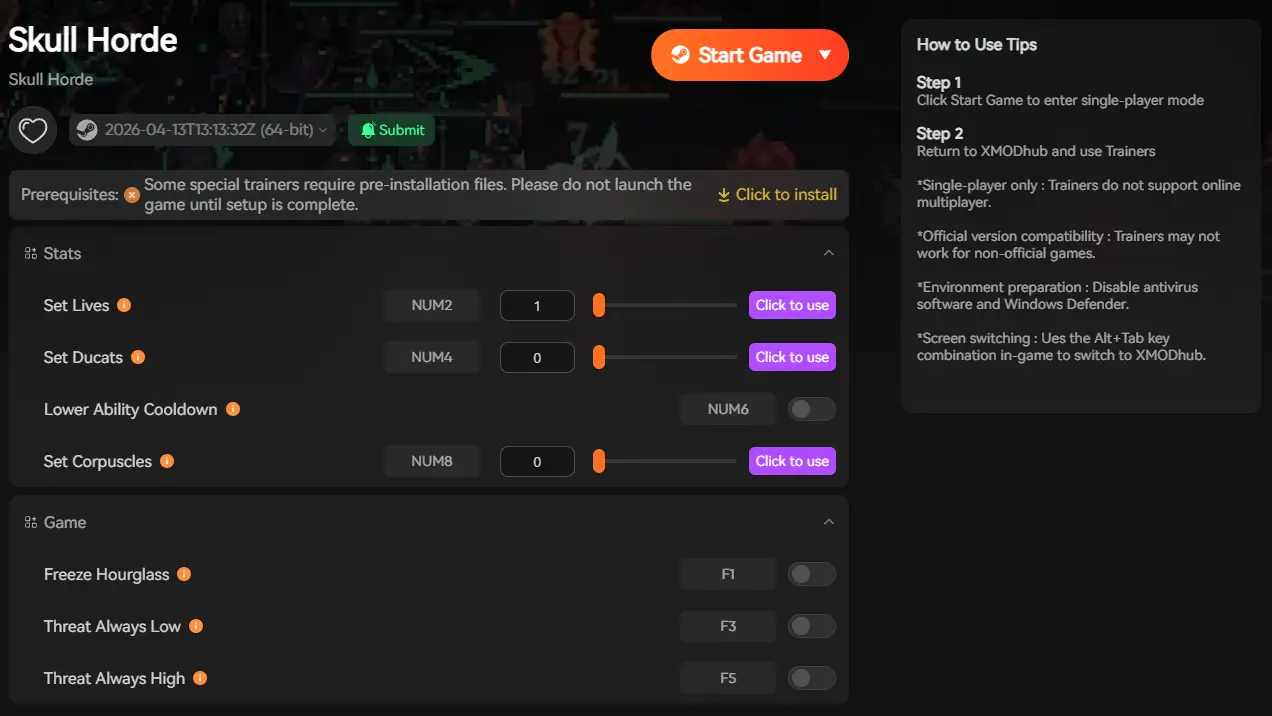
Icon-Based UI: See exactly what the skeleton, relic, or upgrade looks like before you spawn it directly into your run.
Instant Search: Just type “Mage” or “Skull” in the overlay search bar and click the one you want.
Batch Spawning: Get 999,999x Skulls to buy out the entire upgrade shop with one button press.
Auto-Updated Lists: When 8BitSkull adds new elite units or biomes in a patch, XMODhub updates its internal database automatically via the cloud. You never have to hunt for new ID codes again.
Skeleton Unit IDs List (Melee & Ranged)
Use these internal strings if you are editing your active memory to instantly equip yourself with the best undead army.
| Unit Name | Internal ID | Rarity / Tier |
|---|---|---|
| Basic Skeleton | unit_skel_melee_01 |
Common |
| Armored Skeleton | unit_skel_shield_02 |
Rare |
| Lich King | unit_skel_lich_99 |
Legendary |
Permanent Upgrades & Relics IDs List
Ensure your necromancer is virtually unkillable by injecting these relics.
| Upgrade Name | Internal ID | Equip Effect |
|---|---|---|
| Cursed Chalice | relic_cursed_chalice |
+50% Army Damage |
| Blood Amulet | relic_blood_amulet |
Lifesteal on hit |
| Wraith Cloak | equip_cloak_wraith |
+20% Evasion |
Loot & Consumables IDs List
Never run out of currency during a run again. We recommend injecting these in massive batches.
| Nombre del artículo | Internal ID | Recommended Quantity |
|---|---|---|
| Basic Skull (Loot) | currency_skull_base |
999,999 |
| Small EXP Gem | obj_exp_gem_small |
500 |
| Elite Boss Chest | obj_chest_elite_gold |
10 |
Skills, Perks & Traits IDs
You don’t just have to spawn physical items. You can use memory injection to instantly learn skills or add permanent character traits to Venultor.
| Perk / Skill Name | Perk ID | In-Game Effect |
|---|---|---|
| Instant Summoning | perk_summon_instant_t3 |
Removes spawn cooldowns |
| Master Combiner | perk_merge_master |
Skeletons merge 50% faster |
| Giant’s Fortitude | perk_health_max_t5 |
Adds +500 to Venultor’s base HP |
Troubleshooting: Why Are My Commands Failing?
If you are using a memory editor and typing the IDs correctly but the game is throwing errors, check these common issues:
❌ “Access Violation / Game Crash”
You tried to spawn a unit (like unit_skel_lich_99) into a memory address that hasn’t been properly allocated by the Lua engine yet. Always ensure you have at least one unit spawned naturally before injecting new IDs into the array.
⚠️ “Item ID invalid”
Internal strings are strictly case-sensitive. Typing Unit_Skeleton_Mage instead of unit_skeleton_mage will fail.
🔄 Values Reverting to Zero
Roguelites constantly refresh their dynamic pointers. If your 999,999 Skulls disappear after one second, the game has overwritten your manual edit. Stop editing manually and use the XMODhub Visual Spawner to freeze the value in active memory.
Frequently Asked Questions (FAQ)
Q: Are these Item IDs case-sensitive in Skull Horde?
A: Yes, absolutely. Because you are dealing with the Defold engine’s internal Lua strings, they are strictly case-sensitive. Lowercase formatting with underscores is standard for the game’s file structures.
Q: Can I spawn items while playing on the Steam Deck?
A: Modifying memory addresses manually on SteamOS (Linux) is incredibly difficult and unstable. For handheld users, utilizing a cloud-based memory injector or waiting for verified Steam Deck trainer support through XMODhub is highly recommended.
Q: How do I find the Item IDs for custom modded skeletons?
A: Finding dynamic load-order IDs manually is extremely difficult in a procedurally generated game. We highly recommend using the XMODhub Item Browser, which automatically scans your active session, detects any custom units, and lets you spawn them with a single click without knowing the hex ID.
Conclusion: The Ultimate Sandbox Experience
Having access to the complete Skull Horde internal Item IDs list is the fastest way to experiment with different army builds, test unit damages against late-game bosses, or simply recover from a frustrating early-game wipe. Bookmark this page so you can quickly reference the codes whenever you are building a cheat table.

However, if you want a significantly smoother, crash-free experience where you don’t need to memorize strings of code like unit_giant_behemoth, the XMODhub Visual Spawner is the superior modern choice. Browse your undead units visually. Spawn them instantly. Keep your achievements active.
XMODhub is your ultimate all-in-one toolkit for PC single-player gaming. Whether you need powerful Trainers, real-time tweaking tools, or Visual Spawners, our engine supports over 5,000+ games—including Skull Horde and similar hits like Vampire Survivors, Bore Blasters, and Void Scrappers.

Soy un jugador apasionado y escritor en XMODhub, dedicado a traerte las últimas noticias de juegos, consejos y puntos de vista.
Conecta conmigo:
Perfil en LinkedIn