Catherine Hu
Editor’s View: The “Early Access” Reality
“I’ve been playing Crowbar Collective games since the early Black Mesa mod days. While Rogue Point is incredibly fun, it’s technically demanding.
In my testing, 90% of the crashes aren’t actually ‘bugs’ but resource conflicts. The procedural generation hits the CPU hard, and if your Visual C++ libraries are outdated, the game simply gives up. I tested the methods below on my rig (Ryzen 5600X / RTX 3060), and Method 2 was the magic fix for my startup crash.”
You squad up with your friends, select your loadout, and get ready to breach the CEO’s office. You click “Ready,” the loading screen spins, and then… silence. You are staring at your desktop wallpaper.
Launch day issues in Early Access titles like Rogue Point are frustrating. Crowbar Collective has built an amazing tactical roguelite, but the optimization is still a work in progress. Whether you are facing a black screen, random Unreal Engine Crashes, or your game freezes right when the firefight starts, this guide covers the most effective solutions to get you back into the action.
También te puede gustar:
Rogue Point Cheat Engine Table vs. XMODhub Trainer: Best Free Alternative (2026)
Check First: Rogue Point System Requirements
Before debugging, ensure your PC can handle the procedural generation and lighting. Trying to run Rogue Point on an old HDD is the #1 cause of “Infinite Loading” screens.
| Componente | Requisitos mínimos | Recommended Specifications |
|---|---|---|
| OS | Windows 10 (64 bits) | Windows 11 (64 bits) |
| CPU | Intel Core i5-8400 / Ryzen 5 2600 | Intel Core i7-10700 / Ryzen 7 5800X |
| RAM | 12 GB RAM | 16 GB RAM (Dual Channel) |
| GPU | GTX 1060 (6GB) | RTX 3060 Ti / RX 6700 XT |
| DirectX | Versión 11 | Versión 12 |
| Almacenamiento | 30 GB SSD (Required) | NVMe M.2 SSD |
Method 1: Verify Game Files (Steam)
Frequent Early Access patches can corrupt installation files. If Rogue Point crashes immediately after the splash screen, do this first.
Steps:
- Haga clic con el botón derecho del ratón en Rogue Point en tu biblioteca de Steam.
- Seleccione Propiedades > Archivos instalados.
- Haga clic en “Verify integrity of game files”.
- Wait for the process to finish. Steam will re-download any missing assets or corrupted map chunks.
Method 2: Update Drivers & Visual C++ Redistributables
Modern tactical shooters run on engines that require updated software environments. If you see “Fatal Error” or “C++ Runtime Error”:
- GPU Drivers: Update your NVIDIA (Game Ready Driver) or AMD (Adrenalin) drivers. New drivers often include specific optimizations for Unreal Engine titles.
- Visual C++ All-in-One: If you get generic errors or the game closes silently, download and install the Microsoft Visual C++ Redistributable 2015-2022. Install both x86 and x64 versions.
Method 3: Fix Black Screen & Overlay Issues
Tactical shooters often conflict with software that draws over the screen. If you hear audio but see a black screen:
Disable Overlays:
Turn off Discord Overlay, Steam Overlay, and NVIDIA GeForce Experience Overlay.
Fullscreen Optimization:
- Haga clic con el botón derecho del ratón en
RoguePoint.exe> Properties. - Go to the Compatibility ficha.
- Check “Disable fullscreen optimizations”.
- Check “Run this program as an administrator”.
Method 4: Common Error Codes & Fixes
“Unreal Engine 4 Crash Reporter” pops up
This is often a GPU Timeout. Try capping your FPS to 60 in the NVIDIA Control Panel or lowering “Shadow Quality” to Medium.
“Connection to Host Lost” Lobby Crash
This isn’t a game bug; it’s a firewall issue. Allow Rogue Point through Windows Defender Firewall (Public and Private networks).
Also, ensure your system time is synced automatically in Windows Settings, as mismatched timestamps can cause Co-op desync.
Error 0xc0000005 (Access Violation)
Usually caused by aggressive antivirus software blocking the game’s anti-cheat or executable. Whitelist the game folder.
Method 5: Fix Low FPS & Stuttering
Is the game stuttering every time you open a door?
- Enable DLSS/FSR: Rogue Point supports upscaling. Set it to “Quality” mode for a free 20-30 FPS boost.
- Lower Volumetric Fog: In tactical shooters, smoke and fog kill FPS. Set “Effects Quality” to Medium.
- Set High Priority: Open Task Manager > Details > Right-click
RoguePoint.exe> Set Priority > High.
The Workaround: Protect Your Merx with XMODhub
In Rogue Point, a game crash usually counts as a “Failed Run,” meaning you lose your weapons and potential rewards. The game’s native autosave might not save you from a CTD (Crash to Desktop).
XMODhub offers a safety net for Early Access instability:
- Save Manager: Automatically backup your profile after every successful mission. If the game crashes and corrupts your save, roll back instantly to restore your Merx and Unlocks.
- Speedhack: If a specific room is tanking your FPS, use the trainer to slow down game logic (0.8x) to help your CPU catch up and prevent a crash.
How to Get Started with XMODhub
- Descargar e instalar: Get the latest XMODhub Client (Official Site).

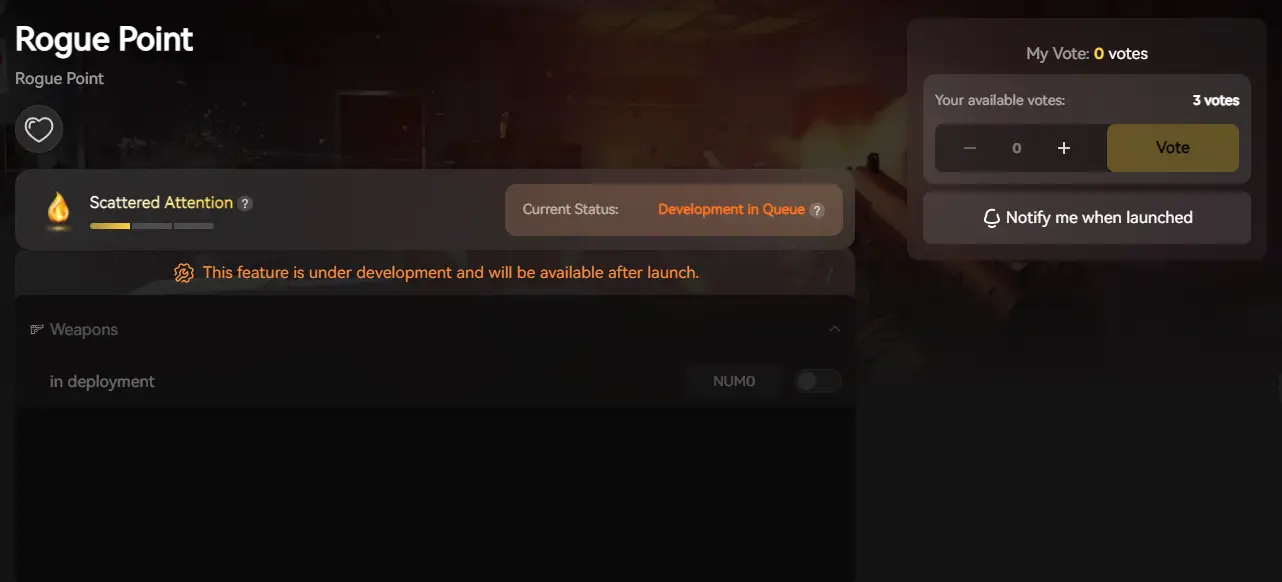
- Detección automática: Launch the app to scan for Rogue Point.
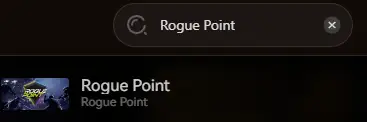
- Secure: Enable “Auto-Backup” in the Save Manager tab before your next run.
PREGUNTAS FRECUENTES
Q: Does Rogue Point run on Windows 7?
A: No. Modern Unreal Engine games strictly require Windows 10 (64-bit) or Windows 11.
Q: Why does my game crash when I join a friend?
A: This is likely a “Asset Mismatch”. Ensure both you and your friend are on the exact same version of the game. Verify your game files (Method 1) to ensure you aren’t missing any map files.
Q: Will reinstalling fix the “Fatal Error”?
A: Reinstalling should be your last resort. Updating C++ Redistributables (Method 2) usually fixes “Fatal Error” crashes much faster than a full redownload.
Conclusión
Launch issues are painful, especially in Early Access. By verifying your files, updating your drivers, and disabling overlays, you should be able to fix the Rogue Point crash on startup.
If the game is still unstable due to beta bugs, XMODhub can help secure your progress. Use Auto-Backups to protect your hard-earned Merx until the developers release a stability patch. Don’t let a crash end your run. Play smarter.

Soy un jugador apasionado y escritor en XMODhub, dedicado a traerte las últimas noticias de juegos, consejos y puntos de vista.
Conecta conmigo:
Perfil en LinkedIn

 Nancy Miller